{
"schema": "lazurio.documentation.content-index.v1",
"canonicalBaseUrl": "https://documentation.lazurio.ai",
"sourceRepository": "https://github.com/Lazurio/documentation",
"sourceCommit": "55c2e47366344303747a3afa12f919ebb5b125b9",
"sourceTreeDirty": false,
"generatedAt": "2026-11-02T10:54:40Z",
"defaultLocale": "en",
"supportedLocales": [
"en",
"cs"
],
"sources": [
{
"id": "openai-browser",
"title": "ChatGPT Browser",
"url": "https://learn.chatgpt.com/docs/browser",
"publisher": "OpenAI"
},
{
"id": "google-third-party-connections",
"title": "Manage third-party connections",
"url": "https://support.google.com/accounts/answer/13533235",
"publisher": "Google"
},
{
"id": "lazurio-readme",
"title": "Lazurio Platform: installed product and Folder Factory",
"url": "https://github.com/Lazurio/LazurioPlatform/blob/v0.1.14/README.md",
"publisher": "Lazurio"
},
{
"id": "lazurio-architecture",
"title": "Current Platform architecture and its target-state caveats",
"url": "https://github.com/Lazurio/LazurioPlatform/blob/v0.1.14/ARCHITECTURE.md",
"publisher": "Lazurio"
},
{
"id": "lazurio-collaboration-model",
"title": "Current public authority and publication rules",
"url": "https://github.com/HumanAndMachines/Lazurio/blob/b41fc7d01f748ebc4724535ce811ffceded38fdb/AGENTS.md",
"publisher": "Lazurio"
},
{
"id": "lazurio-external-apps",
"title": "Current external application integration standard",
"url": "https://github.com/HumanAndMachines/Lazurio/blob/b41fc7d01f748ebc4724535ce811ffceded38fdb/manual/external-app-integrations.md",
"publisher": "Lazurio"
},
{
"id": "lazurio-secret-custody",
"title": "Public secret custody standard",
"url": "https://github.com/HumanAndMachines/Lazurio/blob/b41fc7d01f748ebc4724535ce811ffceded38fdb/manual/security/local-secret-custody.md",
"publisher": "Lazurio"
},
{
"id": "lazurio-license",
"title": "Current Platform Elastic-2.0 license and boundaries",
"url": "https://github.com/Lazurio/LazurioPlatform/blob/v0.1.14/docs/licensing.md",
"publisher": "Lazurio"
},
{
"id": "wispr-flow",
"title": "Wispr Flow downloads and product documentation",
"url": "https://wisprflow.ai/downloads",
"publisher": "Wispr Flow"
},
{
"id": "codexbar",
"title": "CodexBar official website",
"url": "https://codexbar.app/",
"publisher": "CodexBar"
},
{
"id": "amphetamine",
"title": "Amphetamine on the Mac App Store",
"url": "https://apps.apple.com/app/amphetamine/id937984704",
"publisher": "William Gustafson"
},
{
"id": "microsoft-copilot-architecture",
"title": "Microsoft Copilot architecture and how it works",
"url": "https://learn.microsoft.com/en-us/microsoft-365/copilot/microsoft-365-copilot-architecture",
"publisher": "Microsoft Learn"
},
{
"id": "microsoft-copilot-data-protection",
"title": "How data is protected and audited in Microsoft 365 and Microsoft Copilot",
"url": "https://learn.microsoft.com/en-us/microsoft-365/copilot/microsoft-365-copilot-architecture-data-protection-auditing",
"publisher": "Microsoft Learn"
},
{
"id": "microsoft-copilot-privacy",
"title": "Data, privacy, and security for Microsoft Copilot",
"url": "https://learn.microsoft.com/en-us/microsoft-365/copilot/microsoft-365-copilot-privacy",
"publisher": "Microsoft Learn"
},
{
"id": "microsoft-copilot-requirements",
"title": "Microsoft Copilot requirements",
"url": "https://learn.microsoft.com/en-us/microsoft-365/copilot/microsoft-copilot-requirements",
"publisher": "Microsoft Learn"
},
{
"id": "microsoft-copilot-extensibility",
"title": "Extending Microsoft 365 Copilot with plugins",
"url": "https://learn.microsoft.com/en-us/microsoft-365/copilot/extensibility/",
"publisher": "Microsoft Learn"
},
{
"id": "wispr-context-privacy",
"title": "Wispr Flow Context Awareness and privacy controls",
"url": "https://docs.wisprflow.ai/articles/4678293671-Context-Awareness",
"publisher": "Wispr"
},
{
"id": "codexbar-permissions",
"title": "CodexBar macOS permissions",
"url": "https://github.com/steipete/CodexBar/blob/d34fbb47afe73f81dd591bae28a60f72c39a9fe4/README.md#macos-permissions-why-theyre-needed",
"publisher": "CodexBar"
},
{
"id": "lazurio-platform-composio-write-gate-question",
"title": "LazurioPlatform open question: Composio write gate and whether tool filters hold on every execution path",
"url": "https://github.com/Lazurio/LazurioPlatform/issues/39",
"publisher": "Lazurio"
},
{
"id": "lazurio-platform-composio-custody-question",
"title": "LazurioPlatform open question: Composio data custody, log retention and hosting region",
"url": "https://github.com/Lazurio/LazurioPlatform/issues/40",
"publisher": "Lazurio"
},
{
"id": "lazurio-platform-composio-shared-connections-question",
"title": "LazurioPlatform open question: do two Machines signed in to the same Composio account and organization share connections",
"url": "https://github.com/Lazurio/LazurioPlatform/issues/45",
"publisher": "Lazurio"
},
{
"id": "composio-token-custody",
"title": "Composio token custody architecture",
"url": "https://docs.composio.dev/docs/security/token-custody",
"publisher": "Composio"
},
{
"id": "lazurio-environment-network-decisions",
"title": "Lazurio decision register: decisions 0146 (names of hosted Environments, reachable only from the tailnet), 0154 (a personal Remote Environment only through the tailnet) and 0192 (Tailscale, Headscale and an Admin-approved device)",
"url": "https://github.com/HumanAndMachines/Lazurio/blob/25d62a7045a77b7d522cb4603cc778777667bd2f/manual/decision-register.md",
"publisher": "Lazurio"
},
{
"id": "lazurio-environment-access-model",
"title": "Lazurio Environment access model: the network condition of entry and the approval of devices (approved 2026-10-06)",
"url": "https://github.com/HumanAndMachines/Lazurio/blob/25d62a7045a77b7d522cb4603cc778777667bd2f/manual/environment-access-model.md",
"publisher": "Lazurio"
},
{
"id": "lazurio-platform-decision-f41",
"title": "LazurioPlatform decision F41: the offline guide on an Environment's addresses, and why its service worker is always updatable",
"url": "https://github.com/Lazurio/LazurioPlatform/blob/9bdf1db23ef9d0b54bbf3dbeb829c8614390dcc8/docs/decisions.md#f41--the-offline-guide-a-service-worker-on-the-shells-origins-shows-how-to-reach-the-environment-and-is-always-updatable",
"publisher": "Lazurio"
},
{
"id": "headscale-project",
"title": "Headscale: an open source, self-hosted implementation of the Tailscale control server",
"url": "https://github.com/juanfont/headscale",
"publisher": "Headscale project"
},
{
"id": "tailscale-fast-user-switching",
"title": "Tailscale: Fast user switching (one active account per device, switching on macOS, Windows, iOS and Android)",
"url": "https://tailscale.com/kb/1225/fast-user-switching",
"publisher": "Tailscale"
},
{
"id": "tailscale-install-windows",
"title": "Tailscale: Install Tailscale on Windows (the system tray icon and its menu)",
"url": "https://tailscale.com/kb/1022/install-windows",
"publisher": "Tailscale"
},
{
"id": "google-chrome-secure-dns",
"title": "Google Chrome Help: Manage Chrome safety and security (Use secure DNS, no fallback with a custom provider)",
"url": "https://support.google.com/chrome/answer/10468685",
"publisher": "Google"
},
{
"id": "tailscale-android-private-dns-request",
"title": "Tailscale issue 17655: Android Private DNS cannot be used together with MagicDNS (public feature request)",
"url": "https://github.com/tailscale/tailscale/issues/17655",
"publisher": "Tailscale public issue tracker"
},
{
"id": "webkit-storage-cap",
"title": "WebKit: Full Third-Party Cookie Blocking and More (the 7-day cap on script-writable storage, service worker registrations included)",
"url": "https://webkit.org/blog/10218/full-third-party-cookie-blocking-and-more/",
"publisher": "WebKit"
},
{
"id": "lazurio-platform-release-v0-1-8-rc-41",
"title": "LazurioPlatform release candidate v0.1.8-rc.41 (published 2026-10-08, commit 9bdf1db23ef9d0b54bbf3dbeb829c8614390dcc8): the offline guide of decision F41",
"url": "https://github.com/Lazurio/LazurioPlatform/releases/tag/v0.1.8-rc.41",
"publisher": "Lazurio"
},
{
"id": "lazurio-external-apps-current",
"title": "Current external application integration standard",
"url": "https://github.com/HumanAndMachines/Lazurio/blob/b41fc7d01f748ebc4724535ce811ffceded38fdb/manual/external-app-integrations.md",
"publisher": "Lazurio"
},
{
"id": "lazurio-product-vocabulary",
"title": "Lazurio product vocabulary: decisions 0170, 0175, 0179, 0185 and 0207 with their addenda",
"url": "https://github.com/HumanAndMachines/Lazurio/blob/6416d27786296583baf08b75526cff225e2673f7/manual/decision-register.md",
"publisher": "Lazurio"
},
{
"id": "lazurio-microsoft-365-company-app",
"title": "Microsoft 365 company app runbook (Czech): one single-tenant public client with delegated Graph permissions, the IT procedure, Conditional Access, revocation and the verification on a real tenant that is still open",
"url": "https://github.com/HumanAndMachines/Lazurio/blob/66e437f7e563574ea35b79dd1bdd193fd0f6b4b6/manual/integrations/microsoft-365.md",
"publisher": "Lazurio"
},
{
"id": "lazurio-microsoft-365-for-it",
"title": "Microsoft 365 page for an Organization's IT (Czech): permissions, data path, Conditional Access, revocation and audit",
"url": "https://github.com/HumanAndMachines/Lazurio/blob/66e437f7e563574ea35b79dd1bdd193fd0f6b4b6/manual/integrations/microsoft-365-for-it.md",
"publisher": "Lazurio"
},
{
"id": "lazurio-platform-microsoft-365-company-app",
"title": "LazurioPlatform Integrations: the Microsoft 365 company app, its pinned specs and scopes, where the user signs in, Executor's approvals and the IT consent",
"url": "https://github.com/Lazurio/LazurioPlatform/blob/a2927744b5a87113425f93f5e1517ac97b2f6c06/docs/integrations.md#the-microsoft-365-company-app",
"publisher": "Lazurio"
},
{
"id": "lazurio-platform-decision-f45",
"title": "LazurioPlatform decision F45: Organization settings reach the Environment through its relay or from Git and are recorded in the Folder",
"url": "https://github.com/Lazurio/LazurioPlatform/blob/a2927744b5a87113425f93f5e1517ac97b2f6c06/docs/decisions.md#f45--organization-settings-reach-the-environment-asked-through-its-relay-recorded-in-the-folder-reported-back",
"publisher": "Lazurio"
},
{
"id": "lazurio-platform-release-v0-1-9",
"title": "LazurioPlatform release v0.1.9 (published 2026-10-19), the first final release with the Microsoft 365 company app",
"url": "https://github.com/Lazurio/LazurioPlatform/releases/tag/v0.1.9",
"publisher": "Lazurio"
},
{
"id": "lazurio-manifest-family-settings",
"title": "Lazurio manifest family: the Microsoft 365 setting settings.integrations.microsoft365 and the rule that readers ship first",
"url": "https://github.com/HumanAndMachines/Lazurio/blob/66e437f7e563574ea35b79dd1bdd193fd0f6b4b6/manual/lazurio-manifest-family.md#microsoft-365-company-app-settingsintegrationsmicrosoft365",
"publisher": "Lazurio"
},
{
"id": "lazurio-decision-register-gen4",
"title": "Lazurio decision register for GEN3 and GEN4 in LazurioPlatform: the decisions cited by the IT and Admin pages",
"url": "https://github.com/Lazurio/LazurioPlatform/blob/4d5ee62a963a0ae2fc98287f0072e739ff6d2cd8/docs/decision-register.md",
"publisher": "Lazurio"
},
{
"id": "lazurio-first-organization-rollout",
"title": "First Organization rollout runbook (Czech): the GitHub access baseline and its read-back before the first Builder",
"url": "https://github.com/HumanAndMachines/Lazurio/blob/66e437f7e563574ea35b79dd1bdd193fd0f6b4b6/manual/first-client-organization-rollout.md",
"publisher": "Lazurio"
},
{
"id": "lazurio-organization-install",
"title": "Organization install runbook (Czech): Lazurio for GitHub with All repositories, the access baseline, Read on Design Systems and role-scoped installation",
"url": "https://github.com/HumanAndMachines/Lazurio/blob/66e437f7e563574ea35b79dd1bdd193fd0f6b4b6/manual/organization-install.md",
"publisher": "Lazurio"
},
{
"id": "lazurio-root-agent-rules",
"title": "Lazurio Root rules for agents (Czech): Publication, Release, issues and Design System access",
"url": "https://github.com/HumanAndMachines/Lazurio/blob/66e437f7e563574ea35b79dd1bdd193fd0f6b4b6/AGENTS.md",
"publisher": "Lazurio"
},
{
"id": "lazurio-platform-folder-roles",
"title": "LazurioPlatform Folder manual: the Organization roles Admin, Steward, Builder and User",
"url": "https://github.com/Lazurio/LazurioPlatform/blob/a2927744b5a87113425f93f5e1517ac97b2f6c06/src/folder/manual.ts#L888-L904",
"publisher": "Lazurio"
},
{
"id": "lazurio-platform-decision-f31",
"title": "LazurioPlatform decision F31 with its addendum of 2026-10-05: a named person publishes from a Team Environment",
"url": "https://github.com/Lazurio/LazurioPlatform/blob/a2927744b5a87113425f93f5e1517ac97b2f6c06/docs/decisions.md#f31--a-team-environment-publishes-under-the-teams-identity",
"publisher": "Lazurio"
},
{
"id": "lazurio-platform-team-github",
"title": "LazurioPlatform environment tools: gh on a Team Environment works through Lazurio for GitHub and refuses personal sign-ins",
"url": "https://github.com/Lazurio/LazurioPlatform/blob/a2927744b5a87113425f93f5e1517ac97b2f6c06/docs/environment-tools.md#gh-on-a-team-environment",
"publisher": "Lazurio"
},
{
"id": "lazurio-github-app-broker",
"title": "Lazurio for GitHub broker 0.14.0: one-repository installation tokens, permission tiers chosen by the Team's live grant, and the public-issue limitation",
"url": "https://github.com/Lazurio/github-app/blob/751eef11a285dea625c1d3fd4e286e396c5ab1d9/README.md",
"publisher": "Lazurio"
},
{
"id": "lazurio-github-app-public-issues",
"title": "Lazurio for GitHub issue 23: any installation token can open issues in public repositories, whatever permissions it asks for (observed 2026-10-17)",
"url": "https://github.com/Lazurio/github-app/issues/23",
"publisher": "Lazurio"
},
{
"id": "lazurio-external-apps-org-steps",
"title": "External application standard (Czech), revision of 2026-11-01: order of routes, organization-side admin steps and the live standard",
"url": "https://github.com/HumanAndMachines/Lazurio/blob/66e437f7e563574ea35b79dd1bdd193fd0f6b4b6/manual/external-app-integrations.md",
"publisher": "Lazurio"
},
{
"id": "lazurio-provider-runbooks",
"title": "Lazurio provider runbooks (Czech): Google Workspace (2026-08-07), Slack, Atlassian and Canva (2026-09-02), LinkedIn (2026-07-24) and Composio (2026-10-09 with addenda)",
"url": "https://github.com/HumanAndMachines/Lazurio/tree/66e437f7e563574ea35b79dd1bdd193fd0f6b4b6/manual/integrations",
"publisher": "Lazurio"
},
{
"id": "composio-create-organization-request",
"title": "Composio issue 4949: create and rename an organization from the CLI (opened 2026-10-17, open on 2026-11-01)",
"url": "https://github.com/ComposioHQ/composio/issues/4949",
"publisher": "Composio public issue tracker"
},
{
"id": "microsoft-entra-permissions-consent",
"title": "Overview of permissions and consent in the Microsoft identity platform",
"url": "https://learn.microsoft.com/en-us/entra/identity-platform/permissions-consent-overview",
"publisher": "Microsoft Learn"
},
{
"id": "microsoft-graph-permissions-reference",
"title": "Microsoft Graph permissions reference",
"url": "https://learn.microsoft.com/en-us/graph/permissions-reference",
"publisher": "Microsoft Learn"
},
{
"id": "microsoft-entra-app-consent-policies",
"title": "Manage app consent policies: the Microsoft-managed default consent setting and its excluded permissions",
"url": "https://learn.microsoft.com/en-us/entra/identity/enterprise-apps/manage-app-consent-policies",
"publisher": "Microsoft Learn"
},
{
"id": "microsoft-entra-grant-admin-consent",
"title": "Grant tenant-wide admin consent to an application",
"url": "https://learn.microsoft.com/en-us/entra/identity/enterprise-apps/grant-admin-consent",
"publisher": "Microsoft Learn"
},
{
"id": "microsoft-entra-delegate-app-roles",
"title": "Delegate application management administrator permissions: who can register applications",
"url": "https://learn.microsoft.com/en-us/entra/identity/role-based-access-control/delegate-app-roles",
"publisher": "Microsoft Learn"
},
{
"id": "microsoft-entra-register-app",
"title": "How to register an app in Microsoft Entra ID",
"url": "https://learn.microsoft.com/en-us/entra/identity-platform/quickstart-register-app",
"publisher": "Microsoft Learn"
},
{
"id": "microsoft-entra-add-redirect-uri",
"title": "How to add a redirect URI to your application",
"url": "https://learn.microsoft.com/en-us/entra/identity-platform/how-to-add-redirect-uri",
"publisher": "Microsoft Learn"
},
{
"id": "microsoft-entra-enterprise-app-properties",
"title": "Properties of an enterprise application: Enabled for users to sign in and Assignment required",
"url": "https://learn.microsoft.com/en-us/entra/identity/enterprise-apps/application-properties",
"publisher": "Microsoft Learn"
},
{
"id": "microsoft-entra-redirect-uri",
"title": "Redirect URI (reply URL) best practices and limitations",
"url": "https://learn.microsoft.com/en-us/entra/identity-platform/reply-url",
"publisher": "Microsoft Learn"
},
{
"id": "microsoft-entra-desktop-app-configuration",
"title": "Configure desktop apps that call web APIs: Allow public client flows",
"url": "https://learn.microsoft.com/en-us/entra/identity-platform/scenario-desktop-app-configuration",
"publisher": "Microsoft Learn"
},
{
"id": "microsoft-entra-auth-code-flow",
"title": "Microsoft identity platform and OAuth 2.0 authorization code flow",
"url": "https://learn.microsoft.com/en-us/entra/identity-platform/v2-oauth2-auth-code-flow",
"publisher": "Microsoft Learn"
},
{
"id": "microsoft-entra-access-tokens",
"title": "Access tokens in the Microsoft identity platform: default lifetime",
"url": "https://learn.microsoft.com/en-us/entra/identity-platform/access-tokens",
"publisher": "Microsoft Learn"
},
{
"id": "microsoft-entra-refresh-tokens",
"title": "Refresh tokens in the Microsoft identity platform: lifetime and revocation",
"url": "https://learn.microsoft.com/en-us/entra/identity-platform/refresh-tokens",
"publisher": "Microsoft Learn"
},
{
"id": "microsoft-entra-revoke-user-access",
"title": "Revoke user access in an emergency in Microsoft Entra ID",
"url": "https://learn.microsoft.com/en-us/entra/identity/users/users-revoke-access",
"publisher": "Microsoft Learn"
},
{
"id": "microsoft-graph-revoke-sign-in-sessions",
"title": "user: revokeSignInSessions (Microsoft Graph v1.0)",
"url": "https://learn.microsoft.com/en-us/graph/api/user-revokesigninsessions",
"publisher": "Microsoft Learn"
},
{
"id": "microsoft-entra-session-lifetime",
"title": "Conditional Access adaptive session lifetime policies: sign-in frequency",
"url": "https://learn.microsoft.com/en-us/entra/identity/conditional-access/concept-session-lifetime",
"publisher": "Microsoft Learn"
},
{
"id": "microsoft-entra-error-codes",
"title": "Microsoft Entra authentication and authorization error codes",
"url": "https://learn.microsoft.com/en-us/entra/identity-platform/reference-error-codes",
"publisher": "Microsoft Learn"
},
{
"id": "microsoft-entra-noninteractive-sign-ins",
"title": "Non-interactive sign-in logs in Microsoft Entra ID",
"url": "https://learn.microsoft.com/en-us/entra/identity/monitoring-health/concept-noninteractive-sign-ins",
"publisher": "Microsoft Learn"
},
{
"id": "microsoft-purview-audit",
"title": "Learn about auditing solutions in Microsoft Purview",
"url": "https://learn.microsoft.com/en-us/purview/audit-solutions-overview",
"publisher": "Microsoft Learn"
},
{
"id": "microsoft-entra-publisher-verification",
"title": "Publisher verification overview",
"url": "https://learn.microsoft.com/en-us/entra/identity-platform/publisher-verification-overview",
"publisher": "Microsoft Learn"
},
{
"id": "microsoft-graph-create-event",
"title": "Create event (Microsoft Graph v1.0): invitations to attendees",
"url": "https://learn.microsoft.com/en-us/graph/api/user-post-events",
"publisher": "Microsoft Learn"
},
{
"id": "microsoft-graph-event-cancel",
"title": "event: cancel (Microsoft Graph v1.0)",
"url": "https://learn.microsoft.com/en-us/graph/api/event-cancel",
"publisher": "Microsoft Learn"
},
{
"id": "microsoft-graph-driveitem-createlink",
"title": "Share a file with a link (Microsoft Graph v1.0)",
"url": "https://learn.microsoft.com/en-us/graph/api/driveitem-createlink",
"publisher": "Microsoft Learn"
},
{
"id": "microsoft-graph-driveitem-invite",
"title": "driveItem: invite (Microsoft Graph v1.0)",
"url": "https://learn.microsoft.com/en-us/graph/api/driveitem-invite",
"publisher": "Microsoft Learn"
},
{
"id": "microsoft-work-iq-permissions",
"title": "Work IQ API permissions reference",
"url": "https://learn.microsoft.com/en-us/microsoft-365/copilot/extensibility/work-iq/permissions",
"publisher": "Microsoft Learn"
},
{
"id": "microsoft-work-iq-overview",
"title": "Work IQ overview",
"url": "https://learn.microsoft.com/en-us/microsoft-365/copilot/extensibility/work-iq/",
"publisher": "Microsoft Learn"
},
{
"id": "github-organization-roles",
"title": "Roles in an organization",
"url": "https://docs.github.com/en/organizations/managing-peoples-access-to-your-organization-with-roles/roles-in-an-organization",
"publisher": "GitHub Docs"
},
{
"id": "github-base-permissions",
"title": "Setting base permissions for an organization",
"url": "https://docs.github.com/en/organizations/managing-user-access-to-your-organizations-repositories/managing-repository-roles/setting-base-permissions-for-an-organization",
"publisher": "GitHub Docs"
},
{
"id": "github-install-app",
"title": "Installing a GitHub App from a third party",
"url": "https://docs.github.com/en/apps/using-github-apps/installing-a-github-app-from-a-third-party",
"publisher": "GitHub Docs"
},
{
"id": "github-protected-branches",
"title": "About protected branches",
"url": "https://docs.github.com/en/repositories/configuring-branches-and-merges-in-your-repository/managing-protected-branches/about-protected-branches",
"publisher": "GitHub Docs"
},
{
"id": "github-rulesets",
"title": "About rulesets",
"url": "https://docs.github.com/en/repositories/configuring-branches-and-merges-in-your-repository/managing-rulesets/about-rulesets",
"publisher": "GitHub Docs"
},
{
"id": "github-code-owners",
"title": "About code owners",
"url": "https://docs.github.com/en/repositories/managing-your-repositorys-settings-and-features/customizing-your-repository/about-code-owners",
"publisher": "GitHub Docs"
},
{
"id": "github-repository-collaborators",
"title": "REST API endpoints for collaborators",
"url": "https://docs.github.com/en/rest/collaborators/collaborators",
"publisher": "GitHub Docs"
},
{
"id": "github-rest-pull-requests",
"title": "REST API endpoints for pull requests: availability of draft pull requests by plan",
"url": "https://docs.github.com/en/rest/pulls/pulls",
"publisher": "GitHub Docs"
},
{
"id": "google-oauth-audience",
"title": "Manage App Audience: user type, publishing status and the seven-day expiry in Testing",
"url": "https://support.google.com/cloud/answer/15549945",
"publisher": "Google"
},
{
"id": "google-oauth2-refresh-token-expiration",
"title": "Using OAuth 2.0 to Access Google APIs: refresh token expiration",
"url": "https://developers.google.com/identity/protocols/oauth2#expiration",
"publisher": "Google"
},
{
"id": "google-workspace-mcp-servers",
"title": "Configure the Google Workspace MCP servers (Developer Preview)",
"url": "https://developers.google.com/workspace/guides/configure-mcp-servers",
"publisher": "Google"
},
{
"id": "slack-mcp-server",
"title": "Slack MCP server: endpoint, app identity, confidential OAuth and admin approval",
"url": "https://docs.slack.dev/ai/slack-mcp-server/",
"publisher": "Slack"
},
{
"id": "atlassian-mcp-get-started",
"title": "Get started with the Atlassian MCP server",
"url": "https://support.atlassian.com/atlassian-ai-gateway/docs/get-started-with-the-atlassian-remote-mcp-server/",
"publisher": "Atlassian"
},
{
"id": "atlassian-mcp-settings",
"title": "Control Atlassian MCP server settings: domains, API tokens and IP allowlists",
"url": "https://support.atlassian.com/security-and-access-policies/docs/control-atlassian-mcp-server-settings/",
"publisher": "Atlassian"
},
{
"id": "canva-mcp-access",
"title": "Canva MCP: access and permissions",
"url": "https://www.canva.dev/docs/apps/mcp/access/",
"publisher": "Canva"
},
{
"id": "canva-mcp-tools",
"title": "Canva MCP: tools and rate limits",
"url": "https://www.canva.dev/docs/apps/mcp/tools/",
"publisher": "Canva"
},
{
"id": "linkedin-api-access",
"title": "Getting Access to LinkedIn APIs: open permissions and partner programs",
"url": "https://learn.microsoft.com/en-us/linkedin/shared/authentication/getting-access",
"publisher": "LinkedIn"
},
{
"id": "linkedin-authorization-code-flow",
"title": "LinkedIn 3-Legged OAuth Flow: access token lifetime",
"url": "https://learn.microsoft.com/en-us/linkedin/shared/authentication/authorization-code-flow",
"publisher": "LinkedIn"
},
{
"id": "linkedin-share-api",
"title": "Share on LinkedIn: w_member_social and daily rate limits",
"url": "https://learn.microsoft.com/en-us/linkedin/consumer/integrations/self-serve/share-on-linkedin",
"publisher": "LinkedIn"
},
{
"id": "linkedin-user-agreement",
"title": "LinkedIn User Agreement: prohibition of scraping and automated access",
"url": "https://www.linkedin.com/legal/user-agreement",
"publisher": "LinkedIn"
},
{
"id": "lazurio-onboarding-decision-register",
"title": "Lazurio decision register: decisions 0062, 0089, 0103, 0162, 0169, 0170, 0172, 0175, 0179, 0185, 0188, 0189, 0192, 0201, 0207 and 0211 (roles, Buddy, pull requests and Publication, Integrations, Henry, vocabulary, full access, the shell, the first start, entry and questions)",
"url": "https://github.com/Lazurio/LazurioPlatform/blob/4d5ee62a963a0ae2fc98287f0072e739ff6d2cd8/docs/decision-register.md",
"publisher": "Lazurio"
},
{
"id": "lazurio-platform-folder-agent-rules",
"title": "LazurioPlatform Folder generator: the agent instructions (AGENTS.md) on worktrees, Draft pull requests, Publication only with the user's consent, the question tool, Files links and Integrations",
"url": "https://github.com/Lazurio/LazurioPlatform/blob/a2927744b5a87113425f93f5e1517ac97b2f6c06/src/folder/render.ts",
"publisher": "Lazurio"
},
{
"id": "lazurio-platform-folder-manual",
"title": "LazurioPlatform Folder generator: the agents' manual (glossary, roles, the handoff, Publication, where knowledge belongs, work-only Work Environments)",
"url": "https://github.com/Lazurio/LazurioPlatform/blob/a2927744b5a87113425f93f5e1517ac97b2f6c06/src/folder/manual.ts",
"publisher": "Lazurio"
},
{
"id": "lazurio-platform-launchpad-texts",
"title": "LazurioPlatform Apps and Settings texts in English and Czech: Getting started, the tour, Apps, Files, Integrations, Vault and Recovery",
"url": "https://github.com/Lazurio/LazurioPlatform/blob/a2927744b5a87113425f93f5e1517ac97b2f6c06/src/launchpad/messages.ts",
"publisher": "Lazurio"
},
{
"id": "lazurio-platform-getting-started",
"title": "LazurioPlatform Getting started: the steps checked from the Environment's own state, AI before GitHub, the Organization's download after GitHub",
"url": "https://github.com/Lazurio/LazurioPlatform/blob/a2927744b5a87113425f93f5e1517ac97b2f6c06/src/launchpad/start-view.ts",
"publisher": "Lazurio"
},
{
"id": "lazurio-platform-shell-column-head",
"title": "LazurioPlatform shell: the header of the left column with the Environment, its Settings gear, the Chat, Apps and Automate switch and the setup prompt",
"url": "https://github.com/Lazurio/LazurioPlatform/blob/a2927744b5a87113425f93f5e1517ac97b2f6c06/src/shell/view.ts",
"publisher": "Lazurio"
},
{
"id": "lazurio-platform-shell-texts",
"title": "LazurioPlatform shell texts in English and Czech: the Settings of each kind of Environment and Finish setting up",
"url": "https://github.com/Lazurio/LazurioPlatform/blob/a2927744b5a87113425f93f5e1517ac97b2f6c06/src/shell/messages.ts",
"publisher": "Lazurio"
},
{
"id": "lazurio-platform-onboarding-decisions",
"title": "LazurioPlatform decisions F24, F35, F36, F42, F51 and F56: Organization applications as Modules, Files, the shell, Integrations, Chat starting in the Folder and the page guide",
"url": "https://github.com/Lazurio/LazurioPlatform/blob/a2927744b5a87113425f93f5e1517ac97b2f6c06/docs/decisions.md",
"publisher": "Lazurio"
},
{
"id": "github-about-pull-requests",
"title": "GitHub Docs: About pull requests (draft pull requests, ready for review, the Files changed tab)",
"url": "https://docs.github.com/en/pull-requests/collaborating-with-pull-requests/proposing-changes-to-your-work-with-pull-requests/about-pull-requests",
"publisher": "GitHub"
},
{
"id": "github-reviewing-pull-requests",
"title": "GitHub Docs: Reviewing proposed changes in a pull request",
"url": "https://docs.github.com/en/pull-requests/collaborating-with-pull-requests/reviewing-changes-in-pull-requests/reviewing-proposed-changes-in-a-pull-request",
"publisher": "GitHub"
},
{
"id": "lazurio-root-operator-machine-access",
"title": "Lazurio Root, access between one person's Machines (Czech): device and server names, the services Environment per server and IPv4 ranges per Conglomerate Host",
"url": "https://github.com/HumanAndMachines/Lazurio/blob/621d657a593fdca8b6c462ebe7fbec9d5d70a677/manual/operator-machine-access.md",
"publisher": "Lazurio"
},
{
"id": "lazurio-root-conglomerate-owner-administration",
"title": "Lazurio Root, administration of a Conglomerate Host by the Organization's Owners (Czech)",
"url": "https://github.com/HumanAndMachines/Lazurio/blob/621d657a593fdca8b6c462ebe7fbec9d5d70a677/manual/conglomerate-owner-administration.md",
"publisher": "Lazurio"
},
{
"id": "lazurio-root-hosted-machine-handover",
"title": "Lazurio Root, handover of a hosted Machine and the user's onboarding (Czech): the two separate outcomes",
"url": "https://github.com/HumanAndMachines/Lazurio/blob/621d657a593fdca8b6c462ebe7fbec9d5d70a677/manual/hosted-machine-handover.md",
"publisher": "Lazurio"
},
{
"id": "lazurio-platform-release-current",
"title": "Lazurio Platform v0.1.14, released 2026-10-27",
"url": "https://github.com/Lazurio/LazurioPlatform/releases/tag/v0.1.14",
"publisher": "Lazurio"
},
{
"id": "lazurio-platform-integrations-current",
"title": "Released integration catalog, routes and approval scope",
"url": "https://github.com/Lazurio/LazurioPlatform/blob/v0.1.14/docs/integrations.md",
"publisher": "Lazurio"
},
{
"id": "lazurio-platform-content-sync",
"title": "Released product and content update composition",
"url": "https://github.com/Lazurio/LazurioPlatform/blob/v0.1.14/docs/content-sync.md",
"publisher": "Lazurio"
},
{
"id": "lazurio-platform-recovery-current",
"title": "Released Recovery mode; product updates move forward",
"url": "https://github.com/Lazurio/LazurioPlatform/blob/v0.1.14/docs/recovery-mode.md",
"publisher": "Lazurio"
},
{
"id": "lazurio-platform-vault-current",
"title": "Released Environment vault and secret requests, F53/F54",
"url": "https://github.com/Lazurio/LazurioPlatform/blob/v0.1.14/docs/decisions.md#f53--every-environment-owns-its-vault-its-own-organization-in-the-networks-vaultwarden-created-by-its-technical-account",
"publisher": "Lazurio"
},
{
"id": "lazurio-platform-offline-current",
"title": "Released conditional offline guide",
"url": "https://github.com/Lazurio/LazurioPlatform/blob/v0.1.14/src/launchpad/offline-guide.ts",
"publisher": "Lazurio"
},
{
"id": "lazurio-platform-public-current",
"title": "Released public Environment entry, F55",
"url": "https://github.com/Lazurio/LazurioPlatform/blob/v0.1.14/docs/decisions.md#f55--a-public-environment-a-demo-onboarding-a-quiet-notice-that-it-is-public-nothing-to-sign-in-to",
"publisher": "Lazurio"
},
{
"id": "lazurio-platform-chatgpt-apps-policy",
"title": "Approved 2026-10-27 ChatGPT-app policy",
"url": "https://github.com/HumanAndMachines/Lazurio/blob/b41fc7d01f748ebc4724535ce811ffceded38fdb/manual/external-app-integrations.md",
"publisher": "Lazurio"
},
{
"id": "lazurio-platform-chatgpt-apps-main",
"title": "ChatGPT-app implementation after v0.1.14; main c94cf947",
"url": "https://github.com/Lazurio/LazurioPlatform/blob/c94cf947a8c7b388f75a12e5f0e3e0f9338426cd/docs/integrations.md#chatgpt-apps-aplikace-z-chatgpt",
"publisher": "Lazurio"
},
{
"id": "composio-retention-current",
"title": "Composio default payload and log retention",
"url": "https://docs.composio.dev/docs/security/data-retention",
"publisher": "Composio"
},
{
"id": "composio-zdr-current",
"title": "Composio Zero Data Retention conditions and exceptions",
"url": "https://docs.composio.dev/docs/security/zero-data-retention",
"publisher": "Composio"
},
{
"id": "composio-consumer-boundaries",
"title": "Composio consumer and developer project boundaries",
"url": "https://docs.composio.dev/kb/guide/consumer-project-boundaries-and-auth-selection",
"publisher": "Composio"
}
],
"documents": [
{
"stableId": "lazurio-doc-agents",
"locale": "cs",
"route": "/cs/agents/",
"canonicalUrl": "https://documentation.lazurio.ai/cs/agents/",
"sourcePath": "data/v2/docs/cs/agents.md",
"title": "Dokumentace pro AI agenty",
"summary": "Jak najít a načíst dokumentaci přes llms.txt a JSON index.",
"audience": [
"builder",
"agent"
],
"updatedAt": "2026-09-15",
"reviewedAt": "2026-09-15",
"reviewOwner": "Matej Suchanek",
"secondReviewOwner": null,
"trustCritical": false,
"sourceRefs": [
"lazurio-readme",
"lazurio-architecture"
],
"markdown": "Pro automatické vyhledávání použijte textový nebo JSON index. Oba vycházejí\nze stejných stránek, které čtou lidé.\n\n## Jak obsah najít a načíst\n\n- [`/llms.txt`](/llms.txt) nabízí stručný seznam hlavních stránek a jejich\n shrnutí.\n- [`/content-index.json`](/content-index.json) je verzovaný strukturovaný\n index. U každého dokumentu obsahuje stabilní ID, cestu, cílové skupiny,\n datum kontroly, kanonickou URL, veřejnou cestu ke zdrojovému souboru, odkazy\n na podklady a celý obsah v Markdownu.\n- [`/sitemap-index.xml`](/sitemap-index.xml) je mapa webu pro vyhledávače a\n indexovací roboty. Vzniká při sestavení webu.\n- Stránky určené lidem zůstávají hlavním místem pro výklad obsahu.\n\nVyhledání podle stabilního ID ve výchozím nastavení vrací anglický dokument.\nAgent si může výslovně vyžádat jiný publikovaný jazyk; kanonická cesta vždy\nvede na konkrétní jazykovou verzi stránky.\n\nVšechny tyto výstupy vznikají z `data/v2/docs` ve veřejném\n[repozitáři dokumentace](https://github.com/Lazurio/documentation). Index uvádí\npřesný zdrojový commit a informaci, zda náhled vznikl z lokálních\nnecommitnutých změn. Produkční nasazení odmítne takto vytvořený obsah i commit,\nkterý neprošel požadovaným schválením.\n\n## Doporučený postup pro agenty\n\n1. Začněte v `llms.txt` a vyberte odpovídající stránku.\n2. Potřebujete-li odkaz uchovat, použijte stabilní ID z\n `content-index.json`; cesta se může při další lokalizaci změnit.\n3. Před převzetím bezpečnostně důležitého tvrzení projděte `sourceRefs` a\n odpovídající veřejné podklady.\n4. Rozlišujte doložené tvrzení poskytovatele od hodnocení Lazuria.\n5. Pokud záleží na aktuálnosti, uveďte datum kontroly stránky a zdrojový commit.\n6. Jestliže tvrzení v dokumentaci chybí nebo závisí na konkrétním nasazení,\n otevřeně to přiznejte a nedoplňujte odpověď odhadem.\n\n## Plánovaný MCP server\n\nMCP server pro tuto dokumentaci zatím není dostupný. Pokud vznikne, má\nzpřístupnit stejný obsah jako JSON index, pouze pro čtení. Nemá zapisovat do\ndokumentace ani číst soukromá data. Do té doby používejte odkazy uvedené výše."
},
{
"stableId": "lazurio-doc-data-access-security",
"locale": "cs",
"route": "/cs/data-access-security/",
"canonicalUrl": "https://documentation.lazurio.ai/cs/data-access-security/",
"sourcePath": "data/v2/docs/cs/data-access-security.md",
"title": "Přístup k datům a bezpečnost",
"summary": "Která data může agent použít a jak otestovat skutečná omezení přístupu.",
"audience": [
"it-admin",
"decision-maker",
"agent"
],
"updatedAt": "2026-10-28",
"reviewedAt": "2026-10-28",
"reviewOwner": "Anna Blazickova",
"secondReviewOwner": "Pablo AI",
"trustCritical": true,
"sourceRefs": [
"lazurio-external-apps-current",
"lazurio-architecture",
"lazurio-collaboration-model",
"lazurio-external-apps",
"lazurio-secret-custody",
"lazurio-platform-integrations-current",
"lazurio-platform-vault-current",
"lazurio-platform-chatgpt-apps-policy",
"lazurio-platform-chatgpt-apps-main"
],
"markdown": "Před nasazením ověřte, pod jakým účtem agent pracuje, které soubory a služby\nmůže použít a kdo schvaluje jeho výsledky. Samotné pokyny v chatu přístup\nneomezí. Technickou ochranu zajišťují oprávnění operačního systému,\nrepozitářů a služeb a případný sandbox AI nástroje. Lazurio k nim nepřidává\nvlastní univerzální sandbox.\n\n## Hranice důvěry\n\nHranice důvěry určuje, kam může dosáhnout přístup nebo napadený proces.\nOddělené složky například pomáhají uspořádat práci, ale samy nezabrání\nprogramu se stejnými právy číst jejich obsah.\n\n\n\n### Uživatel a agent\n\nAgent pracuje jménem přihlášeného uživatele a nemá vlastní oprávnění.\nPrompt mu nevytvoří přístup k repozitáři ani ke službě. Text pravidel zároveň\nneodebere schopnost, kterou už proces klienta má: čitelný soubor, aktivní\nrelace nebo zpřístupněný přihlašovací údaj mohou být pro klienta použitelné.\n\n### Organizace\n\nOrganizace představuje hranici dat a přístupů jedné firmy. V dokumentovaném\nmodelu zůstávají jednotlivé Organizace oddělenými repozitáři a organizacemi v\nGitHubu. Mezi nimi lze přenášet veřejné a obecně použitelné postupy, nikoli\ntajné údaje, zákaznická data, obchodní strategii nebo soukromé vrstvy\nkonkrétní firmy. Jedno zařízení je však stále jedna doména důvěry: adresáře a\nrepozitáře nejsou izolací od jiného procesu se stejným přístupem v operačním\nsystému. Kde kompromitace nesmí překročit hranici firmy, použijte samostatná\nzařízení nebo rovnocennou infrastrukturu.\n\n### Personalspace\n\nPersonalspace je soukromý prostor jednoho Principála, nikoli sdílené firemní\núložiště. Firemní informace, které potřebují další Kolegové, patří do\nschváleného úložiště Organizace. Personalspace nesmí sloužit k přenosu dat\nmezi přístupovými hranicemi.\n\n### Externí aplikace\n\n[Standard integrací](https://github.com/HumanAndMachines/Lazurio/blob/b41fc7d01f748ebc4724535ce811ffceded38fdb/manual/external-app-integrations.md)\npro nové propojení upřednostňuje oficiální MCP server, potom oficiální CLI,\npovolené Composio, prověřené open-source řešení a nakonec prohlížeč pod\ndohledem uživatele. Vlastní MCP servery v Lazuriu spravuje Executor.\nPři práci s již připojenou aplikací agent použije její nástroj, Executor nebo\nComposio podle evidované cesty, v tomto pořadí.\n\nComposio je povolený zprostředkovatel jen tam, kde jeho použití dovoluje\nOrganizace nebo uživatel Osobního Prostředí. Composio uchovává přihlašovací\núdaje a zpracovává obsah volání. Připojené účty patří účtu a organizaci\nv Composiu; nepředpokládejte jejich oddělení podle zařízení. V Týmovém\nProstředí připojujte jen týmové účty.\n\nNové konektory ChatGPT nebo claude.ai, jiné sdílené brokery a servery založené\nna scrapingu nebo opětovném použití relace prohlížeče standard nepovoluje.\nVzdálený MCP přímo od poskytovatele je přípustný, pokud jeho konfiguraci\na token pro dané zařízení lze samostatně odvolat.\n\nZápis může vyžadovat oprávnění ke čtení i zápisu u poskytovatele. Už návrh\nuložený v připojené aplikaci může přenášet data. Podmínky účtů, uložení tokenů\na omezení zápisu ověřte podle [návodu k propojení aplikací](/cs/environment-app-connections/).\n\n### Tajné a přihlašovací údaje\n\n[Standard správy tajných údajů](https://github.com/HumanAndMachines/Lazurio/blob/b41fc7d01f748ebc4724535ce811ffceded38fdb/manual/security/local-secret-custody.md)\nudržuje skutečné přihlašovací údaje mimo Git. Lokální úložiště jsou oddělená\npodle vlastníka nebo Organizace a verzované soubory obsahují pouze schémata,\nnázvy proměnných a pokyny. Konkrétní nasazení musí zajistit zabezpečení zařízení, ochranu záloh,\nobměnu přihlašovacích údajů a postup při incidentu. Samotný standard\ntato opatření nezaručuje. Vedle vyhrazených cest mimo Git\nlze použít schválené úložiště poskytovatele.\n\n### Připojujte přes katalog\n\nOtevřete Apps → Integrace a kartu aplikace. Přihlásíte se zde vy; agent vám\npředá odkaz a potom ověří účet. Vlastní MCP servery patří na váš výslovný\npokyn do Executoru. Nastavování zvlášť v každém AI klientu není současnou\ncestou Lazuria.\n\nSchválené pravidlo vypíná aplikace z ChatGPT uvnitř Prostředí ve výchozím\nstavu. Povolit je může příslušný Admin či uživatel, jen pro mezery v katalogu.\nImplementace je novější než v0.1.14; starší instalace není důkazem technického\nvynucování. Existující konektor na vašem počítači je samostatný přechodný případ.\nPodrobnosti uvádí [pravidlo a omezení podle verze](/cs/environment-app-connections/#aplikace-z-chatgpt).\n\nExecutor některá volání pozastaví, ale ve výchozím režimu je obnoví agent.\nNení to obecná záruka schválení člověkem a netýká se všech cest přes CLI nebo\nřídicí API. Přesný rozsah popisují [kontroly Integrací](/cs/environment-app-connections/).\n\n### Použijte Trezor Prostředí\n\nV podporovaném nastaveném Prostředí otevřete Apps → Trezor. Agenti používají\ntechnický účet Prostředí, nikoli váš hlavní osobní účet. Trezor Organizace pro\nlidi je oddělený: agentům předejte jen vybrané položky zkopírované do Trezoru\nProstředí. Osobní Prostředí připojuje samostatný účet agentů ve službě Bitwarden\nzvolené uživatelem.\n\nPotřebuje-li agent tajný údaj, může připravit `lazurio vault request`.\nHodnotu vyplňte na stránce žádosti v Apps → Trezor, nikoli v chatu nebo\nverzovaném souboru. Nasazení bez nastaveného trezoru nejprve potřebuje podporované\npřipojení; samotná existence funkce nedokazuje připojení konkrétního trezoru.\nZabezpečte zařízení, zálohy, obměnu údajů i vyšší hranici správy hostitele.\n\n## Hrozby, které je potřeba otestovat\n\n| Hrozba | Navržená ochrana | Přejímací test |\n| --- | --- | --- |\n| Zadání požaduje data jiné firmy | Oddělení Organizací a přístup pouze k vybranému kontextu | Ověřte zamítnutí v GitHubu pro identitu bez oprávnění a zvlášť otestujte hranici přístupu zvoleného klienta k lokálním souborům. |\n| Agent se pokusí zveřejnit nebo nasadit neschválenou změnu | Oprávnění v GitHubu nebo jiné službě a výslovný souhlas uživatele | Pokuste se změnu sloučit nebo nasadit bez potřebného oprávnění či kontroly. |\n| Přihlašovací údaj se dostane do repozitáře | Vyhrazená úložiště mimo Git a skutečně zapnuté kontroly | Ověřte, které skenování je aktivní, a ve schváleném testovacím repozitáři vyzkoušejte neškodný testovací řetězec. |\n| Integrace má příliš široká oprávnění | Rozsah oprávnění nastavený u poskytovatele a samostatné odvolání každého přístupu | Načtěte aktuální oprávnění OAuth nebo aplikace a jedno z nich odvolejte, aniž ovlivníte ostatní. |\n| Prompt se pokusí změnit rozsah práce | Omezený kontext, skutečná oprávnění a schvalovací brány | Vložte neškodný canary a ověřte, že agent nerozšíří kontext ani nic nezveřejní bez příslušné brány. |\n| Zařízení se ztratí | Zabezpečení zařízení, šifrování, odvolání přístupů a postup obnovy | Proveďte interní cvičení pro odchod uživatele nebo ztrátu zařízení. |\n| Dokumentace přestane odpovídat chování systému | Odkazy na přesnou revizi zdrojů, data kontroly a validace v CI | Změňte použitý zdroj nebo nechte skončit jeho platnost a ověřte, že sestavení dokumentace selže. |\n\nKontroly tohoto repozitáře dokumentace zachycují úzký seznam známých\nsoukromých značek a vzorů lokálních cest. Nejde o obecné vyhledávání tajných\núdajů, statickou analýzu kódu (SAST) ani ochranu před únikem dat (DLP) pro\nvšechny Organizace. Zaznamenejte skutečně zapnuté ochrany; test jednoho\nrepozitáře není zárukou pro celý produkt.\n\n## Poskytovatel modelu a hostované služby\n\nVybrané prompty, soubory a výsledky nástrojů přenáší klient agenta a\nposkytovatel modelu, nikoli Lazurio. V podkladech k nasazení pojmenujte také\nklienta a způsob přihlášení.\n\nLazurio lze používat s různými klienty a poskytovateli AI modelů. Tato\ndokumentace proto nemůže dát jeden obecný příslib ohledně uchovávání dat nebo\njejich využití k trénování. Provozovatel musí u konkrétního nasazení uvést\nzvoleného poskytovatele, typ účtu, případný region, zapnutou telemetrii,\npodmínky uchovávání dat a případnou dohodu o nulové retenci. Tyto vlastnosti se\nod poskytovatele automaticky nepřenášejí na Lazurio jako celek.\n\nDashboard, hostovaný týmový workspace a osobní služby Resident/Buddy jsou\nvolitelné nebo se nasazují samostatně. U každé zapnuté služby určete\nprovozovatele, identitu, úložiště, síťovou cestu, zpracovatele dat, logy, dobu\nuchování, zálohy, mazání a postup při incidentu. Přítomnost zdrojového kódu\nnedokazuje, že služba běží.\n\n## Požadavky na auditní stopu\n\nV Gitu dohledáte změny souborů, pull requesty a schválení. Záznamy o nasazení\nukážou, která verze byla uvedena do provozu. Tyto záznamy ale samy nepokrývají\npřečtení lokálních souborů, požadavky na model ani volání externích API.\n\nU každého typu akce určete, kde se zaznamenává účet, cíl a výsledek a jak\ndlouho záznam zůstane dostupný. Pokud log chybí, uveďte to v posouzení nasazení.\n\n## Zbytkové riziko\n\nAni správně nastavená oprávnění nevyloučí všechny chyby. Oprávněný uživatel\nmůže zveřejnit citlivou informaci, schválit škodlivou změnu nebo povolit\nnástroji příliš široký přístup. Model se může řídit škodlivým obsahem a koncové\nzařízení může být napadené. Už návrhová větev nebo návrh u poskytovatele může\npřenášet data před konečným zveřejněním. Lazurio tato rozhodnutí vymezuje a zpřehledňuje,\nale nenahrazuje princip nejmenších oprávnění, zabezpečení zařízení, posouzení\ndodavatelů, testování ani odpovědnost lidí. Přesné veřejné zdroje a jejich\nlimity najdete v části [Bezpečnost a podklady k ověření](/cs/public-evidence/)."
},
{
"stableId": "lazurio-doc-deployment-operations",
"locale": "cs",
"route": "/cs/deployment-operations/",
"canonicalUrl": "https://documentation.lazurio.ai/cs/deployment-operations/",
"sourcePath": "data/v2/docs/cs/deployment-operations.md",
"title": "Nasazení a provoz",
"summary": "Jak připravit nasazení, určit správce a ověřit obnovu i odebrání přístupu.",
"audience": [
"it-admin",
"builder",
"agent"
],
"updatedAt": "2026-10-28",
"reviewedAt": "2026-10-28",
"reviewOwner": "Anna Blazickova",
"secondReviewOwner": "Pablo AI",
"trustCritical": true,
"sourceRefs": [
"lazurio-readme",
"lazurio-architecture",
"lazurio-collaboration-model",
"lazurio-external-apps",
"lazurio-secret-custody",
"lazurio-platform-release-current",
"lazurio-platform-content-sync",
"lazurio-platform-recovery-current"
],
"markdown": "Lazurio může běžet na vašem počítači nebo v hostovaném Prostředí. Provozovatel spravuje instalovaný produkt, pracovní kopie a moduly. Sepište zařízení, repozitáře, AI nástroje, poskytovatele modelů a připojené\nslužby. U každé položky určete správce.\n\n## Dostupné součásti a budoucí cíle\n\nVýchozím bodem je Platform v0.1.14 z 27. října 2026. Před použitím návodu\nověřte instalovanou verzi a zapnuté služby.\n\n| Součást | Dostupné chování | Co ověřit |\n| --- | --- | --- |\n| Instalované CLI a Apps | Jeden vydaný program s diagnostikou a generováním instrukcí pro agenty. | Podporovaný systém a architekturu, ověření vydání a spuštění. |\n| Repozitáře Organizací a moduly | Samostatný verzovaný obsah; čisté deklarované kopie lze synchronizovat. | Oprávnění k repozitářům, deklarované moduly, sestavení a případné migrace dat. |\n| Lokální adresy | Apps a moduly mohou naslouchat na loopbacku. Naslouchání na loopback adrese samo neověřuje identitu volajícího. | Vstup do hostovaného Prostředí nebo místní kontroly přístupu konkrétního nasazení. |\n| Účet, hostované služby a Buddy | Samostatné služby s vlastní dostupností. | Provozovatele, identitu, síť, úložiště a podmínky služby. |\n\nInstalovaný produkt pro každodenní práci nevyžaduje kopii zdrojového kódu Platformu.\n\n## Součásti nasazení\n\n1. **Zařízení uživatele:** počítač uživatele nebo hostované Prostředí s určeným vlastníkem a odpovědným uživatelem.\n2. **Lokální root Lazuria:** rozhraní a spouštěcí prostředí nad povolenými\n pracovními kopiemi Organizací.\n3. **Repozitář Organizace:** hranice jedné firmy, její konfigurace a sdílené\n autoritativní podklady.\n4. **Workspace Moduly:** aplikace s vlastními technickými podmínkami,\n závislostmi, kontrolami a cílem nasazení.\n5. **GitHub:** systém identit a oprávnění pro repozitáře, Teamy, historii\n kontrol a vynucování pravidel větví v dokumentovaném výchozím modelu.\n6. **Klient a poskytovatel AI modelu:** jejich výběr závisí na konkrétním\n nasazení a každý z nich má vlastní obchodní a datové podmínky.\n7. **Externí aplikace:** jednotlivě povolené MCP servery, nástroje příkazové\n řádky nebo řízené postupy v prohlížeči s oprávněními u daného poskytovatele.\n\nNe každý modul musí běžet na veřejném serveru. Některé jsou lokální nástroje,\njiné interní služby a další zpřístupňují veřejný web, například tuto\ndokumentaci. O způsobu provozu a návratu k předchozí verzi se rozhoduje pro\nkaždý modul samostatně.\n\n## Postup zavedení\n\n### 1. Vymezte Organizaci\n\nUrčete organizaci v GitHubu, repozitáře, Teamy, administrátory a vlastníka\nprocesu pro odebírání přístupů. Zároveň stanovte, která firemní data do\nOrganizace patří a která jsou z ní výslovně vyloučená.\n\n### 2. Stanovte minimální zabezpečení zařízení\n\nZdokumentujte vlastnictví zařízení, šifrování, aktualizace, dohled nad\nkoncovými zařízeními, lokální zálohy, vzdálené smazání a reakci na incident.\nRozumným výchozím bodem je jedna Organizace na zařízení. Více Organizací na\njednom zařízení je vědomá výjimka uvnitř jedné domény důvěry, ne tvrdé oddělení\ntenantů. I zařízení vlastněné uživatelem musí při práci s firemními daty\nsplňovat pravidla Organizace.\nPřihlášení k poskytovatelům musí být samostatně pojmenovaná a odvolatelná.\n\n### 3. Vyberte klienta a poskytovatele modelu\n\nZaznamenejte používaného klienta, poskytovatele modelu, typ účtu, způsob\npřihlášení, pravidla pro zpracování a uchovávání dat, telemetrii a smluvního\nvlastníka. Posouzení zopakujte při změně klienta, poskytovatele nebo typu účtu.\n\n### 4. Povolte jen potřebné repozitáře a integrace\n\nZačněte jedním jasně vymezeným scénářem. Uživatel má mít přístup pouze k\nrepozitářům a rozsahům oprávnění, které pro něj potřebuje. Postupujte podle\nveřejného [standardu pro externí aplikace](https://github.com/HumanAndMachines/Lazurio/blob/b41fc7d01f748ebc4724535ce811ffceded38fdb/manual/external-app-integrations.md)\na vyzkoušejte také odebrání přístupu.\n\n### 5. Nastavte schvalování výsledků\n\nPro každý repozitář nastavte ochranu větví, povinné kontroly a review. U zpráv,\ninfrastruktury, plateb, tajných údajů a nevratných operací pojmenujte skutečné\noprávnění nebo potvrzení na straně poskytovatele. Pokud žádné neexistuje,\nuveďte, že schválení musí zajistit pracovní postup, nikoli software.\n\n### 6. Proveďte přejímací testy\n\nOvěřte běžný průběh úkolu, zamítnutý přístup k repozitáři, hranici přístupu\nklienta k lokálním souborům, odvolání přihlašovacího údaje, selhání CI, návrat\nk předchozí verzi, odebrání přístupů a eskalaci incidentu.\nVýsledky testů uložte spolu s rozhodnutím o nasazení.\n\n## Aktualizace a návrat k předchozí verzi\n\nPříkaz `lazurio update` řeší instalovaný produkt i deklarovaný pracovní\nobsah. Nejprve synchronizuje čisté primární kopie, obstará verzi Bunu předepsanou\nzměněnými moduly, sestaví změněné aplikace a potom aktualizuje Lazurio.\nJednotlivé části hlásí výsledky zvlášť: selhání jedné nedokazuje úspěch ani\nselhání ostatních. Rozpracované repozitáře zachová. `lazurio organization sync`\nspouští výslovně synchronizaci obsahu; synchronizace na pozadí sama neaktualizuje\nprodukt.\n\nAktualizace produktu postupují dopředu. Nezdařená příprava zachová aktivní\nverzi; po aktivaci neexistuje `lazurio update rollback`. Pokud se Apps běžně\nnespustí, použijte [Recovery mode](https://github.com/Lazurio/LazurioPlatform/blob/v0.1.14/docs/recovery-mode.md)\na opravu pojmenovanou diagnostikou nebo novější vydání. Návrat zdrojů či\nnasazení modulu k ověřené verzi je samostatný postup daného modulu. Nesmí\nobnovit odvolané přihlašovací údaje ani zastaralá oprávnění.\n\nPřesný rozsah synchronizovaných repozitářů a operací uvádí [kontrakt synchronizace](https://github.com/Lazurio/LazurioPlatform/blob/v0.1.14/docs/content-sync.md).\n\n## Otázky, které musí zodpovědět provozovatel\n\n- Kdo spravuje koncová zařízení, Teamy v GitHubu, závislosti a externí integrace?\n- Který poskytovatel modelu a jaké podmínky účtu platí?\n- Kde běží jednotlivé moduly a ze kterých sítí jsou dostupné?\n- Jaké auditní záznamy vznikají, jak dlouho se uchovávají a kdo řeší incidenty?\n- Jak se lokální data a přihlašovací údaje zálohují, mažou a obnovují?\n- Které součásti jsou stabilní, experimentální, volitelné nebo zatím pouze plánované?\n- Kdo poskytuje podporu a jaká doba reakce je případně smluvně přislíbená?\n\nOdpovědi uložte k podkladům pro schválení nasazení. Pokud některá chybí,\nurčete, kdo ji doplní, ještě před zahájením produkčního provozu."
},
{
"stableId": "lazurio-doc-environment-app-connections",
"locale": "cs",
"route": "/cs/environment-app-connections/",
"canonicalUrl": "https://documentation.lazurio.ai/cs/environment-app-connections/",
"sourcePath": "data/v2/docs/cs/environment-app-connections.md",
"title": "Napojení Prostředí na aplikace",
"summary": "Jak vybrat propojení, schválit oprávnění a později přístup odvolat.",
"audience": [
"builder",
"it-admin",
"decision-maker",
"agent"
],
"updatedAt": "2026-10-28",
"reviewedAt": "2026-10-28",
"reviewOwner": "Anna Blazickova",
"secondReviewOwner": "Pablo AI",
"trustCritical": true,
"sourceRefs": [
"lazurio-external-apps-current",
"lazurio-platform-release-current",
"lazurio-platform-integrations-current",
"lazurio-platform-chatgpt-apps-policy",
"lazurio-platform-chatgpt-apps-main",
"composio-token-custody",
"composio-retention-current",
"composio-zdr-current",
"composio-consumer-boundaries",
"lazurio-platform-composio-write-gate-question",
"lazurio-platform-composio-custody-question",
"lazurio-platform-composio-shared-connections-question"
],
"markdown": "E-mail, kalendář nebo jinou službu připojíte v **Apps → Integrace**.\nOtevřete kartu aplikace, ověřte účet a požadovaná oprávnění a přihlášení\ndokončete sami. Agent může kartu dohledat a vysvětlit, co chybí;\npřipojení za vás nezakládá.\n\n**Prostředí** je místo, kde pro vás pracují agenti. Může běžet na vašem\npočítači nebo být hostované jako Osobní, Pracovní či Týmové Prostředí.\nJeho agenti mohou používat dostupné účty v mezích vašeho zadání a skutečných\noprávnění poskytovatele. Před připojením ověřte, k čím datům účet dosáhne.\n\n## Model v kostce\n\nKaždá aplikace má jednu zaznamenanou cestu: vlastní nástroj CLI, Executor\nProstředí nebo povolené Composio. Lidé vidí cesty a účty v Apps → Integrace.\nAgent čte stejný katalog příkazem `lazurio integrations list --json`\na existující připojení používá v pořadí **nástroj aplikace → Executor → Composio**.\nNedostupný zdroj neznamená, že nic není připojené. Nechte si říct, co agent\nskutečně dokázal ověřit.\n\n## Kterou cestu zvolit\n\nZačněte kartou aplikace v katalogu. Lazurio vybere podporovanou cestu pro dané\nProstředí. Pro novou cestu mimo katalog standard upřednostňuje oficiální MCP\nserver, oficiální CLI, povolené Composio, prověřenou připnutou open-source\nimplementaci a nakonec řízenou práci v prohlížeči. Toto pořadí neopravňuje\nagenta zahájit přihlášení.\n\nVlastní MCP server se přidává jen na váš výslovný pokyn v **Apps → Integrace →\nVlastní**, do Executoru. Případný klíč zadáte zde. Nenastavujte samostatný\nserver pro každého AI klienta a neposílejte přihlašovací údaje do chatu.\nJiní sdílení brokeři, scraping a servery využívající relaci prohlížeče zůstávají\nmimo standard. Samostatné pravidlo mají [aplikace z ChatGPT](#aplikace-z-chatgpt).\n\n## Katalog nástrojů\n\n**Nastavení → Nástroje** slouží instalaci a přihlášení nástrojů příkazové\nřádky, například GitHub CLI (`gh`). Apps → Integrace naproti tomu ukazují\npřipojené aplikace. Přepínač nástroje „Používají agenti“ mění instrukce;\njeho vypnutí neodvolá účet ani neodpojí aplikaci. Přístup zrušte u připojení\na podle potřeby také u poskytovatele.\n\n## Připojení nástroje\n\nPoužívá-li aplikace CLI, její karta ukáže potřebné nastavení. Postupujte přes\npřihlášení nástroje v Nastavení → Nástroje; odpovídající podporované příkazy\njsou `lazurio tools install `, `login ` a `logout `.\nPřihlášení u poskytovatele dokončíte vy. Hesla, klíče ani jednorázové kódy\nagentovi neposílejte. Instalace nástroje sama nedokládá funkční připojení aplikace.\n\n## Napojení aplikací přes Composio\n\nComposio použijte jen tam, kde ho dovoluje Organizace nebo vy v Osobním\nProstředí. Na kartě aplikace ověřte, že má cestu přes Composio. Potřebuje-li\núčet Composia přihlášení, nejprve projděte nastavení z karty a potom na kartě\npřipojte aplikaci. Agent vám předá její odkaz; nespouští za vás `composio link`.\n\nOrganizace Composia závisí na Prostředí. Ve v0.1.14 umí Osobní Prostředí\nvybrat nejstarší výchozí organizaci podle dat podporovaného CLI. Když data\nchybějí nebo nejsou jednoznačná, zůstává volba uživateli. Pracovní a Týmové\nProstředí se řídí pravidlem Organizace; vlastní počítač si volbu ponechává.\nOvěřte skutečně zobrazený účet a organizaci. Nepředpokládejte, že má každé\nzařízení samostatná připojení.\n\n### Účet Prostředí\n\nPřipojení Composia patří účtu a projektu, nikoli názvu zařízení. Veřejný\nvýzkum zdrojů CLI zjistil sdílení consumer připojení mezi dvěma zařízeními se\nstejným účtem a organizací Composia. Jde o závěr ze zdrojů a dokumentace,\n**nikoli o živý test izolace**. Připojení vývojářských projektů a consumer\nprojektu jsou samostatné prostory. Mají-li se přístupy lišit, použijte oddělené účty Composia a ověřte přihlášení každého Prostředí. Samostatná zařízení přihlášená ke stejné identitě Composia tato připojení neoddělují.\n\n### Týmové Prostředí\n\nTýmové Prostředí je sdílené: dostupné účty může použít každý oprávněný člen\nTeamu a jeho agent. Připojujte týmové účty, které smějí používat všichni;\nosobní poštu a kalendář ponechte v příslušném individuálním Prostředí.\nGitHub v Týmovém Prostředí používá GitHub App Organizace, nikoli osobní\npřihlášení člena.\n\n## Doporučení pro správce Organizace\n\nZaznamenejte povolené poskytovatele, oprávnění, vlastníka účtu, úložiště\npřihlašovacích údajů a postup odvolání. Povolení Composia řídí nastavení\nOrganizace; místní přepínač nástroje je nenahrazuje. Vyzkoušejte skutečný\npřístup i odvolání u poskytovatele. Nastavená cesta Lazuria nezabrání procesu\ns širšími údaji dostupnými v operačním systému použít jinou cestu.\n\n## Zápisy a Publikace\n\nÚčet může dovolovat čtení, zápisy i mazání. Tato schopnost není souhlasem\ns Publikací. Agent připraví práci; odeslání, sloučení nebo jiné uvedení\nv účinnost výslovně schválí oprávněný uživatel. Už návrh uložený u poskytovatele\nmůže přenášet data.\n\nExecutor umí pozastavit volání přes svou vykonávací cestu: výslovně\ndestruktivně označené MCP nástroje, zápisové operace OpenAPI, GraphQL mutations\na volání podléhající schvalovací politice. Vrátí `waiting_for_interaction`.\nVe výchozím režimu `model` **pokračování potvrdí nebo odmítne sám agent**;\nuživateli se automaticky otázka nezobrazí. MCP nástroj bez potřebného označení\nmůže běžet rovnou. Přímé řídicí API a jiné cesty přes CLI toto pozastavení\nnepokrývá. Není to obecná technická záruka souhlasu člověka. Účinnost filtrů\nComposia na všech cestách zůstává [samostatnou otevřenou otázkou](https://github.com/Lazurio/LazurioPlatform/issues/39).\n\n## Co přijímáte před prvním připojením\n\nU cloudového Composia uchovává přihlašovací údaje aplikací a zpracovává obsah\nvolání třetí strana. Jeho současná [dokumentace retence](https://docs.composio.dev/docs/security/data-retention)\nuvádí, že výchozí logy mohou obsahovat argumenty a výsledky volání a zůstat\nuložené až rok. Dočasné soubory připravené pro nástroje se mažou po 24 hodinách.\nVypršení odkazu samo soubor nesmaže.\n\n[Zero Data Retention](https://docs.composio.dev/docs/security/zero-data-retention)\nje dostupná na placených plánech a zahrnutá v Enterprise. Má výjimky podle\nfunkce a spravované aplikace. Některé starší Hobby projekty si ponechávají již\nzapnuté ZDR; nové zapnutí vyžaduje placený plán. Nepředpokládejte, že ho váš\nprojekt má nebo že znamená nulové ukládání všech dat. Ověřte skutečné nastavení\na podmínky. Region a smluvní schválení je stále potřeba doložit pro vybrané\nnasazení.\n\nIssues [#40](https://github.com/Lazurio/LazurioPlatform/issues/40) a\n[#45](https://github.com/Lazurio/LazurioPlatform/issues/45) už obsahují výzkum.\nZbývající rozhodnutí a chybějící živé testy neznamenají, že jsou všechny otázky\nnezodpovězené. Stránky poskytovatele zde byly ověřeny 28. října 2026.\n\n## Aplikace z ChatGPT\n\nSchválené pravidlo z 27. října vypíná aplikace, pluginy a konektory účtu\nChatGPT uvnitř Prostředí ve výchozím stavu. Pracovnímu a Týmovému Prostředí je\nmůže povolit Admin Organizace, Osobnímu uživatel. I povolené slouží pouze\naplikacím, které katalog Integrací nemá. Existující konektor na vašem počítači\nmá samostatné přechodné pravidlo; není obecným povolením uvnitř Prostředí.\nNové napojení přes konektory ChatGPT nebo claude.ai standard dál nepovoluje.\n\n**Omezení verze:** implementace tohoto pravidla je na hlavní větvi Platformu\npo v0.1.14, nikoli v tomto vydání. Nepředpokládejte, že starší nasazení tyto\nnástroje technicky blokuje. Novější implementace také zachovává jmenovité\nvýjimky a neodebírá nástroje již běžícím chatům.\n\n\n\n## Stav vydání k 28. říjnu 2026\n\nSoučasné finální vydání je Platform v0.1.14. Apps → Integrace, společný katalog,\ncesty přes Executor a popsané pozastavení volání s pokračováním přes agenta\njsou součástí jeho vydaného kontraktu. Omezení aplikací z ChatGPT je novější\npřijatá změna. Před použitím postupu pro konkrétní verzi ověřte instalované\nvydání a dostupné zdroje.\n\n## Zdroje\n\n- [Vydaný kontrakt Integrací včetně schvalování](https://github.com/Lazurio/LazurioPlatform/blob/v0.1.14/docs/integrations.md)\n- [Současné finální vydání](https://github.com/Lazurio/LazurioPlatform/releases/tag/v0.1.14)\n- [Schválený integrační standard](https://github.com/HumanAndMachines/Lazurio/blob/b41fc7d01f748ebc4724535ce811ffceded38fdb/manual/external-app-integrations.md)\n- [Novější implementace pravidla aplikací z ChatGPT](https://github.com/Lazurio/LazurioPlatform/blob/c94cf947a8c7b388f75a12e5f0e3e0f9338426cd/docs/integrations.md#chatgpt-apps-aplikace-z-chatgpt)\n- [Úschova tokenů Composia](https://docs.composio.dev/docs/security/token-custody) a [hranice projektů](https://docs.composio.dev/kb/guide/consumer-project-boundaries-and-auth-selection)"
},
{
"stableId": "lazurio-doc-faq",
"locale": "cs",
"route": "/cs/faq/",
"canonicalUrl": "https://documentation.lazurio.ai/cs/faq/",
"sourcePath": "data/v2/docs/cs/faq.md",
"title": "Časté otázky",
"summary": "Odpovědi k produktu, přístupům, datům a schvalování výsledků.",
"audience": [
"it-admin",
"decision-maker",
"builder",
"agent"
],
"updatedAt": "2026-10-28",
"reviewedAt": "2026-10-28",
"reviewOwner": "Anna Blazickova",
"secondReviewOwner": "Pablo AI",
"trustCritical": true,
"sourceRefs": [
"lazurio-readme",
"lazurio-license",
"lazurio-architecture",
"lazurio-collaboration-model",
"lazurio-external-apps",
"lazurio-secret-custody",
"microsoft-copilot-architecture",
"lazurio-platform-release-current",
"lazurio-platform-vault-current"
],
"markdown": "## Je Lazurio vlastní AI model?\n\nNe. Lazurio poskytuje prostředí pro práci s firemními podklady a aplikacemi.\nSamotnou AI zajišťuje zvolený nástroj a poskytovatel modelu. Jejich ceny,\nzabezpečení a podmínky zpracování dat posuzujte samostatně.\n\n## Je Lazurio hotový balíčkovaný produkt?\n\nAno. Současný Platform se distribuuje jako instalovatelná vydání. Verze\nv0.1.14 vyšla 27. října 2026 a obsahuje CLI, Apps i generované instrukce pro\nagenty. Vydaný balíček sám nepřislibuje jednotné SLA ani certifikované nasazení.\nPlatform používá [Elastic License 2.0](https://github.com/Lazurio/LazurioPlatform/blob/v0.1.14/LICENSE);\nstarší kód, cizí součásti a volitelné služby mají samostatné podmínky.\nPodrobnosti uvádí [přehled licence a produktu](/cs/public-evidence/#podoba-produktu-a-jeho-zralost).\n\n## Nahrazuje Lazurio Microsoft Copilot?\n\nNe ve všech situacích. Microsoft Copilot je určený především pro práci v\nprostředí Microsoft 365. Lazurio se soustředí na řízenou a dohledatelnou práci\nnapříč repozitáři a dalšími nástroji. Organizace může používat jedno řešení,\nnebo obě s jasně oddělenými rolemi. Podrobnosti najdete ve [srovnání Lazuria a\nMicrosoft Copilotu](/cs/lazurio-vs-microsoft-copilot/).\n\n## Dostane se agent ke všemu, kam se dostane uživatel?\n\nZáleží na nastavení. Agent může použít soubory, účty a nástroje dostupné\njeho běžícímu procesu. Rozhodují oprávnění operačního systému, sandbox AI\nnástroje, pracovní prostor a přístupy ke službám. Prompt nová práva neudělí\na sám ani neodebere ta existující. Otestujte, co agent smí i co má být zamítnuto.\n\n## Jsou všechna data Lazuria uložená lokálně?\n\nNe vždy. Kořen Lazuria a pracovní kopie repozitářů jsou v popsaném modelu\nlokální. Git repozitáře, požadavky odesílané poskytovateli modelu, externí\naplikace a nasazené Moduly však mohou využívat infrastrukturu dalších\nposkytovatelů. Mapa datových toků proto musí být součástí schválení konkrétního\nnasazení.\n\n## Kde Lazurio ukládá tajné a přihlašovací údaje?\n\nSkutečné tajné údaje se nemají ukládat do Gitu. Patří do vyhrazených lokálních\núložišť mimo verzované soubory nebo do schváleného úložiště poskytovatele.\nRepozitář obsahuje pouze schémata, požadované názvy proměnných a pokyny. Více\nuvádí veřejný [standard správy tajných údajů](https://github.com/HumanAndMachines/Lazurio/blob/b41fc7d01f748ebc4724535ce811ffceded38fdb/manual/security/local-secret-custody.md).\n\nV podporovaném nastaveném Prostředí použijte Apps → Trezor a stránku žádosti o tajný údaj. Hodnoty nepatří do chatu. Podrobnosti uvádí [přístup k datům a trezor](/cs/data-access-security/#použijte-trezor-prostředí).\n\n## Co brání agentovi zveřejnit škodlivou změnu?\n\nLazurio odděluje editovatelný návrh od jeho zveřejnění nebo nasazení. U změn v\nGitu rozhodují oprávnění k repozitáři, pravidla větví, povinné kontroly a\nschválení. Ostatní služby musí mít odpovídající oprávnění a schvalovací\nmechanismy na straně poskytovatele. Tato opatření snižují riziko, ale\nnezaručují, že člověk nikdy neschválí škodlivý výsledek.\n\n## Splňuje Lazurio konkrétní normu nebo certifikaci?\n\nTato dokumentace žádnou konkrétní certifikaci ani obecnou shodu s regulatorním\nrámcem netvrdí. Organizace musí posoudit skutečnou podobu svého nasazení,\npoužité dodavatele, zavedená opatření a vlastní právní povinnosti.\n\n## Existuje auditní stopa?\n\nPro změny v Gitu ano: lze je spojit s commity, pull requesty, schváleními a\nzáznamy o nasazení. Akce u poskytovatelů a na zařízeních vyžadují vlastní logy. Lazurio\nautomaticky nezaznamenává přečtení lokálních souborů ani požadavky na model. Organizace by proto měla určit, který systém\nzaznamenává každou důležitou akci a jak dlouho se záznam uchovává.\n\n## Jsou Organizace na jednom zařízení od sebe izolované?\n\nJsou to samostatné hranice repozitářů a GitHubu, nikoli oddělená prostředí operačního systému. Jedno zařízení je jedna doména důvěry. Pokud kompromitovaný proces\nnesmí přejít z jedné firmy do druhé, použijte oddělená zařízení nebo\nrovnocennou infrastrukturu.\n\n## Má dokumentace vlastní MCP server?\n\nZatím ne. AI agenti mohou už dnes použít [llms.txt](/llms.txt) a strukturovaný\n[content-index.json](/content-index.json). Plánovaný MCP server bude pouze\nzpřístupňovat stejný veřejný obsah pro čtení; nemá se stát druhým zdrojem\ndokumentace.\n\n## Kde má IT s posouzením začít?\n\nZačněte [přehledem pro správce IT](/cs/it-administrators/). Potom porovnejte\nstránky [Přístup k datům a bezpečnost](/cs/data-access-security/) a [Nasazení a\nprovoz](/cs/deployment-operations/) s navrhovanou konfigurací vaší organizace."
},
{
"stableId": "lazurio-doc-github-baseline",
"locale": "cs",
"route": "/cs/github-baseline/",
"canonicalUrl": "https://documentation.lazurio.ai/cs/github-baseline/",
"sourcePath": "data/v2/docs/cs/github-baseline.md",
"title": "GitHub pro novou Organizaci",
"summary": "Nastavení GitHubu, které Owner připraví a ověří před prvním Builderem: aplikace, výchozí oprávnění none, Team builders, infra jen pro Adminy, chráněná main a merge.",
"audience": [
"it-admin",
"decision-maker",
"agent"
],
"updatedAt": "2026-11-02",
"reviewedAt": "2026-11-02",
"reviewOwner": "Matej Suchanek",
"secondReviewOwner": "Pablo AI",
"trustCritical": true,
"sourceRefs": [
"lazurio-decision-register-gen4",
"lazurio-first-organization-rollout",
"lazurio-organization-install",
"lazurio-root-agent-rules",
"lazurio-platform-folder-roles",
"lazurio-platform-decision-f31",
"lazurio-platform-team-github",
"lazurio-github-app-broker",
"github-organization-roles",
"github-base-permissions",
"github-install-app",
"github-protected-branches",
"github-rulesets",
"github-code-owners",
"github-repository-collaborators",
"github-rest-pull-requests"
],
"markdown": "O přístupu ke zdrojovému kódu Organizace rozhoduje v Lazuriu jen GitHub.\nČlenství, Teamy, granty k repozitářům a pravidla větví určují, kdo čte,\nzapisuje, schvaluje a merguje; Lazurio žádný druhý seznam přístupů nevede.\nJedna Organizace v Lazuriu je jedna GitHub Organization a jedna hranice\npřístupů. Než první Builder nainstaluje Lazurio pro novou Organizaci, Owner\nGitHub Organization nastaví základ popsaný níže a ověří ho proti manifestu\nOrganizace (rozhodnutí 0150).\n\nDo Prostředí lidé vstupují Lazurio účtem a účet na GitHubu k tomu\nnepotřebují. O tom, co se s repozitáři smí dělat a co se smí publikovat, ale\ndál rozhoduje GitHub. U účtů propojených s GitHubem odpovídá členství\nv Organizaci v Lazuriu živému členství v GitHub Organization. Tento model\nvstupu je cílem rozhodnutí 0192; přechod na něj zatím není dokončený.\n\n## Základ\n\n| Položka | Požadovaný stav | Co ho vynucuje |\n| --- | --- | --- |\n| GitHub Organization | Jedna pro každou Organizaci v Lazuriu. Její Owneři jsou Admini Organizace. | GitHub |\n| Kořenový repozitář | Kořenový repozitář Organizace na `main`, podle konvence `/_GEN3`, s manifestem `lazurio.organization.json`. | Lazurio ho čte, přístup řídí GitHub |\n| Lazurio for GitHub | Owner Organizace aplikaci nainstaluje s přístupem ke **All repositories**. „Only select repositories“ je podporovaná výjimka; musí zahrnout kořenový repozitář a každý repozitář, který Lazurio obsluhuje, a nikdy se nevydává za celou Organizaci. | Rozsah instalace v GitHubu |\n| Výchozí oprávnění k repozitářům | `none` (v API `default_repository_permission`). Samotné členství neotevře žádný soukromý repozitář. | GitHub |\n| Team `builders` | Roli Builder nese právě jeden Team. Jeho úplný seznam členů se rovná schváleným Builderům a každý je aktivním členem, ne čekající pozvánkou. | Členství v GitHubu |\n| Granty Teamu `builders` | Výslovný zápis (Write, v API `push`) do kořenového repozitáře a do každého aktivního repozitáře, který není omezený. Nový repozitář dostane grant ve stejném kroku, ve kterém vznikne nebo se aktivuje. | Granty v GitHubu |\n| Omezené repozitáře | Žádný grant pro `builders` ani pro Buildery, kteří nejsou Admini, k `infra` ani k žádnému repozitáři, který manifest deklaruje jako `default_access: restricted` nebo `private`. | Granty v GitHubu |\n| Design Systemy | Každý aktivní člen včetně účtů Prostředí s automatizacemi má k Design Systemům Organizace alespoň Read. | Proces: kontroluje Admin |\n\nGitHub neumí vyjádřit „všechny současné i budoucí repozitáře kromě `infra`“,\nproto každý nový běžný repozitář potřebuje vlastní grant pro `builders`. Zda je\nrepozitář omezený, plyne jen z jeho deklarace v manifestu, nikdy z názvu nebo\ncesty (rozhodnutí 0143). Owneři na omezené repozitáře dosáhnou díky roli\nOwner; Lazurio to eviduje jako výjimku role Owner, nikdy jako grant Buildera.\nZměna členů, Teamů, grantů nebo instalací aplikací je zápis do GitHubu, který\npotřebuje výslovný pokyn uživatele; agent ji připraví a stav ověří.\n\nOrganizace, která provozuje automatizovanou práci v Prostředí\ns automatizacemi (Henry), přidá svou personu: strojový účet s dvoufázovým\nověřením, člena a nikdy Ownera, v každé Organizaci jiný. Pracuje přes Team\n`steward` s oprávněním Maintain ke všem repozitářům kromě `infra`. K `infra`\nsmí dostat jen přímý zápis, nikdy přes Team a nikdy Admin, jako jmenovaný\nreviewer pull requestů do `infra`, až na to Organizace přepne svá pravidla\nreview (rozhodnutí 0169 a 0093).\n\n## Ověření před prvním Builderem\n\nOwner porovná živý stav s aktivními repozitáři v manifestu, ne s ručně\nvedeným seznamem. Neznámý stav (`unknown`), neúplná data od GitHubu nebo\nBuilder, který chybí nebo přebývá, instalaci zastaví (rozhodnutí 0150).\n\n```sh\ngh api \"orgs/\" --jq '{login, id, default_repository_permission}'\ngh api \"orgs//teams/builders\" --jq '{name, slug, id, privacy}'\ngh api --paginate \"orgs//teams/builders/members?role=all&per_page=100\" \\\n --jq '.[].login'\ngh api --paginate \"orgs//teams/builders/repos?per_page=100\" \\\n --jq '.[] | {name, push: .permissions.push}'\ngh api --paginate \"repos//infra/collaborators?affiliation=all&per_page=100\" \\\n --jq '.[] | {login, role_name}'\n```\n\nPoslední příkaz zopakujte pro každý omezený repozitář. Seznam collaboratorů\nv GitHubu zahrnuje i Ownery Organizace a členy, kteří mají přístup přes Team\nnebo výchozí oprávnění, takže ukazuje výsledný přístup, ne jeho původ.\nPorovnejte ho s rolí každého člověka v Organizaci: člen, který není Owner, se\nv něm objevit nesmí, kromě přímého zápisu persony do `infra` popsaného výše.\n\nKdyž Organizaci instaluje Pracovní Prostředí nebo počítač člověka, příkaz\n`lazurio organization install ` nejdřív ověří živou roli tohoto\nčlověka na GitHubu. Builder a Steward přeskočí repozitáře jen pro Adminy\na role, kterou nejde ověřit, instalaci zastaví (rozhodnutí 0188).\n\n## Role\n\nSamotný název role nic neopravňuje; rozhodují živá práva člověka na GitHubu\n(rozhodnutí 0062).\n\n| Role | Co role dělá |\n| --- | --- |\n| Organization Admin | Owner GitHub Organization. Spravuje členy, Teamy, granty, omezené repozitáře, instalace aplikací a pravidla větví a také Prostředí, která Organizace vlastní. Svůj pull request smí mergnout, kde to GitHub dovolí (rozhodnutí 0095). |\n| Steward | Místo pro review. Merguje zamčenou `main` tam, kde to pravidla větví dovolí, a typicky vydává Release. |\n| Builder | Vyvíjí Moduly se zápisem do aktivních Builder repozitářů a smí mergovat mladou `main`, která je zatím vědomě otevřená. |\n| User | Používá produkční aplikace Organizace a nic neinstaluje (rozhodnutí 0060). |\n\n## Ochrana `main` a kdo merguje\n\nAgenti dodávají každou změnu jako pull request. Merge je Publikace: proběhne\njen na výslovný pokyn uživatele, předáním přes assignee nebo podle stálého\nmandátu, který zapisuje rozhodnutí, a co se smí mergnout, určují živá práva\nuživatele na GitHubu. Před merge agent ověří, že schválení patří přesně\nposlednímu commitu (headu), a merguje s `--match-head-commit` (rozhodnutí\n0103). Každý pull request má assignee, který ho dotáhne do `main`\n(rozhodnutí 0222; jeho automatická kontrola zatím není nasazená).\n\n`main` se zamyká postupně. `main` mladého Modulu smí zůstat otevřená, aby\nBuilder mohl publikovat; Admin Organizace ji vědomě zamkne pravidly větví,\nkdyž na tom záleží. Admin také určuje, kdo musí schválit: v GitHubu zakládají\npravidla ochrany větví a rulesety lidé s administrátorským přístupem\nk repozitáři a povinné review od code ownerů vyžaduje oprávnění admin nebo\nowner. Owneři Organizace mají úplný administrátorský přístup.\n\nCo GitHub skutečně vynutí, závisí na vašem plánu. Pravidla ochrany větví,\nrulesety a code owneři fungují v soukromých repozitářích jen s GitHub Pro,\nGitHub Team nebo GitHub Enterprise; GitHub Free je nabízí pro veřejné\nrepozitáře. Ochrana větve ve výchozím stavu neplatí pro lidi\ns administrátorským přístupem, dokud nezapnete „Do not allow bypassing the\nabove settings“. Kde pravidlo GitHub nevynucuje, drží ho proces a `AGENTS.md`\nOrganizace. Kde plán nenabízí GitHub Draft pull requesty, třeba v soukromých\nrepozitářích na GitHub Free, otevřou agenti běžný pull request a stav práce\nnapíšou do popisu (rozhodnutí 0103).\n\nNaše doporučení pro zamčenou `main` na placeném plánu:\n\n- vyžadujte pull request s alespoň jedním schválením;\n- vyžadujte review od code ownerů uvedených v `CODEOWNERS`;\n- při novém pushi zahazujte stará schválení, aby schválení k přezkoumanému\n headu vázal i sám GitHub;\n- vyžadujte vyřešené konverzace a kontroly (status checks) repozitáře;\n- obcházení pravidel nedovolte.\n\nNa tomto nastavení stojí tři pravidla Lazuria:\n\n- **Týmové Prostředí nikdy nemerguje.** Jeho pull requesty přicházejí od\n `lazurio-for-github[bot]` se štítkem `team:` a schvaluje a publikuje\n je jmenovaný člověk pod vlastním účtem (rozhodnutí 0148). Je to pracovní\n pravidlo na každém plánu. Ochrana větve, která vyžaduje schválení\n a kontroly, aplikaci nezastaví: jakmile jsou splněné, může její token\n s právem zápisu obsahu repozitáře mergnout. Pravidlo by vynutilo jen\n omezení, které merge povolí jmenovaným lidem nebo Teamům a aplikaci\n vynechá; Admin, který na takové omezení spoléhá, si ho na repozitáři\n ověří.\n- **Pull requesty persony schvaluje člověk**: Owner, Admin nebo Steward.\n Persona merguje jen pull requesty, jejichž je assignee, nikdy nespouští\n apply infrastruktury, nevydává Release a nemění přístupy, tajemství ani\n fakturaci (rozhodnutí 0169). Na placeném plánu schválení vynucují pravidla\n větví, na bezplatném je to dohoda.\n- **Release není Publikace.** Release vydává jen ten, komu to dovolují práva\n na GitHubu, a jen na výslovný pokyn uživatele nebo podle stálého mandátu,\n který zapisuje rozhodnutí.\n\nKaždý text, který agent napíše na GitHub, končí podpisem\n`Agent: environment · T3 thread `, u bota Lazurio MausBotu\n`bot ` (rozhodnutí 0218). Je to pravidlo, které agenti dodržují, ne\nkontrola GitHubu.\n\n## Co smí aplikace Lazurio for GitHub\n\nTýmové Prostředí, které sdílejí členové Teamu, pracuje na GitHubu přes\naplikaci Lazurio for GitHub a token broker Organizace. Osobní účty GitHubu se\nv něm nepřihlašují a Lazurio takové přihlášení odmítne. V Osobním a Pracovním\nProstředí se uživatel přihlásí na GitHub vlastním účtem a agenti jednají\nv živých právech tohoto účtu (rozhodnutí 0165).\n\n[Veřejný zdrojový kód brokeru](https://github.com/Lazurio/github-app/blob/751eef11a285dea625c1d3fd4e286e396c5ab1d9/README.md),\nvydání 0.14.0 z 21. 10. 2026, vydává krátkodobý instalační token vždy pro\njeden repozitář. Oprávnění tokenu určuje živý grant Teamu k tomuto\nrepozitáři:\n\n| Grant Teamu | Oprávnění tokenu |\n| --- | --- |\n| Write, Maintain nebo Admin | `actions: write`, `checks: read`, `contents: write`, `members: read`, `pull_requests: write` a navíc `workflows: write` a `issues: write`, pokud je deklaruje politika brokeru Organizace |\n| Read nebo Triage | `actions: read`, `checks: read`, `contents: read`, `members: read`, `pull_requests: read` a navíc `issues: write`, pokud ho politika deklaruje |\n\nToken nikdy nedostane správu repozitáře ani změny členství. Soukromý klíč\naplikace existuje jen v brokeru, nikdy v Prostředí. Dokumentace GitHubu\nk tomu dodává, že nainstalovaná aplikace má vždy alespoň přístup pro čtení ke\nvšem veřejným repozitářům na GitHubu. Rejstřík rozhodnutí Lazuria zatím vede\nkontrolu každého tokenu proti Teamu jako cíl, který ještě nevznikl (rozhodnutí\n0147), veřejný zdrojový kód brokeru ji ale už obsahuje. Veřejný kód nedokazuje,\nco běží v konkrétním nasazení, proto se provozovatele vašeho nasazení Lazuria\nzeptejte, které vydání brokeru vaši Organizaci obsluhuje.\n\nZměny grantu Teamu z Přehledu Organizace má podle rozhodnutí 0186 provádět\nsamostatná úzká aplikace Lazurio Administration Access s jednorázovým tokenem\nčlověka, který změnu dělá, takže audit GitHubu jmenuje tohoto člověka;\nLazurio for GitHub ani broker přístupy měnit nemohou. Změna od Stewarda je\nžádost, kterou schvaluje Admin.\n\nV GEN3 spouští počítač Buildera `lazurio organization install --role builder`,\nkterý odmítne klonovat, když chybí zápis do kořenového repozitáře nebo do\nněkterého Builder repozitáře, a na GitHubu nic nemění (rozhodnutí 0141).\n\n## Zdroje\n\n- Lazurio: [rejstřík rozhodnutí](https://github.com/Lazurio/LazurioPlatform/blob/4d5ee62a963a0ae2fc98287f0072e739ff6d2cd8/docs/decision-register.md) (rozhodnutí 0060, 0062, 0093, 0095, 0103, 0141, 0143, 0147, 0148, 0150, 0165, 0169, 0186, 0188, 0192, 0218 a 0222, anglicky), runbooky GEN3 [zavedení Organizace](https://github.com/HumanAndMachines/Lazurio/blob/66e437f7e563574ea35b79dd1bdd193fd0f6b4b6/manual/first-client-organization-rollout.md) a [instalace Organizace](https://github.com/HumanAndMachines/Lazurio/blob/66e437f7e563574ea35b79dd1bdd193fd0f6b4b6/manual/organization-install.md), [pravidla pro agenty](https://github.com/HumanAndMachines/Lazurio/blob/66e437f7e563574ea35b79dd1bdd193fd0f6b4b6/AGENTS.md), [popis rolí ve Folderu](https://github.com/Lazurio/LazurioPlatform/blob/a2927744b5a87113425f93f5e1517ac97b2f6c06/src/folder/manual.ts#L888-L904), [rozhodnutí F31](https://github.com/Lazurio/LazurioPlatform/blob/a2927744b5a87113425f93f5e1517ac97b2f6c06/docs/decisions.md#f31--a-team-environment-publishes-under-the-teams-identity), [gh v Týmovém Prostředí](https://github.com/Lazurio/LazurioPlatform/blob/a2927744b5a87113425f93f5e1517ac97b2f6c06/docs/environment-tools.md#gh-on-a-team-environment) a [broker Lazurio for GitHub](https://github.com/Lazurio/github-app/blob/751eef11a285dea625c1d3fd4e286e396c5ab1d9/README.md).\n- GitHub, přečteno 1. 11. 2026: [role v organizaci](https://docs.github.com/en/organizations/managing-peoples-access-to-your-organization-with-roles/roles-in-an-organization), [výchozí oprávnění](https://docs.github.com/en/organizations/managing-user-access-to-your-organizations-repositories/managing-repository-roles/setting-base-permissions-for-an-organization), [instalace GitHub App](https://docs.github.com/en/apps/using-github-apps/installing-a-github-app-from-a-third-party), [chráněné větve](https://docs.github.com/en/repositories/configuring-branches-and-merges-in-your-repository/managing-protected-branches/about-protected-branches), [rulesety](https://docs.github.com/en/repositories/configuring-branches-and-merges-in-your-repository/managing-rulesets/about-rulesets), [code owneři](https://docs.github.com/en/repositories/managing-your-repositorys-settings-and-features/customizing-your-repository/about-code-owners), [collaboratoři repozitáře](https://docs.github.com/en/rest/collaborators/collaborators) a [Draft pull requesty podle plánu](https://docs.github.com/en/rest/pulls/pulls)."
},
{
"stableId": "lazurio-doc-guide-course-connected-apps",
"locale": "cs",
"route": "/cs/guide/course/connected-apps/",
"canonicalUrl": "https://documentation.lazurio.ai/cs/guide/course/connected-apps/",
"sourcePath": "data/v2/docs/cs/guide/course/connected-apps.md",
"title": "Lekce 6: Připojené aplikace",
"summary": "Co je Integrace, kdo ji připojuje a co smějí agenti s vaší poštou nebo kalendářem.",
"audience": [
"decision-maker",
"builder",
"agent"
],
"updatedAt": "2026-11-01",
"reviewedAt": "2026-11-01",
"reviewOwner": "Anna Blazickova",
"secondReviewOwner": "Pablo AI",
"trustCritical": true,
"sourceRefs": [
"lazurio-onboarding-decision-register",
"lazurio-platform-folder-agent-rules",
"lazurio-platform-onboarding-decisions",
"lazurio-platform-launchpad-texts",
"lazurio-external-apps-current"
],
"markdown": "**Co se naučíte:** co je Integrace, kdo ji připojuje a co s ní agenti\nsmějí.\n\n**Integrace** je aplikace nebo služba připojená k vašemu Prostředí, třeba\npošta, kalendář nebo chat. Najdete je v Apps → **Integrace**, v záložkách\n**Vše**, **Připojené** a **Vlastní**. Každá aplikace má právě jednu cestu:\nnástroj z Nastavení → Nástroje (například `gh` pro GitHub), Executor\nProstředí, nebo Composio s vaším vlastním účtem tam, kde ho vaše Organizace\npovolila.\n\n**Aplikace připojujete vy.** Přihlášení je váš souhlas, takže agent\naplikaci nikdy nepřipojí sám; místo toho vám pošle odkaz na její kartu.\nJakmile je aplikace připojená, může v ní každý agent a bot tohoto Prostředí\nčíst, zapisovat i mazat, dokud přístup nezúžíte.\n\n**Možnost zapisovat není souhlas s Publikací.** Odeslání e-mailu nebo\nzprávy, pozvánka na schůzku nebo odeslání formuláře je Publikace. Agent\ntakový krok připraví, například jako koncept ve vaší schránce, a dokončí ho,\naž když mu to dovolíte. „Odpověz na ten e-mail“ je zadání připravit\nkoncept, ne pokyn k odeslání. Dnes je to pravidlo, které agenti dodržují;\nzápis přes připojenou aplikaci žádný mechanismus Lazuria neblokuje\n([Napojení Prostředí na aplikace](/cs/environment-app-connections/)).\n\nHesla, tokeny ani ověřovací kódy nikdy nevkládejte do chatu. Když má\nProstředí trezor a agent potřebuje heslo nebo klíč, požádá o něj\nv Apps → **Trezor**, kde ho vyplníte vy.\n\n## Váš úkol\n\n1. Otevřete Apps → **Integrace** → **Připojené**.\n2. V Chatu pošlete:\n\n ```text\n Které aplikace jsou v tomto Prostředí připojené a jakou cestou?\n Nic v nich nečti ani neměň.\n ```\n\n3. Porovnejte odpověď se stránkou.\n\n**Hotovo poznáte takto:** víte, ke kterým aplikacím tu agenti dosáhnou,\na víte, že odeslání, pozvánka nebo odeslání formuláře čeká na váš souhlas.\nPoštu nebo kalendář připojíte podle návodu\n[Propojení nástrojů](/cs/guide/tool-connections/)."
},
{
"stableId": "lazurio-doc-guide-course-find-your-way",
"locale": "cs",
"route": "/cs/guide/course/find-your-way/",
"canonicalUrl": "https://documentation.lazurio.ai/cs/guide/course/find-your-way/",
"sourcePath": "data/v2/docs/cs/guide/course/find-your-way.md",
"title": "Lekce 3: Zorientujte se",
"summary": "Chat, Apps a Automate, moduly vaší Organizace, Soubory a jak si nechat vysvětlit stránku.",
"audience": [
"decision-maker",
"builder",
"agent"
],
"updatedAt": "2026-11-01",
"reviewedAt": "2026-11-01",
"reviewOwner": "Anna Blazickova",
"secondReviewOwner": "Pablo AI",
"trustCritical": true,
"sourceRefs": [
"lazurio-onboarding-decision-register",
"lazurio-platform-onboarding-decisions",
"lazurio-platform-launchpad-texts"
],
"markdown": "**Co se naučíte:** tři části Lazuria, kde najdete moduly své Organizace\na jak si nechat vysvětlit stránku.\n\nNahoře v levém sloupci je přepínač **Chat · Apps · Automate**:\n\n- **Chat** je místo pro práci s agenty. V Prostředí je to T3 Code\n s označením T3 Code (Lazurio). Na každý nový úkol založte nové vlákno.\n- **Apps** ukazuje moduly vaší Organizace a stránky **Soubory**,\n **Integrace** a tam, kde má Prostředí trezor, také **Trezor**.\n- **Automate** slouží pravidelným úkolům a automatizaci. Kde neběží, řekne\n vám to prohlídka.\n\n**Modul** je jedna aplikace nebo oblast práce vaší Organizace, například\nMission Control pro plány nebo Knowledgebase pro sdílené znalosti. V části\n**Workspace** ukazuje Apps každý modul Organizace, ke kterému se dostane\nGitHub identita vašeho Prostředí, a to každý jednou. V části\n**Productionspace** jsou produkční repozitáře Organizace, jen ke čtení.\nO tom, jaké moduly Organizace má, rozhoduje ona sama. Když Kolega zmíní\nmodul, který nevidíte, možná k němu nemáte přístup; zeptejte se svého\nAdmina.\n\n**Soubory** jsou složka Dokumenty tohoto Prostředí. Nahrajete do ní\npodklady pro agenty a stáhnete si z ní, co připravili, v případě potřeby\ni celou složku jako ZIP. **?** za nadpisem stránky vám stránku vysvětlí\npřímo na místě.\n\n## Váš úkol\n\n1. V **Apps** najděte jeden modul, který souvisí s vaší prací. Otevřete\n jeho nabídku a zvolte **Informace o modulu**.\n2. Otevřete **Soubory** a podívejte se, co v nich je.\n3. Otevřete **Chat**, založte nové vlákno a pošlete:\n\n ```text\n V této Organizaci začínám. Vypiš moduly, které vidím v Apps, a ke\n každému jednou větou řekni, k čemu slouží. Vycházej jen z vlastních\n dokumentů naší Organizace a u každé odpovědi uveď zdroj. Nic neměň.\n ```\n\n**Hotovo poznáte takto:** víte, ve kterém modulu má vaše Organizace plány\na ve kterém sdílené znalosti, případně že nemá ani jeden, a Soubory\ni Nastavení → Začínáme znovu najdete."
},
{
"stableId": "lazurio-doc-guide-course-first-sign-in",
"locale": "cs",
"route": "/cs/guide/course/first-sign-in/",
"canonicalUrl": "https://documentation.lazurio.ai/cs/guide/course/first-sign-in/",
"sourcePath": "data/v2/docs/cs/guide/course/first-sign-in.md",
"title": "Lekce 1: Přihlaste se do svého Prostředí",
"summary": "Co je Prostředí, v jakém druhu pracujete a jak se do něj dostanete.",
"audience": [
"decision-maker",
"builder",
"agent"
],
"updatedAt": "2026-11-01",
"reviewedAt": "2026-11-01",
"reviewOwner": "Anna Blazickova",
"secondReviewOwner": "Pablo AI",
"trustCritical": true,
"sourceRefs": [
"lazurio-onboarding-decision-register",
"lazurio-platform-folder-manual",
"lazurio-platform-shell-column-head",
"lazurio-platform-launchpad-texts"
],
"markdown": "**Co se naučíte:** co je Prostředí, v jakém druhu pracujete a jak se do něj\ndostanete.\n\n**Prostředí** je počítač, na kterém pro vás pracují agenti. Lazurio je vaše\nokno do něj: v prohlížeči vidíte jeho Chat, Apps a Automate, zatímco agenti,\njejich soubory i přihlášení zůstávají v Prostředí. Hostovaná Prostředí mají\ntři druhy:\n\n- **Pracovní Prostředí.** Vlastní ho vaše Organizace a přiřadí ho vám.\n Agenti v něm jednají za vás, ve vašich právech. Slouží jen práci: ukládají\n se v něm konverzace ze všech klientů, které používáte, takže osobní věci do\n něj nepatří.\n- **Týmové Prostředí.** Sdílejí ho členové Teamu. Účty, které jsou v něm\n přihlášené, používá každý, kdo do něj má přístup, proto do něj patří jen\n týmové účty.\n- **Osobní Prostředí.** Patří jen vám. Každé nové má Buddyho, vašeho\n osobního zástupce.\n\nLazurio na vašem vlastním počítači žádný druh nemá; je to prostě **váš\npočítač**. Prostředí s automatizacemi je obyčejné Pracovní Prostředí, a když\npotřebuje jméno, jmenuje se Henry. Tento kurz počítá s Pracovním Prostředím.\n\n## Jak se dovnitř dostanete\n\nSchválený model přístupu Lazuria drží tři podmínky odděleně\n([rozhodnutí 0192](https://github.com/Lazurio/LazurioPlatform/blob/4d5ee62a963a0ae2fc98287f0072e739ff6d2cd8/docs/decision-register.md)):\nsíť, aktivní členství v Organizaci a přístup k Prostředí nebo k jedné jeho\naplikaci. Členství a přístup vám zařídí Admin vaší Organizace. Když je\nProstředí dostupné jen v tailnetu Organizace, potřebuje vaše zařízení navíc\nTailscale a schválení od Admina. Přechod na tento model ještě není\ndokončený, takže jak se zařízení schvaluje dnes, se může mezi Organizacemi\nlišit.\n\nDo Lazuria se přihlašujte ve svém vlastním prohlížeči. Prohlížeč v pravém\npanelu Prostředí patří Prostředí a jeho přihlášení sdílejí všichni agenti\nv něm. Do Lazuria se v něm nikdy nepřihlašujte.\n\n## Váš úkol\n\n1. Otevřete adresu svého Prostředí a přihlaste se svým účtem Lazuria.\n2. V hlavičce levého sloupce najděte název Prostředí a komu slouží. Ozubené\n kolo vedle něj otevře Nastavení právě tohoto Prostředí.\n3. V Nastavení otevřete oddíl pojmenovaný podle Prostředí, například **Toto\n Pracovní Prostředí**, a přečtěte si **Druh**, **Owner** a **Přiřazení**.\n\nKdyž se adresa neotevře, postupujte podle návodu\n[Připojení k Prostředí přes Tailscale](/cs/guide/tailscale/).\n\n**Hotovo poznáte takto:** přihlášení proběhlo, nahoře v levém sloupci vidíte\npřepínač Chat · Apps · Automate a umíte říct, jaký druh Prostředí to je, kdo\nho vlastní a komu je přiřazené."
},
{
"stableId": "lazurio-doc-guide-course-first-task",
"locale": "cs",
"route": "/cs/guide/course/first-task/",
"canonicalUrl": "https://documentation.lazurio.ai/cs/guide/course/first-task/",
"sourcePath": "data/v2/docs/cs/guide/course/first-task.md",
"title": "Lekce 7: První úkol",
"summary": "Zadejte práci agentovi v Chatu a nechte výsledek uložit jako návrh ke kontrole.",
"audience": [
"decision-maker",
"builder",
"agent"
],
"updatedAt": "2026-11-02",
"reviewedAt": "2026-11-02",
"reviewOwner": "Anna Blazickova",
"secondReviewOwner": "Pablo AI",
"trustCritical": true,
"sourceRefs": [
"lazurio-platform-folder-agent-rules",
"lazurio-platform-folder-manual",
"lazurio-onboarding-decision-register",
"github-about-pull-requests",
"github-protected-branches"
],
"markdown": "**Co se naučíte:** jak zadat práci agentovi v Chatu a jak agent výsledek\nuloží, abyste ho mohli zkontrolovat.\n\nZaložte v Chatu nové vlákno. Každé nové vlákno začíná v Lazurio\n**Folderu**, složce, ve které Lazurio drží instrukce pro agenty vedle vašich\nOrganizací; odtud agent najde vaši Organizaci (rozhodnutí 0189). V zadání\njmenujte Organizaci a práci.\n\nPopište úkol vlastními slovy: co chcete, proč, z jakých podkladů, co se\nnesmí změnit a že chcete návrh ke kontrole. Technické názvy znát nemusíte;\nagent si pojmy vaší Organizace dohledá v jejích vlastních dokumentech.\nZadání můžete i nadiktovat (viz [Doporučené aplikace](/cs/guide/recommended-apps/)).\nVíc o dobrém zadání najdete v návodu\n[Jak přemýšlet o Lazuriu a agentech](/cs/guide/start-here/).\n\n## Co agent udělá\n\nInstrukce, které Lazurio pro agenty generuje, tedy `AGENTS.md` ve Folderu,\nkaždému agentovi ukládají\n([`render.ts`](https://github.com/Lazurio/LazurioPlatform/blob/a2927744b5a87113425f93f5e1517ac97b2f6c06/src/folder/render.ts)):\n\n1. pracovat ve **worktree**, oddělené pracovní kopii repozitáře, aby platná\n verze v `main` zůstala netknutá;\n2. dát práci hned na GitHub jako **Draft pull request**, navrženou změnu,\n kterou GitHub nikomu nedovolí mergnout, dokud je to Draft. Kde plán GitHubu\n pro repozitář Drafty nenabízí, otevře agent běžný pull request a do jeho\n popisu napíše, že je práce rozpracovaná;\n3. zeptat se vás otázkou s volbami, kdykoli potřebuje rozhodnutí. Dokud\n neodpovíte, tato část práce čeká;\n4. až je práce hotová a ověřená, přepnout pull request na **Ready for\n review** a skončit **handoffem**: odkazem, tím, co Publikace zavede, co\n agent ověřil, a otázkou, jestli má změny Publikovat vaším jménem, nebo\n požádat jiného Kolegu.\n\nKdyž repozitář můžete jen číst, agent místo toho zapíše návrh jako issue.\nSoubor, který nepatří do žádného repozitáře, uloží do Souborů a pošle vám na\nněj odkaz; úkol níže používá repozitář nebo issue, které jste vybrali\nv lekci 5.\n\nJsou to pravidla v instrukcích agentů, ne technické zámky. Pravidla pro\nreview a merge vynucuje GitHub jen tam, kde má vaše Organizace větev\nchráněnou.\n\n## Váš úkol\n\nNechte uložit práci z lekce 5. V novém vlákně v Chatu pošlete:\n\n```text\nV naší Organizaci [název] přidej tohle do [místa, na kterém jsme se\ndomluvili] jako návrh ke kontrole: [vaše dvě nebo tři věty].\nNejdřív ověř, jestli už něco podobného neexistuje a jestli tam můžu\nzapisovat. Když můžu, připrav pull request; když to můžu jen číst,\nzapiš návrh jako issue. Když ti něco nebude jasné, zeptej se. Nic\nnepublikuj. Na konci mi dej odkaz.\n```\n\nNa otázky agenta odpovídejte, jakmile se objeví.\n\n**Hotovo poznáte takto:** agent vám dal odkaz na pull request ve stavu Ready\nfor review, nebo na issue; samotná změna je tam vidět; a nic se\nnepublikovalo. U pull requestu na vaši odpověď čeká závěrečná otázka. Zatím\nna ni neodpovídejte: změnu nejdřív zkontrolujte v lekci 8. Issue končí bez\ntéto otázky, protože o změně rozhodnou Kolegové, které v něm agent zmínil."
},
{
"stableId": "lazurio-doc-guide-course-getting-started",
"locale": "cs",
"route": "/cs/guide/course/getting-started/",
"canonicalUrl": "https://documentation.lazurio.ai/cs/guide/course/getting-started/",
"sourcePath": "data/v2/docs/cs/guide/course/getting-started.md",
"title": "Lekce 2: Dokončete Začínáme",
"summary": "Připojte AI a GitHub a stáhněte svou Organizaci, v tomto pořadí.",
"audience": [
"decision-maker",
"builder",
"agent"
],
"updatedAt": "2026-11-01",
"reviewedAt": "2026-11-01",
"reviewOwner": "Anna Blazickova",
"secondReviewOwner": "Pablo AI",
"trustCritical": true,
"sourceRefs": [
"lazurio-onboarding-decision-register",
"lazurio-platform-getting-started",
"lazurio-platform-launchpad-texts",
"lazurio-platform-shell-column-head"
],
"markdown": "**Co se naučíte:** co Prostředí potřebuje, než pro vás agenti mohou\npracovat, a v jakém pořadí.\n\n**Začínáme** je první oddíl Nastavení Prostředí. Ukazuje kroky, které\nProstředí připraví k práci. Každý krok ověřuje podle stavu samotného\nProstředí, ne podle vašeho prohlížeče, takže vypadá stejně, ať ho otevřete\nkdekoli\n([`start-view.ts`](https://github.com/Lazurio/LazurioPlatform/blob/a2927744b5a87113425f93f5e1517ac97b2f6c06/src/launchpad/start-view.ts)).\nDokud některý povinný krok chybí, ukazuje hlavička levého sloupce\n**Dokončit nastavení**, například **(1 ze 3)**, a dovede vás tam\n([`view.ts`](https://github.com/Lazurio/LazurioPlatform/blob/a2927744b5a87113425f93f5e1517ac97b2f6c06/src/shell/view.ts)).\n\nPovinné kroky jdou v tomto pořadí:\n\n1. **Připojit AI.** Přihlaste se svým účtem ChatGPT nebo Claude, případně\n oběma. V Prostředí na serveru se přihlašovací stránka otevře v prohlížeči\n v pravém panelu; přístupové klíče (passkeys) ani správce hesel vašeho\n počítače v něm nefungují. Když AI zajišťuje vaše Organizace, krok ukáže\n **Zajišťuje vaše Organizace.**\n2. **GitHub.** Tlačítko **Připojit** se zpřístupní, jakmile je AI připojené.\n Jednorázový kód potvrďte na github.com účtem GitHubu, který má přístup\n k vaší Organizaci.\n3. **Stáhnout** vaši Organizaci. Krok se spustí sám po připojení GitHubu\n a stáhne moduly Organizace.\n\nAI je na řadě první proto, aby vám se zbytkem mohl pomoct agent v Chatu.\nKdyž se krok zastaví, řekne, co dál. **Vyřešit v Chatu** otevře v Chatu nové\nvlákno s připraveným zadáním, které ještě není odeslané. **Organizaci\npřipravuje Admin.** znamená, že jednat musí váš Admin, ne vy.\n\nPod povinnými kroky jsou volitelné, například Composio pro poštu\na kalendář, SSH z vlastního počítače a prohlídka aplikace. Přidat je můžete\nkdykoli. Týmové Prostředí má povinné kroky připravené předem.\n\n## Váš úkol\n\n1. Otevřete Nastavení → **Začínáme**.\n2. Dokončete povinné kroky, dokud stránka neukáže **Prostředí je\n připravené.**\n3. V části **Prohlídka aplikace** zvolte **Spustit prohlídku** a proklikejte\n Apps, Chat a Automate.\n\n**Hotovo poznáte takto:** všechny povinné kroky jsou hotové, stránka ukazuje\n**Prostředí je připravené.** a řádek **Apps, Chat a Automate** ukazuje\n**Prohlédnuto**."
},
{
"stableId": "lazurio-doc-guide-course",
"locale": "cs",
"route": "/cs/guide/course/",
"canonicalUrl": "https://documentation.lazurio.ai/cs/guide/course/",
"sourcePath": "data/v2/docs/cs/guide/course/index.md",
"title": "Úvodní kurz",
"summary": "Devět krátkých lekcí od prvního přihlášení po první úkol, který agent uloží a vy zkontrolujete.",
"audience": [
"decision-maker",
"builder",
"agent"
],
"updatedAt": "2026-11-01",
"reviewedAt": "2026-11-01",
"reviewOwner": "Anna Blazickova",
"secondReviewOwner": "Pablo AI",
"trustCritical": true,
"sourceRefs": [
"lazurio-onboarding-decision-register",
"lazurio-platform-launchpad-texts",
"lazurio-platform-folder-agent-rules"
],
"markdown": "Tento kurz vás provede od prvního přihlášení do Prostředí po první úkol,\nkterý agent uloží a vy zkontrolujete. Je určený těm, kdo v Organizaci\nzačínají a pracují v Pracovním Prostředí. Každá lekce končí jedním\npraktickým úkolem a řekne vám, podle čeho poznáte, že je hotový.\n\n## Než začnete\n\nBudete potřebovat:\n\n- **Prostředí přiřazené vám** a jeho adresu. Přiřazuje ho vaše Organizace;\n když adresu nemáte, požádejte jejího Admina.\n- **Tailscale na schváleném zařízení**, pokud jsou Prostředí vaší Organizace\n dostupná jen v jejím tailnetu. Tailnet je výchozí cesta; viz\n [Připojení k Prostředí přes Tailscale](/cs/guide/tailscale/).\n- **Účet ChatGPT nebo Claude**, pokud AI pro svá Prostředí nezajišťuje vaše\n Organizace.\n- **Účet na GitHubu** s přístupem k repozitářům vaší Organizace.\n\n## Lekce\n\n1. [Přihlaste se do svého Prostředí](/cs/guide/course/first-sign-in/): co je Prostředí a v jakém druhu pracujete.\n2. [Dokončete Začínáme](/cs/guide/course/getting-started/): připojte AI a GitHub a stáhněte svou Organizaci.\n3. [Zorientujte se](/cs/guide/course/find-your-way/): Chat, Apps, Automate a Nastavení.\n4. [Kdo s vámi pracuje](/cs/guide/course/who-works-with-you/): vy, agenti, Kolegové, Henry a Buddy.\n5. [Kam co patří](/cs/guide/course/where-things-belong/): Knowledgebase, Mission Control, issue, nebo Soubory.\n6. [Připojené aplikace](/cs/guide/course/connected-apps/): co smějí agenti s vaší poštou nebo kalendářem.\n7. [První úkol](/cs/guide/course/first-task/): zadejte práci agentovi a nechte výsledek uložit jako návrh.\n8. [Kontrola a Publikace](/cs/guide/course/review/): zkontrolujte výsledek a rozhodněte, kdo ho publikuje.\n9. [Když něco nefunguje](/cs/guide/course/when-stuck/): kam se obrátit a co nikdy neposílat.\n\nLekce 1 a 2 projdete v každém Prostředí jednou. Lekce 5 až 8 tvoří jednu\npráci: v lekci 5 ji vyberete, v lekci 7 ji necháte uložit a v lekci 8 ji\nzkontrolujete. Použijte skutečnou, ale necitlivou práci.\n\n## Co kurz popisuje\n\nKurz popisuje Lazurio Platform podle jejího veřejného zdroje k 1. listopadu\n2026. Novější verze může mít jiné popisky. Pokud vaše Organizace ještě\npracuje s Lazurio Rootem na vašem počítači (GEN3), některé obrazovky\na kroky se liší.\n\nPrompty jsou příklady: zkopírujte je do Chatu a upravte podle své práce.\nPrompt sám žádný přístup nedává. Agenti mohou použít jen to, co je ve vašem\nProstředí přihlášené.\n\n## Po kurzu\n\n- Uložte opakovaný postup a použijte ho znovu: cvičení 2 a 3 v návodu\n [První kroky s agentem](/cs/guide/first-steps/).\n- Nechte agenta pracovat na webu: [Tipy pro práci](/cs/guide/work-tips/).\n- Připojte poštu nebo kalendář: [Propojení nástrojů](/cs/guide/tool-connections/).\n- Najděte si pojem: [Slovníček pojmů](/cs/guide/glossary/)."
},
{
"stableId": "lazurio-doc-guide-course-review",
"locale": "cs",
"route": "/cs/guide/course/review/",
"canonicalUrl": "https://documentation.lazurio.ai/cs/guide/course/review/",
"sourcePath": "data/v2/docs/cs/guide/course/review.md",
"title": "Lekce 8: Kontrola a Publikace",
"summary": "Zkontrolujte, co agent uložil, řekněte si o úpravy a rozhodněte, kdo změnu publikuje.",
"audience": [
"decision-maker",
"builder",
"agent"
],
"updatedAt": "2026-11-01",
"reviewedAt": "2026-11-01",
"reviewOwner": "Anna Blazickova",
"secondReviewOwner": "Pablo AI",
"trustCritical": true,
"sourceRefs": [
"lazurio-platform-folder-manual",
"lazurio-platform-folder-agent-rules",
"lazurio-onboarding-decision-register",
"github-reviewing-pull-requests",
"github-protected-branches"
],
"markdown": "**Co se naučíte:** jak zkontrolovat, co agent uložil, a jak funguje\nPublikace.\n\nOtevřete odkaz z handoffu. Když se stránka neotevře, ověřte, že je\nv prohlížeči přihlášený účet GitHubu, který máte připojený v Začínáme.\nPull request má popis a na záložce **Files changed** přesnou změnu. Čtěte\nsamotnou změnu, ne jen shrnutí od agenta, a ověřte, že:\n\n- je na správném místě a říká, co máte na mysli;\n- každý údaj má zdroj a nic není vymyšlené: uhlazený text, za kterým nic\n není, vraťte agentovi;\n- neobsahuje soukromá data ani nic z jiné Organizace;\n- nový Kolega mu porozumí.\n\nKdyž něco nesedí, napište to ve stejném vlákně v Chatu, konkrétně: „Odstraň\ntermín, zdroj ho nepotvrzuje.“ Agent opravu přidá do stejného pull\nrequestu nebo issue. Vy i vaši Kolegové můžete komentovat i přímo na\nGitHubu.\n\n## Publikace\n\n**Publikace** je krok, kterým se práce stane těžko vratnou nebo viditelnou\npro ostatní: merge pull requestu, odeslání e-mailu nebo zprávy, odeslání\nformuláře, platba. Do té doby je práce návrh, který jde ještě změnit nebo\nzahodit. Agent publikuje, jen když mu to dovolíte: volbou **Publikovat vaším\njménem** v jeho závěrečné otázce, slovem „publikuj“, nebo předem pro úkol či\ncelé vlákno. Platí vaše poslední slovo.\n\nJestli merge smí proběhnout, rozhodují vaše živá práva na GitHubu. Když\nmergovat nesmíte, nebo chcete, aby práci zkontroloval ještě někdo další,\nzvolte **Požádat jiného Kolegu**: agent tohoto Kolegu požádá o review,\npřiřadí mu pull request a zmíní ho na GitHubu. V Týmovém Prostředí se agent\nmísto toho zeptá, komu má změnu předat.\n\nKdyž Publikaci dovolíte, instrukce agentovi ukládají mergnout přesně\nposlední verzi pull requestu, a když mezitím přibude další změna, GitHub\ntakový merge odmítne. Před souhlasem proto zkontrolujte poslední verzi.\nPravidlo, že agent publikuje jen s vaším souhlasem, je v jeho instrukcích;\npravidla pro merge, například povinné review, vynucuje GitHub jen\nu chráněných větví.\n\n## Váš úkol\n\n1. Přečtěte si změnu z lekce 7 na záložce **Files changed**, nebo si\n přečtěte issue.\n2. Řekněte si alespoň o jednu konkrétní úpravu a ověřte, že se objevila ve\n stejném pull requestu nebo issue.\n3. U pull requestu odpovězte na závěrečnou otázku. Když nevíte jistě, jestli\n rozhodnutí patří vám, zvolte **Požádat jiného Kolegu**. U issue ověřte,\n že jmenuje, kdo může změnu provést.\n\n**Hotovo poznáte takto:** samotnou změnu máte přečtenou, vaše připomínka je\nv ní zapracovaná a na závěrečnou otázku máte odpověď, nebo víte, kdo\no issue rozhodne. Váš první úkol je uložený a zkontrolovaný."
},
{
"stableId": "lazurio-doc-guide-course-when-stuck",
"locale": "cs",
"route": "/cs/guide/course/when-stuck/",
"canonicalUrl": "https://documentation.lazurio.ai/cs/guide/course/when-stuck/",
"sourcePath": "data/v2/docs/cs/guide/course/when-stuck.md",
"title": "Lekce 9: Když něco nefunguje",
"summary": "Kam se obrátit, když se něco zastaví, jak popsat problém a co nikdy neposílat.",
"audience": [
"decision-maker",
"builder",
"agent"
],
"updatedAt": "2026-11-01",
"reviewedAt": "2026-11-01",
"reviewOwner": "Anna Blazickova",
"secondReviewOwner": "Pablo AI",
"trustCritical": true,
"sourceRefs": [
"lazurio-platform-launchpad-texts",
"lazurio-platform-folder-manual",
"lazurio-onboarding-decision-register"
],
"markdown": "**Co se naučíte:** kam se obrátit, když se něco zastaví, a jak popsat\nproblém, aby vám někdo mohl pomoct.\n\n| Co se děje | Co udělat |\n| --- | --- |\n| Adresa Prostředí se neotevře | Postupujte podle návodu [Připojení k Prostředí přes Tailscale](/cs/guide/tailscale/). |\n| Krok v Začínáme se zastavil | Přečtěte si, co krok říká. Když je připojené AI, otevře **Vyřešit v Chatu** nové vlákno s připraveným zadáním; přečtěte si ho a odešlete. Když krok říká, že Organizaci připravuje Admin, obraťte se na svého Admina. |\n| Aplikace modulu se neotevře | Proč, říká přehled modulu v Apps. Požádejte agenta v Chatu, ať se na to podívá. |\n| Agent jako by se zasekl | Nejdřív zkontrolujte, jestli nečeká na vaši odpověď na otázku. Pak se ho zeptejte, co už ověřil, na co čeká a co mu chybí. |\n| Lazurio hlásí vlastní závadu | Nastavení → **Obnova** ukazuje kontroly samotného Lazuria. Když některá selže, nabídne připravený prompt pro opravného agenta a připravené issue. |\n\nKdyž agent narazí na problém, který teď nevyřeší, zapíše ho jako GitHub\nIssue do repozitáře, kterého se týká, dá vám odkaz a pokračuje ve zbytku\npráce.\n\nProblém popište třemi věcmi: o co se pokoušíte, co se stalo a co vidíte,\npřípadně se screenshotem. Nejdřív z popisu odstraňte hesla, tokeny, kódy\na data jiných lidí a nikdy je neposílejte do chatu. Když nevíte, co se\nděje, neklikejte dál naslepo.\n\n## Váš úkol\n\n1. Otevřete Nastavení → **Obnova** a přečtěte si, jestli je Lazurio v tomto\n Prostředí v pořádku. Nic nespouštějte.\n2. Ve vlákně svého prvního úkolu pošlete:\n\n ```text\n Shrň, co už máš ověřené, na co právě čekáš a co ti chybí.\n ```\n\n**Hotovo poznáte takto:** pro každou situaci z tabulky víte, kam se obrátit,\na máte shrnutí stavu svého prvního úkolu.\n\nTím kurz končí. Pokračujte odkazy v části [Po kurzu](/cs/guide/course/#po-kurzu)."
},
{
"stableId": "lazurio-doc-guide-course-where-things-belong",
"locale": "cs",
"route": "/cs/guide/course/where-things-belong/",
"canonicalUrl": "https://documentation.lazurio.ai/cs/guide/course/where-things-belong/",
"sourcePath": "data/v2/docs/cs/guide/course/where-things-belong.md",
"title": "Lekce 5: Kam co patří",
"summary": "Kam ukládat práci, aby ji Kolegové i agenti našli: Knowledgebase, Mission Control, issues, repozitáře a Soubory.",
"audience": [
"decision-maker",
"builder",
"agent"
],
"updatedAt": "2026-11-02",
"reviewedAt": "2026-11-02",
"reviewOwner": "Anna Blazickova",
"secondReviewOwner": "Pablo AI",
"trustCritical": true,
"sourceRefs": [
"lazurio-platform-folder-manual",
"lazurio-platform-folder-agent-rules"
],
"markdown": "**Co se naučíte:** kam ukládat práci, aby ji Kolegové i agenti později\nnašli.\n\nChat je pracovní rozhovor. Agenti ho berou jako mezipaměť: co zůstane jen\nv chatu, je pro všechny ostatní ztracené. Každý druh výsledku má svůj\ndomov:\n\n| Co | Kam patří |\n| --- | --- |\n| Sdílené znalosti: postupy, souvislosti, co se při práci ukázalo | Knowledgebase Organizace |\n| Plány, jejich stav a kdo za ně odpovídá | Mission Control Organizace |\n| Otevřený problém nebo nejistota | GitHub Issue v repozitáři, kterého se týká |\n| Software a dokumentace | repozitář na GitHubu, změna přes pull request |\n| Hotový soubor, který nepatří do žádného repozitáře, třeba prezentace | Soubory Prostředí |\n| Osobní věci | vaše Osobní Prostředí, nikdy Pracovní |\n\nKaždá změna repozitáře jde jako pull request. Když repozitář můžete jen\nčíst, agent v něm zapíše návrh jako issue a zmíní, kdo může změnu provést.\nVaše Organizace může své moduly jmenovat jinak; agent je najde v jejích\nvlastních instrukcích a dokumentech.\n\n## Váš úkol\n\nVyberte jednu věc ze své nedávné práce, kterou by potřeboval znát nový\nKolega: pojem, krok postupu nebo pravidlo. Vyberte něco, co patří do\nrepozitáře nebo do issue, protože v lekcích 7 a 8 to uložíte jako pull\nrequest nebo issue a tam zkontrolujete; hotový soubor do Souborů do tohoto\ncvičení nepatří. Tu věc zapište dvěma nebo třemi větami. Pak pošlete v Chatu:\n\n```text\nChci tohle uložit pro Kolegy: [vaše dvě nebo tři věty].\nŘekni mi, kam to v naší Organizaci patří (Knowledgebase, Mission\nControl, nebo issue) a proč. Ověř, jestli už něco podobného\nneexistuje. Zatím nic neukládej.\n```\n\n**Hotovo poznáte takto:** máte jednu malou skutečnou práci a víte, kam\npatří. Uložit ji necháte v lekci 7."
},
{
"stableId": "lazurio-doc-guide-course-who-works-with-you",
"locale": "cs",
"route": "/cs/guide/course/who-works-with-you/",
"canonicalUrl": "https://documentation.lazurio.ai/cs/guide/course/who-works-with-you/",
"sourcePath": "data/v2/docs/cs/guide/course/who-works-with-you.md",
"title": "Lekce 4: Kdo s vámi pracuje",
"summary": "Vy jako uživatel, agenti, Kolegové a jejich role, Henry a Buddy: kdo o čem rozhoduje.",
"audience": [
"decision-maker",
"builder",
"agent"
],
"updatedAt": "2026-11-01",
"reviewedAt": "2026-11-01",
"reviewOwner": "Anna Blazickova",
"secondReviewOwner": "Pablo AI",
"trustCritical": true,
"sourceRefs": [
"lazurio-onboarding-decision-register",
"lazurio-platform-folder-manual"
],
"markdown": "**Co se naučíte:** kdo o čem rozhoduje ve vašem Prostředí a ve vaší\nOrganizaci.\n\n**Vy jste uživatel.** Agenti ve vašem Prostředí pracují pro vás a jednají ve\nvašich právech. Pokyn k Publikaci jejich práce dáváte vy a poslední slovo\nmáte vy.\n\n**Agent** (Task Agent) je pracovní relace AI nástroje, jako je Codex nebo\nClaude Code, třeba jedno vlákno v Chatu. Nemá žádné vlastní pravomoce\na žádný prompt mu je nedá. Uvnitř Prostředí pracuje s plným přístupem, bez\nsandboxu a bez schvalování jednotlivých příkazů: hranicí je Prostředí\n(rozhodnutí 0172). Co je ve vašem Prostředí přihlášené, mohou jeho agenti\npoužít. Plný přístup je schopnost, ne souhlas: Publikace zůstává vám.\n\n**Kolega** je uživatel v Organizaci. Co smí, určují jeho role a Teamy.\nOrganizace zná čtyři role: **Admin** spravuje přístupy Organizace a její\nProstředí, **Steward** kontroluje změny a merguje je tam, kde je větev\nchráněná, **Builder** vyvíjí moduly a **User** pracuje s aplikacemi\nOrganizace. Název role sám nic neopravňuje; rozhodují živá práva na GitHubu\n(rozhodnutí 0062).\n\n**Henry** je jméno Pracovního Prostředí Organizace s automatizacemi.\nPracuje v něm tým botů pod personou Organizace a odpovídá za něj jeden\nodpovědný uživatel, Owner nebo Admin Organizace (rozhodnutí 0169). Kde vaše\nOrganizace Henryho provozuje, potkáte ho hlavně na GitHubu, třeba v review\npull requestu.\n\n**Buddy** je váš osobní zástupce. Běží ve vašem Osobním Prostředí, pokud ho\nmáte, a jedná jen ve vašich právech a v rámci mandátů, které mu dáte. Platby\na vlastnictví, obnova, tajné údaje, změny přístupů a ničivé kroky vždy\npotřebují váš souhlas s přesně tímto krokem, stejně jako merge, Publikace\nnebo Release, na které se nevztahuje výslovný mandát (rozhodnutí 0089).\n\nPersona, třeba Henry nebo jméno, které dáte svému Buddymu, je jen jméno\na povaha. Není to uživatel a nemá žádnou vlastní pravomoc. Čísla rozhodnutí\nodkazují na veřejný\n[rejstřík rozhodnutí Lazuria](https://github.com/Lazurio/LazurioPlatform/blob/4d5ee62a963a0ae2fc98287f0072e739ff6d2cd8/docs/decision-register.md).\n\n## Váš úkol\n\nV novém vlákně v Chatu pošlete:\n\n```text\nZjisti, co v naší Organizaci smím na GitHubu. U kořenového repozitáře\nOrganizace a u repozitáře, kde máme sdílené znalosti, mi řekni, jestli\ndo nich můžu zapisovat, nebo je jen číst, a kdo v nich smí mergovat\nzměny. Jen čti, nic neměň.\n```\n\n**Hotovo poznáte takto:** víte, jestli můžete zapisovat do repozitáře, kam\npůjde váš první úkol, a pokud ne, kdo v něm změny publikuje."
},
{
"stableId": "lazurio-doc-guide-first-steps",
"locale": "cs",
"route": "/cs/guide/first-steps/",
"canonicalUrl": "https://documentation.lazurio.ai/cs/guide/first-steps/",
"sourcePath": "data/v2/docs/cs/guide/first-steps.mdx",
"title": "První kroky s agentem",
"summary": "Vyzkoušejte zadání úkolu, kontrolu výsledku a uložení postupu pro příště.",
"audience": [
"decision-maker",
"builder",
"agent"
],
"updatedAt": "2026-10-28",
"reviewedAt": "2026-10-28",
"reviewOwner": "Anna Blazickova",
"secondReviewOwner": "Pablo AI",
"trustCritical": true,
"sourceRefs": [
"lazurio-collaboration-model",
"lazurio-external-apps"
],
"markdown": "Na malém pracovním úkolu si vyzkoušejte zadání, zpětnou vazbu\na uložení postupu pro příště. Pokud s agenty začínáte,\npřečtěte si nejprve [krátký úvod](/cs/guide/start-here/).\n\nUkázky rozhovorů jsou připravené předem. Prompty zkopírujte do svého chatu\na upravte podle úkolu. Přiložte jen podklady, které v něm smíte použít.\n\n## 1. Zadejte první úkol a zkontrolujte výsledek\n\nV Apps vyberte správnou organizaci a oblast práce. V agentním nástroji\notevřete úkol v odpovídajícím pracovním kontextu. Než začnete, ověřte s agentem,\npro kterou organizaci a s jakými podklady pracuje.\n\n```text\nZ přiložených poznámek připrav návrh agendy na 30minutovou týmovou poradu.\nU každého bodu uveď cíl, navržený čas a otázku, kterou potřebujeme rozhodnout.\nPoužij jen tyto poznámky. Chybějící informace označ, nic si nedomýšlej.\nVýstup chci jako krátký seznam. Nic neposílej ani nevytvářej v kalendáři.\n```\n\nUkázat příklad pokračování chatu
AI · ilustrace: U prvního bodu chybí rozhodnutí, kterého chcete dosáhnout. Máme vybrat variantu, nebo jen sdílet stav?
Vy: Potřebujeme vybrat variantu. Dej tomuto bodu 15 minut a ostatní body zkrať tak, aby celá porada měla 30 minut.
\n\n**Hotovo poznáte takto:** agenda odpovídá poznámkám, součet časů je 30 minut,\nnepotvrzené údaje jsou označené a nic se neodeslalo. Nestačí, že agent napíše\n„hotovo“ — přečtěte výsledný návrh.\n\n## 2. Předejte jeden opakovaný postup\n\nVyberte něco, co v práci pravidelně vysvětlujete. Popište to vlastními slovy,\nklidně hlasem. Agent může pomoci s uspořádáním; vy ověříte, že výsledek sedí.\n\n```text\nChci ti vysvětlit, jak u nás připravujeme týmovou poradu.\nNejdřív se mě zeptej na vstupy, pořadí kroků a podobu hotového výsledku.\nPotom připrav návrh postupu do Knowledgebase naší organizace.\nOvěř, zda už takový postup existuje, a nenavrhuj zbytečnou duplicitu.\nUkaž mi změny, jejich umístění a komu budou dostupné. Zatím nepublikuj.\n```\n\nUkázat příklad zpětné vazby
AI · ilustrace: V návrhu chybí pravidlo pro neuzavřené body z minulé porady. Jak s nimi pracujete?
Vy: Nejdřív je porovnáme s aktuálním stavem. Neaktuální bod nepřenášej automaticky. Přidej to do návrhu a ukaž mi finální znění.
\n\n**Hotovo poznáte takto:** postup je správný a víte, kam patří. Publikaci\nschvalujte jako samostatný krok podle svých oprávnění a pravidel organizace.\nPokud musí změnu schválit jiný kolega, nechte připravit předání jemu.\n\n## 3. Použijte schválený postup v novém úkolu\n\nPo schválení a zveřejnění postupu založte nový úkol ve stejné organizaci.\nNeověřujete „paměť chatu“, ale skutečné načtení uložených podkladů.\n\n```text\nNajdi v Knowledgebase naší organizace schválený postup pro přípravu porady.\nUkaž mi zdroj a stručně shrň pravidla. Pokud ho nenajdeš nebo nemáš přístup,\nřekni to a neodhaduj jeho obsah. Pak podle něj připrav návrh agendy\nz nových přiložených poznámek. Nic neposílej.\n```\n\n**Hotovo poznáte takto:** vidíte konkrétní zdroj a návrh používá jeho pravidla.\nPokud agent zdroj nenašel, zkontrolujte organizaci, umístění, publikaci a přístup.\n\n## Kdy založit nové vlákno\n\nVe stejném vlákně pokračujte, když upravujete tentýž výsledek. Pro jiný cíl\nzaložte nový úkol: například agenda porady a rozbor jiného dokumentu mohou\nběžet souběžně. Novému úkolu dejte potřebné podklady; nepředpokládejte, že zná\nvedlejší chat. Dva agenty nenechávejte bez koordinace upravovat stejný dokument.\n\n## Outlook, SharePoint a další nástroje\n\nNejdřív ověřte dostupné **schválené propojení**, správný účet a rozsah přístupu.\nSamotné přihlášení v běžném prohlížeči není důkaz, že má agent přístup.\n\n```text\nPotřebuji pracovat s Outlookem. Ověř, zda máš v tomto prostředí dostupné\nschválené propojení, a řekni, který účet a jaké operace můžeš použít.\nZatím nic nečti ani neměň. Pokud propojení chybí, vysvětli další postup;\nnepřecházej bez domluvy na jinou službu nebo ovládání prohlížeče.\n```\n\nPo ověření můžete zadat malý čtecí úkol:\n\n```text\nV určené složce SharePointu [odkaz] najdi dokument [název].\nShrň ho do pěti bodů a připoj zdroj. Hledej pouze v této složce.\nNic neupravuj ani nesdílej. Pokud nemáš přístup, zastav se a řekni proč.\n```\n\nHranaté závorky nahraďte konkrétními údaji. Jde o zadání, ne automatické\nzprovoznění přístupu. Další ukázky najdete v [Propojení nástrojů](/cs/guide/tool-connections/)\na [práci v prohlížeči](/cs/guide/work-tips/).\n\n## Když odpověď trvá dlouho nebo nesedí\n\nPokud nástroj umožňuje nastavit intenzitu přemýšlení, zkuste pro jednoduchý\núkol nižší a pro náročný rozbor vyšší. Nastavení nezaručuje rychlost ani\nsprávnost. Ovládání závisí na aplikaci a čekání může mít i jiné příčiny.\n\n```text\nShrň, co už máš ověřené, na co právě čekáš a co ti chybí.\nNavrhni nejmenší další krok. Neopakuj neúspěšný postup stále dokola.\n```\n\nKdyž výsledek nesedí, pojmenujte konkrétní rozdíl: „Potřebuji rozhodnutí,\nne přepis poznámek.“ Když problém přetrvává, pošlete podpoře název aplikace,\nstručné zadání, očekávaný a skutečný výsledek a očištěný screenshot chyby.\nHesla, tokeny ani citlivé podklady nepřikládejte.\n\n## První dva týdny bez dalšího školení navíc\n\n- **První den:** dokončete jeden malý úkol a opravte návrh konkrétní připomínkou.\n- **První týden:** zachyťte jeden opakovaný postup do Knowledgebase a nechte ho schválit.\n- **Druhý týden:** použijte postup v novém úkolu a doplňte, co při skutečné práci chybělo.\n\nTempo si přizpůsobte práci; uvedené lhůty jsou pouze doporučené."
},
{
"stableId": "lazurio-doc-guide-glossary",
"locale": "cs",
"route": "/cs/guide/glossary/",
"canonicalUrl": "https://documentation.lazurio.ai/cs/guide/glossary/",
"sourcePath": "data/v2/docs/cs/guide/glossary.md",
"title": "Slovníček pojmů",
"summary": "Pojmy pro každodenní práci, správu a vývoj Lazuria.",
"audience": [
"it-admin",
"decision-maker",
"builder",
"agent"
],
"updatedAt": "2026-11-01",
"reviewedAt": "2026-11-01",
"reviewOwner": "Anna Blazickova",
"secondReviewOwner": "Pablo AI",
"trustCritical": true,
"sourceRefs": [
"lazurio-product-vocabulary",
"lazurio-readme",
"lazurio-architecture",
"lazurio-collaboration-model",
"lazurio-onboarding-decision-register",
"lazurio-platform-folder-manual",
"lazurio-platform-launchpad-texts",
"github-about-pull-requests",
"github-protected-branches"
],
"markdown": "Základní pojmy potkáte při běžné práci. Pokročilá část vysvětluje správu,\nvývoj a schvalování změn.\n\n## Základní pojmy\n\n
\n\n**Lazurio** Společné pracovní prostředí pro lidi a AI agenty. Pomáhá vám\nnajít aplikace, práci a potřebné informace.\n\n**Prostředí** Místo, kde pro vás pracují agenti. U hostovaných Prostředí\nrozlišujeme tři druhy: Osobní, Pracovní a Týmové.\n\n**Osobní Prostředí** Vaše Prostředí s Buddym a Osobním Workspace.\n\n**Pracovní Prostředí** Prostředí Organizace přiřazené konkrétnímu uživateli.\nMohou v něm běžet automatizace; ty netvoří samostatný čtvrtý druh.\n\n**Týmové Prostředí** Sdílené Prostředí členů Teamu. Připojené účty v něm\nsmějí používat všichni oprávnění členové, proto do něj patří týmová přihlášení.\n\n**Váš počítač** Vlastní zařízení s místním Lazuriem. Není čtvrtým druhem\nhostovaného Prostředí.\n\n**Apps (ve starších zdrojích Launchpad)** Část Lazuria, kde otevíráte\naplikace Organizace. Uvnitř Prostředí mezi částmi přepínáte přes Chat,\nApps a Automate.\n\n**Chat** Část Prostředí pro práci s agenty, na každý úkol jedno vlákno.\nV Prostředí je to T3 Code.\n\n**Automate** Část Prostředí pro pravidelné úkoly a automatizaci.\n\n**Začínáme** První oddíl Nastavení Prostředí. Ukazuje kroky, které Prostředí\npřipraví k práci: AI, GitHub a obsah Organizace, v tomto pořadí.\n\n**Guide** Praktická nápověda k Lazuriu. Když nevíte, co něco znamená nebo\njak pokračovat, začněte tady.\n\n**GitHub** Služba pro repozitáře a jejich oprávnění. Určuje, které\nrepozitáře můžete číst a upravovat. Přihlášení k AI poskytovateli a jeho\npředplatné se řeší samostatně.\n\n**Předplatné AI služby** Tarif zvoleného poskytovatele určuje dostupné\nmodely a limity. Je oddělený od oprávnění k repozitářům v GitHubu.\n\n**Tokeny** Jednotky, podle kterých se počítá využití AI. Spotřebovávají se\npři čtení zadání i vytváření odpovědi; nejde o hesla ani přístupové klíče.\n\n**Organizace** Oddělený pracovní prostor jedné firmy. Má vlastní lidi,\naplikace, data a přístupy.\n\n**Team** Skupina lidí, kteří společně pracují na určité oblasti,\nnapříklad na obchodu nebo produktu.\n\n**Workspace** Část Organizace s aplikacemi pro každodenní práci.\n\n**Modul** Jedna konkrétní aplikace v Organizaci, například Mission Control\nnebo Knowledgebase.\n\n**Marketplace** Místo, kde můžete objevit další aplikace a rozšíření pro\nLazurio.\n\n**Mission Control** Místo pro řízení práce. Uvidíte zde, co se řeší, kdo za\nto odpovídá a co má následovat.\n\n**Knowledgebase** Společný firemní notýsek s postupy a souvislostmi pro další\npráci. Agent z něj může čerpat, pokud k němu má přístup a načte si příslušný\nzápis. Obsah chatu se do něj neukládá automaticky.\n\n**Integrace** Aplikace nebo služba připojená k Prostředí, třeba pošta nebo\nkalendář. Připojujete ji vy v Apps → Integrace; potom ji může používat každý\nagent tohoto Prostředí. Odeslání nebo Publikace přes ni dál potřebuje váš\nsouhlas.\n\n**Osobní Workspace** Váš soukromý pracovní obsah v Osobním Prostředí.\nSlouží vám a vašemu Buddymu; není sdíleným úložištěm Organizace.\nVe starších technických zdrojích se objevuje název Personalspace.\n\n**Kolega** Uživatel v Organizaci. Co smí, určují jeho role a Teamy.\n\n**AI Kolega** Starší označení dlouhodobé AI role. Automatizace dnes\npopisujeme jako práci agentů v Pracovním Prostředí, za kterou odpovídá\nuživatel. Název role sám žádná oprávnění neuděluje.\n\n**Henry** Jméno Pracovního Prostředí Organizace s automatizacemi. Pracuje\nv něm tým botů pod personou Organizace a odpovídá za něj jeden odpovědný\nuživatel. Není to samostatný druh Prostředí.\n\n**Buddy** Jméno osobního produktu Lazuria a vašeho osobního AI zástupce.\nBuddy patří k vašemu Osobnímu Prostředí a jedná jen ve vašich právech\na v rámci mandátů, které mu dáte. Platby, tajné údaje, změny přístupů\na merge nebo Publikace mimo výslovný mandát vždy potřebují váš souhlas\ns přesně tímto krokem.\n\n**Prompt** Zadání, které napíšete AI. Například: „Připravte mi přehled\nnezaplacených faktur a vysvětlete, co mám řešit jako první.“\n\n**Spustit** Zapnout aplikaci, aby ji bylo možné používat.\n\n**Otevřít** Přejít do vybrané aplikace. Pokud ještě neběží, Launchpad ji\nmůže nejprve spustit.\n\n**Zastavit** Vypnout lokálně spuštěnou aplikaci. Její data se tím nemažou.\n\n**Synchronizovat** Načíst aktuální stav projektů a aplikací, abyste\npracovali s nejnovějšími změnami.\n\n
\n\n## Pokročilé pojmy\n\n
\n\n**User** Uživatel Organizace. Používá zpřístupněné aplikace, ale běžně\nnemění jejich zdrojový kód ani nastavení Organizace.\n\n**Builder** Člen Organizace, který vytváří a upravuje aplikace. Jeho přesné\nmožnosti určují skutečná oprávnění na GitHubu.\n\n**Steward** Správce kvality a pořádku v Organizaci. Kontroluje změny, pomáhá\nje dotahovat a podle svých oprávnění je může publikovat.\n\n**Admin** Správce Organizace s rozšířenými oprávněními. Řídí přístupy a\ndůležitá nastavení; tím ale nezískává přístup do cizího Personalspace.\n\n**Principál** Označení odpovědné identity ve starších zdrojích Lazuria.\nAktuální texty mluví o uživateli jako o člověku, který práci zadává a má\nposlední slovo.\n\n**Task Agent** Pracovní relace AI nástroje pro konkrétní úkol. Nemá vlastní\noprávnění; používá přístupy dostupné v Prostředí a řídí se zadáním uživatele.\n\n**Skill** Uložený návod pro agenta k určitému typu práce, například přípravě\nprezentace nebo kontrole změn. Může obsahovat instrukce, šablony a skripty.\nNenahrazuje kontrolu výsledku.\n\n**MCP server** Spojení, přes které může AI používat konkrétní nástroj nebo\npracovat s jeho daty, například s GitHubem. Sám AI nedává další oprávnění —\npoužije jen přístupy dostupné na daném zařízení.\n\n**Opatrovník** Ve starších zdrojích určený člověk, který pomáhá s obnovou\nnebo servisním zásahem u AI Kolegy. Tato role sama neuděluje obecný přístup.\n\n**Draft** Rozpracovaný návrh, který ještě není oficiální. Můžete ho\nkontrolovat, měnit nebo zahodit.\n\n**Publikace** Okamžik, kdy se Draft stane oficiálním nebo viditelným\nostatním, třeba merge pull requestu nebo odeslání e-mailu či zprávy. Agent ji\nprovede pouze po výslovném souhlasu uživatele; co smí publikovat, určují jeho\nživá práva.\n\n**Handoff** Závěr práce agenta: odkaz na ni, co Publikace zavede, co agent\nověřil, a otázka, kdo změny publikuje.\n\n**Release** Oficiální vydání označené verze produktu nebo aplikace,\nnapříklad nové verze pro zákazníky.\n\n**Pull request (PR)** Návrh změn čekající na kontrolu a schválení před\nzařazením do oficiální verze.\n\n**Draft pull request** Pull request, který je ještě rozpracovaný. GitHub ho\nnikomu nedovolí mergnout, dokud ho někdo nepřepne na Ready for review.\nAgenti v Lazuriu ho otevírají hned, jak začnou na změně pracovat.\n\n**Review** Kontrola pull requestu někým jiným než autorem, než se mergne.\nU chráněné větve může GitHub schvalující review vyžadovat.\n\n**Main** Hlavní, aktuálně platná verze projektu. Rozpracované změny se do ní\ndostanou až po potřebných kontrolách.\n\n**Worktree** Oddělená pracovní kopie projektu. Agent nebo vývojář v ní může\nbezpečně připravovat změny bez zásahu do hlavní verze.\n\n**Productionspace** Technická část Organizace pro zdrojové kódy a systémy,\nkteré nejsou běžnými pracovními aplikacemi.\n\n**Folder (Lazurio Folder)** Složka v Prostředí, ve které Lazurio drží\ninstrukce, manuály a skilly pro agenty, vedle vašich Organizací. Každé nové\nvlákno v Chatu začíná v ní. Soubory v ní generuje Lazurio, takže ruční\núprava v nich zablokuje jejich aktualizace.\n\n**Bun** Technický nástroj používaný k instalaci, spouštění a testování\naplikací. Pokud nejste vývojář, obvykle s ním nemusíte pracovat přímo.\n\n**Zařízení (Machine)** Zařízení nebo izolované prostředí operačního systému,\nve kterém Lazurio běží. Tvoří hranici pro zabezpečení, přístupy a obnovu.\n\n**Přístup** Skutečné oprávnění něco zobrazit nebo změnit. Oprávnění\nk repozitářům určuje GitHub. Samotný název role přístup neuděluje.\n\n
\n\nPojmenování odpovídá veřejným [rozhodnutím Lazuria](https://github.com/Lazurio/LazurioPlatform/blob/4d5ee62a963a0ae2fc98287f0072e739ff6d2cd8/docs/decision-register.md),\nzejména 0170 a 0207 s jejich dodatky, 0169 pro Henryho a 0089 pro Buddyho.\nKonkrétní instalace může používat starší popisky; technické názvy a příkazy\nzůstávají přesné. Pojmy krok za krokem používá [Úvodní kurz](/cs/guide/course/)."
},
{
"stableId": "lazurio-doc-guide",
"locale": "cs",
"route": "/cs/guide/",
"canonicalUrl": "https://documentation.lazurio.ai/cs/guide/",
"sourcePath": "data/v2/docs/cs/guide/index.mdx",
"title": "Guide",
"summary": "Vyberte si návod k zadávání úkolů, sdíleným postupům nebo propojení nástrojů.",
"audience": [
"decision-maker",
"builder",
"agent"
],
"updatedAt": "2026-11-01",
"reviewedAt": "2026-11-01",
"reviewOwner": "Anna Blazickova",
"secondReviewOwner": null,
"trustCritical": false,
"sourceRefs": [
"lazurio-readme"
],
"markdown": "
\n
Jak zadat agentovi práci, předat mu firemní postup a zkontrolovat výsledek. Začněte úvodem, nebo si vyberte konkrétní návod.
\n \n
\n\n\n\nChybí vám návod? Popište svému agentovi, co potřebujete udělat a kde jste se\nzastavili. Pokud si nevíte rady ani potom, obraťte se na podporu svého týmu."
},
{
"stableId": "lazurio-doc-guide-recommended-apps",
"locale": "cs",
"route": "/cs/guide/recommended-apps/",
"canonicalUrl": "https://documentation.lazurio.ai/cs/guide/recommended-apps/",
"sourcePath": "data/v2/docs/cs/guide/recommended-apps.mdx",
"title": "Doporučené aplikace",
"summary": "Nástroje pro diktování, přehled AI limitů a Mac, který neusne.",
"audience": [
"decision-maker",
"builder",
"agent"
],
"updatedAt": "2026-10-24",
"reviewedAt": "2026-10-24",
"reviewOwner": "Anna Blazickova",
"secondReviewOwner": "Pablo AI",
"trustCritical": true,
"sourceRefs": [
"wispr-flow",
"wispr-context-privacy",
"codexbar",
"codexbar-permissions",
"amphetamine"
],
"markdown": "Tyto aplikace pomáhají s diktováním, přehledem AI limitů a uspáváním Macu.\nNejsou součástí Lazuria. Před instalací ověřte, že je vaše Organizace dovoluje.\n\n
\n \n
\n
Hlasové zadávání
Wispr Flow
\n
Diktování, které funguje v textových polích napříč aplikacemi. Mluvte přirozeně a Wispr Flow z řeči připraví upravený text.
\n
Kdy se hodí: Když chcete rychle nadiktovat delší prompt, e-mail nebo zprávu a nechcete vše psát na klávesnici.
\n
Soukromí: Zapnuté Context Awareness může odesílat okolní text, údaje o aplikaci a historii konverzace spolu s diktováním. Podle dokumentace Wispr nepořizuje screenshoty. Na iPhonu se posílá okolí kurzoru a samostatný přepínač této funkce není. Před použitím s pracovními daty nechte schválit zpracování a oprávnění; na Macu a Windows v citlivém prostředí vypněte Context awareness v Settings → Data and Privacy. I potom se podle Wispr posílá název aplikace a doména webu; Command Mode a Polish odesílají upravovaný text. Nastavení uchování a použití dat pro trénink ověřte zvlášť. Co může Wispr číst.
Bezplatná open-source aplikace pro macOS, která v horní liště ukazuje využití AI služeb, dostupné limity a čas jejich obnovení.
\n
Kdy se hodí: Než zadáte delší práci agentovi, rychle uvidíte, kolik kapacity zbývá a kdy se limit obnoví.
\n
Oprávnění: Podle připojené služby může CodexBar používat cookies prohlížeče, Keychain nebo OAuth údaje. Čtení Safari cookies může vyžadovat Full Disk Access (úplný přístup k disku). Tato oprávnění nejsou pouhým zobrazením limitů: před připojením pracovního účtu nechte konkrétní přístup schválit a zvolte nejmenší potřebný rozsah. Cookies ani tokeny neposílejte do chatu. Dokumentace oprávnění.
"
},
{
"stableId": "lazurio-doc-guide-start-here",
"locale": "cs",
"route": "/cs/guide/start-here/",
"canonicalUrl": "https://documentation.lazurio.ai/cs/guide/start-here/",
"sourcePath": "data/v2/docs/cs/guide/start-here.mdx",
"title": "Jak přemýšlet o Lazuriu a agentech",
"summary": "Co agent potřebuje k práci a jak používat společné postupy v Knowledgebase.",
"audience": [
"decision-maker",
"builder",
"agent"
],
"updatedAt": "2026-09-15",
"reviewedAt": "2026-09-15",
"reviewOwner": "Anna Blazickova",
"secondReviewOwner": "Pablo AI",
"trustCritical": true,
"sourceRefs": [
"lazurio-collaboration-model",
"lazurio-architecture"
],
"markdown": "Nový asistent umí psát a hledat informace, ale zatím nezná vaše postupy,\nzkratky ani požadavky na výsledek.\n\nAgent potřebuje podobné uvedení do práce: co má udělat, z čeho má vycházet\na podle čeho výsledek posoudíte. Nemusíte hledat zvláštní formulaci.\nPopište úkol vlastními slovy a opravte to, čemu nerozuměl. V Lazuriu máte\npro tuto práci společné podklady a pravidla.\n\n## Vy zadáváte směr. Asistent připravuje práci.\n\n\n
\n
👤Vy
Znáte firmu, cíl a to, co je důležité.
\n
Zadání a podklady →← Návrh ke kontrole
\n
👤Váš AI asistent
Připravuje práci, ptá se a zapracovává připomínky.
\n
\n
▤Knowledgebase · společný notýsek
Ověřené postupy a souvislosti pro další práci. Zápis navrhnete, zkontrolujete a necháte schválit podle pravidel týmu.
\n Ilustrace spolupráce: zadání → návrh → kontrola → schválený postup do společného notýsku. Oprávnění kolegové a jejich agenti z něj mohou čerpat, když mají přístup a načtou si ho.\n\n\nPřirovnání k člověku pomáhá se zadáváním práce, není ale doslovné. Agent není\nčlověk, může se mýlit a nemá automaticky vaše zkušenosti ani přístup ke všemu.\nV tomto návodu mluvíme o **agentovi pro konkrétní úkol**, nikoli automaticky\no dlouhodobém osobním Buddym nebo samostatném AI Kolegovi.\n\n## Co byste řekli novému asistentovi?\n\nMísto „Připrav schůzku“ mu vysvětlete, s čím potřebujete pomoct:\n\n```text\nPřipravuji se na týmovou poradu. Z přiložených poznámek připrav\njednostránkový přehled: co je hotové, co nás blokuje a co musíme rozhodnout.\nPiš stručně pro kolegy, kteří znají projekt. Nevymýšlej chybějící údaje;\noznač je jako otázky. Zatím jen připrav návrh, nikam ho neposílej.\n```\n\nPodívejte se na příklad reakce asistenta
AI · ilustrační odpověď: Připravím přehled v těchto třech částech. U chybějícího termínu uvedu otázku, místo abych datum odhadoval. Nejdřív ale potřebuji poznámky, ze kterých mám vycházet.
Vy: Tady jsou poznámky. U každého blokovaného bodu přidej, kdo nám může pomoci.
\n\n## Knowledgebase je váš společný notýsek\n\nNovému asistentovi byste dali firemní příručku. V Lazuriu tuto roli plní\n**Knowledgebase**: místo pro sdílené znalosti, postupy a souvislosti.\nNemusíte stejnou věc vysvětlovat pokaždé od začátku — pokud je správně\nzapsaná, dostupná a agent si ji pro danou práci načte.\n\n**Chat je pracovní rozhovor. Knowledgebase je místo pro to, co má zůstat.**\nVěta „to si zapamatuj“ sama nedokazuje, že se pravidlo uložilo pro ostatní.\nNechte si ukázat konkrétní zápis, jeho umístění a komu bude dostupný.\nSoukromé informace do společného notýsku nepatří.\n\n```text\nZ toho, co jsme si upřesnili, připrav návrh postupu do Knowledgebase\nnaší organizace. Nejdřív ověř, zda už podobný postup existuje.\nUkaž mi navržené změny, kam patří a kdo k nim má přístup.\nZatím je nepublikuj. Pokud k Knowledgebase nemáš přístup, řekni to.\n```\n\n## Zaučujte při skutečné práci\n\nNemusíte nejprve sepsat celou firmu. Začněte jedním malým úkolem. Opravte\nvýsledek konkrétní připomínkou, například „Termín uváděj jen tam, kde je\npotvrzený ve zdroji“. Pokud se pravidlo bude hodit znovu, připravte jeho\nzápis do Knowledgebase. Zaučování zde znamená předávání kontextu a postupů,\nne trénování samotného AI modelu.\n\nPříště už můžete odkázat na schválený postup a vysvětlit jen to, co se změnilo.\n\nPokračujte na [První kroky s agentem](/cs/guide/first-steps/): tři krátká\ncvičení od prvního zadání po znovupoužití společného postupu."
},
{
"stableId": "lazurio-doc-guide-tailscale",
"locale": "cs",
"route": "/cs/guide/tailscale/",
"canonicalUrl": "https://documentation.lazurio.ai/cs/guide/tailscale/",
"sourcePath": "data/v2/docs/cs/guide/tailscale.md",
"title": "Připojení k Prostředí přes Tailscale",
"summary": "Zapněte Tailscale, vyberte správnou síť a ověřte, proč se adresa neotevírá.",
"audience": [
"builder",
"decision-maker",
"it-admin",
"agent"
],
"updatedAt": "2026-10-28",
"reviewedAt": "2026-10-28",
"reviewOwner": "Anna Blazickova",
"secondReviewOwner": "Pablo AI",
"trustCritical": true,
"sourceRefs": [
"lazurio-environment-network-decisions",
"lazurio-environment-access-model",
"lazurio-platform-decision-f41",
"lazurio-platform-release-v0-1-8-rc-41",
"headscale-project",
"tailscale-fast-user-switching",
"tailscale-install-windows",
"google-chrome-secure-dns",
"tailscale-android-private-dns-request",
"webkit-storage-cap",
"lazurio-platform-offline-current",
"lazurio-platform-public-current"
],
"markdown": "Tento návod platí pro **soukromá Prostředí přístupná přes tailnet**.\nNení podmínkou vstupu do každého hostovaného Prostředí. Veřejná nasazení\na schválený nový osobní produkt Buddy používají vlastní přihlášení účtem;\nověřte cestu, kterou skutečně nabízí vaše instalace. Starší osobní instalace\nv tailnetu mohou tento návod dál potřebovat.\n\nPokud se adresa Prostředí neotevírá, ověřte nejdřív připojení zařízení\ndo správné soukromé sítě. **Zapněte\nTailscale, vyberte tailnet, který Prostředí potřebuje, a otevřete adresu\nznovu.** Stránka Lazuria **Zapni Tailscale** vás přesměruje automaticky,\njakmile Prostředí odpoví. Když se adresa ani pak neotevře, pokračujte\nčástí [Pořád to nejde?](#pořád-to-nejde)\n\n## Proč Tailscale\n\n**Tailnet** je soukromá síť zařízení propojených přes\n[Tailscale](https://tailscale.com/). Aplikace tohoto soukromého Prostředí, třeba\nApps, Chat nebo Automate, mají adresy, které fungují jen uvnitř tailnetu,\nkterý je obsluhuje. Žádná veřejná cesta k nim nevede: mimo tento tailnet je\nprohlížeč neotevře a adresu obvykle ani nenajde. Ukáže chybu, třeba „Tento web\nnení dostupný“.\n\nK Prostředí tak vaše zařízení potřebuje tři věci:\n\n1. zapnutou aplikaci Tailscale;\n2. v ní vybraný správný tailnet;\n3. přístup tohoto zařízení do tailnetu, který zařídí Admin vaší Organizace.\n\nLazurio provozuje své tailnety na\n[Headscale](https://github.com/juanfont/headscale), open-source serveru, ke\nkterému se aplikace Tailscale připojuje. Proto aplikace Tailscale takový\ntailnet pojmenuje adresou jeho serveru, třeba `headscale.example.com`, a ne\nnázvem firmy. Přesný název, který potřebujete, ukazuje stránka Lazuria **Zapni\nTailscale**.\n\n## Zapněte Tailscale a vyberte tailnet\n\n### macOS\n\n1. Klikněte na ikonu Tailscale v horní liště.\n2. Zapněte přepínač **Tailscale**.\n3. Najeďte na svůj účet a v seznamu vyberte tailnet.\n\n### Windows\n\n1. Klikněte pravým tlačítkem na ikonu Tailscale vpravo dole na hlavním\n panelu. Když ji nevidíte, klikněte nejdřív na šipku nahoru (**^**).\n2. Najeďte na svůj účet a v seznamu vyberte tailnet.\n3. Když Tailscale není připojený, zvolte **Connect**.\n\n### iPhone a iPad\n\n1. Otevřete aplikaci Tailscale.\n2. Klepněte na obrázek svého účtu vpravo nahoře, pak na svůj účet a v seznamu\n vyberte tailnet.\n3. Zapněte přepínač Tailscale.\n\n### Android\n\n1. Otevřete aplikaci Tailscale.\n2. Klepněte na ikonu účtu vpravo nahoře, pak na svůj účet a v seznamu vyberte\n tailnet.\n3. Zapněte přepínač Tailscale.\n\nKdyž tailnet v seznamu není, zařízení se do něj ještě nepřipojilo. Pokračujte\nčástí [Pořád to nejde?](#pořád-to-nejde)\n\n## Víc tailnetů\n\nPracujete-li pro víc Organizací, jejich Prostředí mohou být v různých\ntailnetech. Aplikace Tailscale má na zařízení aktivní vždy jen jeden účet, takže\ndokud je aktivní jeden tailnet, Prostředí jiného se neotevřou. Přepněte,\nkdykoli mezi nimi přecházíte. Přepnutí nevyžaduje nové přihlášení, pokud klíči\nzařízení pro daný tailnet nevypršela platnost.\n\n## Pořád to nejde?\n\nKde si prohlížeč stránku Lazuria podržel (viz\n[Kdy Lazurio ukáže vlastní stránku](#kdy-lazurio-ukáže-vlastní-stránku)), ukáže\nji pokaždé, když adresa není dostupná, ať je důvod jakýkoli, nejen při vypnutém\nTailscale. Se zapnutým Tailscale a správným tailnetem ověřte tyto příčiny\nv tomto pořadí:\n\n1. **Zařízení v tailnetu není, nebo ještě není schválené.** Když tailnet\n v seznamu účtů chybí, zařízení se do něj nikdy nepřipojilo. Když tam je a je\n aktivní, ale žádné Prostředí Organizace se neotevře, zařízení možná ještě\n nemá přístup. Požádejte Admina své Organizace, aby ho přidal nebo schválil.\n Schválený model přístupu Lazuria počítá s tím, že každé zařízení pro každou\n Organizaci schvaluje Admin (rozhodnutí 0192 ze 6. října 2026); jak se\n zařízení do tailnetu dostane dnes, se ale může mezi tailnety ještě lišit.\n2. **Prostředí neodpovídá.** Když se jiná Prostředí ve stejném tailnetu\n otevřou, toto je možná zastavené nebo se restartuje. Počkejte pár minut\n a zkuste to znovu. Když se nevrátí, dejte vědět Adminovi jeho Organizace.\n U svého Osobního Prostředí na serveru se obraťte na podporu svého týmu.\n3. **Prohlížeč používá vlastní zabezpečené DNS.** Prohlížeč může adresy\n vyhledávat u vlastního poskytovatele DNS místo vašeho zařízení. Ten jména\n tailnetu nezná. Když má Chrome v nastavení zabezpečeného DNS (Use secure\n DNS) vybraného vlastního poskytovatele, na běžné vyhledávání zařízení se\n nevrátí. Nastavení vypněte, nebo vyberte svého současného poskytovatele\n služeb. Jiné prohlížeče mají podobná nastavení.\n4. **Android používá vlastní soukromé DNS.** Když je **Soukromé DNS** (Private\n DNS) nastavené na hostname poskytovatele, jména Tailscale nemusí fungovat;\n tento konflikt nahlásil Tailscale jeden z uživatelů ve veřejném issue. Pro\n vyzkoušení přepněte v nastavení sítě telefonu Soukromé DNS na **Vypnuto**\n nebo **Automaticky** a zkuste to znovu.\n5. **Nejste připojení k internetu.** Tailscale potřebuje internet. Když se\n neotevírají ani jiné weby, opravte nejdřív připojení.\n\n## Kdy Lazurio ukáže vlastní stránku\n\nJakmile v prohlížeči jednou otevřete Apps, Chat nebo Automate\nsoukromého Prostředí, které běží na Lazurio Platform v0.1.8-rc.41 nebo novější\na má v konfiguraci údaje o tailnetu,\nprohlížeč si pro tuto adresu podrží stránku Lazuria **Zapni Tailscale**. Když\npak adresa není dostupná, prohlížeč na téže adrese ukáže tuto\nstránku místo vlastní chyby. Stránka jmenuje Prostředí, jeho Organizaci\na tailnet a sama na adresu pokračuje, jakmile adresa odpoví.\n\nVlastní chybu prohlížeče v těchto případech uvidíte i tak a postup výše platí\nstejně:\n\n- když Prostředí v prohlížeči otevíráte poprvé, a v anonymním okně;\n- u aplikací modulů, které mají vlastní adresy;\n- v Safari po sedmi dnech používání Safari bez interakce se stránkami\n Prostředí, kdy Safari uložená data webu smaže;\n- po 30 dnech, kdy se prohlížeč k Prostředí nedostal. Stránka se pak sama\n odstraní, takže po přejmenovaném nebo zrušeném Prostředí nic nezůstane.\n\nStránka patří k vlastní adrese Prostředí a komunikuje jen s ní. Při každém\notevření Prostředí ověří, jestli nemá novou verzi, sama se aktualizuje\na odstraní se, jakmile ji Prostředí přestane nabízet. Lazurio Platform tuto\nstránku přidala ve verzi v0.1.8-rc.41 (kandidát vydání z 8. října 2026).\nProstředí ji udržuje pouze tehdy, když jeho konfigurace uvádí tailnet."
},
{
"stableId": "lazurio-doc-tool-connections",
"locale": "cs",
"route": "/cs/guide/tool-connections/",
"canonicalUrl": "https://documentation.lazurio.ai/cs/guide/tool-connections/",
"sourcePath": "data/v2/docs/cs/guide/tool-connections.mdx",
"title": "Propojení nástrojů",
"summary": "Jak propojit e-mail nebo kalendář a ověřit rozsah přístupu agenta.",
"audience": [
"decision-maker",
"builder",
"agent"
],
"updatedAt": "2026-10-28",
"reviewedAt": "2026-10-28",
"reviewOwner": "Anna Blazickova",
"secondReviewOwner": "Pablo AI",
"trustCritical": true,
"sourceRefs": [
"lazurio-external-apps-current",
"lazurio-platform-integrations-current",
"lazurio-platform-chatgpt-apps-policy",
"lazurio-platform-chatgpt-apps-main",
"google-third-party-connections"
],
"markdown": "export const walkthrough = {\n \"appLabel\": \"Co chcete propojit?\",\n \"methodLabel\": \"Jakým způsobem?\",\n \"demo\": \"Interaktivní ukázka\",\n \"title\": \"Váš chat s AI\",\n \"you\": \"Vy · prompt ke zkopírování\",\n \"assistant\": \"AI · příklad odpovědi\",\n \"next\": \"Další krok →\",\n \"back\": \"Zpět\",\n \"restart\": \"Zkusit znovu\",\n \"copy\": \"Zkopírovat prompt\",\n \"copied\": \"Prompt je zkopírovaný. Vložte ho do svého AI chatu.\",\n \"failed\": \"Kopírování se nezdařilo. Označený text zkopírujte ručně.\",\n \"steps\": [\n \"Připojení\",\n \"Ověření\",\n \"První úkol\"\n ],\n \"manual\": \"Co uděláte vy\",\n \"note\": \"Předem připravená ukázka: účty zde nepřipojujete a nic neposíláte. Váš asistent musí nástroje a oprávnění ověřit; jeho odpovědi se mohou lišit.\",\n \"apps\": [\n {\n \"id\": \"gmail\",\n \"name\": \"Gmail\",\n \"purpose\": \"Najděte důležité zprávy a připravte si přehled, aniž by AI něco odesílala.\",\n \"test\": \"V připojeném Gmailu najdi nejvýše 5 zpráv za posledních 7 dní a shrň jejich předmět a hlavní sdělení. Neotevírej přílohy, neměň stav přečtení, nic nemaž ani neposílej. Pokud to dostupný nástroj neumí bez změn, zastav se a vysvětli proč.\"\n },\n {\n \"id\": \"calendar\",\n \"name\": \"Google Calendar\",\n \"purpose\": \"Získejte přehled svého dne. Vytváření pozvánek přijde až po samostatném schválení.\",\n \"test\": \"V připojeném Google Calendar vypiš události na zítřek z mého hlavního kalendáře. Uveď použité datum a časové pásmo. Nevytvářej ani neupravuj události a nikomu neposílej pozvánky.\"\n }\n ],\n \"connectStart\": \"Chci v tomto AI chatu pracovat s aplikací \",\n \"connectEnd\": \". Nejprve ověř, jaké nástroje a propojení tu skutečně podporuješ. \",\n \"methods\": [\n {\n \"id\": \"catalog\",\n \"name\": \"Katalog Integrací Lazuria\",\n \"prerequisite\": \"Otevřete Apps → Integrace v Prostředí, kde chcete pracovat. Katalog ukáže podporovanou cestu a připojené účty. Samotný prompt aplikaci nepřipojí.\",\n \"connect\": \"Ověř dostupné Integrace a účet této aplikace. Pokud připojení chybí, předej mi skutečný odkaz na její kartu v Apps → Integrace. Nezahajuj přihlášení ani sám nepřipojuj účet. Připojení dokončím na kartě.\",\n \"reply\": \"Nejprve načtu katalog Integrací. Je-li potřeba přihlášení, předám odkaz na kartu aplikace. Dokončíte ho zde vy; potom ověřím skutečný účet a dostupné operace.\",\n \"action\": \"Otevřete kartu v Apps → Integrace. Zkontrolujte doménu, účet a oprávnění a přihlášení dokončete sami. Potom se vraťte do chatu k ověření. Hesla ani tokeny do chatu neposílejte.\"\n },\n {\n \"id\": \"composio\",\n \"name\": \"Composio\",\n \"prerequisite\": \"V Lazuriu jen tam, kde je Composio povolené Organizací nebo uživatelem Osobního Prostředí. Composio uchovává přihlašovací údaje a zpracovává obsah volání. Před připojením pracovního účtu ověřte oprávnění a podmínky zpracování dat. Účet ani prompt samy nezpřístupní nástroje Composio vašemu AI klientovi.\",\n \"connect\": \"Ověř, zda má tato aplikace v Prostředí cestu přes povolené Composio. Předej skutečný odkaz na její kartu v Apps → Integrace a vysvětli případné chybějící nastavení. Nespouštěj příkaz pro připojení ani nezahajuj autorizaci. Přihlásím se na kartě.\",\n \"reply\": \"Nejprve ověřím nastavenou cestu a povolení Composia. Vy připojíte účet na kartě aplikace a potom ověřím výsledek.\",\n \"action\": \"Otevřete kartu v Apps → Integrace. Případné nastavení Composia i přihlášení do aplikace dokončete sami. Před pokračováním ověřte účet a požadovaná oprávnění.\"\n },\n {\n \"id\": \"plugin\",\n \"name\": \"Existující propojení mimo Lazurio\",\n \"prerequisite\": \"Tato ukázka se týká vaší samostatné AI aplikace. Uvnitř Prostředí Lazuria platí pro aplikace z ChatGPT pravidlo výchozího vypnutí a omezení podle verze; existující konektor není obecným povolením. Nové konektory ChatGPT nebo claude.ai v Lazuriu nezakládejte.\",\n \"connect\": \"Používám vlastní samostatnou AI aplikaci mimo Prostředí Lazuria. Ověř její název, tarif a dostupné schválené existující propojení. Nezakládej nové připojení ani nepřepínej službu. Vysvětli, kde zkontroluji účet a oprávnění.\",\n \"reply\": \"Nejprve ověřím aplikaci a existující propojení. Pokud chybí nebo není schválené, řeknu, co je potřeba, a před nastavováním se zastavím.\",\n \"action\": \"V nastavení své AI aplikace prohlédněte existující propojení, účet a oprávnění. V Prostředí Lazuria použijte cestu z katalogu nebo nejprve vyřešte pravidlo aplikací z ChatGPT s příslušným Adminem.\"\n }\n ],\n \"verify\": \"Ověř aktuální stav připojení. Uveď, který účet používáš, pokud ho nástroj bezpečně identifikuje, a jaké operace máš skutečně k dispozici. Nevypisuj přihlašovací údaje. Nic neměň ani neposílej. Pokud připojení nebo oprávnění chybí, nepředstírej úspěch.\",\n \"verifyReply\": \"Ověření musí vycházet z výsledku nástroje, ne z předchozí odpovědi v chatu. Pokud účet nelze určit nebo oprávnění nestačí, nejprve to vyřešíme. Až potom zkusíme malý úkol pouze pro čtení.\",\n \"testReply\": \"Asistent by měl vrátit výsledek ze skutečně připojené aplikace nebo přesně popsat, proč úkol nemůže provést. Srovnejte výsledek s aplikací. Odeslání zprávy, změnu události nebo jiný zápis schvalujte zvlášť.\"\n};\n\nPropojte AI s e-mailem nebo kalendářem. Vyberte aplikaci, projděte si ukázkový chat a zkopírujte prompt do svého asistenta.\n\n\n\n## Než začnete\n\nPřipravte si název AI nástroje, tarif a účet, který chcete připojit.\nZačněte testovacími nebo necitlivými daty.\n\n**V Lazuriu se řiďte pravidly své Organizace.** Nové propojení vybírejte\npodle [standardu připojených aplikací](/cs/environment-app-connections/).\nComposio je povolená možnost za podmínek tohoto standardu. Vestavěné\nkonektory zde ukazujeme i pro samostatné AI aplikace; ukázka sama\nneschvaluje nového poskytovatele pro pracovní data.\n\n## Když propojení nefunguje\n\nOvěřte správný účet, dostupnost funkce v tarifu, pravidla správce a platnost přihlášení. Prompt sám nedoplní chybějící propojení ani MCP server. Neposílejte do chatu hesla, tokeny nebo citlivé diagnostické výpisy.\n\n## Jak přístup odebrat\n\nOdpojte účet ve zvolené integrační službě nebo AI aplikaci a zkontrolujte také oprávnění třetích stran v účtu Google. U MCP připojení v Lazuriu odeberte server v Executoru a podle způsobu přihlášení zrušte jeho přístup u poskytovatele. Pouhé zavření chatu není odebrání oprávnění.\n\n## Podklady a rozsah ukázky\n\nUkázka vám pomůže zadat připojení a ověřit, že funguje. Přesný instalační postup se liší podle AI aplikace a tarifu; ověřte ho v její dokumentaci.\n\n- [Composio: přihlašování a propojené účty](https://docs.composio.dev/docs/authentication)\n- [MCP: připojení lokálních serverů](https://modelcontextprotocol.io/docs/develop/connect-local-servers)\n- [Google: správa připojení třetích stran](https://support.google.com/accounts/answer/13533235)"
},
{
"stableId": "lazurio-doc-guide-work-tips",
"locale": "cs",
"route": "/cs/guide/work-tips/",
"canonicalUrl": "https://documentation.lazurio.ai/cs/guide/work-tips/",
"sourcePath": "data/v2/docs/cs/guide/work-tips.md",
"title": "Tipy pro práci",
"summary": "Jak zadat práci v prohlížeči a zkontrolovat výsledek.",
"audience": [
"decision-maker",
"builder",
"agent"
],
"updatedAt": "2026-10-24",
"reviewedAt": "2026-10-24",
"reviewOwner": "Anna Blazickova",
"secondReviewOwner": "Pablo AI",
"trustCritical": true,
"sourceRefs": [
"lazurio-collaboration-model",
"lazurio-external-apps",
"openai-browser"
],
"markdown": "## Když má agent pracovat na webu\n\nS funkcí **Browser Use** může agent otevřít web, přečíst stránku, klikat a\nvyplňovat formuláře. Zadávejte ji, když potřebujete práci přímo na webu,\nne jen seznam odkazů. Funkci poskytuje váš AI nástroj, nikoli Lazurio.\n\n\n \n \n \n Ilustrační maketa vytvořená pomocí AI: zadání vlevo, web vpravo. Nejde\no skutečný screenshot; web i údaje jsou smyšlené a rozhraní se může lišit.\nKliknutím obrázek zvětšíte.\n\n\n## Jak začít v ChatGPT\n\nV desktopové aplikaci ChatGPT můžete mít chat a vestavěný prohlížeč vedle sebe.\nOtevřete ho volbou **New tab** a zadáním adresy, nebo zkratkou **Cmd + T**\nna Macu (**Ctrl + T** ve Windows). Zkratkou **Cmd + Shift + B**\n(**Ctrl + Shift + B** ve Windows) zobrazíte nebo skryjete karty vedle chatu. V zadání použijte **`@Browser`**\na vyberte nabízenou zmínku prohlížeče. Stejné rozhraní nečekejte v Codex CLI\nnebo IDE rozšíření.\n\n1. **Zadejte adresu a cíl.** Co má agent najít nebo připravit?\n2. **Určete hranice.** Co může číst a co nesmí měnit nebo odeslat?\n3. **Sledujte otevřenou stránku.** Zkontrolujte web a případné žádosti o přístup.\n4. **Přihlaste se osobně.** Vestavěný prohlížeč má vlastní profil; vaše běžné přihlášení se automaticky nepřenáší.\n5. **Ověřte výsledek.** Nechte si ukázat zdroj nebo připravený formulář.\n\n## Prompt: najdi informace na webu\n\nZkopírujte text do svého chatu a nahraďte hranaté závorky konkrétními údaji.\n\n```text\n@Browser Použij vestavěný prohlížeč a otevři [adresa webu].\nNa stránce zjisti [co potřebuji vědět].\nPracuj přímo s otevřenou stránkou, ne jen s výsledky vyhledávání.\nNic neodesílej, nenakupuj a neměň nastavení.\nNa konci shrň zjištění a přidej odkazy na použité stránky.\nPokud Browser Use nemáš, řekni to. Nepředstírej ovládání stránky.\n```\n\n## Prompt: připrav formulář, ale neodesílej ho\n\n```text\n@Browser Otevři [adresa webu] a pomoz mi připravit [název formuláře].\nNejprve prohlédni pole a řekni mi, jaké údaje potřebuješ.\nPokud je nutné přihlášení, zastav se a nech mě přihlásit osobně.\nVyplň pouze údaje, které ti pro tento úkol poskytnu.\nPřed odesláním zastav a ukaž mi vyplněný formulář ke kontrole.\nNeodesílej ho bez mého výslovného souhlasu s tímto odesláním.\nHesla ani ověřovací kódy po mně v chatu nechtěj.\n```\n\n## Jak agenta nasměrovat\n\nPište konkrétně, například: **„Pracuj v právě otevřené kartě. Ukaž mi sekci\nKontakty a zatím na nic neklikej.“** Pokud rozhraní nabízí komentáře ke stránce,\noznačte přímo problematické místo. Když nástroj není dostupný, požádejte\no vysvětlení podporované varianty; prompt sám chybějící nástroj nenainstaluje.\n\n:::note[Mějte na paměti]\nPřístup na web není souhlas se všemi akcemi. Obsah stránky může obsahovat\nzavádějící pokyny a nemá přepsat vaše zadání. Citlivé, destruktivní a publikační\nkroky schvalujte zvlášť. Hesla a tajné údaje nezadávejte do běžného chatu.\n:::\n\nPodklad pro ovládání a dostupnost: [OpenAI — Browser](https://learn.chatgpt.com/docs/browser).\nRozhraní se může měnit podle verze aplikace a nastavení pracovního prostředí.\n\n## Jak smazat vlákno s agentem\n\nV desktopové aplikaci ChatGPT se trvalé smazání vlákna nabízí jen v režimu\n**Codex**:\n\n1. Vlevo nahoře přepněte přepínač z **ChatGPT** na **Codex**.\n2. Na vlákno v seznamu klikněte pravým tlačítkem.\n3. Zvolte **Permanently delete**.\n\nV režimu ChatGPT nabídka vlákna nabízí jen **Archive**. Archivované vlákno\nzůstává uložené, nesmaže se. Ověřeno 9. 10. 2026 v aplikaci ChatGPT pro\nWindows; v jiné verzi aplikace se rozhraní může lišit."
},
{
"stableId": "lazurio-doc-how-it-works",
"locale": "cs",
"route": "/cs/how-lazurio-works/",
"canonicalUrl": "https://documentation.lazurio.ai/cs/how-lazurio-works/",
"sourcePath": "data/v2/docs/cs/how-lazurio-works.md",
"title": "Jak Lazurio funguje",
"summary": "Kdo zadává práci, jak agent připraví návrh a kdo schvaluje zveřejnění.",
"audience": [
"it-admin",
"decision-maker",
"builder",
"agent"
],
"updatedAt": "2026-10-28",
"reviewedAt": "2026-10-28",
"reviewOwner": "Anna Blazickova",
"secondReviewOwner": null,
"trustCritical": false,
"sourceRefs": [
"lazurio-readme",
"lazurio-architecture",
"lazurio-collaboration-model",
"lazurio-platform-release-current",
"lazurio-platform-content-sync"
],
"markdown": "V Lazuriu zadáte agentovi úkol, dáte mu potřebné podklady a zkontrolujete\nvýsledek. Agent může připravit dokument, změnu aplikace nebo jinou práci.\nZveřejnění či nasazení pak schvaluje ten, kdo k tomu má oprávnění.\nAgent si tuto pravomoc nemůže udělit sám.\n\nAktuální názvy Prostředí, Buddyho a Apps najdete ve [slovníčku](/cs/guide/glossary/). Starší technické zdroje používají také označení Principál a Personalspace.\n\n## Základní pojmy\n\n**Uživatel** je člověk, pro kterého se práce dělá. Jeho skutečná oprávnění a zadání určují, co agent smí. Starší zdroje pro tuto identitu používají pojem Principál.\n\n**Task Agent** je právě běžící pracovní relace s AI nástrojem. Pracuje pro\nuživatele a nemá vlastní oprávnění. Umí navrhnout a připravit práci; prompt z\nněj administrátora neudělá.\n\n**Organizace** je hranice repozitářů a přístupů jedné firmy. V popsaném modelu\nodpovídá GitHub organizaci a samostatnému kořeni repozitářů. Více Organizací\nmůže být na jednom zařízení, zařízení je však stále jedna sdílená doména\ndůvěry, nikoli sada oddělených operačních prostředí.\n\n**Workspace modul** je aplikace nebo jasně vymezená pracovní oblast uvnitř\nOrganizace. Má vlastní pravidla pro spuštění, testy a nasazení. Lze jej\nsamostatně upravovat a vrátit na předchozí verzi.\n\n**Osobní Workspace** je soukromý obsah jednoho uživatele v Osobním Prostředí. Starší technické zdroje mu říkají Personalspace. Neslouží ke sdílení\nfiremních informací ani k obcházení hranic mezi Organizacemi.\n\n## Od zadání ke zveřejněnému výsledku\n\n1. **Vymezte práci:** určete Organizaci, modul a očekávaný výsledek.\n2. **Ověřte oprávnění:** pracujte se skutečným přístupem uživatele. Textové\n zadání nová práva nevytváří.\n3. **Vyberte kontext:** načtěte jen repozitáře a nástroje potřebné pro úkol.\n4. **Připravte Návrh a podklady:** práce zůstává vratná a upravitelná, obvykle\n na větvi v Gitu; zároveň přibývají kontroly a důkazy pro review.\n5. **Rozhodněte:** oprávněný uživatel schválí nebo odmítne přesný výsledek.\n6. **Zveřejněte:** až potom lze změnu sloučit, nasadit, odeslat nebo jinak\n uvést v účinnost.\n7. **Uzavřete práci:** aktualizujte zdroj pravdy, zapište, co zbývá, a ukliďte\n dočasné pracovní prostředí.\n\nI příprava návrhu může přenášet data. Například odeslání pracovní větve do\nGitHubu zpřístupní její obsah lidem s přístupem k repozitáři, přestože změna\nještě není v hlavní větvi. Schvalování výsledku nenahrazuje kontrolu toho,\nkam během práce posíláte podklady.\n\n## Zdroje pravdy místo jedné obří databáze\n\nPodklady mají své určené místo:\n\n- kód v repozitářích;\n- plány v Mission Control organizace;\n- firemní znalosti v její Knowledgebase;\n- e-maily a další data v původních službách, dostupných přes schválená propojení.\n\nAgent si načte podklady pro daný úkol; nemusíte je kopírovat do jedné AI databáze. Přístupy měňte v systému, který je spravuje: odeberte oprávnění\nk repozitáři nebo odvolejte připojený účet. Přejmenování role v dokumentu\nsamo nic neomezí.\n\n## Co běží dnes\n\nPlatform v0.1.14 obsahuje CLI, Apps, diagnostiku a součást, která připravuje\ninstrukce pro agenty v pracovní složce Lazuria. Uživatel instaluje vydání\nproduktu. Repozitáře Organizací a moduly zůstávají samostatným verzovaným\nobsahem. `lazurio update` synchronizuje čisté pracovní kopie, sestaví změněné\nmoduly a aktualizuje produkt; každá část hlásí vlastní výsledek.\n\nPožadavky na model se řídí podmínkami zvoleného klienta AI a poskytovatele.\nLazurio účet, Přehled Organizace, hosting a Buddy mají vlastní podmínky\nprovozu a dostupnosti. Nejsou skrytými závislostmi každé vlastní instalace.\nPodrobnosti najdete v [nasazení a provozu](/cs/deployment-operations/)."
},
{
"stableId": "lazurio-doc-overview",
"locale": "cs",
"route": "/cs/",
"canonicalUrl": "https://documentation.lazurio.ai/cs/",
"sourcePath": "data/v2/docs/cs/index.mdx",
"title": "Dokumentace Lazuria",
"summary": "První kroky, návody a podklady pro nasazení Lazuria.",
"audience": [
"it-admin",
"decision-maker",
"builder",
"agent"
],
"updatedAt": "2026-10-28",
"reviewedAt": "2026-10-28",
"reviewOwner": "Anna Blazickova",
"secondReviewOwner": null,
"trustCritical": false,
"sourceRefs": [
"lazurio-readme",
"lazurio-license",
"lazurio-architecture",
"lazurio-collaboration-model",
"lazurio-platform-release-current"
],
"markdown": "V Lazuriu pracujete s AI agenty nad společnými podklady. Postupy, plány\na aplikace má tým na určených místech, kde může zkontrolovat jejich změny.\n\nZákladem je GitHub: kromě kódu v něm mohou být úkoly, dokumentace a rozhodnutí.\nHistorie ukáže, kdo co změnil; oprávnění určují, kdo smí podklady číst,\nupravovat a schvalovat. Účetnictví, e-mail nebo další zavedené služby kvůli\ntomu nemusíte přesouvat.\n\nAgent pracuje s podklady a nástroji, které má pro úkol dostupné. Připraví\nnávrh, ověří ho a předloží ke kontrole. Vy určujete, co potřebujete;\nzveřejnění nebo nasazení schvaluje oprávněná osoba.\n\n## Co je Lazurio dnes\n\nLazurio Platform v0.1.14 je instalovatelné vydání z 27. října 2026. Obsahuje\nnástroj příkazové řádky, Apps a diagnostiku. Připravuje také instrukce, které\nagenti čtou v pracovní složce Lazuria. Pro každodenní práci nepotřebujete kopii\nzdrojového kódu Platformu. Podrobnosti najdete v [nasazení a\naktualizacích](/cs/deployment-operations/).\n\nKlienta AI a poskytovatele modelu si vybíráte zvlášť. Vlastní instalace\nnevyžaduje volitelné služby Lazurio účtu a spravovaného hostingu. Lazurio\nnepřidává univerzální bezpečnostní sandbox pro AI nástroje; ověřte poskytovatele\na přístupy používané ve vašem nasazení. [Bezpečnost a podklady k\nověření](/cs/public-evidence/) vysvětlují tyto hranice.\n\n## Kde začít\n\nPokud Lazurio používáte poprvé, otevřete Guide. Technické podmínky,\npřístupy a provoz najdete v navazujících částech.\n\n\n\nSoučasný Platform používá [Elastic License 2.0](https://github.com/Lazurio/LazurioPlatform/blob/v0.1.14/LICENSE).\nStarší kód, cizí součásti a volitelné služby mají vlastní licenční hranice;\nvysvětluje je [přehled licence](/cs/public-evidence/#podoba-produktu-a-jeho-zralost)."
},
{
"stableId": "lazurio-doc-it-administrators",
"locale": "cs",
"route": "/cs/it-administrators/",
"canonicalUrl": "https://documentation.lazurio.ai/cs/it-administrators/",
"sourcePath": "data/v2/docs/cs/it-administrators.md",
"title": "Deset minut pro IT",
"summary": "Přehled pro správce IT: hranice přístupu, podmínky poskytovatelů a schvalování výsledků před nasazením.",
"audience": [
"it-admin",
"decision-maker",
"agent"
],
"updatedAt": "2026-10-28",
"reviewedAt": "2026-10-28",
"reviewOwner": "Anna Blazickova",
"secondReviewOwner": "Pablo AI",
"trustCritical": true,
"sourceRefs": [
"lazurio-readme",
"lazurio-license",
"lazurio-architecture",
"lazurio-collaboration-model",
"lazurio-external-apps",
"lazurio-secret-custody",
"lazurio-platform-release-current",
"lazurio-platform-integrations-current"
],
"markdown": "Tento přehled vám pomůže připravit pilot Lazuria a určit, co musí provozovatel\ndoložit před nasazením. Lazurio používá Git repozitáře pro firemní podklady\na historii změn. Agent připravuje návrhy, jejich zveřejnění se schvaluje\nzvlášť. Přístupy dál určují GitHub, operační systém a připojené služby.\n\nTento přehled vychází z instalovatelného Platformu v0.1.14 z 27. října 2026.\nCLI a Apps sdílejí jeden instalovaný program, který připravuje instrukce\nv pracovní složce Lazuria. Součástí není předplatné AI ani univerzální sandbox.\nVolitelné hostované služby evidujte zvlášť.\n\nPřed schválením určete **účet, zařízení, Organizaci, nástroj a dostupná data**.\nZvlášť ověřte, kdo smí výsledek zveřejnit.\n\nVolitelné hostované služby jsou samostatné služby; do seznamu součástí patří\njen tehdy, když je konkrétní nasazení zapne.\n\n## Podklady pro rozhodnutí\n\n| Položka | Stav podle odkazované revize veřejných zdrojů |\n| --- | --- |\n| Podoba produktu | Instalovatelné CLI a Apps s generovanými instrukcemi. Kopie zdrojového kódu není podmínkou každodenní práce. |\n| Vyspělost prostředí | Ověřte instalované vydání a zapnuté služby. Vydání produktu nedokládá nasazení každé volitelné služby. |\n| Licence | [Elastic License 2.0](https://github.com/Lazurio/LazurioPlatform/blob/v0.1.14/LICENSE) pro současný Platform, bez automatického přechodu na Apache. Starší kód a cizí součásti mají vlastní licence. |\n| Záruky | Nepřislibujeme certifikaci, univerzální úroveň služby, dobu uchování dat ani jednotné uspořádání nasazení. Podpora a hosting se řeší pro konkrétní nasazení. |\n\n## Stručně\n\n| Oblast | Jak je Lazurio navržené | Co má IT ověřit v konkrétním nasazení |\n| --- | --- | --- |\n| Identita | Agent pracuje s oprávněními přihlášeného uživatele; samotným zadáním žádná další práva nezíská. | Správnost lidské nebo servisní identity, členství v repozitářích a vlastníka zařízení. |\n| Oddělení firem | Jedna firma odpovídá jedné Organizaci a hranici přístupů v GitHubu; jedno zařízení je však stále jedna doména důvěry. | Připojené jsou jen zamýšlené repozitáře. Kde firmy nemají sdílet hranici operačního systému, použijte oddělená zařízení nebo rovnocennou izolaci. |\n| Lokální pracovní prostředí | Práce vychází z lokálně stažených, verzovaných podkladů na zařízení uživatele. | Zabezpečení zařízení, šifrování disku, dohled nad koncovými zařízeními, zálohování a odebrání přístupů odpovídají interním pravidlům. |\n| Schválení výsledku | Výstup agenta je nejprve vratný návrh. Sloučení změny, nasazení, odeslání nebo jiné zveřejnění vyžaduje příslušné oprávnění. | Pravidla repozitářů, povinné kontroly a oprávnění k nasazení skutečně vynucují zamýšlený schvalovací postup. |\n| Externí aplikace | Apps → Integrace ukazují používané cesty a účty. Ověřte, co přesně odpojení zruší; stejný účet či projekt může sdílet připojení mezi zařízeními. | U každého poskytovatele jsou schválené rozsahy oprávnění, datové toky, uchovávání dat i postup odebrání přístupu. |\n| Přihlašovací a tajné údaje | Citlivé údaje patří do vyhrazených úložišť mimo Git a veřejnou dokumentaci. | Zvolené úložiště, obměna údajů, reakce na incident a kontrola úniků fungují i v praxi. |\n| Audit | Commity, pull requesty, schválení a záznamy o nasazení dobře dokládají změny zdrojů; jejich pokrytí závisí na použitých nástrojích. | Potřebné záznamy existují v GitHubu, na koncových zařízeních, u poskytovatele modelu, v připojených aplikacích i v infrastruktuře pro nasazení. |\n\nTabulka popisuje pravidla a kontroly, které je třeba ověřit; není bezpečnostní\ncertifikací. Odkazy na zdroje a omezení tohoto popisu najdete v části\n[Bezpečnost a podklady k ověření](/cs/public-evidence/).\n\n## Ke kterým datům může Lazurio přistupovat?\n\nRozsah přístupu není pro všechna nasazení stejný. Závisí na identitě\nuživatele, použitém zařízení, oprávněních k repozitářům a zapnutých nástrojích.\nPřed nasazením zmapujte těchto pět míst:\n\n1. Git repozitáře a Teamy dostupné přihlášené identitě.\n2. Lokální soubory v aktivním pracovním prostředí i jiné soubory, které klient dokáže přečíst.\n3. Externí aplikace připojené přes schválený MCP server nebo nástroj příkazové\n řádky nebo schválený postup v prohlížeči.\n4. Poskytovatele modelu a hostingu, které využívá zvolený klient a jednotlivé\n Moduly.\n5. Volitelné hostované služby Lazuria, například Dashboard, týmový workspace\n nebo Resident/Buddy, pokud je konkrétní nasazení skutečně používá.\n\nTo, že Lazurio určitý typ integrace podporuje, ještě neznamená, že je v daném\nprostředí zapnutý. Pro konkrétní nasazení si vyžádejte aktuální seznam\nposkytovatelů, rozsahů oprávnění, vlastníků a postupů pro odebrání přístupu.\n\n## Jak se brání nechtěnému zveřejnění nebo nasazení?\n\n[Pravidla spolupráce v Lazuriu](https://github.com/HumanAndMachines/Lazurio/blob/b41fc7d01f748ebc4724535ce811ffceded38fdb/AGENTS.md)\noddělují editovatelný návrh od okamžiku, kdy se výsledek skutečně zveřejní nebo\nnasadí. Při vývoji se běžně pracuje na samostatné větvi a přes pull request.\nPravidla větví, povinné kontroly, review a oprávnění k merge mohou chránit\ncílovou větev; odeslání review větve je přesto už přenos dat do GitHubu. Mimo\nGit rozhodují oprávnění a potvrzení daného poskytovatele. Tam, kde technická\nzávora neexistuje, zůstává výslovné schválení procesním pravidlem.\n\nProcesní pravidlo má být podpořené technickou kontrolou všude, kde ji platforma\numožňuje. V rámci přejímacího testu proto ověřte také zamítnutý přístup k\nrepozitáři, neschválený externí nástroj, pokus o sloučení do chráněné větve a\npoužití odvolaného přihlašovacího údaje. Samotné přečtení pravidel nestačí.\n\n### Kde se jednotlivé akce skutečně omezují\n\nLazurio nemění text pravidel v univerzální technickou zábranu. Rozhoduje\nsystém, který daný přístup poskytuje:\n\n| Akce | Účinná kontrola |\n| --- | --- |\n| Čtení lokálního souboru | Oprávnění operačního systému, výběr pracovního prostředí a případný sandbox klienta. Čitelný soubor může klient odeslat poskytovateli modelu jako kontext úkolu. |\n| Push větve nebo otevření pull requestu | Právo zápisu v GitHubu. Jde o návrh určený ke kontrole, ale soubory už byly přeneseny do GitHubu. |\n| Sloučení nebo nasazení přesné revize | Pravidla větví, povinné kontroly, review, právo sloučit změny a schvalovací podmínky nasazení daného modulu. |\n| Vytvoření nebo odeslání obsahu v externí službě | Přihlašovací údaj, rozsahy oprávnění a potvrzení u poskytovatele. Už návrh uložený u poskytovatele může znamenat přenos dat; pokud poskytovatel omezení technicky nevynucuje, výslovný souhlas zůstává procesním pravidlem. |\n\n## Co si vyžádat před schválením\n\nPřed produkčním nasazením by měl provozovatel doložit:\n\n- seznam Organizací, repozitářů, Teamů a zapnutých služeb zahrnutých do nasazení;\n- konkrétní lidské nebo servisní identity a jejich oprávnění v GitHubu;\n- minimální požadavky na zabezpečení zařízení a lokálních dat;\n- poskytovatele modelu a podmínky zpracování dat pro zvoleného klienta;\n- seznam integrací včetně rozsahu oprávnění a vlastníka jejich odebrání;\n- postupy pro správu citlivých údajů, zálohy, mazání dat a ukončení přístupu;\n- pravidla chráněných větví a určení osob oprávněných ke schválení výsledku;\n- zdroje auditních záznamů, dobu jejich uchování a kontakt pro incidenty;\n- postup návratu k předchozí verzi a omezený pilot, který ověří běžný úkol i skutečné zamítnutí nepovolených akcí.\n\nPokud některý z těchto bodů není známý, patří mezi otevřené otázky konkrétního\nnasazení. Architektonický záměr sám o sobě není důkazem, že je opatření opravdu\nzapnuté.\n\n## Doporučený postup\n\nZačněte omezeným pilotem, pokud lze jednoznačně určit a otestovat identity,\nrepozitáře, integrace, poskytovatele modelu a schvalování výsledků. Plošné\nnasazení neschvalujte pouze na základě tohoto přehledu. Uveďte, kdo spravuje instalaci a kdo poskytuje podporu.\nPodrobnosti najdete na\nstránkách [Přístup k datům a bezpečnost](/cs/data-access-security/) a\n[Nasazení a provoz](/cs/deployment-operations/)."
},
{
"stableId": "lazurio-doc-copilot-comparison",
"locale": "cs",
"route": "/cs/lazurio-vs-microsoft-copilot/",
"canonicalUrl": "https://documentation.lazurio.ai/cs/lazurio-vs-microsoft-copilot/",
"sourcePath": "data/v2/docs/cs/lazurio-vs-microsoft-copilot.md",
"title": "Lazurio a Microsoft Copilot",
"summary": "Porovnejte účel, přístupy a nároky na správu obou řešení.",
"audience": [
"it-admin",
"decision-maker",
"agent"
],
"updatedAt": "2026-10-28",
"reviewedAt": "2026-10-28",
"reviewOwner": "Anna Blazickova",
"secondReviewOwner": "Pablo AI",
"trustCritical": true,
"sourceRefs": [
"lazurio-readme",
"lazurio-architecture",
"lazurio-collaboration-model",
"lazurio-external-apps",
"microsoft-copilot-architecture",
"microsoft-copilot-data-protection",
"microsoft-copilot-privacy",
"microsoft-copilot-requirements",
"microsoft-copilot-extensibility",
"lazurio-platform-release-current",
"lazurio-platform-integrations-current"
],
"markdown": "Volba záleží na tom, jakou práci chcete s AI dělat a kdo ji bude spravovat.\nMicrosoft Copilot pomáhá především v Microsoft 365. Lazurio se zaměřuje na\npráci nad firemními repozitáři a propojenými nástroji, včetně kontroly změn\na jejich schvalování. V jedné firmě se mohou doplňovat.\n\nV obou případech záleží na oprávněních. Copilot používá pracovní data dostupná\npřihlášenému uživateli Microsoft 365. Agent v Lazuriu pracuje s vybranými\nrepozitáři a nástroji, ke kterým má skutečný přístup.\n\nMicrosoft přejmenoval Microsoft 365 Copilot na Microsoft Copilot a Microsoft\n365 Copilot Chat na Microsoft Copilot Chat. Některé licence, funkce\na odkazované stránky, například dokumentace k rozšiřitelnosti, během přechodu\nještě používají původní název. Údaje o produktech Microsoftu vycházejí\nz aktuální dokumentace Microsoft Learn. Popis Lazuria vychází z jeho veřejných\nzdrojů; závěry a doporučení jsou naším hodnocením.\n\n## Hlavní rozdíly\n\n| Oblast | Microsoft Copilot | Lazurio |\n| --- | --- | --- |\n| Hlavní účel | Pomoc s prací v aplikacích a službách Microsoft 365. | Řízená práce lidí a AI agentů nad verzovanými firemními podklady a nástroji. |\n| Běžně dostupný kontext | Microsoft Graph a obsah Microsoft 365, ke kterému má uživatel oprávnění; další zdroje lze připojit pomocí agentů a konektorů. | Vybrané repozitáře Organizace, lokální pracovní prostředí a jednotlivě schválené externí nástroje. |\n| Oprávnění | Vycházejí z identity a oprávnění přihlášeného uživatele v Microsoft 365 a z pravidel služby. | Vycházejí z oprávnění přihlášeného uživatele v GitHubu a dalších systémech. Samotné zadání žádná práva neuděluje. |\n| Typický výstup | Odpověď, souhrn, návrh nebo akce v aplikacích Microsoftu a v prostředích Copilotu. | Zkontrolovatelná změna, plán, znalostní podklad, aplikace nebo akce připravená k výslovnému schválení. |\n| Správa | Cloudová služba spravovaná Microsoftem, doplněná o licence, Entra, Purview a administraci Microsoft 365. | Git repozitáře vlastněné Organizací, její zařízení, pravidla Modulů a samostatná správa každého připojeného poskytovatele. |\n| Rozšíření | Pluginy, které spojují deklarativní agenty, dovednosti (skills), konektory Copilotu a MCP servery. | Workspace Moduly, připravené role pro agenty, MCP servery, oficiální nástroje příkazové řádky a řízené postupy v prohlížeči. |\n| Nasazení | Cloudová služba Microsoftu s publikovanými požadavky na tenant. | Instalovatelné vydání Platformu na vašem počítači nebo v hostovaném Prostředí. Moduly a volitelné služby mají vlastní podmínky nasazení. |\n| Kdy dává největší smysl | Když je většina kancelářské a znalostní práce soustředěná v Microsoft 365. | Když práce prochází více repozitáři nebo nástroji a má zůstat verzovaná, testovatelná a výslovně schvalovaná. |\n\nMicrosoft uvádí, že Copilot pracuje uvnitř hranice služby Microsoft 365,\nvyužívá Microsoft Graph a uživateli zpřístupňuje jen data, ke kterým má daný\nuživatel oprávnění. Podrobnosti najdete v [přehledu architektury Microsoft\n365 Copilotu](https://learn.microsoft.com/en-us/microsoft-365/copilot/microsoft-365-copilot-architecture)\na na stránce věnované [ochraně dat a auditu](https://learn.microsoft.com/en-us/microsoft-365/copilot/microsoft-365-copilot-architecture-data-protection-auditing).\n\nVeřejná pravidla Lazuria určují GitHub jako autoritu pro přístup k\nrepozitářům, oddělují jednotlivé Organizace a považují výstup agenta za návrh,\ndokud jej oprávněná osoba neschválí. Viz [pravidla spolupráce](https://github.com/HumanAndMachines/Lazurio/blob/b41fc7d01f748ebc4724535ce811ffceded38fdb/AGENTS.md)\na [architekturu Lazuria](https://github.com/Lazurio/LazurioPlatform/blob/v0.1.14/ARCHITECTURE.md).\n\n## Data a soukromí\n\nMicrosoft uvádí, že výzvy, odpovědi a data získaná přes Microsoft Graph\nneslouží k trénování základních modelů, a to ani těch, které používá Microsoft\nCopilot. Zároveň popisuje ukládání historie interakcí, možnosti správy pomocí\nMicrosoft Purview, potřebu ověřit podmínky používaných agentů a další\npodmínky, které mohou platit, když správce zapne modely třetích stran,\nnapříklad od Anthropicu nebo OpenAI. Přesné a aktuální podmínky jsou uvedené\nv dokumentaci Microsoftu k [ochraně soukromí a bezpečnosti](https://learn.microsoft.com/en-us/microsoft-365/copilot/microsoft-365-copilot-privacy).\n\nU Lazuria nelze stejné tvrzení vztáhnout na všechny instalace, protože není\nvázané na jediný účet ani jediného poskytovatele AI. Datové toky závisejí na\nzvoleném klientovi, poskytovateli modelu, oprávněních Organizace a připojených\nintegracích. Před schválením je proto nutné vytvořit seznam poskytovatelů a\nrozsahů oprávnění pro konkrétní nasazení. Za správné nastavení odpovídá Organizace.\n\n## Správa a technické předpoklady\n\nMicrosoft zveřejňuje požadavky na tenant, například způsobilé předplatné\nMicrosoft 365 s licencí Microsoft Copilot, pracovní účty Microsoft Entra ID,\npoštovní schránku v Exchange Online pro funkce pracující s poštou a síťový\npřístup k doméně `*.cloud.microsoft`. Důrazně doporučuje bezpečně spravovaný\nzáklad dat, který se nastavuje pomocí SharePoint Advanced Management\na Microsoft Purview. Aktuální seznam uvádí stránka s [požadavky Microsoft\nCopilotu](https://learn.microsoft.com/en-us/microsoft-365/copilot/microsoft-copilot-requirements).\n\nU Lazuria musí organizace spravovat vlastní strukturu v GitHubu, požadavky na\nkoncová zařízení, zvoleného poskytovatele AI, pravidla repozitářů a zapnuté\nintegrace. Získává tím přímější kontrolu nad pracovními podklady a schvalováním\nvýsledků, ale více provozních rozhodnutí zůstává na ní.\n\n## Rozšiřitelnost\n\nMicrosoft Copilot se rozšiřuje pomocí pluginů. Plugin spojí deklarativní\nagenty, dovednosti (skills), konektory Copilotu a MCP servery do jednoho\nbalíčku, který se pak zveřejňuje a spravuje. Postup popisuje [dokumentace k rozšiřitelnosti](https://learn.microsoft.com/en-us/microsoft-365/copilot/extensibility/).\nTato cesta se hodí pro postupy spravované v produktech Microsoftu.\n\nLazurio se rozšiřuje pomocí Workspace Modulů a samostatně vymezených integrací.\nVeřejný [standard pro externí aplikace](https://github.com/HumanAndMachines/Lazurio/blob/b41fc7d01f748ebc4724535ce811ffceded38fdb/manual/external-app-integrations.md)\npoužívá Apps → Integrace pro zobrazení podporované cesty a účtu; ověřte jejich skutečný přístup a rozsah odvolání. To se hodí tam, kde práce\nvychází z repozitářů, prochází více službami nebo vyžaduje vlastní testy a\nschválení.\n\n## Které řešení zvolit?\n\n### Microsoft Copilot je přirozenější volbou, pokud\n\n- většina důležité práce probíhá v Outlooku, Teams, Wordu, Excelu, PowerPointu\n a SharePointu;\n- oprávnění a správa identit v tenantovi Microsoft 365 jsou dobře nastavené;\n- chcete službu spravovanou dodavatelem s administračními a kontrolními\n nástroji Microsoftu;\n- vlastní pracovní postupy mohou zůstat v ekosystému agentů a konektorů\n Microsoftu.\n\n### Lazurio je přirozenější volbou, pokud\n\n- výsledkem má být zkontrolovaná změna repozitáře, Modul, provozní plán nebo\n trvalý firemní podklad;\n- práce prochází GitHubem, lokálními zdrojovými podklady a více službami mimo\n Microsoft;\n- potřebujete důsledně oddělit firmy a výslovně schvalovat zveřejnění nebo\n nasazení výsledku;\n- organizace je připravená spravovat zařízení, repozitáře, poskytovatele a\n integrace.\n\n### Obě řešení se mohou doplňovat\n\nMicrosoft Copilot může sloužit jako asistent pro práci v Microsoft 365,\nzatímco Lazurio řídí verzované změny a práci napříč dalšími nástroji.\nOdpovědnosti a přihlašovací údaje je nutné držet odděleně. Schválení ani\ndatové hranice jednoho řešení se automaticky nepřenášejí do druhého.\n\n## Závěr\n\nVyzkoušejte obě možnosti na stejném úkolu. Porovnejte výsledek, potřebná\noprávnění, kontrolu změn a čas na správu."
},
{
"stableId": "lazurio-doc-microsoft-365",
"locale": "cs",
"route": "/cs/microsoft-365/",
"canonicalUrl": "https://documentation.lazurio.ai/cs/microsoft-365/",
"sourcePath": "data/v2/docs/cs/microsoft-365.md",
"title": "Microsoft 365 pro IT a Admina",
"summary": "Jedna aplikace Entra pro jediný tenant s delegovanými oprávněními Graphu a bez tajného klíče: co schvaluje IT, postup Admina, podmíněný přístup, audit a odvolání.",
"audience": [
"it-admin",
"decision-maker",
"agent"
],
"updatedAt": "2026-11-01",
"reviewedAt": "2026-11-01",
"reviewOwner": "Matej Suchanek",
"secondReviewOwner": "Pablo AI",
"trustCritical": true,
"sourceRefs": [
"lazurio-microsoft-365-company-app",
"lazurio-microsoft-365-for-it",
"lazurio-platform-microsoft-365-company-app",
"lazurio-platform-decision-f45",
"lazurio-platform-release-v0-1-9",
"lazurio-manifest-family-settings",
"lazurio-decision-register-gen4",
"microsoft-entra-permissions-consent",
"microsoft-graph-permissions-reference",
"microsoft-entra-app-consent-policies",
"microsoft-entra-grant-admin-consent",
"microsoft-entra-delegate-app-roles",
"microsoft-entra-register-app",
"microsoft-entra-add-redirect-uri",
"microsoft-entra-enterprise-app-properties",
"microsoft-entra-redirect-uri",
"microsoft-entra-desktop-app-configuration",
"microsoft-entra-auth-code-flow",
"microsoft-entra-access-tokens",
"microsoft-entra-refresh-tokens",
"microsoft-entra-revoke-user-access",
"microsoft-graph-revoke-sign-in-sessions",
"microsoft-entra-session-lifetime",
"microsoft-entra-error-codes",
"microsoft-entra-noninteractive-sign-ins",
"microsoft-purview-audit",
"microsoft-entra-publisher-verification",
"microsoft-graph-create-event",
"microsoft-graph-event-cancel",
"microsoft-graph-driveitem-createlink",
"microsoft-graph-driveitem-invite",
"microsoft-work-iq-permissions",
"microsoft-work-iq-overview"
],
"markdown": "Lazurio napojuje poštu a kalendář v Outlooku, OneDrive a SharePoint přes jednu\naplikaci, kterou vaše IT zaregistruje ve vašem vlastním tenantu Microsoft Entra.\nRozhraní Lazuria jí říká firemní aplikace. Aplikace přijímá jen účty vašeho\ntenantu, má jen delegovaná oprávnění Microsoft Graph a žádný klientský tajný\nklíč. IT k ní jednou udělí souhlas za všechny. Lazurio dostane id tenantu a id\naplikace (client ID), které tajné nejsou. Každý uživatel pak připojí svůj\npracovní účet a agenti v jeho Prostředí dosáhnou jen tam, kam dosáhne tento\núčet.\n\n**Stav k 1. 11. 2026.** Lazurio Platform aplikaci Organizace podporuje od\n[vydání v0.1.9](https://github.com/Lazurio/LazurioPlatform/releases/tag/v0.1.9)\nz 19. 10. 2026. Dvě části hotové nejsou. Admin zatím nemůže nastavení upravit\nv Přehledu Organizace, proto se přidává pull requestem do repozitáře\nOrganizace, který projde kontrolou. Lazurio celý postup ještě neprošlo na\nskutečném tenantu: výměna přihlašovacího kódu bez tajného klíče na návratové\nadrese HTTPS, obnova po vypršení přístupového tokenu a odvolání přes\n„Assignment required“ jsou zatím otevřené kontroly. Rejstřík rozhodnutí\nLazuria vede nastavení Microsoftu 365 z rozhodnutí 0162 jako rozhodnuté,\nzatím nenasazené. Nastavení u první Organizace proto plánujte jako pilot.\n\n## Co potřebuje tenant\n\n| Položka | Nastavení |\n| --- | --- |\n| Registrace aplikace | Jedna aplikace ve vašem tenantu, například „Lazurio (<Organizace>)“. Podporované typy účtů: jen tento tenant („Single tenant only“, `AzureADMyOrg`). |\n| Oprávnění | Jen delegovaná oprávnění Microsoft Graph uvedená níže. Žádná aplikační oprávnění a žádná oprávnění k adresáři ani ke správě. |\n| Typ klienta | Veřejný klient. Uživatelé se přihlašují tokem autorizačního kódu s PKCE. Aplikace nemá klientský tajný klíč ani certifikát. |\n| Návratové adresy | Platforma „Mobile and desktop applications“: návratová adresa každého Prostředí Organizace na serveru, `https://launchpad...lazurio.io/api/integrations/oauth/callback`, a `http://localhost/api/oauth/callback`. |\n| Souhlas | Souhlas správce za celý tenant, udělený jednou. |\n| Co dostane Lazurio | Directory (tenant) ID a Application (client) ID. |\n\nMicrosoft dovoluje u aplikace pro pracovní a školní účty nejvýš 256 návratových\nadres. U adresy `localhost` port nebere v úvahu, cesta se ale shodovat musí.\nJedna registrace `http://localhost/api/oauth/callback` proto pokryje i místní\nnávrat Executoru v Prostředí. Nastavení Lazuria přijme nejvýš 255 návratových\nadres Prostředí a žádné zástupné znaky.\n\n## Oprávnění a co dovolují\n\nVšechna oprávnění jsou delegovaná. Microsoft uvádí, že s delegovaným\noprávněním aplikace nedosáhne na nic, k čemu nemá přístup přihlášený uživatel.\nAplikace nežádá nic k adresáři, uživatelům, skupinám ani nastavení tenantu.\nPřipojený účet správce proto dosáhne jen na poštu, kalendáře, soubory a weby,\ntam ale na všechno, k čemu má přístup tento účet.\n\n| Oprávnění | Popis Microsoftu | Co to znamená pro agenty |\n| --- | --- | --- |\n| `openid`, `profile`, `email`, `User.Read` | Přihlášení a čtení profilu přihlášeného uživatele | Jméno a adresa účtu označují připojení. |\n| `offline_access` | Zachovat přístup k datům, ke kterým ho uživatel udělil; žádná další oprávnění nepřidává | Executor obnovuje přístup bez nového přihlášení. |\n| `Mail.ReadWrite` | Vytvářet, číst, upravovat a mazat poštu v poštovních schránkách uživatelů; nezahrnuje odesílání pošty | Agenti čtou, třídí, přesouvají a mažou poštu a vytvářejí koncepty. Odeslat nemohou. |\n| `Calendars.ReadWrite` | Vytvářet, číst, upravovat a mazat události v kalendářích uživatelů | Když agent založí událost s účastníky, Microsoft jim pošle pozvánky; vypnout to nejde. Zrušení schůzky organizátorem pošle účastníkům zprávu o zrušení. |\n| `Files.ReadWrite.All` | Číst, vytvářet, upravovat a mazat všechny soubory, ke kterým má přihlášený uživatel přístup | Platí pro OneDrive i knihovny SharePointu, včetně odkazů ke sdílení a pozvání lidí k souboru. |\n| `Sites.Read.All` | Číst dokumenty a položky seznamů ve všech kolekcích webů jménem přihlášeného uživatele | Agenti najdou weby, jejich knihovny a seznamy. |\n\nAplikace nemá `Mail.Send`: odesílání pošty zůstává vypnuté, dokud ho\nOrganizace vědomě nepřidá jako samostatné oprávnění se souhlasem správce.\nNežádá ani `MailboxSettings.ReadWrite`, oprávnění ke sdíleným schránkám\n(`.Shared`) ani žádné oprávnění pro Teams; Teams přijdou ve druhé fázi, pro\nčtení a koncepty.\n\nSeznam `apps` v nastavení vybírá části, které Lazurio používá: `outlook` (pošta\na kalendář), `one_drive` (soubory) a `share_point` (soubory a weby). Přihlášení\nžádá jen oprávnění vybraných částí a oprávnění k přihlášení. Když vydání\nLazuria požádá o oprávnění, ke kterému váš tenant souhlas nedal, přihlášení\nohlásí, že je potřeba schválení správce (`AADSTS65001` nebo `AADSTS90094`).\nAdmin požádá IT o doplnění souhlasu a uživatel se připojí znovu.\n\n## Proč musí souhlas udělit IT\n\nNové tenanty používají výchozí nastavení souhlasu Microsoftu „Let Microsoft\nmanage your consent settings“. K 1. 11. 2026 Microsoft uvádí, že podle něj\nuživatelé smějí souhlasit s delegovanými oprávněními kromě seznamu, ve kterém\njsou i `Mail.ReadWrite`, `Calendars.ReadWrite`, `Files.ReadWrite.All`\na `Sites.Read.All`. Aplikace, která vyžaduje přiřazení uživatelů, navíc podle\nMicrosoftu potřebuje souhlas správce vždy. Jeden souhlas správce za celý tenant\nplatí pro všechny uživatele a nikoho dalšího se aplikace na souhlas neptá.\n\nSouhlas za celý tenant s delegovanými oprávněními Microsoft Graph smí podle\nMicrosoftu udělit Cloud Application Administrator, Application Administrator,\nAI Administrator nebo Privileged Role Administrator. Aplikaci ve výchozím stavu\nsmí zaregistrovat každý uživatel tenantu; pokud to váš tenant omezuje, smí to\nrole Application Developer.\n\n## Kdo o čem rozhoduje\n\n| Kdo | Rozhoduje |\n| --- | --- |\n| IT, správci tenantu | Zda aplikace existuje, její oprávnění a souhlas; kdo se smí připojit („Assignment required“ a skupina); podmíněný přístup; vypnutí nebo smazání aplikace. Vypínačem je Entra. |\n| Admin Organizace v Lazuriu | Zapíše id tenantu, id aplikace, zvolené části a zaregistrované návratové adresy do nastavení Organizace a požádá IT o registraci adresy každého nového Prostředí. |\n| Každý uživatel | Připojí svůj pracovní účet v Apps → Integrace, může přidat další účty a odpojuje je. |\n| Agenti | Používají připojené účty. Účet nikdy nepřipojují sami a změny, které uvidí ostatní, dělají jen na pokyn uživatele. Je to pravidlo práce, které agenti dodržují, ne technická zábrana. |\n\n## Postup Admina\n\nIT pracuje ve vlastním prohlížeči. Do Prostředí se nikdo nepřihlašuje účtem\nsprávce.\n\n1. **Sepište návratové adresy.** Admin Organizace, třeba s pomocí agenta,\n sepíše návratovou adresu každého Prostředí Organizace na serveru podle vzoru\n výše.\n2. **Zaregistrujte aplikaci.** V Microsoft Entra admin center otevřete\n Entra ID → App registrations → New registration. Pojmenujte aplikaci\n „Lazurio (<Organizace>)“, zvolte typ účtů pro jediný tenant („Single\n tenant only“, v manifestu `AzureADMyOrg`) a aplikaci zaregistrujte.\n3. **Authentication.** Na stránce Authentication přidejte návratovou adresu,\n zvolte platformu „Mobile and desktop applications“ a jako vlastní návratové\n adresy (custom redirect URIs) zadejte všechny adresy z kroku 1\n a `http://localhost/api/oauth/callback`. Volbu „Allow public client flows“\n nechte vypnutou: Microsoft ji používá pro toky bez návratové adresy, třeba\n pro přihlášení kódem zařízení. Platformu Web ani Single-page application\n nepřidávejte.\n4. **API permissions.** Přidejte devět delegovaných oprávnění Microsoft Graph\n z tabulky a zvolte „Grant admin consent for <tenant>“.\n5. **Certificates & secrets.** Nic nepřidávejte. Microsoft uvádí, že veřejný\n klient při výměně autorizačního kódu tajný klíč ani certifikát používat\n nesmí.\n6. **Omezte, kdo se smí připojit (doporučeno).** V Enterprise apps → aplikace →\n Properties nastavte „Assignment required“ na Yes a v Users and groups\n přiřaďte skupinu lidí, kteří se smějí připojit. Ostatní Microsoft odmítne\n chybou `AADSTS50105`. Microsoft upozorňuje, že uživatelé s rolí Global\n Administrator se přihlásí bez ohledu na toto nastavení.\n7. **Předejte identifikátory.** Z Overview zkopírujte Application (client) ID\n a Directory (tenant) ID a předejte je Adminovi Organizace.\n8. **Ověřte nastavení.** Zkontrolujte, že typ účtů je `AzureADMyOrg`, návratové\n adresy jsou přesně ty zamýšlené, platforma Web neexistuje, aplikace nemá\n tajné klíče ani certifikáty a souhlas je udělený pro všech devět oprávnění.\n Skutečným důkazem je až první připojení.\n9. **Zapište nastavení.** Admin Organizace schválí pull request, který do\n souboru `lazurio.organization.json` Organizace přidá\n `settings.integrations.microsoft365`: `tenant_id`, `client_id`, `apps`\n a `callbacks`, tedy přesně zaregistrované návratové adresy Prostředí bez\n adresy `localhost`. Nastavení jiný klíč nepřijme, takže tajemství obsahovat\n nemůže. Před prvním nastavením ověřte, že všechna Prostředí Organizace\n běží na vydání Lazuria, které nastavení umí přečíst: starší čtenář odmítne\n celou sekci `settings`. Každé Prostředí Organizace pak nastavení použije\n samo a v Apps → Integrace ukáže jednu kartu „Microsoft 365“; Prostředí,\n které se na nastavení ptá Přehledu Organizace, se ptá každé dvě minuty.\n10. **Uživatelé se připojí.** Každý uživatel otevře Apps → Integrace →\n Microsoft 365, zvolí Připojit, později Přidat účet, a jednou se přihlásí\n pracovním účtem. Kde je návratová adresa Prostředí zaregistrovaná, otevře\n se přihlášení ve vlastním prohlížeči uživatele. Jinak se otevře v prohlížeči\n Prostředí, který sdílejí agenti tohoto Prostředí; Lazurio v něm po skončení\n přihlášení smaže přihlašovací cookies Microsoftu. Účtem správce se\n v prohlížeči Prostředí nepřihlašujte.\n11. **Nové Prostředí.** IT doplní jeho návratovou adresu v Authentication\n a stejná adresa jde pull requestem do `callbacks`. Do té doby se uživatelé\n tohoto Prostředí přihlašují v prohlížeči Prostředí.\n\nKroky 2 až 5 může IT místo admin centra udělat i přes Azure CLI v Azure Cloud\nShellu ve vlastním prohlížeči; ověření v kroku 8 zůstává stejné.\n\n## Podmíněný přístup\n\n- Interaktivní přihlášení se vyhodnocuje tam, kde je prohlížeč uživatele.\n Obnova tokenu a každé volání Graphu přicházejí z odchozí adresy Prostředí.\n Pokud máte zásady podle lokality, vyžádejte si od provozovatele vašeho\n nasazení Lazuria odchozí adresy Prostředí Organizace.\n- Zásada, která vyžaduje vyhovující zařízení, zablokuje přihlášení\n v prohlížeči Prostředí chybou `AADSTS53000`. Přihlášení ve vlastním\n prohlížeči uživatele na spravovaném zařízení projít může; pozdější obnova\n z Prostředí ale na zásadu narazit může.\n- Frekvence přihlášení (sign-in frequency) ukončí připojení po uplynutí\n intervalu chybou `AADSTS70043`. Microsoft odkládá frekvenci přihlášení\n u neinteraktivních přihlášení jen u důvěrných klientů a tato aplikace je\n veřejný klient. Uživatel se pak připojí znovu.\n- Změna hesla zneplatní obnovovací tokeny z přihlášení heslem, ne\n z přihlášení bez hesla. Přístup ukončíte zablokováním účtu nebo odvoláním\n jeho relací.\n\n## Data a tokeny\n\n- Microsoft Graph komunikuje přímo s Executorem v Prostředí uživatele, tedy\n s místní MCP bránou, kterou Lazurio provozuje v každém Prostředí na serveru.\n Žádná další služba Lazuria mezi nimi není.\n- Co agent při práci přečte, odchází k poskytovateli AI modelu, se kterým\n Prostředí pracuje.\n- Executor drží tokeny připojení v Prostředí v souboru, který smí číst jen účet\n operačního systému Prostředí (`0600`). Soubor není šifrovaný. Tokeny může\n použít každý agent v tomto Prostředí (rozhodnutí 0172), správce serveru, na\n kterém Prostředí Organizace běží, a každý, kdo má zálohu Prostředí.\n- V Týmovém Prostředí slouží připojený účet všem členům a agentům tohoto\n Prostředí.\n- Executor každé zapisující volání (POST, PUT, PATCH, DELETE) pozastaví ke\n schválení, schválení ale dává sám agent. Pokyny Lazuria agentům říkají, ať\n ho přijmou jen pro koncept nebo pro Publikaci, kterou uživatel výslovně\n schválil. Je to pravidlo práce, ne technická zábrana.\n\n## Odvolání přístupu\n\n| Rozsah | Jak | Kdy to platí |\n| --- | --- | --- |\n| Jeden uživatel, i při odchodu z Organizace | Zablokujte účet nebo odvolejte relace uživatele (Microsoft Entra admin center → uživatel → Revoke sessions, nebo Graph `revokeSignInSessions`). | Další obnova selže a Executor pak ukáže připojení jako vypršelé. Už vydaný přístupový token platí do vypršení: Microsoft ve výchozím stavu přiděluje 60 až 90 minut a samotné odvolání může trvat několik minut. |\n| Celá Organizace | Enterprise apps → aplikace → Properties → „Enabled for users to sign in?“ na No, nebo odeberte souhlas, nebo aplikaci smažte. | Microsoft pro aplikaci nevydá žádné další tokeny, ani přiřazeným uživatelům. Už vydané tokeny vyprší jako výše. |\n| Jedno připojení, uživatelem | Apps → Integrace → ⋯ → Odpojit. | Připojení se smaže z Executoru Prostředí. |\n\nLazurio samo nic neodpojí a na jeho straně nic nevyprší. Odebrání nastavení\nz nastavení Organizace přestane aplikaci nabízet, existující připojení ale\nzůstanou; vypínačem proto zůstává Entra. Když Prostředí přechází k jinému\nčlověku, účty, které se v něm už používat nemají, odpojí ten, kdo ho předává,\nnebo ten, kdo ho přebírá. U člověka, který z Organizace odchází, je\nspolehlivým odstřižením blokace účtu v IT. Microsoft dává obnovovacím tokenům\nvýchozí životnost 90 dní a při každém použití je nahradí novými, takže\npřipojení, které se tak dlouho nepoužije, potřebuje nové přihlášení.\n\n## Kde aktivitu uvidíte\n\n- **Přihlašovací protokoly Microsoft Entra** (sign-in logs) ukazují\n interaktivní přihlášení uživatele do aplikace i neinteraktivní přihlášení,\n při kterých klient obnovovacím tokenem získává přístupový token, včetně\n adres.\n- **Audit Microsoft Purview** (jednotný protokol auditu) zaznamenává operace\n uživatelů a správců v Exchange Online, SharePointu a OneDrivu pod účtem\n uživatele. Co se zaznamená a jak dlouho se to uchová, závisí na vašich\n licencích auditu.\n\n## Proč u aplikace stojí „Unverified“\n\nAplikaci zaregistrovala vaše Organizace ve vlastním tenantu, takže vydavatelem\nje vaše Organizace, ne Lazurio. Microsoft popisuje ověření vydavatele hlavně\njako věc aplikací pro více tenantů. Naše hodnocení: u aplikace pro jediný\ntenant se souhlasem správce tento štítek nic nemění.\n\n## Co Lazurio nepoužívá\n\n- **Work IQ MCP.** Oficiální MCP server Microsoftu pro data Microsoftu 365 není\n výchozí cestou Lazuria. Jeho jediné delegované oprávnění `WorkIQAgent.Ask`\n zahrnuje čtení i zápis ve zdrojích Microsoftu 365, na které agenti Work IQ za\n uživatele dosáhnou, správce musí Work IQ nejdřív zapnout a účtuje se podle\n využití. Naše hodnocení: Organizace, která ho chce, ho může později přidat\n k téže aplikaci a do Executoru.\n- **Nové konektory ChatGPT nebo claude.ai** a aplikace zaregistrované jiným\n vydavatelem: souhlas správce patří vaší vlastní aplikaci.\n- **Komunitní MCP servery**, které vedle Executoru drží vlastní cache tokenů.\n- **Composio pro pracovní účty**, jakmile je aplikace Organizace nastavená.\n Osobní účty Microsoftu (Outlook.com) aplikaci Organizace použít nemohou;\n v Osobním Prostředí zůstávají na Composiu. Viz\n [napojení Prostředí na aplikace](/cs/environment-app-connections/).\n\nV GEN3, tedy v Lazurio Rootu na počítači uživatele, karta aplikace Organizace\nnení; runbook GEN3 připojí účet přes Executor jen na výslovný pokyn uživatele,\nse stejnou registrací aplikace.\n\n## Zdroje\n\nStránky Microsoft Learn byly přečtené 1. 11. 2026.\n\n- Microsoft: [oprávnění a souhlas](https://learn.microsoft.com/en-us/entra/identity-platform/permissions-consent-overview), [přehled oprávnění Graphu](https://learn.microsoft.com/en-us/graph/permissions-reference), [zásady souhlasu](https://learn.microsoft.com/en-us/entra/identity/enterprise-apps/manage-app-consent-policies), [souhlas správce za celý tenant](https://learn.microsoft.com/en-us/entra/identity/enterprise-apps/grant-admin-consent), [kdo smí registrovat aplikace](https://learn.microsoft.com/en-us/entra/identity/role-based-access-control/delegate-app-roles), [registrace aplikace](https://learn.microsoft.com/en-us/entra/identity-platform/quickstart-register-app), [přidání návratové adresy](https://learn.microsoft.com/en-us/entra/identity-platform/how-to-add-redirect-uri), [vlastnosti podnikové aplikace](https://learn.microsoft.com/en-us/entra/identity/enterprise-apps/application-properties), [pravidla návratových adres](https://learn.microsoft.com/en-us/entra/identity-platform/reply-url), [toky veřejného klienta](https://learn.microsoft.com/en-us/entra/identity-platform/scenario-desktop-app-configuration), [tok autorizačního kódu](https://learn.microsoft.com/en-us/entra/identity-platform/v2-oauth2-auth-code-flow).\n- Microsoft: [přístupové tokeny](https://learn.microsoft.com/en-us/entra/identity-platform/access-tokens), [obnovovací tokeny](https://learn.microsoft.com/en-us/entra/identity-platform/refresh-tokens), [odvolání přístupu uživatele](https://learn.microsoft.com/en-us/entra/identity/users/users-revoke-access), [`revokeSignInSessions`](https://learn.microsoft.com/en-us/graph/api/user-revokesigninsessions), [frekvence přihlášení](https://learn.microsoft.com/en-us/entra/identity/conditional-access/concept-session-lifetime), [chybové kódy](https://learn.microsoft.com/en-us/entra/identity-platform/reference-error-codes), [neinteraktivní přihlášení](https://learn.microsoft.com/en-us/entra/identity/monitoring-health/concept-noninteractive-sign-ins), [audit v Purview](https://learn.microsoft.com/en-us/purview/audit-solutions-overview), [ověření vydavatele](https://learn.microsoft.com/en-us/entra/identity-platform/publisher-verification-overview).\n- Microsoft: [vytvoření události](https://learn.microsoft.com/en-us/graph/api/user-post-events), [zrušení události](https://learn.microsoft.com/en-us/graph/api/event-cancel), [odkazy ke sdílení](https://learn.microsoft.com/en-us/graph/api/driveitem-createlink), [pozvání k souboru](https://learn.microsoft.com/en-us/graph/api/driveitem-invite), [přehled Work IQ](https://learn.microsoft.com/en-us/microsoft-365/copilot/extensibility/work-iq/) a [oprávnění Work IQ](https://learn.microsoft.com/en-us/microsoft-365/copilot/extensibility/work-iq/permissions).\n- Lazurio: [runbook Microsoft 365](https://github.com/HumanAndMachines/Lazurio/blob/66e437f7e563574ea35b79dd1bdd193fd0f6b4b6/manual/integrations/microsoft-365.md) a [stránka pro IT](https://github.com/HumanAndMachines/Lazurio/blob/66e437f7e563574ea35b79dd1bdd193fd0f6b4b6/manual/integrations/microsoft-365-for-it.md), [tvar nastavení a pořadí čtenářů](https://github.com/HumanAndMachines/Lazurio/blob/66e437f7e563574ea35b79dd1bdd193fd0f6b4b6/manual/lazurio-manifest-family.md#microsoft-365-company-app-settingsintegrationsmicrosoft365), v Lazurio Platform [aplikace Organizace](https://github.com/Lazurio/LazurioPlatform/blob/a2927744b5a87113425f93f5e1517ac97b2f6c06/docs/integrations.md#the-microsoft-365-company-app) a [rozhodnutí F45](https://github.com/Lazurio/LazurioPlatform/blob/a2927744b5a87113425f93f5e1517ac97b2f6c06/docs/decisions.md#f45--organization-settings-reach-the-environment-asked-through-its-relay-recorded-in-the-folder-reported-back) (anglicky) a [rejstřík rozhodnutí](https://github.com/Lazurio/LazurioPlatform/blob/4d5ee62a963a0ae2fc98287f0072e739ff6d2cd8/docs/decision-register.md) (rozhodnutí 0162, 0172 a 0194, anglicky)."
},
{
"stableId": "lazurio-doc-provider-notes",
"locale": "cs",
"route": "/cs/provider-notes/",
"canonicalUrl": "https://documentation.lazurio.ai/cs/provider-notes/",
"sourcePath": "data/v2/docs/cs/provider-notes.md",
"title": "Ověřené poznatky o poskytovatelích",
"summary": "Datované poznatky o Google Workspace, Slacku, Atlassianu, Canvě, LinkedInu, GitHubu a Composiu, každý ověřený ve vlastní dokumentaci poskytovatele.",
"audience": [
"it-admin",
"builder",
"agent"
],
"updatedAt": "2026-11-01",
"reviewedAt": "2026-11-01",
"reviewOwner": "Matej Suchanek",
"secondReviewOwner": "Pablo AI",
"trustCritical": true,
"sourceRefs": [
"lazurio-external-apps-org-steps",
"lazurio-provider-runbooks",
"lazurio-github-app-broker",
"lazurio-github-app-public-issues",
"composio-create-organization-request",
"google-oauth-audience",
"google-oauth2-refresh-token-expiration",
"google-workspace-mcp-servers",
"slack-mcp-server",
"atlassian-mcp-get-started",
"atlassian-mcp-settings",
"canva-mcp-access",
"canva-mcp-tools",
"linkedin-api-access",
"linkedin-authorization-code-flow",
"linkedin-share-api",
"linkedin-user-agreement"
],
"markdown": "Tyto poznatky zachycují chování poskytovatelů, na které Lazurio narazilo při\nnapojování aplikací a které platí pro každou Organizaci. U každého je uvedené,\nkdy ho Lazurio zapsalo, a odkaz na stránku poskytovatele, kde byl znovu\nověřený 1. 11. 2026. Poskytovatelé své produkty mění, proto si před použitím\npoznatku otevřete odkazovanou stránku. Microsoft 365 má vlastní stránku\n[Microsoft 365 pro IT a Admina](/cs/microsoft-365/) a obecná pravidla volby\nnapojení najdete v [napojení Prostředí na aplikace](/cs/environment-app-connections/).\n\n## Co správce udělá nejdřív\n\nNěkteří poskytovatelé potřebují jednorázový krok na straně Organizace dřív,\nnež se k nim může připojit jakékoli Prostředí.\n\n| Poskytovatel | První krok na straně poskytovatele |\n| --- | --- |\n| Google Workspace | Vlastní projekt v Google Cloudu se zapnutými API, nastavenou obrazovkou souhlasu OAuth a vlastním klientem OAuth. |\n| Slack | Správce workspace schválí aplikaci MCP klienta standardním schvalováním aplikací ve Slacku. |\n| Atlassian | Správce organizace určí, které domény se smějí připojit přes OAuth 2.1 a zda jsou povolené API tokeny. |\n| LinkedIn | Vývojářská aplikace LinkedIn s produktem Share on LinkedIn. |\n| Microsoft 365 | Jedna aplikace ve vašem tenantu Entra a jeden souhlas správce; viz [stránka o Microsoftu 365](/cs/microsoft-365/). |\n\n## Google Workspace\n\nLazurio tyto poznatky zapsalo 7. 8. 2026; sedmidenní vypršení jeho runbook\nuvádí jako nejčastější opakovaný problém.\n\n- **Přihlášení na sedm dní.** V projektu Google Cloudu, jehož obrazovka\n souhlasu OAuth má typ uživatelů External a stav publikování Testing,\n vyprší autorizace testovacího uživatele sedm dní po souhlasu, včetně\n obnovovacího tokenu. Výjimkou je jen aplikace, která nežádá nic víc než\n jméno, e-mailovou adresu a profil, takže se to týká Gmailu, Disku\n i ostatních rozsahů Workspace. Pro integraci, kterou používají jen vaše\n účty, použijte projekt ve vaší organizaci Google Cloudu s typem uživatelů\n Internal, nebo aplikaci publikujte jako In production; to může vyžadovat\n ověření od Googlu.\n- **Další důvody konce obnovovacího tokenu.** Google uvádí tyto: uživatel\n přístup odvolal, token se šest měsíců nepoužil, uživatel změnil heslo\n a token má rozsahy Gmailu, účet překročil limit 100 živých obnovovacích\n tokenů na jednoho klienta OAuth, což bez varování zneplatní ten nejstarší,\n a správce nastavil požadovanou službu jako Restricted. Přihlášení každého\n Prostředí je samostatný grant, takže se do limitu počítá každé přihlášení\n téhož účtu přes stejného klienta.\n- **Oficiální MCP servery.** MCP servery Googlu pro Gmail, Disk, Dokumenty,\n Tabulky, Prezentace, Kalendář, Chat a Classroom jsou ve stavu Developer\n Preview. Potřebují zapnutá API a služby MCP ve vašem vlastním projektu\n Google Cloudu, obrazovku souhlasu OAuth a vlastní ID a tajný klíč klienta\n OAuth. Google Meet mezi nimi není.\n\n## Slack\n\nLazurio tyto poznatky zapsalo 2. 9. 2026: oficiální adresa s interaktivním\npřihlášením bez ID a tajného klíče aplikace ve Slacku nestačí.\n\n- Oficiální MCP server je `https://mcp.slack.com/mcp` přes Streamable HTTP.\n Slack nepodporuje SSE ani dynamickou registraci klienta.\n- MCP klient musí stát na zaregistrované aplikaci ve Slacku, publikované ve\n Slack Marketplace nebo interní pro váš workspace; nezveřejněné aplikace MCP\n používat nesmějí. Tok OAuth je důvěrný: klient používá ID a tajný klíč\n aplikace, takže tajný klíč patří do trezoru, nikdy do Gitu.\n- Správci workspace aplikace MCP klientů schvalují a spravují standardním\n schvalováním aplikací ve Slacku.\n- Limity platí pro každý nástroj zvlášť, stejně jako pro odpovídající metody\n Web API, a seznam povolených IP adres aplikace platí i pro její požadavky\n přes MCP.\n\n## Atlassian: Jira a Confluence\n\nLazurio tyto poznatky zapsalo 2. 9. 2026. K 1. 11. 2026 uvádí Atlassian jinou\nadresu, než má runbook Lazuria.\n\n- Návod Atlassianu nyní uvádí `https://mcp.atlassian.com/v2/mcp`. Adresu\n berte z aktuálního návodu Atlassianu, ne ze starší poznámky.\n- Přihlášení používá ve výchozím stavu OAuth 2.1 a akce respektují stávající\n oprávnění uživatele v Atlassianu. Přihlášení API tokenem je volitelné;\n správce organizace ho zapíná nebo vypíná v Atlassian Administration →\n Connectors → Atlassian MCP server.\n- Povolené domény platí jen pro nástroje, které používají OAuth 2.1. Nástroje\n s API tokenem omezuje seznam povolených IP adres a rozsah tokenu a seznam\n povolených IP adres platí pro každý požadavek přes MCP server.\n- Některá volání nástrojů, třeba sjednocené vyhledávání a kontext Teamwork\n Graph, čerpají Rovo kredity.\n\n## Canva\n\nLazurio zapsalo nastavení Canvy 2. 9. 2026.\n\n- Každý uživatel se přihlašuje samostatně a dostupné operace odpovídají jeho\n vlastnímu přístupu v Canvě.\n- Canva omezuje každý nástroj zvlášť, na 20 až 100 požadavků za minutu.\n- Změna rozměrů návrhů, autofill, brand kity a brand šablony vyžadují Canva Pro\n nebo vyšší plán.\n- Mezi nástroji je i vytvoření a publikování brand šablony. Publikování brand\n šablony je v Lazuriu Publikace a potřebuje pokyn uživatele.\n\n## LinkedIn\n\nLazurio tyto poznatky zapsalo 24. 7. 2026.\n\n- Bez schválení má každý vývojář k dispozici jen otevřená oprávnění: Sign in\n with LinkedIn using OpenID Connect a `w_member_social` z produktu Share on\n LinkedIn. Většina ostatních oprávnění a partnerských programů potřebuje\n výslovné schválení od LinkedInu.\n- Přístupové tokeny platí 60 dní a programové obnovovací tokeny má jen omezený\n okruh partnerů. Integrace pro publikování příspěvků proto potřebuje nové\n přihlášení nejméně každých 60 dní.\n- Share API dovoluje 150 požadavků na člena a 100 000 na aplikaci za den podle\n UTC.\n- Uživatelská smlouva LinkedInu zakazuje scraping i boty a jiné nepovolené\n automatizované metody. Lazurio proto dovoluje jen publikování přes oficiální\n API a agenti LinkedIn čtou jen v prohlížeči pod dohledem uživatele.\n\n## GitHub\n\nLazurio tento poznatek zapsalo 17. 10. 2026 při stavbě brokeru aplikace\nLazurio for GitHub; doklady jsou v\n[issue 23 jeho veřejného repozitáře](https://github.com/Lazurio/github-app/issues/23).\n\n- U instalace, která přijala oprávnění Issues, mohl každý testovaný instalační\n token otevřít issue ve veřejném repozitáři bez ohledu na to, o jaká\n oprávnění žádal a na který repozitář byl omezený, a to i ve veřejném\n repozitáři úplně jiného vlastníka. GitHub uvedl jako přijaté oprávnění\n `issues=write`, ale nevynutil ho. Komentování GitHub odmítl u všech\n takových tokenů a úpravu, zavření a znovuotevření u tokenu jen pro čtení.\n Instalace bez oprávnění Issues testovaná nebyla. Token jen pro čtení proto\n nezabrání tomu, kdo ho má, otevírat issues ve veřejných repozitářích.\n\n## Composio\n\nLazurio tento poznatek zapsalo 17. 10. 2026.\n\n- CLI Composia nemá příkaz, který by založil organizaci. Organizaci Composia\n pojmenovanou podle vaší Organizace v Lazuriu založte na webu Composia.\n Lazurio o tento příkaz Composio požádalo v\n [issue 4949](https://github.com/ComposioHQ/composio/issues/4949), které bylo\n k 1. 11. 2026 stále otevřené.\n\n## Zdroje\n\n- Lazurio: [standard napojení externích aplikací](https://github.com/HumanAndMachines/Lazurio/blob/66e437f7e563574ea35b79dd1bdd193fd0f6b4b6/manual/external-app-integrations.md), [runbooky poskytovatelů](https://github.com/HumanAndMachines/Lazurio/tree/66e437f7e563574ea35b79dd1bdd193fd0f6b4b6/manual/integrations) a [broker Lazurio for GitHub](https://github.com/Lazurio/github-app/blob/751eef11a285dea625c1d3fd4e286e396c5ab1d9/README.md#opening-issues-in-public-repositories) (anglicky).\n- Google: [typ uživatelů a stav publikování OAuth](https://support.google.com/cloud/answer/15549945), [vypršení obnovovacího tokenu](https://developers.google.com/identity/protocols/oauth2#expiration), [MCP servery Workspace](https://developers.google.com/workspace/guides/configure-mcp-servers).\n- Slack: [MCP server Slacku](https://docs.slack.dev/ai/slack-mcp-server/).\n- Atlassian: [začátek s MCP serverem Atlassianu](https://support.atlassian.com/atlassian-ai-gateway/docs/get-started-with-the-atlassian-remote-mcp-server/) a [nastavení pro správce](https://support.atlassian.com/security-and-access-policies/docs/control-atlassian-mcp-server-settings/).\n- Canva: [přístup a oprávnění](https://www.canva.dev/docs/apps/mcp/access/) a [nástroje a limity](https://www.canva.dev/docs/apps/mcp/tools/).\n- LinkedIn: [přístup k API](https://learn.microsoft.com/en-us/linkedin/shared/authentication/getting-access), [tok autorizačního kódu](https://learn.microsoft.com/en-us/linkedin/shared/authentication/authorization-code-flow), [Share on LinkedIn](https://learn.microsoft.com/en-us/linkedin/consumer/integrations/self-serve/share-on-linkedin), [uživatelská smlouva](https://www.linkedin.com/legal/user-agreement).\n- Composio: [žádost o zakládání organizací](https://github.com/ComposioHQ/composio/issues/4949)."
},
{
"stableId": "lazurio-doc-public-evidence",
"locale": "cs",
"route": "/cs/public-evidence/",
"canonicalUrl": "https://documentation.lazurio.ai/cs/public-evidence/",
"sourcePath": "data/v2/docs/cs/public-evidence.md",
"title": "Bezpečnost a podklady k ověření",
"summary": "Veřejné zdroje k produktovým a bezpečnostním tvrzením a hranice jejich platnosti.",
"audience": [
"it-admin",
"decision-maker",
"builder",
"agent"
],
"updatedAt": "2026-10-28",
"reviewedAt": "2026-10-28",
"reviewOwner": "Anna Blazickova",
"secondReviewOwner": "Pablo AI",
"trustCritical": true,
"sourceRefs": [
"lazurio-readme",
"lazurio-license",
"lazurio-architecture",
"lazurio-collaboration-model",
"lazurio-external-apps-current",
"lazurio-platform-release-current",
"lazurio-platform-integrations-current",
"lazurio-platform-content-sync",
"lazurio-platform-vault-current",
"lazurio-platform-chatgpt-apps-main"
],
"markdown": "Tato stránka vysvětluje veřejné podklady k současnému produktu. Vychází\nz **Platformu v0.1.14, vydaného 27. října 2026**. Zdrojový kontrakt dokládá\nnávrh a implementaci funkce. Sám nepotvrzuje její zapnutí ani nezávislý audit\nkonkrétního nasazení.\n\n## Podoba produktu a jeho zralost\n\n[Vydání](https://github.com/Lazurio/LazurioPlatform/releases/tag/v0.1.14)\nobsahuje instalovatelné CLI a Apps. [README](https://github.com/Lazurio/LazurioPlatform/blob/v0.1.14/README.md)\npopisuje instalovaný produkt a součást, která připravuje instrukce v pracovní\nsložce Lazuria. Uživatel ke každodenní práci nepotřebuje kopii zdrojového kódu\nPlatformu. Volitelné služby účtu a spravovaného hostingu mají vlastní podmínky.\nOznačené vydání samo nepřislibuje certifikaci, podporu ani SLA.\n\nSoučasný Platform má dostupný zdrojový kód pod [Elastic License 2.0](https://github.com/Lazurio/LazurioPlatform/blob/v0.1.14/LICENSE),\nnejde o open source podle OSI. **Po dvou letech automaticky nepřechází pod Apache.**\nOsobní a interní firemní použití dovoluje za podmínek licence. Nabízet třetím\nstranám hostovanou či spravovanou službu s podstatnou částí jeho funkcí vyžaduje\nsamostatnou dohodu. Není to zákaz veškerého hostingu.\n\n[Vysvětlení licence](https://github.com/Lazurio/LazurioPlatform/blob/v0.1.14/docs/licensing.md)\nrozlišuje vlastní nový kód, výjimku MIT pro kontrakt prohlížeče, cizí součásti,\nšablony a volitelné neveřejné služby. Generátor nemění licenci obsahu, který\nvytvoří uživatel. Podmínky FSL staršího zdrojového kódu Lazuria platí pro tento\nhistorický kód; nejsou současnou licencí Platformu. Poskytovatelem licence\nsoučasného Platformu je Human and Machine s.r.o.\n\n## Identita a oprávnění\n\nAgent používá identitu a nástroje dostupné v Prostředí. Instrukce nevytvářejí\noprávnění k repozitáři ani poskytovateli. Ověřte přihlášený účet a jeho živý\npřístup. GitHub určuje možnosti práce s repozitáři, operační systém a připojené\nslužby přístup ke svým prostředkům.\n\nNový model účtu a vstupu do Prostředí má vlastní podmínky zavedení. Schválený\nnávrh přístupů není důkazem, že na něj přešla každá starší instalace.\n\n## Hranice zařízení a Organizace\n\nRepozitáře a oprávnění Organizace oddělují firemní práci. Složky na jednom\nzařízení ale nejsou oddělené operační systémy: proces se stejným přístupem\nk souborům může číst napříč nimi. Kde kompromitace nesmí zasáhnout jinou\nOrganizaci, použijte oddělená zařízení nebo rovnocennou infrastrukturu.\n\nOsobní Workspace patří jednomu uživateli v Osobním Prostředí. Firemní podklady,\nkteré potřebují kolegové, patří do povoleného zdroje Organizace. Samotný název\nsložky není kryptografické omezení přístupu.\n\n## Návrh a zveřejnění\n\nAgent připravuje upravitelnou práci, o Publikaci rozhoduje oprávněný uživatel.\nUž odeslání větve ke kontrole přenese její obsah do GitHubu. Hlavní větev mohou\nchránit pravidla větví, kontroly, review a právo sloučit změnu. Také návrh\nuložený u poskytovatele může přenášet data před odesláním zprávy nebo uvedením\nzměny v účinnost. Ověřte skutečné kontroly každého poskytovatele.\n\n## Externí aplikace a přihlašovací údaje\n\n[Vydaný integrační kontrakt](https://github.com/Lazurio/LazurioPlatform/blob/v0.1.14/docs/integrations.md)\nzavádí jeden katalog v Apps → Integrace. Agent zjistí stejné nastavené cesty\npříkazem `lazurio integrations list --json`. Aplikace připojuje uživatel na\njejich kartách; agent připojení nezahajuje. Vlastní MCP server patří na výslovný\npokyn uživatele do Executoru. Nastavení → Nástroje dál spravuje nástroje CLI.\n\nExecutor umí některá volání pozastavit, například výslovně destruktivně\npopsané MCP nástroje a zápisy přes API. Ve výchozím režimu `model` ale\n**pokračování potvrzuje agent**. Není to obecná záruka souhlasu člověka.\nPřímé řídicí API a jiné cesty přes CLI nejsou automaticky pokryté. Podrobnosti\nuvádí [kontroly integrací](/cs/environment-app-connections/).\n\nComposio lze používat pouze podle pravidel daného Prostředí. Uchovává\npřihlašovací údaje a zpracovává obsah volání. Hranice účtů a projektů,\nuchovávání logů i podmínky Zero Data Retention vysvětluje stejná stránka.\nSamostatné zařízení samo nedokládá oddělený účet Composia.\n\n[Aktuální integrační standard](https://github.com/HumanAndMachines/Lazurio/blob/b41fc7d01f748ebc4724535ce811ffceded38fdb/manual/external-app-integrations.md)\nzahrnuje také schválené pravidlo aplikací z ChatGPT z 27. října. Jeho technická\nimplementace je novější než v0.1.14; pravidlo a instalované vynucování se musí\nrozlišovat. Již existující konektor není obecnou výjimkou uvnitř Prostředí.\n\n## Lokální a hostované služby\n\nApps a spustitelné moduly mohou používat lokální loopback adresy. Samotný\nloopback neověřuje volajícího. Vstup do hostovaného Prostředí, síťovou\ndostupnost a oprávnění účtu ověřte pro konkrétní nasazení. Tailscale se týká\nsoukromých nasazení v tailnetu, ne všech možných Prostředí.\n\nVydaný model trezoru dává podporovaným Prostředím vlastní trezor pro agenty.\nFiremní trezor lidí a osobní účty mají samostatné hranice. Použijte Apps →\nTrezor a podporovanou žádost o tajný údaj v Prostředí, nikoli chat. Trezor\nneodstraňuje rizika správy hostitele, záloh ani incidentů.\n\n## Co tyto podklady nedokazují\n\n- Zapnutí kontrol ani nezávislou certifikaci zákaznického nasazení.\n- Stejné podmínky trénování, uchovávání a regionu u všech poskytovatelů modelů.\n- Záznam každého lokálního čtení, požadavku na model nebo volání externího API.\n- Izolaci Organizací jako samostatných tenantů na jednom zařízení.\n- Rovnost mezi pozastavením, které obnoví agent, a pokynem uživatele k Publikaci.\n\n[Přehled pro IT](/cs/it-administrators/) pomůže určit, co má zamýšlené nasazení\nještě doložit."
},
{
"stableId": "lazurio-doc-reference",
"locale": "cs",
"route": "/cs/reference/",
"canonicalUrl": "https://documentation.lazurio.ai/cs/reference/",
"sourcePath": "data/v2/docs/cs/reference.md",
"title": "Použité zdroje",
"summary": "Odkazy na zdroje Lazuria a Microsoftu a pravidla jejich ověřování.",
"audience": [
"it-admin",
"decision-maker",
"builder",
"agent"
],
"updatedAt": "2026-10-30",
"reviewedAt": "2026-10-28",
"reviewOwner": "Anna Blazickova",
"secondReviewOwner": "Pablo AI",
"trustCritical": true,
"sourceRefs": [
"lazurio-readme",
"lazurio-license",
"lazurio-architecture",
"lazurio-collaboration-model",
"lazurio-external-apps",
"lazurio-secret-custody",
"microsoft-copilot-architecture",
"microsoft-copilot-data-protection",
"microsoft-copilot-privacy",
"microsoft-copilot-requirements",
"microsoft-copilot-extensibility",
"lazurio-platform-release-current",
"lazurio-platform-content-sync",
"lazurio-platform-integrations-current",
"lazurio-external-apps-current"
],
"markdown": "Tyto podklady popisují současné vydání Platformu a pravidla Integrací.\nRevize zdroje určuje, co bylo ověřeno; sama nepotvrzuje, že na ní běží každé\nnasazení. Datum „Poslední aktualizace“ pod názvem stránky označuje poslední\núpravu jejího obsahu. Neznamená, že proběhla nová věcná kontrola. Datum věcné\nkontroly najdete jako `reviewedAt` v metadatech zdrojové stránky a v indexu\nobsahu. Podmínky externích poskytovatelů se mohou měnit.\n\n\n\n## Zdroje Lazuria\n\n- [Vydání Platformu v0.1.14](https://github.com/Lazurio/LazurioPlatform/releases/tag/v0.1.14)\n- [Instalovaný produkt](https://github.com/Lazurio/LazurioPlatform/blob/v0.1.14/README.md)\n- [Elastic License 2.0](https://github.com/Lazurio/LazurioPlatform/blob/v0.1.14/LICENSE) a [hranice licence](https://github.com/Lazurio/LazurioPlatform/blob/v0.1.14/docs/licensing.md)\n- [Integrace a rozsah schvalování](https://github.com/Lazurio/LazurioPlatform/blob/v0.1.14/docs/integrations.md)\n- [Synchronizace obsahu](https://github.com/Lazurio/LazurioPlatform/blob/v0.1.14/docs/content-sync.md)\n- [Schválená pravidla Integrací včetně dodatku z 27. října](https://github.com/HumanAndMachines/Lazurio/blob/b41fc7d01f748ebc4724535ce811ffceded38fdb/manual/external-app-integrations.md)\n\n## Dokumentace Microsoftu\n\n- [Architektura Microsoft Copilotu](https://learn.microsoft.com/en-us/microsoft-365/copilot/microsoft-365-copilot-architecture)\n- [Ochrana dat a audit](https://learn.microsoft.com/en-us/microsoft-365/copilot/microsoft-365-copilot-architecture-data-protection-auditing)\n- [Data, soukromí a bezpečnost](https://learn.microsoft.com/en-us/microsoft-365/copilot/microsoft-365-copilot-privacy)\n- [Technické požadavky](https://learn.microsoft.com/en-us/microsoft-365/copilot/microsoft-copilot-requirements)\n- [Rozšíření pomocí pluginů](https://learn.microsoft.com/en-us/microsoft-365/copilot/extensibility/)\n\n## Kontrola aktuálnosti\n\nSoubor `data/v2/source-map.json` ve veřejném repozitáři uvádí u každého\nzdroje odpovědnou osobu a data poslední i příští kontroly. Jakmile platnost zdroje skončí,\nvalidace obsahu selže; tvrzení se tak nesmí zveřejnit, dokud se zdroj znovu\nneověří.\n\nBezpečnostně významné stránky uvádějí Pabla AI jako druhého reviewera.\nProdukční zveřejnění je vázané na schválení konkrétního Git commitu; starší\nsouhlas se automaticky nevztahuje na pozdější úpravy."
},
{
"stableId": "lazurio-doc-servers-conglomerate-host",
"locale": "cs",
"route": "/cs/servers-conglomerate-host/",
"canonicalUrl": "https://documentation.lazurio.ai/cs/servers-conglomerate-host/",
"sourcePath": "data/v2/docs/cs/servers-conglomerate-host.md",
"title": "Servery a Conglomerate Host",
"summary": "Jména serverů a Prostředí služeb, jeden IPv4 prefix na Conglomerate Host, správa Ownerem se jmenovitou identitou, přesnými granty a cestou obnovy a dva samostatné výsledky předání Prostředí na serveru.",
"audience": [
"it-admin",
"agent"
],
"updatedAt": "2026-11-02",
"reviewedAt": "2026-11-02",
"reviewOwner": "Matej Suchanek",
"secondReviewOwner": "Pablo AI",
"trustCritical": true,
"sourceRefs": [
"lazurio-root-operator-machine-access",
"lazurio-root-conglomerate-owner-administration",
"lazurio-root-hosted-machine-handover",
"lazurio-decision-register-gen4"
],
"markdown": "Tato stránka je pro Ownery a IT Organizace, která pro Lazurio provozuje vlastní servery. **Conglomerate Host** je server, na kterém běží soukromá síť (Headscale) a trezor (Vaultwarden) pro Prostředí na serveru jedné nebo více Organizací.\n\nKde je níže pravidlo jen konvence, nic ho nekontroluje: nic neuděluje a kvůli němu se existující servery nepřejmenovávají ani nepřečíslují.\n\n## Jména\n\n- **Virtualizační host:** `-proxmox-NN`, například `example-proxmox-01`. `` je krátký štítek, který Owner zvolí jednou. Nemění se, když se změní GitHub login nebo DNS jméno Organizace, takže správce více Organizací rozliší své hosty v konzoli poskytovatele, v SSH i v tailnetu. Číslování začíná `01` a smí přerůst dvě číslice. Je to konvence.\n- **Prostředí služeb:** každý server Organizace má právě jedno `services-NN` s číslem svého serveru (`-proxmox-01` má `services-01`). Je to Pracovní Prostředí jen pro Ownery a Adminy a každá služba v něm běží ve vlastním kontejneru. Když mu nestačí výkon, zvětší se; druhé na tomtéž serveru nevzniká (rozhodnutí 0209).\n- **Zařízení lidí v tailnetu:** `-`, například `-macbook`. `` je štítek síťového uživatele člověka: u účtu propojeného s GitHubem jeho GitHub login malými písmeny, zmrazený, takže pozdější přejmenování na GitHubu síťového uživatele nepřejmenuje. `` je krátký štítek zvolený jednou a stejný ve všech tailnetech. Druhý, headless klient na tomtéž zařízení je `--cli` a Osobní Prostředí na serveru `-personal-vm`. Jméno nastavuje majitel na zařízení samém. Jméno nic neuděluje.\n\n## Rozsah adres tailnetu\n\n- Každý Conglomerate Host dostane vlastní rozsah uvnitř `100.64.0.0/10`, který se nepřekrývá s žádným jiným Conglomerate téhož provozovatele (rozhodnutí 0155). Jinak by každý tailnet rozdával stejné adresy `100.64.0.x` a počítač správce by je nerozlišil.\n- Provozovatel, který Conglomeraty zakládá, si vede seznam rozsahů, které přidělil, jako pomůcku pro sebe. Není to centrální autorita ani registr cizích sítí.\n- Nový Conglomerate Host musí svůj rozsah určit při založení. Existující si rozsah ponechá, dokud ho nepřečísluje řízená migrace.\n\n## Správa Conglomerate Hostu\n\nSpráva hostu se dotýká všech Organizací, které obsluhuje. Pravidla níže jsou standard: sám nic neuděluje a nedokazuje, že ho Organizace nasadila. Konkrétní účty, zařízení, klíče, síťové vazby a důkazy patří do infrastrukturního repozitáře vlastníka hostu. Pro každého Ownera platí:\n\n- **Vlastní cesta, vlastní klíče, tři druhy zdrojů.** Po schváleném onboardingu může host spravovat každý aktivní GitHub Owner Organizace, která ho vlastní, a to jen:\n - ze svého osobního počítače výslovně povoleného pro správu;\n - ze svého Osobního Prostředí;\n - ze svého výslovně jmenovaného Pracovního Prostředí (rozhodnutí 0202, zatím nenasazené).\n\n Telefon, jiná Pracovní Prostředí ani pracovní laptop správu nedostanou, ani když jsou schválené pro jiný přístup. Owner používá vlastní jmenovitou identitu přes soukromou síť a nativní SSH a jeho klíče jdou odvolat jednotlivě. Cesta nikdy nezávisí na IP adrese, počítači, přihlášení ani soukromém klíči jiného Ownera nebo dodavatele a soukromý klíč zůstává na svém zařízení.\n- **Roli dokazuje jen GitHub.** Členství v tailnetu, sdílený síťový uživatel, štítek Prostředí ani jméno serveru roli Ownera nedokazují. Rozhoduje živá role na GitHubu a přesná vazba zdroje na daného Ownera a přístup se nikdy nedává všem uzlům Organizace najednou.\n- **Jen přesné granty.** Host má jmenovité SSH účty, přesné síťové granty a jen ta správcovská práva, která práce potřebuje. Odpověď na navázané spojení neopravňuje otevřít spojení opačným směrem. Novou IP adresu nebo novou registraci zařízení opravuje schválená změna přesné vazby, nikdy širší grant.\n- **Onboarding končí změnou, ne přihlášením.** Samotné funkční přihlášení přes SSH onboarding Ownera nedokončuje. Owner pod vlastním účtem umí:\n - přečíst stav sítě a konfiguraci, kterou potřebuje;\n - dostat se do infrastrukturního repozitáře Organizace;\n - navrhnout, ověřit a provést schválenou změnu běžným postupem nasazení s vlastními přístupy;\n - vysvětlit publikaci, review a obnovu a mít vlastní cestu k obnově.\n- **Správcovská práva neobcházejí postup.** Požadovaný stav zůstává v infrastrukturním repozitáři a každá změna prochází review a postupem nasazení, u Ownera stejně jako u agenta. Nezávislá kontrola může potřebovat dalšího oprávněného Kolegu, nikdy ale tajný údaj, který má jen dodavatel.\n- **Odvolání je samostatný krok.** Když Owner odchází, mění roli nebo ztratí zařízení, odvolejte jeho granty a klíče a kde to jde, ukončete i živé relace. Zapište, jestli to proběhlo automaticky, nebo ručně. Role se kontroluje při nasazení přístupu, ne při každém přihlášení přes SSH.\n- **Sdílený host má víc nájemců.** Owner jedné Organizace nemá automaticky právo spravovat host jiné Organizace: schválení odpovídá vlastnictví hostu a celé jeho sdílené hranici. Správa nikdy neopravňuje číst cizí Personalspace.\n- **Vzdálené ovládání sahá dál než síť.** Plné ovládání počítače člověka z Pracovního Prostředí může nepřímo zpřístupnit správcovské přístupy toho počítače a síťové pravidlo proti přímé cestě to nezastaví. Rozsah vzdáleného ovládání držte vědomý a zdokumentovaný a neslibujte přísnou izolaci.\n- **Nejdřív soukromá síť, záchrana poskytovatele pro nouzi.** Správa jde přes soukromou síť. Konzole poskytovatele a jeho záchranný režim jsou nouzová cesta. Než zavřete veřejnou záložní cestu přes SSH, ověřte, že funguje soukromý vstup, oprávnění k obnově u poskytovatele, identita hostu i návrat do běžného startu. Záchranný režim může přerušit sdílené služby, proto každou nouzovou změnu promítněte zpět do infrastrukturního repozitáře a jeho záznamů.\n- **Nasazené znamená prokázané.** Infrastrukturní repozitář vlastníka hostu zaznamenává povolená zařízení a jejich vazbu na současné Ownery. Zaznamenává i nasazenou verzi, důkaz nasazení a oba druhy testu: skutečné přihlášení přes SSH a se správcovskými právy z každého povoleného zdroje a odmítnuté spojení ze zdroje, který povolený není. Standard, plán, otevřený pull request a živé nasazení jsou čtyři různé stavy.\n\n## Dva výsledky předání Prostředí na serveru\n\nToto je cílový kontrakt předání Prostředí na serveru a jeho implementace ještě není dokončená: běžící Prostředí se od něj může lišit. Co je nasazené, důkazy a pořadí oprav patří do infrastrukturního repozitáře vlastníka Prostředí. Předání má dva výsledky a každý se prokazuje zvlášť.\n\n**Prostředí na serveru je připravené k předání**, když:\n\n- jsou ověřené jeho prostředky, operační systém, identita, správa, síť a izolace;\n- webový vstup má platný certifikát, správné DNS a funkční bránu;\n- čisté Lazurio a základní pracovní vstup běží bez checkoutu Organizace, bez osobního GitHub tokenu a bez přihlášení uživatele k nástrojům AI;\n- Lazurio ukazuje pravdivý prázdný stav a chybějící checkout nezpůsobí pád, automatické klonování ani přístup k jiné Organizaci;\n- opakovaná instalace zachová identitu a existující pracovní data;\n- záloha a obnova mají vlastní ověřený výsledek. Pokud pilot obnovu výslovně odloží, report to omezení uvede a obnovu za ověřenou neoznačí.\n\n**Uživatel je připravený pracovat** v individuálním Prostředí, které má jednoho přiděleného uživatele, když:\n\n- má za sebou vstup ze svého zařízení a přihlášení vlastním účtem do GitHubu (`gh`);\n- má vybrané a nastavené Organizace, které potřebuje a ke kterým má přístup, každou jako samostatný checkout a hranici přístupu;\n- své checkouty najde bez změny konfigurace hostingu a moduly přitom zůstávají v hranici své Organizace a živých práv;\n- má nastavené vlastní nástroje, přihlášení a závislosti projektů;\n- má ověřenou skutečnou práci. Úspěšné přihlášení na web nedokazuje SSH, přístup do Gitu, funkci každého modulu ani obnovu aplikace.\n\n**Sdílené Týmové Prostředí** osobního uživatele nemá, a proto pro něj neplatí pravidlo individuálního Prostředí, kde se uživatel přihlásí vlastním účtem a připojí kteroukoli svou Organizaci. Na GitHubu pracuje přes aplikaci Lazurio for GitHub Organizace s omezeným rozsahem Organizace a Teamu, nikdy s osobním tokenem toho, kdo se přihlásil naposledy (rozhodnutí 0147). Ani instalace Lazuria tam nepotřebuje checkout dat Organizace a nastavení obsahu Teamu je samostatný krok pod identitou Teamu.\n\nČekání na přihlášení člověka je `onboarding pending`, ne porucha zřizování; název popisuje stav, není to hodnota v žádném systému. Report nikdy nesloučí infrastrukturu, základní Lazurio a přijetí uživatelem do jednoho zeleného políčka.\n\n## Zdroje\n\n- Lazurio: [rejstřík rozhodnutí](https://github.com/Lazurio/LazurioPlatform/blob/4d5ee62a963a0ae2fc98287f0072e739ff6d2cd8/docs/decision-register.md) (rozhodnutí 0147, 0155, 0202 a 0209, anglicky) a tři manuály GEN3: [přístupy mezi Prostředími jednoho uživatele](https://github.com/HumanAndMachines/Lazurio/blob/621d657a593fdca8b6c462ebe7fbec9d5d70a677/manual/operator-machine-access.md), plné znění rozhodnutí 0155 se jmény, Prostředím služeb a IPv4 rozsahy; [správa Conglomerate Hostu Ownery Organizace](https://github.com/HumanAndMachines/Lazurio/blob/621d657a593fdca8b6c462ebe7fbec9d5d70a677/manual/conglomerate-owner-administration.md); a [předání Prostředí na serveru a onboarding uživatele](https://github.com/HumanAndMachines/Lazurio/blob/621d657a593fdca8b6c462ebe7fbec9d5d70a677/manual/hosted-machine-handover.md) se dvěma samostatnými výsledky."
},
{
"stableId": "lazurio-doc-use-cases",
"locale": "cs",
"route": "/cs/use-cases/",
"canonicalUrl": "https://documentation.lazurio.ai/cs/use-cases/",
"sourcePath": "data/v2/docs/cs/use-cases.md",
"title": "Kdy dává Lazurio smysl",
"summary": "Příklady práce, pro kterou se Lazurio hodí, a kdy zvolit jiné řešení.",
"audience": [
"it-admin",
"decision-maker",
"builder",
"agent"
],
"updatedAt": "2026-10-28",
"reviewedAt": "2026-10-28",
"reviewOwner": "Anna Blazickova",
"secondReviewOwner": null,
"trustCritical": false,
"sourceRefs": [
"lazurio-readme",
"lazurio-architecture",
"lazurio-collaboration-model",
"lazurio-platform-integrations-current"
],
"markdown": "Lazurio se hodí pro práci, jejíž výsledek potřebujete uchovat, zkontrolovat\na sdílet: změnu aplikace, pracovní postup nebo podklady k rozhodnutí.\nV příkladech níže agent připravuje práci a tým kontroluje výsledek.\n\n## Kde může Lazurio pomoci\n\n### Vývoj produktů a softwaru\n\nZadejte agentovi konkrétní změnu aplikace. Může projít vybraný modul,\nupravit kód, spustit testy a připravit pull request. Tým před přijetím změny\nzkontroluje rozdíly a výsledky testů. Historie zůstává v Gitu.\n\n### Provozní postupy napříč nástroji\n\nJeden úkol může vyžadovat podklady z repozitáře i přístup ke schválené externí\naplikaci. Apps → Integrace ukazují každou cestu a účet. Ověřte skutečný rozsah odvolání: účet nebo projekt může sdílet připojení mezi zařízeními. Systém nespoléhá na jedinou\nprostřednickou cloudovou službu se souhrnným přístupem ke všem nástrojům.\n\n### Trvalé organizační znalosti\n\nZ rozhovoru s agentem může vzniknout pracovní postup, plán nebo návrh\nrozhodnutí. Nechte ho uložit na odpovídající místo v organizaci a projít\nschválením. Ostatní pak nemusí hledat důležité informace ve vašem chatu.\n\n### Opakované agentní role\n\nPro opakovanou práci uložte instrukce, nástroje, testy a podmínky schválení\ndo zkontrolovaného postupu. Další úkol z něj může vycházet bez předpokladů\nskrytých v kopii starého zadání.\n\n\n\n### Práce pro více Organizací\n\nLazurio může na jednom zařízení zpřístupnit několik povolených Organizací a\nkaždou zachovat jako samostatnou hranici v GitHubu i v lokálních repozitářích.\nTo je užitečné pro zakladatele, konzultanty a provozní role, které pracují pro\nvíce firem a nesmějí míchat jejich neveřejná data. Nejde ale o tvrdé OS\noddělení; kde je potřeba silnější izolace, použijte jinou hranici zařízení.\n\n## Kde jsou nutná další opatření\n\nPráce s regulovanými daty, produkční infrastrukturou, finančními operacemi,\nhromadnou komunikací, přihlašovacími údaji nebo nevratnými zásahy vyžaduje\nopatření odpovídající konkrétnímu riziku. Lazurio nenahrazuje právní\npovinnosti, certifikaci, oddělení rolí ani bezpečnostní posouzení dodavatele.\n\n## Kdy Lazurio nemusí být nejlepší první volbou\n\n- Potřebujete pouze osobního asistenta v jedné kancelářské sadě a neřešíte\n verzované změny ani práci napříč nástroji.\n- Organizace nechce spravovat přístupy k repozitářům, zabezpečení zařízení a\n pravidla pro kontrolu změn.\n- Úkol nelze rozumně vymezit, otestovat ani vrátit zpět a není jasné, kdo smí\n rozhodnout o výsledku.\n- Celý pracovní postup už spolehlivě pokrývá zavedený produkt s jednodušší\n správou.\n\nPro osobní produktivitu soustředěnou v Microsoftu si přečtěte srovnání\n[Lazurio vs Microsoft Copilot](/cs/lazurio-vs-microsoft-copilot/). Rozumným\nvýsledkem může být Copilot, Lazurio nebo obě řešení s oddělenými\nodpovědnostmi."
},
{
"stableId": "lazurio-doc-agents",
"locale": "en",
"route": "/en/agents/",
"canonicalUrl": "https://documentation.lazurio.ai/en/agents/",
"sourcePath": "data/v2/docs/en/agents.md",
"title": "Documentation for agents",
"summary": "Find and read documentation through llms.txt and the JSON index.",
"audience": [
"builder",
"agent"
],
"updatedAt": "2026-09-15",
"reviewedAt": "2026-09-15",
"reviewOwner": "Matej Suchanek",
"secondReviewOwner": null,
"trustCritical": false,
"sourceRefs": [
"lazurio-readme",
"lazurio-architecture"
],
"markdown": "Use the text or JSON index for automated search. Both contain the same\ndocumentation that people read on this site.\n\n## Where to find the content\n\n- [`/llms.txt`](/llms.txt) is a compact map of canonical pages and summaries.\n- [`/content-index.json`](/content-index.json) is the versioned structured\n index. It includes stable document IDs, routes, audiences, review metadata,\n canonical URLs, public source paths, evidence references and Markdown content.\n- [`/sitemap-index.xml`](/sitemap-index.xml) is the web crawler map generated\n by the documentation build.\n- Use the published pages when you need the full explanation.\n\nStable-ID retrieval defaults to the English document. Agents can request a\ndifferent published locale explicitly; canonical routes always select the exact\nlocalized page.\n\nAll artifacts are built from `data/v2/docs` in the public\n[documentation repository](https://github.com/Lazurio/documentation). The\nindex identifies the exact source commit and whether it came from a dirty local\npreview. Production deployment rejects a dirty or non-approved commit.\n\n## Retrieval guidance\n\n1. Start with `llms.txt` to select a page.\n2. Prefer a stable ID from `content-index.json` when persisting a reference;\n routes may be localized later.\n3. Read `sourceRefs` and the matching public source records before repeating a\n trust-critical claim.\n4. Distinguish documented provider facts from Lazurio's assessment.\n5. Report the page review date and source commit when freshness matters.\n6. If a statement is absent or deployment-specific, say so instead of filling\n the gap from inference.\n\n## Future MCP server\n\nAn MCP server for this documentation is not available yet. If added, it should\nserve the same content as the JSON index, read-only. It should neither edit\ndocumentation nor read private data. For now, use the links above."
},
{
"stableId": "lazurio-doc-data-access-security",
"locale": "en",
"route": "/en/data-access-security/",
"canonicalUrl": "https://documentation.lazurio.ai/en/data-access-security/",
"sourcePath": "data/v2/docs/en/data-access-security.md",
"title": "Data access and security",
"summary": "Which data an agent can use and how to test access restrictions.",
"audience": [
"it-admin",
"decision-maker",
"agent"
],
"updatedAt": "2026-10-28",
"reviewedAt": "2026-10-28",
"reviewOwner": "Anna Blazickova",
"secondReviewOwner": "Pablo AI",
"trustCritical": true,
"sourceRefs": [
"lazurio-external-apps-current",
"lazurio-architecture",
"lazurio-collaboration-model",
"lazurio-external-apps",
"lazurio-secret-custody",
"lazurio-platform-integrations-current",
"lazurio-platform-vault-current",
"lazurio-platform-chatgpt-apps-policy",
"lazurio-platform-chatgpt-apps-main"
],
"markdown": "Before deployment, check which account the agent uses, which files and\nservices it can access, and who approves its results. Chat instructions alone\ndo not restrict access. Technical protection comes from OS, repository and\nservice permissions, plus any sandbox provided by the AI tool. Lazurio does\nnot add a universal sandbox of its own.\n\n## Boundary map\n\nA trust boundary limits how far access or a compromised process can reach.\nSeparate folders organize work, but do not by themselves stop a program with\nthe same permissions from reading their contents.\n\n### Identity and session\n\nA task agent works for the signed-in principal and owns no separate rights. A\nprompt creates no repository or provider grant. At the same time, policy text\ncannot remove a capability already available to the process: a readable file,\nactive session or exposed credential may be usable by the client.\n\n### Machine and Organization\n\nAn Organization is one company's GitHub and repository boundary. Company data,\nsecrets and strategy must not cross into another Organization. One machine,\nhowever, is one trust domain. Directory and repository boundaries are not\nkernel or cryptographic isolation from another process with the same OS access.\nUse separate machines or equivalent infrastructure when a compromise must not\ncross company boundaries.\n\n### Personalspace\n\nPersonalspace is private to one principal, not a shared company store. Company\nknowledge needed by colleagues belongs in an authorized Organization source of\ntruth rather than another person's private context.\n\n### External tools and secrets\n\nFor a new connection, the [integration standard](https://github.com/HumanAndMachines/Lazurio/blob/b41fc7d01f748ebc4724535ce811ffceded38fdb/manual/external-app-integrations.md)\nprefers an official MCP server, then an official CLI, permitted Composio,\na reviewed open-source implementation and finally supervised browser use.\nExecutor manages custom MCP servers in Lazurio. For an existing connection,\nagents use the app's tool, Executor or Composio according to its recorded\nroute, in that order.\n\nComposio is an approved broker only where the Organization or Personal\nEnvironment user permits it. Composio holds credentials and processes call\ncontent. Connected accounts belong to the Composio account and organization;\ndo not assume that separate machines isolate them. Use team accounts in a\nTeam Environment.\n\nThe standard excludes new ChatGPT or claude.ai connectors, other shared\nbrokers, and scraping or browser-session servers. A provider-operated remote\nMCP can fit when its configuration and token remain separately revocable for\nthe machine.\n\nA workflow that writes may need read-and-write provider scopes. A draft stored\nat the provider can already transfer data. Check account scope, token custody\nand write restrictions in [Connecting an Environment to apps](/en/environment-app-connections/).\nReal credentials stay outside Git in scoped ignored paths or approved provider\nstores. Endpoint, backup, rotation and incident controls must protect them.\n\n### Connect through the catalog\n\nOpen Apps → Integrations and the app's card. You sign in there; the agent\nreturns the card link and verifies the account afterwards. Custom MCP servers\nbelong in Executor on your explicit instruction. A separate AI-client setup is\nnot the current Lazurio route.\n\nThe approved ChatGPT-app policy is default-off inside an Environment, with\nAdmin/user permission and only for gaps in the catalog. Its implementation is\nnewer than v0.1.14; an older installation is not proof of technical enforcement.\nAn existing connector on your own computer is a separate transition case.\nSee the [version and policy details](/en/environment-app-connections/#chatgpt-apps).\n\nExecutor pauses certain calls, but in the default mode the agent resumes them.\nThis is not a universal human-approval gate and does not cover every CLI or\nmanagement API path. [Integration controls](/en/environment-app-connections/)\nexplain the exact scope.\n\n### Use the Environment vault\n\nFor a supported configured Environment, use Apps → Vault. Agents use the\nEnvironment's technical account, not your personal master account. The\nOrganization vault for people is separate: give agents only the selected\nitems copied into their Environment vault. Personal Environments connect a\nseparate agent account in the user's chosen Bitwarden service.\n\nIf an agent needs a secret, it can prepare a `lazurio vault request`. Enter\nthe value on the request page in Apps → Vault, not in chat or a tracked file.\nA deployment without a configured vault needs its supported setup first;\nthe feature's presence does not prove that any particular vault is connected.\nProtect the endpoint, backups, rotation and the higher host-administration boundary.\n\n## Threats to test\n\n| Threat | Acceptance test |\n| --- | --- |\n| Access to another company | Confirm GitHub denial for an identity without the grant, then separately test the chosen client's local filesystem boundary. |\n| Unapproved publication | Attempt a protected merge or deployment without the required permission, check or review. |\n| Credential copied into source | Read back the scanning actually enabled and run an approved safe-canary exercise in a test repository. |\n| Over-broad integration | Inspect live scopes and revoke one credential without affecting unrelated access. |\n| Prompt injection | Seed a harmless canary and confirm the agent neither expands scope nor publishes without the relevant gate. |\n| Lost endpoint | Exercise device lockout, credential revocation, recovery and offboarding. |\n| Documentation drift | Expire or change a source reference in a test branch and confirm validation fails. |\n\nThe documentation repository's own checks include a narrow denylist for known\nprivate markers and local-path patterns. They are not general secret scanning,\nSAST or DLP for every Organization. Record the live controls rather than\npromoting one repository's test into a product-wide claim.\n\n## Model and hosted-service boundaries\n\nThe agent client sends selected prompts, files and tool results to the\nmodel provider. Lazurio does not handle those model requests itself. The operator must name the client, provider, account tier,\nauthentication, telemetry, retention and region where relevant. This site\nmakes no universal training or retention claim across providers.\n\nDashboard, hosted team workspaces and per-owner Resident/Buddy services are\noptional or separately deployed. If enabled, each needs its own operator,\nidentity, storage, network path, processor list, logs, retention, backup,\ndeletion and incident controls. Source code being present does not prove that a\nservice is active.\n\n## Audit and residual risk\n\nGit records file changes, pull requests and approvals. Deployment records\nshow which version went live. These records do not automatically cover local\nfile reads, model requests or external API calls.\n\nFor each type of action, identify where the account, target and result are\nlogged and how long the record is kept. Note any missing logs in the deployment\nreview.\n\nAn authorized identity can still expose data or approve a harmful change. A\nmodel can follow malicious content. A machine can be compromised, and a Draft\nbranch or provider draft may already move data before final publication.\nLazurio narrows and exposes these decisions; it does not replace least\nprivilege, endpoint security, provider review, testing or accountability. See\nthe [security and control evidence](/en/public-evidence/) for the exact public-source\nbasis of these claims."
},
{
"stableId": "lazurio-doc-deployment-operations",
"locale": "en",
"route": "/en/deployment-operations/",
"canonicalUrl": "https://documentation.lazurio.ai/en/deployment-operations/",
"sourcePath": "data/v2/docs/en/deployment-operations.md",
"title": "Deployment and operations",
"summary": "Plan the deployment, assign owners and test recovery and access revocation.",
"audience": [
"it-admin",
"builder",
"agent"
],
"updatedAt": "2026-10-28",
"reviewedAt": "2026-10-28",
"reviewOwner": "Anna Blazickova",
"secondReviewOwner": "Pablo AI",
"trustCritical": true,
"sourceRefs": [
"lazurio-readme",
"lazurio-architecture",
"lazurio-collaboration-model",
"lazurio-external-apps",
"lazurio-secret-custody",
"lazurio-platform-release-current",
"lazurio-platform-content-sync",
"lazurio-platform-recovery-current"
],
"markdown": "Lazurio can run on your computer or in a hosted Environment. The operator manages the installed product, working copies and modules. Start by listing the machines,\nrepositories, AI tools, model providers and connected services you will use.\nName an owner for each.\n\n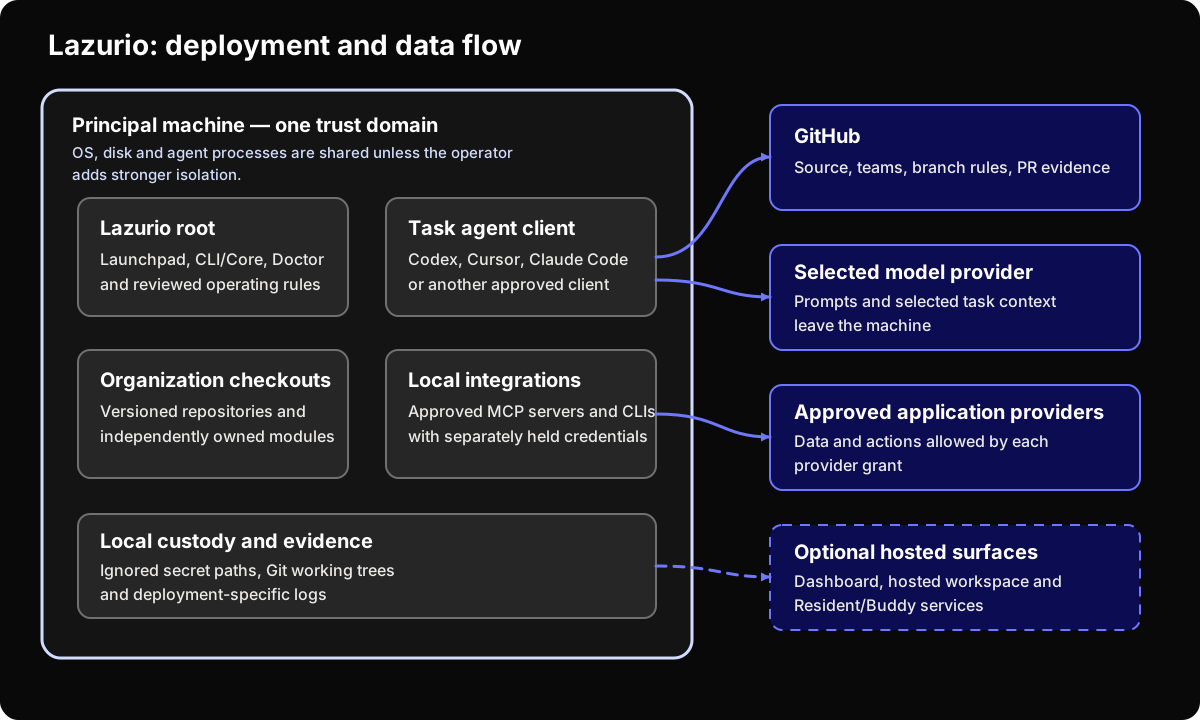\n\n## Current and target state\n\nThe baseline is Platform v0.1.14, released on 27 October 2026. Check the\ninstalled version and enabled services before applying the instructions.\n\n| Surface | Available behavior | What to verify |\n| --- | --- | --- |\n| Installed CLI and Apps | One released program, with diagnostics and generated agent instructions. | Supported OS and architecture, release verification and startup. |\n| Organization repositories and modules | Separate versioned content; clean declared checkouts can be synchronized. | Repository grants, declared modules, build and data-migration requirements. |\n| Local listeners | Apps and modules can listen on loopback. Loopback listeners are not caller authentication. | Hosted entry or local access controls for the concrete deployment. |\n| Account, hosted services and Buddy | Separate services with their own availability. | Operator, identity, network, storage and service terms. |\n\nThe installed product does not require a Platform source checkout for daily work.\n\n## Rollout sequence\n\n### 1. Define the Organization\n\nName its GitHub organization, repositories, teams, administrators and\noffboarding owner. State what company data belongs there and what is excluded.\n\n### 2. Approve the machine boundary\n\nDocument ownership, encryption, patching, endpoint monitoring, local backup,\nremote wipe and incident handling. The recommended starting point is one\nOrganization per machine. A multi-Organization machine is an accepted\nexception inside one shared trust domain, not hard tenant isolation. Keep its\nprovider sessions separately named and revocable.\n\n### 3. Select the agent and model providers\n\nRecord the client, model provider, account type, authentication, data handling,\nretention, telemetry and contractual owner. Repeat the review when the client\nor account tier changes.\n\n### 4. Enable only the required context\n\nBegin with one bounded use case. Grant only the repositories and provider\nscopes it needs, follow the [external application\nstandard](https://github.com/HumanAndMachines/Lazurio/blob/b41fc7d01f748ebc4724535ce811ffceded38fdb/manual/external-app-integrations.md),\nand test revocation.\n\n### 5. Enforce publication\n\nSet branch rules, checks and reviewers for repository changes. For messages,\ninfrastructure, billing, secrets and destructive actions, name the real\nprovider-side permission or confirmation. Where none exists, mark the rule as\nprocess-only.\n\n### 6. Exercise the rollout\n\nProve the normal task, a repository denial, the client's local filesystem\nboundary, credential revocation, failed CI, rollback, offboarding and incident\nescalation. Keep the evidence with the approval decision.\n\n## Updates, rollback and ownership\n\nUse `lazurio update` for the installed product and current declared content.\nIt synchronizes clean primary checkouts first, obtains the Bun version moved\nmodules pin, builds what changed and then updates Lazurio. The parts report\nseparately: failure of one does not prove failure or success of the others.\nDirty repositories are left intact. `lazurio organization sync` runs the content\nsynchronization explicitly; the product's background content sync does not\nsilently update the product itself.\n\nProduct updates move forward. A failed preparation preserves the active\nversion; after activation there is no `lazurio update rollback`. If Apps cannot\nstart normally, use [Recovery mode](https://github.com/Lazurio/LazurioPlatform/blob/v0.1.14/docs/recovery-mode.md)\nand the diagnosed repair or a newer release. Returning a module's source or\nits deployment to a verified revision is a separate, module-owned procedure;\nit must not restore revoked credentials or obsolete access.\n\nBefore production use, close the remaining deployment-specific questions:\n\n- Who maintains machines, GitHub teams, dependencies and integrations?\n- Where do services run, and which networks can reach them?\n- Which logs exist, how long are they retained and who handles incidents?\n- How are local data and credentials backed up, deleted and recovered?\n- Which components are stable, experimental, optional or target-only?\n- Who provides support, and what response time—if any—is promised?\n\nKeep the answers with the deployment approval. See the [content-sync contract](https://github.com/Lazurio/LazurioPlatform/blob/v0.1.14/docs/content-sync.md)\nfor exactly which repositories and operations are included."
},
{
"stableId": "lazurio-doc-environment-app-connections",
"locale": "en",
"route": "/en/environment-app-connections/",
"canonicalUrl": "https://documentation.lazurio.ai/en/environment-app-connections/",
"sourcePath": "data/v2/docs/en/environment-app-connections.md",
"title": "Connecting an Environment to apps",
"summary": "Choose a connection, approve its permissions and revoke access when needed.",
"audience": [
"builder",
"it-admin",
"decision-maker",
"agent"
],
"updatedAt": "2026-10-28",
"reviewedAt": "2026-10-28",
"reviewOwner": "Anna Blazickova",
"secondReviewOwner": "Pablo AI",
"trustCritical": true,
"sourceRefs": [
"lazurio-external-apps-current",
"lazurio-platform-release-current",
"lazurio-platform-integrations-current",
"lazurio-platform-chatgpt-apps-policy",
"lazurio-platform-chatgpt-apps-main",
"composio-token-custody",
"composio-retention-current",
"composio-zdr-current",
"composio-consumer-boundaries",
"lazurio-platform-composio-write-gate-question",
"lazurio-platform-composio-custody-question",
"lazurio-platform-composio-shared-connections-question"
],
"markdown": "Open **Apps → Integrations** to connect email, a calendar or another service.\nChoose the app's card, check the account and requested permissions, and complete\nsign-in yourself. The agent can find the card and explain what is missing;\nit does not create the connection for you.\n\nAn **Environment** is where agents work for you. It can run on your computer or\nbe a hosted Personal, Work or Team Environment. Accounts available there may\nbe used by its agents within your instructions and actual provider permissions.\nCheck whose data the account reaches before connecting it.\n\n## The model in one paragraph\n\nEach app has one recorded route: its installed CLI tool, the Environment's\nExecutor, or permitted Composio. People see the routes and accounts in\nApps → Integrations. Agents read the same catalog with\n`lazurio integrations list --json` and use an existing connection in the order\n**app tool → Executor → Composio**. An unavailable source is not evidence that\nnothing is connected. Ask the agent to state what it could actually verify.\n\n## Which route to choose\n\nStart with the app's catalog card. Lazurio chooses its supported route for the\nEnvironment. For a new route outside the catalog, the integration standard\nprefers an official MCP server, official CLI, permitted Composio, a reviewed\npinned open-source implementation, and finally supervised browser use.\nDo not treat that order as permission for an agent to initiate sign-in.\n\nA custom MCP server is added only on your explicit instruction, under\n**Apps → Integrations → Custom**, into Executor. You enter any key there.\nDo not configure a separate server for each AI client or paste credentials into chat.\nOther shared brokers, scraping and browser-session servers remain outside\nthe standard. See [ChatGPT apps](#chatgpt-apps) for the separate policy.\n\n## The tool catalog\n\n**Settings → Tools** installs and signs in command-line tools such as GitHub\nCLI (`gh`). It is distinct from Apps → Integrations, which lists the connected\napplications. A tool's “Used by agents” switch changes instructions; turning\nit off does not revoke an account or disconnect an app. Revoke access through\nthe connection and, where required, at its provider.\n\n## Connecting a tool\n\nIf an app uses a CLI, its card points to the required setup. Follow the tool's\nsign-in in Settings → Tools; the supported CLI equivalents are\n`lazurio tools install `, `login ` and `logout `.\nYou complete the provider sign-in. Do not send passwords, keys or one-time\ncodes to an agent. Installing a tool is not proof that its app connection works.\n\n## Connecting apps through Composio\n\nUse Composio only where your Organization, or you in a Personal Environment,\npermits it. Open the app card and check that its route is Composio. If the\nComposio account needs sign-in, follow the card's setup first; then connect\nthe app on its card. Agents return the card link rather than running\n`composio link` for you.\n\nThe Composio organization depends on the Environment. In v0.1.14 a Personal\nEnvironment can select the oldest/default organization with the supported\nComposio CLI data. When those data are missing or ambiguous, it retains the\nuser-choice flow. Work/Team Environments follow their Organization rule;\nyour own computer retains its choice. Check the account and organization\nactually shown instead of assuming each device has separate connections.\n\n### The account of the Environment\n\nComposio connections belong to an account and project, not to a device name.\nPublic CLI-source research found that two Machines with the same account and\nComposio organization share consumer connections. That answer is based on\nsource and documentation, **not a live isolation test**. Developer-project\nconnections and the consumer project's connections are separate surfaces.\nWhen access must differ, use separate Composio accounts and verify the credentials in each Environment. Separate devices signed in to the same Composio identity do not isolate those connections.\n\n### Team Environments\n\nA Team Environment is shared: every authorized Team member and agent there\nmay use its connected accounts. Connect team accounts that everyone may use;\nkeep personal mail and calendars in the appropriate individual Environment.\nThe Team's GitHub route uses the Organization's GitHub App rather than a\nmember's personal GitHub session.\n\n## Guidance for Organization admins\n\nRecord the permitted providers, scopes, account owner, credential custody and\nrevocation procedure. Organization settings govern whether Composio is allowed;\na local tool switch is not a substitute. Test actual provider access and\nrevocation. Lazurio's configured route does not prevent a process with broader\nOS credentials from using another path.\n\n## Writes and Publication\n\nAn account may permit reads, writes and deletion. Those capabilities are not\nconsent to publish. The agent prepares work; an authorized user explicitly\napproves sending, merging or otherwise making it effective. A provider draft\ncan already transfer data.\n\nExecutor can pause calls through its execution path: explicitly destructive\nMCP tools, OpenAPI writes, GraphQL mutations and applicable approval policies.\nIt returns `waiting_for_interaction`. In the default `model` mode, **the agent\nitself resumes or declines the call**; no human confirmation is automatically\nrequested. MCP tools without the relevant annotation may run immediately.\nThe typed management API and other CLI paths are not covered by this pause.\nIt is not a universal human-consent gate. Whether Composio filters hold on\nevery path remains a [separate open question](https://github.com/Lazurio/LazurioPlatform/issues/39).\n\n## What you accept before the first connection\n\nWith cloud Composio, a third party holds app credentials and processes call\ncontent. Its current [retention documentation](https://docs.composio.dev/docs/security/data-retention)\nsays default tool logs can contain arguments and results and remain for up to\none year; staged tool files are deleted after 24 hours. Link expiry does not\nitself delete a file.\n\n[Zero Data Retention](https://docs.composio.dev/docs/security/zero-data-retention)\nis available on paid plans and included on Enterprise, with feature and\nmanaged-app exceptions. Some legacy Hobby projects retain an existing ZDR\nsetting; enabling it anew requires a paid plan. Do not assume that your project\nhas ZDR, or that ZDR means no data is stored anywhere. Read the actual setting\nand terms. Region and contractual approval still require evidence for your\nchosen deployment.\n\nIssues [#40](https://github.com/Lazurio/LazurioPlatform/issues/40) and\n[#45](https://github.com/Lazurio/LazurioPlatform/issues/45) already contain\nresearch; remaining decisions and live-verification gaps do not make all their\nquestions unanswered. Provider pages here were checked on 28 October 2026.\n\n## ChatGPT apps\n\nThe approved policy of 27 October disables ChatGPT account apps, plugins and\nconnectors by default inside an Environment. The Organization Admin may allow\nthem for Work/Team; the user decides for Personal. Even when allowed, they fill\nonly gaps in the Integrations catalog. An existing connector on your own\ncomputer has a separate transition rule; it is not blanket permission inside\nan Environment. New ChatGPT or claude.ai connector setup remains excluded.\n\n**Version limit:** the policy's implementation is in Platform main after\nv0.1.14, not in that final release. Do not assume an older deployment technically\nblocks those tools. The newer implementation also preserves named exceptions\nand does not remove tools from already running chats.\n\n\n\n## Release status on 28 October 2026\n\nPlatform v0.1.14 is the current final release. Apps → Integrations, the shared\ncatalog, Executor routing and the agent-resumable pauses above are in its\nreleased contract. ChatGPT-app controls described above are a newer accepted\nchange. Check your installed version and enabled sources before following a\nversion-specific instruction.\n\n## Sources\n\n- [Released integration contract, including approvals](https://github.com/Lazurio/LazurioPlatform/blob/v0.1.14/docs/integrations.md)\n- [Current final release](https://github.com/Lazurio/LazurioPlatform/releases/tag/v0.1.14)\n- [Approved integration standard](https://github.com/HumanAndMachines/Lazurio/blob/b41fc7d01f748ebc4724535ce811ffceded38fdb/manual/external-app-integrations.md)\n- [Newer ChatGPT-app implementation](https://github.com/Lazurio/LazurioPlatform/blob/c94cf947a8c7b388f75a12e5f0e3e0f9338426cd/docs/integrations.md#chatgpt-apps-aplikace-z-chatgpt)\n- [Composio token custody](https://docs.composio.dev/docs/security/token-custody) and [consumer/developer boundaries](https://docs.composio.dev/kb/guide/consumer-project-boundaries-and-auth-selection)"
},
{
"stableId": "lazurio-doc-faq",
"locale": "en",
"route": "/en/faq/",
"canonicalUrl": "https://documentation.lazurio.ai/en/faq/",
"sourcePath": "data/v2/docs/en/faq.md",
"title": "Frequently asked questions",
"summary": "Answers about the product, access, data and approval of results.",
"audience": [
"it-admin",
"decision-maker",
"builder",
"agent"
],
"updatedAt": "2026-10-28",
"reviewedAt": "2026-10-28",
"reviewOwner": "Anna Blazickova",
"secondReviewOwner": "Pablo AI",
"trustCritical": true,
"sourceRefs": [
"lazurio-readme",
"lazurio-license",
"lazurio-architecture",
"lazurio-collaboration-model",
"lazurio-external-apps",
"lazurio-secret-custody",
"microsoft-copilot-architecture",
"lazurio-platform-release-current",
"lazurio-platform-vault-current"
],
"markdown": "\n\nIs Lazurio an AI model?\n\nNo. Lazurio is the working environment for company materials and applications.\nThe selected AI client and model provider supply the AI. Review their pricing,\nsecurity and data terms separately.\n\n\n\n\n\nIs Lazurio a finished, packaged product?\n\nYes. The current Platform is distributed as installable releases. Version\nv0.1.14 was published on 27 October 2026 and includes CLI, Apps and generated\nagent instructions. A released package does not imply a universal SLA or a\ncertified deployment. The Platform uses [Elastic License 2.0](https://github.com/Lazurio/LazurioPlatform/blob/v0.1.14/LICENSE),\nwith separate terms for legacy code, third-party parts and optional services.\nSee the [license and product evidence](/en/public-evidence/#product-form-and-maturity).\n\n\n\n\n\nDoes Lazurio replace Microsoft Copilot?\n\nThe tools serve different needs. Microsoft Copilot mainly assists with work\nin Microsoft 365. Lazurio focuses on reviewing and approving versioned work\nacross repositories and tools. An Organization may use both. See the [full\ncomparison](/en/lazurio-vs-microsoft-copilot/).\n\n\n\n\n\nCan an agent access everything the user can?\n\nIt depends on the setup. An agent may use files, accounts and tools available\nto its running process. OS permissions, the AI tool's sandbox, the workspace\nand service credentials determine access. A prompt neither grants new rights\nnor removes existing ones. Test what should be allowed and what should be denied.\n\n\n\n\n\nIs all Lazurio data stored locally?\n\nNo. Working checkouts are local, while Git repositories, model requests,\nexternal applications and deployed modules may use provider infrastructure.\nOptional hosted Lazurio services add further stores when enabled. The concrete\ndata-flow and processor map belongs to the deployment.\n\n\n\n\n\nHow are secrets handled?\n\nReal secrets stay outside Git. In a supported configured Environment, use Apps → Vault and its secret-request page; do not put values in chat. Other approved custody paths depend on the deployment. Tracked files contain only schemas, required variable names and\ninstructions. Endpoint, backup, rotation and incident controls must protect the\nactual custody location.\n\n\n\n\n\nWhat stops an agent from publishing a bad change?\n\nFor Git work, branch rules, required checks, reviews and merge permissions can\nmechanically protect the target branch. Pushing a review branch is still a data\ntransfer to GitHub. Email, chat and other providers need their own permissions\nand confirmations; explicit authorization is process-only where no provider\ninterlock exists.\n\n\n\n\n\nAre Organizations isolated from each other on one machine?\n\nThey are separate GitHub and repository boundaries, not isolated operating-system environments. One\nmachine is one trust domain. Use separate machines or equivalent infrastructure\nwhen a process compromise must not cross company boundaries.\n\n\n\n\n\nIs Lazurio certified for a compliance framework?\n\nNo certification or universal compliance claim is made. Evaluate the actual\ndeployment, providers, controls and legal obligations.\n\n\n\n\n\nIs there an audit trail?\n\nGit changes can be tied to commits, pull requests, reviews and deployments.\nProvider and endpoint actions need their own logs. Local file reads and model\nrequests are not automatically logged by Lazurio.\n\n\n\n\n\nDoes the documentation have an MCP server?\n\nNot yet. Agents can use [/llms.txt](/llms.txt) and\n[/content-index.json](/content-index.json) today. A future MCP server is\nplanned as a read-only view over the same content, not a second source.\n\n\n\n\n\nWhere should I start an IT review?\n\nStart with the [ten-minute IT briefing](/en/it-administrators/), then test\n[data access and security](/en/data-access-security/) and [deployment and\noperations](/en/deployment-operations/) against the proposed configuration.\n\n"
},
{
"stableId": "lazurio-doc-github-baseline",
"locale": "en",
"route": "/en/github-baseline/",
"canonicalUrl": "https://documentation.lazurio.ai/en/github-baseline/",
"sourcePath": "data/v2/docs/en/github-baseline.md",
"title": "GitHub baseline for a new Organization",
"summary": "The GitHub settings an Owner prepares and reads back before the first Builder: the app, base permission none, the builders Team, Admin-only infra, protected main and merging.",
"audience": [
"it-admin",
"decision-maker",
"agent"
],
"updatedAt": "2026-11-02",
"reviewedAt": "2026-11-02",
"reviewOwner": "Matej Suchanek",
"secondReviewOwner": "Pablo AI",
"trustCritical": true,
"sourceRefs": [
"lazurio-decision-register-gen4",
"lazurio-first-organization-rollout",
"lazurio-organization-install",
"lazurio-root-agent-rules",
"lazurio-platform-folder-roles",
"lazurio-platform-decision-f31",
"lazurio-platform-team-github",
"lazurio-github-app-broker",
"github-organization-roles",
"github-base-permissions",
"github-install-app",
"github-protected-branches",
"github-rulesets",
"github-code-owners",
"github-repository-collaborators",
"github-rest-pull-requests"
],
"markdown": "GitHub is the only authority for access to an Organization's source code in\nLazurio. Membership, Teams, repository grants and branch rules decide who\nreads, writes, reviews and merges; Lazurio keeps no second access list. One\nLazurio Organization is one GitHub Organization and one access boundary. Before\nthe first Builder installs Lazurio for a new Organization, an Owner of the\nGitHub Organization sets up the baseline below and reads it back against the\nOrganization's manifest (decision 0150).\n\nPeople enter Environments with a Lazurio account and need no GitHub account for\nthat. GitHub still decides what can be done with the repositories and what may\nbe published, and for accounts linked to GitHub, live membership of the GitHub\nOrganization mirrors membership of the Lazurio Organization. This entry model\nis Lazurio's target under decision 0192; the transition is not complete.\n\n## The baseline\n\n| Item | Required state | What enforces it |\n| --- | --- | --- |\n| GitHub Organization | One per Lazurio Organization. Its Owners are the Organization's Admins. | GitHub |\n| Root repository | The Organization's root repository on `main`, by convention `/_GEN3`, with the manifest `lazurio.organization.json`. | Lazurio reads it; GitHub controls access |\n| Lazurio for GitHub | An Organization Owner installs the app with access to **All repositories**. \"Only select repositories\" is a supported exception; it must include the root and every repository Lazurio serves, and it is never presented as the full Organization. | GitHub installation scope |\n| Base repository permission | `none` (API `default_repository_permission`). Membership alone opens no private repository. | GitHub |\n| Team `builders` | Exactly one Team holds the Builder role. Its complete roster equals the approved Builders, and each is an active member, not a pending invitation. | GitHub membership |\n| Grants of `builders` | Explicit Write (API `push`) on the root and on every active repository that is not restricted. A new repository gets this grant in the same step that creates or activates it. | GitHub grants |\n| Restricted repositories | No grant for `builders` or for Builders who are not Admins on `infra` or on any repository the manifest declares `default_access: restricted` or `private`. | GitHub grants |\n| Design Systems | Every active member, including the accounts of Environments with automations, has at least Read on the Organization's Design Systems. | Process: the Admin checks it |\n\nGitHub cannot express \"every current and future repository except `infra`\",\nso each new regular repository needs its own grant for `builders`. Whether a\nrepository is restricted follows only from its declaration in the manifest,\nnever from its name or path (decision 0143). Owners reach restricted\nrepositories through their Owner role; Lazurio records that as an owner-role\nexception, never as a Builder grant. Changing members, Teams, grants or app\ninstallations is a write to GitHub that needs the user's explicit instruction;\nan agent prepares it and reads it back.\n\nAn Organization that runs automated work in an Environment with automations\n(Henry) adds its persona: a machine user account with two-factor\nauthentication, a member and never an Owner, different in every Organization.\nIt works through a Team `steward` with Maintain on all repositories except\n`infra`. On `infra` it may get only a direct Write, never through a Team and\nnever Admin, as the named reviewer of infra pull requests once the Organization\nswitches its review policy to it (decisions 0169 and 0093).\n\n## Read it back before the first Builder\n\nThe Owner compares the live state with the manifest's active repositories, not\nwith a hand-kept list. An `unknown` status, incomplete provider data or a\nBuilder who is missing or extra blocks the installation (decision 0150).\n\n```sh\ngh api \"orgs/\" --jq '{login, id, default_repository_permission}'\ngh api \"orgs//teams/builders\" --jq '{name, slug, id, privacy}'\ngh api --paginate \"orgs//teams/builders/members?role=all&per_page=100\" \\\n --jq '.[].login'\ngh api --paginate \"orgs//teams/builders/repos?per_page=100\" \\\n --jq '.[] | {name, push: .permissions.push}'\ngh api --paginate \"repos//infra/collaborators?affiliation=all&per_page=100\" \\\n --jq '.[] | {login, role_name}'\n```\n\nRepeat the last command for every restricted repository. GitHub's list of\ncollaborators includes Organization Owners and members who have access through\na Team or the base permission, so it shows effective access and does not say\nwhere it comes from. Compare it with each person's Organization role: a member\nwho is not an Owner must not appear there, apart from the persona's direct\nWrite on `infra` described above.\n\nWhen a person's Work Environment or computer installs the Organization,\n`lazurio organization install ` first verifies that person's live role\non GitHub. Builders and Stewards skip the Admin-only repositories, and a role\nthat cannot be verified stops the installation (decision 0188).\n\n## Roles\n\nA role name authorizes nothing by itself; the person's live rights on GitHub\ndecide (decision 0062).\n\n| Role | What the role does |\n| --- | --- |\n| Organization Admin | An Owner of the GitHub Organization. Administers members, Teams, grants, restricted repositories, app installations and branch rules, and the Environments the Organization owns. May merge their own pull request where GitHub allows it (decision 0095). |\n| Steward | The review seat. Merges a locked `main` where the branch rules allow it and typically issues a Release. |\n| Builder | Develops Modules with Write on the active Builder repositories and may merge a young `main` that is still deliberately open. |\n| User | Uses the Organization's production applications and installs nothing (decision 0060). |\n\n## Protecting `main` and who merges\n\nAgents deliver every change as a pull request. A merge is a Publication: it\nhappens only on the user's explicit instruction, through an assignee handover\nor under a standing mandate that a decision records, and the user's live GitHub\nrights decide what may be merged. Before merging, the agent checks that the\napproval belongs to the exact head commit and merges with\n`--match-head-commit` (decision 0103). Every pull request has an assignee who\ntakes it to `main` (decision 0222; its automatic check is not deployed yet).\n\n`main` locks progressively. A young Module's `main` may stay open so that a\nBuilder can publish; the Organization's Admin locks it deliberately with branch\nrules when it matters. The Admin also decides who must approve: in GitHub,\nbranch protection rules and rulesets are created by people with admin access to\nthe repository, and requiring a review from code owners needs admin or owner\npermissions. Organization Owners have complete administrative access.\n\nYour GitHub plan decides what GitHub enforces. Branch protection rules,\nrulesets and code owners work in private repositories only with GitHub Pro,\nGitHub Team or GitHub Enterprise; GitHub Free offers them for public\nrepositories. By default, branch protection does not apply to people with admin\naccess unless \"Do not allow bypassing the above settings\" is on. Where GitHub\ndoes not enforce a rule, it is held by process and by the Organization's\n`AGENTS.md`. Where the plan offers no GitHub Draft pull requests, as in private\nrepositories on GitHub Free, agents open a regular pull request and state its\nprogress in the description (decision 0103).\n\nOur recommendation for a locked `main` on a paid plan:\n\n- require a pull request with at least one approval;\n- require a review from the code owners named in `CODEOWNERS`;\n- dismiss stale approvals when new commits are pushed, so GitHub itself keeps\n the approval tied to the reviewed head;\n- require conversation resolution and the repository's status checks;\n- do not allow bypassing the rules.\n\nThree Lazurio rules depend on this:\n\n- **A Team Environment never merges.** Its pull requests come from\n `lazurio-for-github[bot]` with the label `team:`, and a named person\n approves and publishes them under their own account (decision 0148). This\n is a working rule on every plan. Branch protection that requires an\n approval and checks does not stop the app: once they are met, its token,\n which may write repository contents, can merge. Only a restriction that\n allows merging to named people or Teams and leaves the app out would\n enforce the rule, and an Admin who relies on one verifies it on the\n repository.\n- **The persona's own pull requests are approved by a person**: an Owner, Admin\n or Steward. The persona merges only pull requests it is assigned to, never\n runs an infrastructure apply, issues no Release and changes no access,\n secrets or billing (decision 0169). On a paid plan branch rules enforce the\n approval; on a free one it is an agreement.\n- **A Release is not a Publication.** Only someone whose GitHub rights allow it\n issues a Release, and only on the user's explicit instruction or under a\n standing mandate that a decision records.\n\nEvery text an agent writes on GitHub ends with\n`Agent: environment · T3 thread `, or `bot ` for a bot of\nLazurio MausBot (decision 0218). This is a rule agents follow, not a GitHub\ncontrol.\n\n## What Lazurio for GitHub can do\n\nA Team Environment, shared by the members of a Team, works on GitHub through the\nLazurio for GitHub app via the Organization's token broker. People's personal\nGitHub accounts are not signed in there, and Lazurio refuses such a sign-in.\nOn Personal and Work Environments the user signs in to GitHub with their own\naccount, and agents act with that account's live rights (decision 0165).\n\nThe broker's [public source](https://github.com/Lazurio/github-app/blob/751eef11a285dea625c1d3fd4e286e396c5ab1d9/README.md),\nrelease 0.14.0 of 21 October 2026, issues a short-lived installation token for\none repository at a time. The Team's live grant on that repository chooses the\npermissions:\n\n| Team's grant | Token permissions |\n| --- | --- |\n| Write, Maintain or Admin | `actions: write`, `checks: read`, `contents: write`, `members: read`, `pull_requests: write`, plus `workflows: write` and `issues: write` where the Organization's broker policy declares them |\n| Read or Triage | `actions: read`, `checks: read`, `contents: read`, `members: read`, `pull_requests: read`, plus `issues: write` where the policy declares it |\n\nThe token never gets administration or membership changes. The app's private\nkey exists only in the broker, never on the Environment. GitHub's\ndocumentation adds that an installed app always has at least read-only access\nto all public repositories on GitHub.\nLazurio's decision register still lists the Team-bound check of every token as\na target that is not built (decision 0147), while the broker's public source\nalready implements it; public source is not proof of what a deployment runs, so\nask the operator of your Lazurio deployment which broker release serves your\nOrganization.\n\nChanging a Team's grant from Organization overview is assigned to a separate\nnarrow app, Lazurio Administration Access, which uses the acting person's own\none-time token, so GitHub's audit log names that person; neither Lazurio for\nGitHub nor the broker can change access (decision 0186). A Steward's change is\na request that an Admin approves.\n\nIn GEN3, a Builder's computer runs `lazurio organization install --role builder`,\nwhich refuses to clone when Write is missing on the root or any Builder\nrepository and changes nothing on GitHub (decision 0141).\n\n## Sources\n\n- Lazurio: the [decision register](https://github.com/Lazurio/LazurioPlatform/blob/4d5ee62a963a0ae2fc98287f0072e739ff6d2cd8/docs/decision-register.md) (decisions 0060, 0062, 0093, 0095, 0103, 0141, 0143, 0147, 0148, 0150, 0165, 0169, 0186, 0188, 0192, 0218 and 0222), the GEN3 [Organization rollout](https://github.com/HumanAndMachines/Lazurio/blob/66e437f7e563574ea35b79dd1bdd193fd0f6b4b6/manual/first-client-organization-rollout.md) and [Organization install](https://github.com/HumanAndMachines/Lazurio/blob/66e437f7e563574ea35b79dd1bdd193fd0f6b4b6/manual/organization-install.md) runbooks (in Czech), the [rules for agents](https://github.com/HumanAndMachines/Lazurio/blob/66e437f7e563574ea35b79dd1bdd193fd0f6b4b6/AGENTS.md) (in Czech), the Folder's [role descriptions](https://github.com/Lazurio/LazurioPlatform/blob/a2927744b5a87113425f93f5e1517ac97b2f6c06/src/folder/manual.ts#L888-L904), [decision F31](https://github.com/Lazurio/LazurioPlatform/blob/a2927744b5a87113425f93f5e1517ac97b2f6c06/docs/decisions.md#f31--a-team-environment-publishes-under-the-teams-identity), [gh on a Team Environment](https://github.com/Lazurio/LazurioPlatform/blob/a2927744b5a87113425f93f5e1517ac97b2f6c06/docs/environment-tools.md#gh-on-a-team-environment) and the [Lazurio for GitHub broker](https://github.com/Lazurio/github-app/blob/751eef11a285dea625c1d3fd4e286e396c5ab1d9/README.md).\n- GitHub, read on 1 November 2026: [roles in an organization](https://docs.github.com/en/organizations/managing-peoples-access-to-your-organization-with-roles/roles-in-an-organization), [base permissions](https://docs.github.com/en/organizations/managing-user-access-to-your-organizations-repositories/managing-repository-roles/setting-base-permissions-for-an-organization), [installing a GitHub App](https://docs.github.com/en/apps/using-github-apps/installing-a-github-app-from-a-third-party), [protected branches](https://docs.github.com/en/repositories/configuring-branches-and-merges-in-your-repository/managing-protected-branches/about-protected-branches), [rulesets](https://docs.github.com/en/repositories/configuring-branches-and-merges-in-your-repository/managing-rulesets/about-rulesets), [code owners](https://docs.github.com/en/repositories/managing-your-repositorys-settings-and-features/customizing-your-repository/about-code-owners), [repository collaborators](https://docs.github.com/en/rest/collaborators/collaborators) and [draft pull requests by plan](https://docs.github.com/en/rest/pulls/pulls)."
},
{
"stableId": "lazurio-doc-guide-course-connected-apps",
"locale": "en",
"route": "/en/guide/course/connected-apps/",
"canonicalUrl": "https://documentation.lazurio.ai/en/guide/course/connected-apps/",
"sourcePath": "data/v2/docs/en/guide/course/connected-apps.md",
"title": "Lesson 6: Connected apps",
"summary": "What an Integration is, who connects it and what agents may do with your mail or calendar.",
"audience": [
"decision-maker",
"builder",
"agent"
],
"updatedAt": "2026-11-01",
"reviewedAt": "2026-11-01",
"reviewOwner": "Anna Blazickova",
"secondReviewOwner": "Pablo AI",
"trustCritical": true,
"sourceRefs": [
"lazurio-onboarding-decision-register",
"lazurio-platform-folder-agent-rules",
"lazurio-platform-onboarding-decisions",
"lazurio-platform-launchpad-texts",
"lazurio-external-apps-current"
],
"markdown": "**In this lesson:** what an Integration is, who connects it and what agents\nmay do with it.\n\nAn **Integration** is an app or service connected to your Environment, such\nas mail, a calendar or a chat. You find them in Apps → **Integrations**, in\nthe tabs **All**, **Connected** and **Custom**. Each app has exactly one\nroute: a tool from Settings → Tools (for example `gh` for GitHub), the\nEnvironment's Executor, or Composio with your own account where your\nOrganization allows it.\n\n**You connect apps yourself.** Signing in is your consent, so an agent never\nconnects an app on its own; it sends you a link to the app's card instead.\nOnce an app is connected, every agent and bot of this Environment can read,\nwrite and delete there until you narrow it.\n\n**Being able to write is not consent to publish.** Sending an email or a\nmessage, inviting people to a meeting or submitting a form is Publication.\nAn agent prepares such a step, for example as a draft in your mailbox, and\nfinishes it only when you allow it. \"Reply to that email\" asks for a draft,\nnot for sending. Today this is a rule that agents follow; no Lazurio mechanism\nblocks a write through a connected app\n([Connecting an Environment to apps](/en/environment-app-connections/)).\n\nNever paste passwords, tokens or verification codes into a chat. If the\nEnvironment has a vault and an agent needs a password or a key, it asks for\nit in Apps → **Vault**, where you fill it in yourself.\n\n## Your task\n\n1. Open Apps → **Integrations** → **Connected**.\n2. In Chat, send:\n\n ```text\n Which apps are connected in this Environment and through which route?\n Do not read or change anything in them.\n ```\n\n3. Compare the answer with the page.\n\n**Done means:** you know which apps agents can reach here, and that sending,\ninviting or submitting waits for your consent. To connect your mail or\ncalendar, continue with [Connect your tools](/en/guide/tool-connections/)."
},
{
"stableId": "lazurio-doc-guide-course-find-your-way",
"locale": "en",
"route": "/en/guide/course/find-your-way/",
"canonicalUrl": "https://documentation.lazurio.ai/en/guide/course/find-your-way/",
"sourcePath": "data/v2/docs/en/guide/course/find-your-way.md",
"title": "Lesson 3: Find your way around",
"summary": "Chat, Apps and Automate, your Organization's Modules, Files and how to get a page explained.",
"audience": [
"decision-maker",
"builder",
"agent"
],
"updatedAt": "2026-11-01",
"reviewedAt": "2026-11-01",
"reviewOwner": "Anna Blazickova",
"secondReviewOwner": "Pablo AI",
"trustCritical": true,
"sourceRefs": [
"lazurio-onboarding-decision-register",
"lazurio-platform-onboarding-decisions",
"lazurio-platform-launchpad-texts"
],
"markdown": "**In this lesson:** the three parts of Lazurio, where your Organization's\nModules are and how to get a page explained.\n\nAt the top of the left column is the switch **Chat · Apps · Automate**:\n\n- **Chat** is where you work with agents. In an Environment it is T3 Code,\n labelled T3 Code (Lazurio). Start a new thread for each new task.\n- **Apps** shows your Organization's Modules and the pages **Files**,\n **Integrations** and, where the Environment has a vault, **Vault**.\n- **Automate** is for regular tasks and automation. Where it does not run,\n the tour says so.\n\nA **Module** is one application or area of work of your Organization, for\nexample Mission Control for plans or a Knowledgebase for shared knowledge.\nUnder **Workspace**, Apps lists every Module of the Organization that your\nEnvironment's GitHub identity can reach, each once. Under **Productionspace**\nit shows the Organization's production repositories, read-only. Your\nOrganization decides which Modules it has. If a colleague mentions a Module\nyou do not see, you may not have access to it; ask your Admin.\n\n**Files** is the Documents folder of this Environment. Upload materials for\nagents there and download what they prepare, a whole folder as a ZIP if you\nneed it. The **?** after a page heading explains that page in place.\n\n## Your task\n\n1. In **Apps**, find one Module related to your work. Open its menu and\n choose **Module information**.\n2. Open **Files** and look at what is there.\n3. Open **Chat**, start a new thread and send:\n\n ```text\n I am new in this Organization. List the Modules I can see in Apps and\n say in one sentence what each one is for. Use only our Organization's\n own documents and say where you found each answer. Do not change anything.\n ```\n\n**Done means:** you know which Module holds your Organization's plans and\nwhich holds its shared knowledge, or that it has neither, and you can find\nFiles and Settings → Getting started again."
},
{
"stableId": "lazurio-doc-guide-course-first-sign-in",
"locale": "en",
"route": "/en/guide/course/first-sign-in/",
"canonicalUrl": "https://documentation.lazurio.ai/en/guide/course/first-sign-in/",
"sourcePath": "data/v2/docs/en/guide/course/first-sign-in.md",
"title": "Lesson 1: Sign in to your Environment",
"summary": "What an Environment is, which kind you work in and how you get in.",
"audience": [
"decision-maker",
"builder",
"agent"
],
"updatedAt": "2026-11-01",
"reviewedAt": "2026-11-01",
"reviewOwner": "Anna Blazickova",
"secondReviewOwner": "Pablo AI",
"trustCritical": true,
"sourceRefs": [
"lazurio-onboarding-decision-register",
"lazurio-platform-folder-manual",
"lazurio-platform-shell-column-head",
"lazurio-platform-launchpad-texts"
],
"markdown": "**In this lesson:** what an Environment is, which kind you work in and how\nyou get in.\n\nAn **Environment** is the computer on which agents work for you. Lazurio is\nyour window into it: in the browser you see its Chat, Apps and Automate,\nwhile the agents, their files and the sign-ins stay on the Environment.\nPeople see three kinds of hosted Environment:\n\n- **Work Environment.** Your Organization owns it and assigns it to you.\n Agents in it act for you, within your rights. It serves only work:\n conversations from every client you use are stored in it, so personal\n matters do not belong there.\n- **Team Environment.** The members of a Team share it. Everyone with access\n uses the accounts signed in there, so only team accounts belong in it.\n- **Personal Environment.** It belongs to you alone. Every new one comes\n with Buddy, your personal representative.\n\nLazurio on your own computer has no kind; it is simply **your computer**.\nAn Environment with automations is an ordinary Work Environment, named Henry\nwhere it needs a name. This course uses a Work Environment.\n\n## How you get in\n\nLazurio's approved access model keeps three conditions apart\n([decision 0192](https://github.com/Lazurio/LazurioPlatform/blob/4d5ee62a963a0ae2fc98287f0072e739ff6d2cd8/docs/decision-register.md)):\nthe network, active membership of the Organization and a grant to the\nEnvironment or to one of its apps. Your Organization's Admin arranges the\nmembership and the grant. Where the Environment is reachable only in the\nOrganization's tailnet, your device also needs Tailscale and the Admin's\napproval. The transition to this model is not complete, so how a device is\napproved today can still differ between Organizations.\n\nSign in to Lazurio in your own browser. The browser in the right panel of an\nEnvironment belongs to the Environment, and every agent there shares its\nsign-ins. Never sign in to Lazurio in it.\n\n## Your task\n\n1. Open the address of your Environment and sign in with your Lazurio account.\n2. In the header of the left column, find the name of the Environment and\n whom it serves. The gear beside it opens the Settings of exactly this\n Environment.\n3. In Settings, open the section named after the Environment, for example\n **This Work Environment**, and read **Kind**, **Owner** and **Assignment**.\n\nIf the address does not open, follow\n[Reach an Environment through Tailscale](/en/guide/tailscale/).\n\n**Done means:** you are signed in, you see the switch Chat · Apps · Automate\nat the top of the left column, and you can say which kind of Environment this\nis, who owns it and to whom it is assigned."
},
{
"stableId": "lazurio-doc-guide-course-first-task",
"locale": "en",
"route": "/en/guide/course/first-task/",
"canonicalUrl": "https://documentation.lazurio.ai/en/guide/course/first-task/",
"sourcePath": "data/v2/docs/en/guide/course/first-task.md",
"title": "Lesson 7: Your first task",
"summary": "Brief an agent in Chat and have the result saved as a draft for your review.",
"audience": [
"decision-maker",
"builder",
"agent"
],
"updatedAt": "2026-11-02",
"reviewedAt": "2026-11-02",
"reviewOwner": "Anna Blazickova",
"secondReviewOwner": "Pablo AI",
"trustCritical": true,
"sourceRefs": [
"lazurio-platform-folder-agent-rules",
"lazurio-platform-folder-manual",
"lazurio-onboarding-decision-register",
"github-about-pull-requests",
"github-protected-branches"
],
"markdown": "**In this lesson:** how to brief an agent in Chat and how it saves the\nresult for your review.\n\nStart a new thread in Chat. Every new thread starts in the Lazurio\n**Folder**, the folder in which Lazurio keeps the agents' instructions next\nto your Organizations; from there the agent finds your Organization\n(decision 0189). Name the Organization and the work in your request.\n\nDescribe the task in your own words: what you want, why, from which\nmaterials, what must not change, and that you want a draft for your review.\nYou do not need technical names; the agent looks up your Organization's\nterms in its own documents. You can also dictate the request (see\n[Recommended applications](/en/guide/recommended-apps/)). More about good\nbriefs is in [How to think about Lazurio and agents](/en/guide/start-here/).\n\n## What the agent does\n\nThe instructions Lazurio generates for agents, the Folder's `AGENTS.md`,\ntell every agent to\n([`render.ts`](https://github.com/Lazurio/LazurioPlatform/blob/a2927744b5a87113425f93f5e1517ac97b2f6c06/src/folder/render.ts)):\n\n1. work in a **worktree**, a separate working copy of the repository, so that\n the valid version on `main` stays untouched;\n2. put the work on GitHub right away as a **Draft pull request**, a proposed\n change that GitHub does not let anyone merge while it is a draft. Where the\n repository's GitHub plan offers no drafts, the agent opens an ordinary pull\n request and writes in its description that the work is in progress;\n3. ask you with a question that offers options whenever it needs a decision.\n Until you answer, that part of the work waits;\n4. when the work is finished and checked, mark the pull request **Ready for\n review** and end with a **handoff**: the link, what Publication would\n introduce, what it has verified, and the question whether to publish in\n your name or to ask another colleague.\n\nIf you can only read the repository, the agent writes the proposal as an\nissue there instead. A file that belongs in no repository goes to Files,\nand you get a link to it; the task below uses the repository or issue you\nchose in lesson 5.\n\nThese are rules in the agents' instructions, not technical locks. GitHub\nenforces review and merge rules only where your Organization has protected\nthe branch.\n\n## Your task\n\nHave the piece of work from lesson 5 saved. Send in a new Chat thread:\n\n```text\nIn our Organization [name], add this to [the place we agreed on] as a\ndraft for my review: [your two or three sentences].\nFirst check whether something similar already exists and whether I can\nwrite there. If I can, prepare a pull request; if I can only read it,\nwrite the proposal as an issue. Ask me if anything is unclear. Do not\npublish anything. At the end, give me the link.\n```\n\nAnswer the agent's questions when they appear.\n\n**Done means:** the agent has given you a link to a pull request marked Ready\nfor review, or to an issue; the change itself is visible there; and nothing\nhas been published. For a pull request, the closing question is waiting for\nyour answer. Do not answer it yet: review the change first in lesson 8. An\nissue ends without that question, because the colleagues mentioned in it\ndecide on the change."
},
{
"stableId": "lazurio-doc-guide-course-getting-started",
"locale": "en",
"route": "/en/guide/course/getting-started/",
"canonicalUrl": "https://documentation.lazurio.ai/en/guide/course/getting-started/",
"sourcePath": "data/v2/docs/en/guide/course/getting-started.md",
"title": "Lesson 2: Finish Getting started",
"summary": "Connect AI and GitHub and download your Organization, in this order.",
"audience": [
"decision-maker",
"builder",
"agent"
],
"updatedAt": "2026-11-01",
"reviewedAt": "2026-11-01",
"reviewOwner": "Anna Blazickova",
"secondReviewOwner": "Pablo AI",
"trustCritical": true,
"sourceRefs": [
"lazurio-onboarding-decision-register",
"lazurio-platform-getting-started",
"lazurio-platform-launchpad-texts",
"lazurio-platform-shell-column-head"
],
"markdown": "**In this lesson:** what your Environment needs before agents can work for\nyou, and in which order.\n\n**Getting started** is the first section of the Environment's Settings. It\nlists the steps that make the Environment ready for work. It checks each\nstep against the Environment's own state, not against your browser, so it\nshows the same wherever you open it\n([`start-view.ts`](https://github.com/Lazurio/LazurioPlatform/blob/a2927744b5a87113425f93f5e1517ac97b2f6c06/src/launchpad/start-view.ts)).\nWhile a required step is missing, the header of the left column shows\n**Finish setting up**, for example **(1 of 3)**, and leads you there\n([`view.ts`](https://github.com/Lazurio/LazurioPlatform/blob/a2927744b5a87113425f93f5e1517ac97b2f6c06/src/shell/view.ts)).\n\nThe required steps go in this order:\n\n1. **Connect AI.** Sign in with your ChatGPT or Claude account, or with both.\n On an Environment on a server, the sign-in page opens in the browser in the\n right panel; passkeys and your computer's password manager do not work\n there. If your Organization provides AI, the step says **Provided by your\n Organization.**\n2. **GitHub.** **Connect** becomes available once AI is connected. Confirm the\n one-time code on github.com with the GitHub account that has access to your\n Organization.\n3. **Download** your Organization. It starts by itself once GitHub is connected\n and downloads the Organization's Modules.\n\nAI comes first so that an agent in Chat can help you with the rest. When a\nstep stops, it says what to do next. **Solve in Chat** opens a new Chat thread\nwith a prepared request that is not sent yet. **The Organization's Admin\nprepares it.** means that your Admin has to act, not you.\n\nBelow the required steps are optional ones, such as Composio for mail and\ncalendars, SSH from your own computer and a tour of the app. You can add them\nat any time. A Team Environment has its required steps prepared in advance.\n\n## Your task\n\n1. Open Settings → **Getting started**.\n2. Complete the required steps until the page says **The Environment is ready.**\n3. Under **App tour**, choose **Start the tour** and click through Apps, Chat\n and Automate.\n\n**Done means:** every required step is done, the page says **The Environment\nis ready.** and the row **Apps, Chat and Automate** shows **Seen**."
},
{
"stableId": "lazurio-doc-guide-course",
"locale": "en",
"route": "/en/guide/course/",
"canonicalUrl": "https://documentation.lazurio.ai/en/guide/course/",
"sourcePath": "data/v2/docs/en/guide/course/index.md",
"title": "Onboarding course",
"summary": "Nine short lessons from your first sign-in to your first task that an agent saves and you review.",
"audience": [
"decision-maker",
"builder",
"agent"
],
"updatedAt": "2026-11-01",
"reviewedAt": "2026-11-01",
"reviewOwner": "Anna Blazickova",
"secondReviewOwner": "Pablo AI",
"trustCritical": true,
"sourceRefs": [
"lazurio-onboarding-decision-register",
"lazurio-platform-launchpad-texts",
"lazurio-platform-folder-agent-rules"
],
"markdown": "This course takes you from your first sign-in to an Environment to your\nfirst task that an agent saves and you review. It is written for people\nwho are new in an Organization and work in a Work Environment. Each lesson\nends with one practical task and tells you how to know that it is done.\n\n## Before you start\n\nYou need:\n\n- **An Environment assigned to you** and its address. Your Organization\n assigns it; if you do not have the address, ask its Admin.\n- **Tailscale on an approved device**, if your Organization's Environments\n are reachable only in its tailnet. The tailnet is the default; see\n [Reach an Environment through Tailscale](/en/guide/tailscale/).\n- **A ChatGPT or Claude account**, unless your Organization provides AI for\n its Environments.\n- **A GitHub account** with access to your Organization's repositories.\n\n## The lessons\n\n1. [Sign in to your Environment](/en/guide/course/first-sign-in/): what an Environment is and which kind you work in.\n2. [Finish Getting started](/en/guide/course/getting-started/): connect AI and GitHub and download your Organization.\n3. [Find your way around](/en/guide/course/find-your-way/): Chat, Apps, Automate and Settings.\n4. [Who works with you](/en/guide/course/who-works-with-you/): you, agents, colleagues, Henry and Buddy.\n5. [Where things belong](/en/guide/course/where-things-belong/): Knowledgebase, Mission Control, an issue or Files.\n6. [Connected apps](/en/guide/course/connected-apps/): what agents may do with your mail or calendar.\n7. [Your first task](/en/guide/course/first-task/): brief an agent and have the result saved as a draft.\n8. [Review and Publication](/en/guide/course/review/): check the result and decide who publishes it.\n9. [When something does not work](/en/guide/course/when-stuck/): where to turn and what never to send.\n\nYou do lessons 1 and 2 once per Environment. Lessons 5 to 8 are one piece\nof work: you choose it in lesson 5, have it saved in lesson 7 and review it\nin lesson 8. Use real but non-sensitive work.\n\n## What this course describes\n\nThe course describes Lazurio Platform as its public source stood on\n1 November 2026. A newer release may show other labels. If your\nOrganization still works with the Lazurio Root on your own computer (GEN3),\nsome screens and steps differ.\n\nThe prompts are examples: copy them into Chat and adapt them to your work.\nA prompt grants no access. Agents can use only what is signed in to your\nEnvironment.\n\n## After the course\n\n- Save a recurring procedure and use it again: exercises 2 and 3 of\n [First steps with an agent](/en/guide/first-steps/).\n- Let an agent work on a website: [Tips for working](/en/guide/work-tips/).\n- Connect your mail or calendar: [Connect your tools](/en/guide/tool-connections/).\n- Look up a term: [Glossary](/en/guide/glossary/)."
},
{
"stableId": "lazurio-doc-guide-course-review",
"locale": "en",
"route": "/en/guide/course/review/",
"canonicalUrl": "https://documentation.lazurio.ai/en/guide/course/review/",
"sourcePath": "data/v2/docs/en/guide/course/review.md",
"title": "Lesson 8: Review and Publication",
"summary": "Check what an agent saved, ask for changes and decide who publishes it.",
"audience": [
"decision-maker",
"builder",
"agent"
],
"updatedAt": "2026-11-01",
"reviewedAt": "2026-11-01",
"reviewOwner": "Anna Blazickova",
"secondReviewOwner": "Pablo AI",
"trustCritical": true,
"sourceRefs": [
"lazurio-platform-folder-manual",
"lazurio-platform-folder-agent-rules",
"lazurio-onboarding-decision-register",
"github-reviewing-pull-requests",
"github-protected-branches"
],
"markdown": "**In this lesson:** how to check what an agent saved and how Publication\nworks.\n\nOpen the link from the handoff. If the page does not open, check that you\nare signed in to GitHub with the account you connected in Getting started.\nA pull request has a description and, in the tab **Files changed**, the\nexact change. Read the change itself, not only the agent's summary, and\ncheck that:\n\n- it is in the right place and says what you meant;\n- every fact has a source and nothing is invented: polished text with\n nothing behind it goes back to the agent;\n- it contains no private data and nothing from another Organization;\n- a new colleague would understand it.\n\nIf something is wrong, say so in the same Chat thread, concretely: \"Remove\nthe deadline; the source does not confirm it.\" The agent adds the fix to the\nsame pull request or issue. You and your colleagues can also comment on\nGitHub.\n\n## Publication\n\n**Publication** is the step that makes work hard to take back or visible to\nothers: merging a pull request, sending an email or a message, submitting a\nform, a payment. Until then the work is a draft that can still change or be\ndiscarded. The agent publishes only when you allow it: when you choose\n**Publish in your name** in its closing question, write \"publish\", or allow\nit in advance for a task or a whole thread. Your last word applies.\n\nYour live rights on GitHub decide whether a merge may happen. If you may\nnot merge, or you want someone else to check the work, choose **Ask another\nKolega**: the agent requests that colleague's review, assigns the pull\nrequest to them and mentions them on GitHub. In a Team Environment the\nagent asks instead whom it should hand the change to.\n\nWhen you allow Publication, the agent's instructions require it to merge the\nexact latest version of the pull request, and GitHub refuses that merge if\nanother change has arrived in the meantime. So check the latest version\nbefore you allow it. The rule that agents publish only with your consent\nlives in their instructions; GitHub enforces merge rules such as required\nreviews only on protected branches.\n\n## Your task\n\n1. Read the change from lesson 7 in **Files changed**, or read the issue.\n2. Ask for at least one concrete improvement and check that it appears in\n the same pull request or issue.\n3. For a pull request, answer the closing question. If you are not sure\n that the decision is yours, choose **Ask another Kolega**. For an issue,\n check that it names who can make the change.\n\n**Done means:** you have read the change itself, your feedback is in it, and\nyou have answered the closing question or know who decides on the issue.\nYour first task is saved and reviewed."
},
{
"stableId": "lazurio-doc-guide-course-when-stuck",
"locale": "en",
"route": "/en/guide/course/when-stuck/",
"canonicalUrl": "https://documentation.lazurio.ai/en/guide/course/when-stuck/",
"sourcePath": "data/v2/docs/en/guide/course/when-stuck.md",
"title": "Lesson 9: When something does not work",
"summary": "Where to turn when something stops, how to describe a problem and what never to send.",
"audience": [
"decision-maker",
"builder",
"agent"
],
"updatedAt": "2026-11-01",
"reviewedAt": "2026-11-01",
"reviewOwner": "Anna Blazickova",
"secondReviewOwner": "Pablo AI",
"trustCritical": true,
"sourceRefs": [
"lazurio-platform-launchpad-texts",
"lazurio-platform-folder-manual",
"lazurio-onboarding-decision-register"
],
"markdown": "**In this lesson:** where to turn when something stops, and how to describe\na problem so that someone can help.\n\n| What happens | What to do |\n| --- | --- |\n| The Environment's address does not open | Follow [Reach an Environment through Tailscale](/en/guide/tailscale/). |\n| A step in Getting started stops | Read what the step says. Once AI is connected, **Solve in Chat** opens a new thread with a prepared request; read it and send it. If the step says that the Organization's Admin prepares it, contact your Admin. |\n| The app of a Module does not open | Its overview in Apps says why. Ask an agent in Chat to look at it. |\n| An agent seems stuck | First look for a question it is waiting for you to answer. Then ask it what it has verified, what it is waiting for and what is missing. |\n| Lazurio itself reports a fault | Settings → **Recovery** shows Lazurio's own checks. When one fails, it offers a prepared prompt for a repair agent and a prepared issue. |\n\nWhen an agent finds a problem it cannot fix now, it records it as a GitHub\nIssue in the repository concerned, gives you the link and goes on with the\nrest of the work.\n\nDescribe a problem in three parts: what you wanted to do, what happened and\nwhat you see, with a screenshot if it helps. Remove passwords, tokens, codes\nand other people's data from it first, and never send them in a chat. Do not\nkeep clicking when you do not know what is happening.\n\n## Your task\n\n1. Open Settings → **Recovery** and read whether Lazurio in this Environment\n is healthy. Do not start anything.\n2. In the thread of your first task, send:\n\n ```text\n Summarize what you have verified, what you are waiting for and what is missing.\n ```\n\n**Done means:** you know where to turn in each situation in the table, and\nyou have a status summary of your first task.\n\nThis is the end of the course. Continue with the links in\n[After the course](/en/guide/course/#after-the-course)."
},
{
"stableId": "lazurio-doc-guide-course-where-things-belong",
"locale": "en",
"route": "/en/guide/course/where-things-belong/",
"canonicalUrl": "https://documentation.lazurio.ai/en/guide/course/where-things-belong/",
"sourcePath": "data/v2/docs/en/guide/course/where-things-belong.md",
"title": "Lesson 5: Where things belong",
"summary": "Where work is saved so that colleagues and agents find it: Knowledgebase, Mission Control, issues, repositories and Files.",
"audience": [
"decision-maker",
"builder",
"agent"
],
"updatedAt": "2026-11-02",
"reviewedAt": "2026-11-02",
"reviewOwner": "Anna Blazickova",
"secondReviewOwner": "Pablo AI",
"trustCritical": true,
"sourceRefs": [
"lazurio-platform-folder-manual",
"lazurio-platform-folder-agent-rules"
],
"markdown": "**In this lesson:** where work is saved so that colleagues and agents find\nit later.\n\nChat is the working conversation. Agents treat it as a cache: what stays\nonly in a chat is lost to everyone else. Each kind of result has its home:\n\n| What | Where it belongs |\n| --- | --- |\n| Shared knowledge: procedures, context, what you have learned | the Organization's Knowledgebase |\n| Plans, their status and who is responsible | the Organization's Mission Control |\n| An open problem or an uncertainty | a GitHub Issue in the repository it concerns |\n| Software and documentation | a repository on GitHub, changed by a pull request |\n| A finished file that belongs in no repository, such as a presentation | Files of the Environment |\n| Personal matters | your Personal Environment, never a Work Environment |\n\nEvery change to a repository goes as a pull request. If you can only read\nthe repository, the agent writes the proposal as an issue there and\nmentions who can make the change. Your Organization may call its Modules\ndifferently; the agent finds them in the Organization's own instructions\nand documents.\n\n## Your task\n\nPick one thing from your recent work that a new colleague would need to\nknow: a term, a step of a procedure or a rule. Choose something that belongs\nin a repository or an issue, because lessons 7 and 8 save it as a pull\nrequest or an issue and review it there; a finished file for Files is not\npart of this exercise. Write it down in two or three sentences. Then send in\nChat:\n\n```text\nI want to save this for colleagues: [your two or three sentences].\nTell me where it belongs in our Organization (Knowledgebase, Mission\nControl or an issue) and why. Check whether something similar\nalready exists. Do not save anything yet.\n```\n\n**Done means:** you have one small, real piece of work and you know where\nit belongs. You will have it saved in lesson 7."
},
{
"stableId": "lazurio-doc-guide-course-who-works-with-you",
"locale": "en",
"route": "/en/guide/course/who-works-with-you/",
"canonicalUrl": "https://documentation.lazurio.ai/en/guide/course/who-works-with-you/",
"sourcePath": "data/v2/docs/en/guide/course/who-works-with-you.md",
"title": "Lesson 4: Who works with you",
"summary": "You as the user, agents, colleagues and their roles, Henry and Buddy: who decides what.",
"audience": [
"decision-maker",
"builder",
"agent"
],
"updatedAt": "2026-11-01",
"reviewedAt": "2026-11-01",
"reviewOwner": "Anna Blazickova",
"secondReviewOwner": "Pablo AI",
"trustCritical": true,
"sourceRefs": [
"lazurio-onboarding-decision-register",
"lazurio-platform-folder-manual"
],
"markdown": "**In this lesson:** who decides what in your Environment and in your\nOrganization.\n\n**You are the user.** The agents in your Environment work for you and act\nwith your rights. You give the instruction to publish their work and you\nhave the last word.\n\n**An agent** (Task Agent) is a working session of an AI tool such as Codex\nor Claude Code, for example one thread in Chat. It has no authority of its\nown, and no prompt gives it any. Inside the Environment it works with full\naccess, without a sandbox and without approval of each command: the\nEnvironment is the boundary (decision 0172). Whatever is signed in to your\nEnvironment, its agents can use. Full access is a capability, not consent:\nPublication stays with you.\n\n**A colleague** (Kolega) is a user in an Organization. Their roles and Teams\nsay what they may do. An Organization knows four roles: an **Admin** manages\nthe Organization's access and its Environments, a **Steward** reviews changes\nand merges them where the branch is protected, a **Builder** develops Modules\nand a **User** works with the Organization's applications. A role name\nauthorizes nothing by itself; live rights on GitHub decide (decision 0062).\n\n**Henry** is the name of an Organization's Work Environment with\nautomations. A team of bots works there under the Organization's persona,\nand one responsible user, an Owner or Admin of the Organization, answers\nfor it (decision 0169). Where your Organization runs Henry, you meet it\nmostly on GitHub, for example in a review of a pull request.\n\n**Buddy** is your personal representative. Buddy runs in your Personal\nEnvironment, if you have one, and acts only within your rights and the\nmandates you give. Billing and ownership, recovery, secrets, changes of\naccess and destructive steps always need your consent to that exact step,\nand so do a merge, a publication or a release that no explicit mandate\ncovers (decision 0089).\n\nA persona, such as Henry or the name you give your Buddy, is only a name and\na character. It is not a user and holds no authority of its own. The\ndecision numbers refer to the public\n[Lazurio decision register](https://github.com/Lazurio/LazurioPlatform/blob/4d5ee62a963a0ae2fc98287f0072e739ff6d2cd8/docs/decision-register.md).\n\n## Your task\n\nIn a new Chat thread, send:\n\n```text\nCheck what I may do in our Organization on GitHub. For the Organization's\nroot repository and for the repository where we keep shared knowledge,\ntell me whether I can write to them or only read them, and who can merge\nchanges there. Only read; do not change anything.\n```\n\n**Done means:** you know whether you can write to the repository where your\nfirst task will go and, if you cannot, who publishes changes there."
},
{
"stableId": "lazurio-doc-guide-first-steps",
"locale": "en",
"route": "/en/guide/first-steps/",
"canonicalUrl": "https://documentation.lazurio.ai/en/guide/first-steps/",
"sourcePath": "data/v2/docs/en/guide/first-steps.mdx",
"title": "First steps with an agent",
"summary": "Try assigning a task, reviewing the result and saving a procedure for next time.",
"audience": [
"decision-maker",
"builder",
"agent"
],
"updatedAt": "2026-10-28",
"reviewedAt": "2026-10-28",
"reviewOwner": "Anna Blazickova",
"secondReviewOwner": "Pablo AI",
"trustCritical": true,
"sourceRefs": [
"lazurio-collaboration-model",
"lazurio-external-apps"
],
"markdown": "Use a small work task to practise giving instructions, reviewing a draft\nand saving a procedure for next time. If you are new to agents,\nread the [short introduction](/en/guide/start-here/) first.\n\nThe example conversations are scripted. Copy the prompts into your chat and\nadapt them to the task. Supply only materials you are allowed to use there.\n\n## 1. Brief your first task and review the result\n\nChoose the correct Organization and area of work in Apps. Open a task\nin the corresponding working context in your agent tool. Before starting,\ncheck with the agent which organization and materials it is working with.\n\n```text\nUse the attached notes to draft an agenda for a 30-minute team meeting.\nFor each item, include its goal, proposed duration and the question to decide.\nUse only these notes. Flag missing information; do not invent it.\nReturn a short list. Do not send anything or create calendar events.\n```\n\nShow an example conversation
AI · illustration: The first item does not specify the decision you need. Are we choosing an option or just sharing progress?
You: We need to choose an option. Allow 15 minutes for that item and shorten the others to keep the whole meeting within 30 minutes.
\n\n**Done means:** the agenda matches the notes, durations total 30 minutes,\nunconfirmed facts are marked and nothing was sent. The agent saying “done”\nis not enough — read the actual draft.\n\n## 2. Explain one recurring procedure\n\nChoose something you regularly explain at work. Describe it in your own\nwords, by voice if you prefer. The agent can organize it; you check that it\naccurately reflects your work.\n\n```text\nI want to explain how we prepare team meetings.\nFirst ask me about the inputs, sequence of steps and finished result.\nThen draft a procedure for our organization's Knowledgebase.\nCheck whether one already exists; do not propose an unnecessary duplicate.\nShow the changes, their location and who will have access. Do not publish yet.\n```\n\nShow an example of feedback
AI · illustration: The draft does not cover unresolved items from the previous meeting. How do you handle them?
You: First compare them with the current situation. Do not carry outdated items forward automatically. Add that to the draft and show the final wording.
\n\n**Done means:** the procedure is accurate and you know where it belongs.\nApprove publication as a separate step under your permissions and your\norganization's rules. If another colleague must approve it, ask for a handoff\nto that person.\n\n## 3. Use the approved procedure in a new task\n\nAfter the procedure is approved and published, start a new task in the same\norganization. You are checking that saved materials are actually loaded,\nnot testing “chat memory”.\n\n```text\nFind the approved meeting preparation procedure in our organization's\nKnowledgebase. Show its source and summarize the rules. If you cannot find\nor access it, tell me; do not guess its contents. Then use it to draft an\nagenda from the new attached notes. Do not send anything.\n```\n\n**Done means:** you can see the actual source and the draft follows its rules.\nIf the agent cannot find it, check the organization, location, publication\nand access.\n\n## When to start a new thread\n\nStay in the same thread when refining the same result. Start a new task for\na different goal: a meeting agenda and an unrelated document analysis can\nrun in parallel. Give the new task its materials; do not assume it knows\nthe neighboring chat. Do not have two agents edit the same document without\ncoordination.\n\n## Outlook, SharePoint and other tools\n\nFirst verify an available **approved connection**, the correct account and\nthe access scope. Being signed in through your regular browser is not proof\nthat the agent has access.\n\n```text\nI need to work with Outlook. Check whether an approved connection is\navailable in this environment and tell me which account and operations\nyou can use. Do not read or change anything yet. If the connection is\nmissing, explain the next step; do not switch to another service or browser\ncontrol without discussing it with me.\n```\n\nAfter verification, try a small read-only task:\n\n```text\nIn the specified SharePoint folder [link], find the document [name].\nSummarize it in five points and include the source. Search only that folder.\nDo not edit or share anything. If you lack access, stop and explain why.\n```\n\nReplace brackets with actual details. These are task instructions, not\nautomatic access setup. See more examples in [Connect your tools](/en/guide/tool-connections/)\nand [working in the browser](/en/guide/work-tips/).\n\n## When a response is slow or misses the point\n\nIf your tool offers a reasoning setting, try a lower level for simple tasks\nand a higher one for demanding analysis. This does not guarantee speed or\naccuracy. Controls vary by application, and delays can have other causes.\n\n```text\nSummarize what you have verified, what you are waiting for and what is missing.\nPropose the smallest next step. Do not repeat the same unsuccessful approach.\n```\n\nWhen the result misses the point, describe the difference: “I need a decision,\nnot a transcript of the notes.” If the problem persists, send support the\napplication name, a short brief, expected and actual results, and a sanitized\nscreenshot of the error. Do not include passwords, tokens or sensitive materials.\n\n## Your first two weeks, without a separate training project\n\n- **Day one:** finish a small task and improve the draft with specific feedback.\n- **Week one:** capture one recurring procedure in Knowledgebase and have it approved.\n- **Week two:** use the procedure in a new task and fill gaps exposed by real work.\n\nAdjust the pace to your work; these are suggestions, not deadlines."
},
{
"stableId": "lazurio-doc-guide-glossary",
"locale": "en",
"route": "/en/guide/glossary/",
"canonicalUrl": "https://documentation.lazurio.ai/en/guide/glossary/",
"sourcePath": "data/v2/docs/en/guide/glossary.md",
"title": "Glossary",
"summary": "Terms for everyday work, administration and development in Lazurio.",
"audience": [
"it-admin",
"decision-maker",
"builder",
"agent"
],
"updatedAt": "2026-11-01",
"reviewedAt": "2026-11-01",
"reviewOwner": "Anna Blazickova",
"secondReviewOwner": "Pablo AI",
"trustCritical": true,
"sourceRefs": [
"lazurio-product-vocabulary",
"lazurio-readme",
"lazurio-architecture",
"lazurio-collaboration-model",
"lazurio-onboarding-decision-register",
"lazurio-platform-folder-manual",
"lazurio-platform-launchpad-texts",
"github-about-pull-requests",
"github-protected-branches"
],
"markdown": "The basic terms cover everyday work. The advanced section explains\nadministration, development and change approval.\n\n## Basic terms\n\n
\n\n**Lazurio** A shared work environment for people and AI agents. It helps\nyou find applications, work, and the information you need.\n\n**Environment** The place where agents work for you. Hosted Environments\nhave three kinds: Personal, Work and Team.\n\n**Personal Environment** Your Environment with Buddy and a Personal Workspace.\n\n**Work Environment** An Organization Environment assigned to a particular\nuser. It may run automations; these do not create a separate fourth kind.\n\n**Team Environment** An Environment shared by Team members. Every authorized\nmember can use its connected accounts, so connect team accounts there.\n\n**Your computer** Your own device running Lazurio locally. It is not a fourth\nkind of hosted Environment.\n\n**Apps (called Launchpad in older sources)** The part of Lazurio where\nyou open Organization applications. Within an Environment, switch between\nChat, Apps and Automate.\n\n**Chat** The part of an Environment where you work with agents, one thread\nper task. In an Environment it is T3 Code.\n\n**Automate** The part of an Environment for regular tasks and automation.\n\n**Getting started** The first section of an Environment's Settings. It shows\nthe steps that make the Environment ready for work: AI, GitHub and the\nOrganization's content, in this order.\n\n**Guide** Practical help for Lazurio. When you are unsure what something\nmeans or how to continue, start here.\n\n**GitHub** The service that hosts repositories and manages their\npermissions. It determines which repositories you can read or change.\nYour AI provider account and subscription are separate.\n\n**AI subscription** Your provider's plan determines available models and\nusage limits. It is separate from GitHub repository permissions.\n\n**Tokens** Units used to measure AI usage. They are consumed when reading\nrequests and generating responses; they are not passwords or access keys.\n\n**Organization** A separate workspace for one company. It has its own\npeople, applications, data, and access.\n\n**Team** A group of people who work together in a specific\narea, such as sales or product.\n\n**Workspace** The part of an Organization that contains applications for\nday-to-day work.\n\n**Module** One specific application in an Organization, such as Mission\nControl or Knowledgebase.\n\n**Marketplace** A place to discover additional applications and extensions\nfor Lazurio.\n\n**Mission Control** The place for managing work. It shows what is being\naddressed, who is responsible, and what should happen next.\n\n**Knowledgebase** A shared company notebook with procedures and context for\nfuture work. An agent can use an entry if it has access and loads it. Chat\ncontent is not saved there automatically.\n\n**Integration** An app or service connected to an Environment, such as mail\nor a calendar. You connect it yourself in Apps → Integrations; every agent\nof that Environment can then use it. Sending or publishing through it still\nneeds your consent.\n\n**Personal Workspace** Your private working content in a Personal\nEnvironment. It serves you and your Buddy, rather than the Organization.\nOlder technical sources call it Personalspace.\n\n**Colleague (Kolega)** A user in an Organization. Their roles and Teams\ndecide what they may do.\n\n**AI Colleague** An older name for a long-running AI role. Current\ndocumentation describes automation as agents working in a Work Environment\nwith a responsible user. A role name grants no permissions by itself.\n\n**Henry** The name of an Organization's Work Environment with automations.\nA team of bots works in it under the Organization's persona, and one\nresponsible user answers for it. It is not a separate kind of Environment.\n\n**Buddy** The name of Lazurio's personal product and of your personal AI\nrepresentative. Buddy belongs to your Personal Environment and acts only\nwithin your rights and the mandates you give. Billing, secrets, access\nchanges, and a merge or publication outside an explicit mandate always need\nyour consent to that exact step.\n\n**Prompt** A request you write for AI. For example: “Prepare an overview of\nunpaid invoices and explain what I should address first.”\n\n**Start** Turn an application on so it can be used.\n\n**Open** Go to the selected application. If it is not running yet, Launchpad\nmay start it first.\n\n**Stop** Turn off a locally running application. This does not delete its\ndata.\n\n**Sync** Load the current state of projects and applications so you work\nwith the latest changes.\n\n
\n\n## Advanced terms\n\n
\n\n**User** An Organization user. They use available applications but do not\nnormally change their source code or Organization settings.\n\n**Builder** An Organization member who creates and changes applications.\nTheir exact capabilities are determined by actual GitHub permissions.\n\n**Steward** Reviews changes, helps complete them and may publish them\nwithin their permissions. This role looks after quality in an Organization.\n\n**Admin** An Organization administrator with extended permissions. They\nmanage access and important settings, but this does not grant access to\nanother person's Personalspace.\n\n**Principal** A term for the responsible identity in older Lazurio sources.\nCurrent copy uses “user” for the person who assigns work and has the final say.\n\n**Task Agent** An AI tool session for a particular task. It has no\npermissions of its own; it uses access available in the Environment and\nfollows the user's instructions.\n\n**Skill** A saved guide for an agent doing a particular kind of work, such as\npreparing a presentation or reviewing changes. It may contain instructions,\ntemplates and scripts. You still need to check the result.\n\n**MCP server** A connection through which AI can use a specific tool or work\nwith its data, such as GitHub. It does not grant AI extra permission — it uses\nonly the access available on that Machine.\n\n**Guardian** In older sources, a designated person who helps with recovery\nor a service intervention for an AI Colleague. This does not grant general access.\n\n**Draft** Work in progress that is not official yet. You can review, change,\nor discard it.\n\n**Publication** The moment a Draft becomes official or visible to others,\nsuch as merging a pull request or sending an email or a message. An agent\npublishes only with the explicit approval of the user, whose live rights\ndecide what may be published.\n\n**Handoff** How an agent ends a piece of work: the link to it, what\nPublication would introduce, what the agent verified and the question who\npublishes it.\n\n**Release** An official, labeled version of a product or application, such\nas a new version for customers.\n\n**Pull request (PR)** A proposed set of changes awaiting review and approval\nbefore it enters the official version.\n\n**Draft pull request** A pull request that is still in progress. GitHub does\nnot let anyone merge it until it is marked ready for review. Agents in\nLazurio open one as soon as they start a change.\n\n**Review** A check of a pull request by someone other than its author before\nit is merged. On a protected branch, GitHub can require an approving review.\n\n**Main** The project's primary, currently valid version. Work in progress\nenters it only after the required checks.\n\n**Worktree** A separate working copy of a project. An Agent or developer can\nsafely prepare changes there without affecting the main version.\n\n**Productionspace** The technical part of an Organization for source code\nand systems that are not ordinary work applications.\n\n**Folder (Lazurio Folder)** The folder in an Environment where Lazurio keeps\nthe agents' instructions, manuals and skills, next to your Organizations.\nEvery new Chat thread starts there. Lazurio generates these files, so a\nchange made in them by hand blocks Lazurio's updates of them.\n\n**Bun** A technical tool used to install, run, and test applications. If you\nare not a developer, you usually do not need to use it directly.\n\n**Machine** A device or isolated work environment in which Lazurio runs. It\nalso forms a boundary for security, access, and recovery.\n\n**Access** Actual permission to view or change something. GitHub determines\nrepository permissions. A role name alone grants no access.\n\n
\n\nThese names follow the public [Lazurio decisions](https://github.com/Lazurio/LazurioPlatform/blob/4d5ee62a963a0ae2fc98287f0072e739ff6d2cd8/docs/decision-register.md),\nespecially 0170 and 0207 with their addenda, 0169 for Henry and 0089 for\nBuddy. A particular installation may still show older labels; technical\nnames and commands stay unchanged. The [onboarding course](/en/guide/course/)\nuses these terms step by step."
},
{
"stableId": "lazurio-doc-guide",
"locale": "en",
"route": "/en/guide/",
"canonicalUrl": "https://documentation.lazurio.ai/en/guide/",
"sourcePath": "data/v2/docs/en/guide/index.mdx",
"title": "Guide",
"summary": "Choose a guide to assigning tasks, sharing procedures or connecting tools.",
"audience": [
"decision-maker",
"builder",
"agent"
],
"updatedAt": "2026-11-01",
"reviewedAt": "2026-11-01",
"reviewOwner": "Anna Blazickova",
"secondReviewOwner": null,
"trustCritical": false,
"sourceRefs": [
"lazurio-readme"
],
"markdown": "
\n
Learn to brief an agent, share a company procedure and check the result. Start with the introduction or choose a specific task below.
\n \n
\n\n\n\nMissing a guide? Tell your agent what you need to do and where you got stuck.\nIf that does not help, contact your team's support."
},
{
"stableId": "lazurio-doc-guide-recommended-apps",
"locale": "en",
"route": "/en/guide/recommended-apps/",
"canonicalUrl": "https://documentation.lazurio.ai/en/guide/recommended-apps/",
"sourcePath": "data/v2/docs/en/guide/recommended-apps.mdx",
"title": "Recommended applications",
"summary": "Tools for dictation, checking AI limits and keeping a Mac awake.",
"audience": [
"decision-maker",
"builder",
"agent"
],
"updatedAt": "2026-10-24",
"reviewedAt": "2026-10-24",
"reviewOwner": "Anna Blazickova",
"secondReviewOwner": "Pablo AI",
"trustCritical": true,
"sourceRefs": [
"wispr-flow",
"wispr-context-privacy",
"codexbar",
"codexbar-permissions",
"amphetamine"
],
"markdown": "These applications help with dictation, checking AI limits and keeping a Mac\nawake. They are not part of Lazurio. Check your Organization's rules before\ninstalling them.\n\n
\n \n
\n
Voice input
Wispr Flow
\n
Dictation that works in text fields across applications. Speak naturally and Wispr Flow turns your speech into polished text.
\n
Useful when: You want to dictate a longer prompt, email, or message quickly instead of typing everything.
\n
Privacy: With Context Awareness enabled, Flow can send surrounding text, app details and conversation history with a dictation. Wispr states that it does not take screenshots. On iPhone, the keyboard sends text around the cursor and has no separate Context Awareness switch. Before using work data, get its processing and permissions approved; on Mac and Windows in sensitive environments, turn off Context awareness in Settings → Data and Privacy. Wispr says the app name and website domain are still sent; Command Mode and Polish also send the text being edited. Check retention and model-training settings separately. What Wispr can read.
A free, open-source macOS application that shows AI service usage, available limits, and reset times in the menu bar.
\n
Useful when: Before assigning a longer task to an agent, you want to see how much capacity remains and when the limit resets.
\n
Permissions: Depending on the service, CodexBar may use browser cookies, Keychain or OAuth credentials. Reading Safari cookies may require Full Disk Access. These permissions do more than display a number: get the specific access approved before connecting a work account and choose the least access needed. Never paste cookies or tokens into chat. Permission documentation.
A free macOS app from the Mac App Store that keeps the computer from sleeping. When connected to power, it can keep a MacBook running even with the lid closed.
\n
When it helps: A long-running task needs the Mac to stay awake.
"
},
{
"stableId": "lazurio-doc-guide-start-here",
"locale": "en",
"route": "/en/guide/start-here/",
"canonicalUrl": "https://documentation.lazurio.ai/en/guide/start-here/",
"sourcePath": "data/v2/docs/en/guide/start-here.mdx",
"title": "How to think about Lazurio and agents",
"summary": "What an agent needs to work and how to use shared Knowledgebase procedures.",
"audience": [
"decision-maker",
"builder",
"agent"
],
"updatedAt": "2026-09-15",
"reviewedAt": "2026-09-15",
"reviewOwner": "Anna Blazickova",
"secondReviewOwner": "Pablo AI",
"trustCritical": true,
"sourceRefs": [
"lazurio-collaboration-model",
"lazurio-architecture"
],
"markdown": "A new assistant can write and research, but does not yet know your\nprocedures, abbreviations or expectations.\n\nAn agent needs a similar introduction: what to do, which materials to use\nand how you will judge the result. You do not need a special formula.\nDescribe the task in your own words and correct misunderstandings. Lazurio\nprovides shared materials and rules for this work.\n\n## You set the direction. Your assistant prepares the work.\n\n\n
\n
👤You
You know your company, the goal and what matters.
\n
Brief and materials →← Draft for review
\n
👤Your AI assistant
Prepares work, asks questions and incorporates feedback.
\n
\n
▤Knowledgebase · a shared notebook
Verified procedures and context for future work. Propose an entry, review it and have it approved under your team's rules.
\n Collaboration illustrated: brief → draft → review → approved procedure in the shared notebook. Authorized colleagues and their agents can use it when they have access and load it.\n\n\nThe human analogy helps with delegation; it is not literal. An agent is not\na person, can make mistakes and does not automatically have your experience\nor access to everything. Here we mean an **agent working on a specific task**,\nnot automatically a long-term personal Buddy or a separate AI Colleague.\n\n## What would you tell a new assistant?\n\nInstead of “Prepare the meeting”, explain what you need:\n\n```text\nI am preparing for a team meeting. Use the attached notes to create a\none-page brief: what is done, what is blocked and what we need to decide.\nKeep it concise for colleagues who know the project. Do not invent missing\nfacts; mark them as questions. Prepare a draft only; do not send it anywhere.\n```\n\nSee an example assistant response
AI · illustrative response: I will prepare those three sections. I will turn a missing deadline into a question rather than guess a date. First, I need the notes to work from.
You: Here are the notes. For each blocked item, add who could help us.
\n\n## Knowledgebase is your shared notebook\n\nYou would give a new assistant a company handbook. In Lazurio,\n**Knowledgebase** serves that purpose: a place for shared knowledge,\nprocedures and context. You do not have to explain everything from scratch\neach time — provided it is recorded correctly, accessible and loaded by the\nagent for the task.\n\n**Chat is the working conversation. Knowledgebase holds what should last.**\n“Remember this” alone is not evidence that a rule was saved for other people.\nAsk to see the actual entry, its location and who can access it. Private\ninformation does not belong in the shared notebook.\n\n```text\nTurn what we clarified into a proposed procedure for our organization's\nKnowledgebase. First check whether a similar procedure already exists.\nShow the proposed changes, where they belong and who has access.\nDo not publish yet. If you cannot access Knowledgebase, tell me.\n```\n\n## Introduce your work through real tasks\n\nYou do not need to document the entire company first. Start with one small\ntask. Give specific feedback, such as “Include a deadline only when the\nsource confirms it”. If the rule will be useful again, prepare a Knowledgebase\nentry. Here, onboarding means supplying context and procedures, not training\nthe underlying AI model.\n\nNext time, refer to the approved procedure and explain only what has changed.\n\nContinue with [First steps with an agent](/en/guide/first-steps/): three short\nexercises from your first brief to reusing a shared procedure."
},
{
"stableId": "lazurio-doc-guide-tailscale",
"locale": "en",
"route": "/en/guide/tailscale/",
"canonicalUrl": "https://documentation.lazurio.ai/en/guide/tailscale/",
"sourcePath": "data/v2/docs/en/guide/tailscale.md",
"title": "Reach an Environment through Tailscale",
"summary": "Turn on Tailscale, choose the right network and troubleshoot connection problems.",
"audience": [
"builder",
"decision-maker",
"it-admin",
"agent"
],
"updatedAt": "2026-10-28",
"reviewedAt": "2026-10-28",
"reviewOwner": "Anna Blazickova",
"secondReviewOwner": "Pablo AI",
"trustCritical": true,
"sourceRefs": [
"lazurio-environment-network-decisions",
"lazurio-environment-access-model",
"lazurio-platform-decision-f41",
"lazurio-platform-release-v0-1-8-rc-41",
"headscale-project",
"tailscale-fast-user-switching",
"tailscale-install-windows",
"google-chrome-secure-dns",
"tailscale-android-private-dns-request",
"webkit-storage-cap",
"lazurio-platform-offline-current",
"lazurio-platform-public-current"
],
"markdown": "This guide is for **private Environments reached through a tailnet**.\nIt is not a prerequisite for every hosted Environment. Public deployments and\nthe approved new Buddy personal product use their own account-entry model;\ncheck which access path your installation actually offers. Older personal\ntailnet installations may still use this guide.\n\nIf an Environment's address will not open, first check that your device\nis connected to the right private network.\n**Turn on Tailscale, choose the tailnet the Environment needs and open the\naddress again.** If your browser shows the Lazurio page **Turn on Tailscale**,\nit redirects automatically once the Environment responds. If it\nstill does not open, see [Still not working?](#still-not-working)\n\n## Why Tailscale\n\nA **tailnet** is a private network of devices connected with\n[Tailscale](https://tailscale.com/). The apps of a private tailnet Environment, such as\nits Launchpad, Chat or Automate, have addresses that work only inside the\ntailnet that serves them. No public route leads to them: outside that tailnet\nyour browser cannot open them, and usually cannot even find the address. It\nshows an error such as \"This site can't be reached\".\n\nTo reach an Environment, your device needs three things:\n\n1. the Tailscale app, turned on;\n2. the right tailnet chosen in it;\n3. access for this device to that tailnet, which an Admin of your Organization\n arranges.\n\nLazurio runs its tailnets on [Headscale](https://github.com/juanfont/headscale),\nan open-source server that the Tailscale app connects to. That is why the\nTailscale app names such a tailnet by the address of its server, for example\n`headscale.example.com`, rather than by the name of a company. The Lazurio page\n**Turn on Tailscale** shows the exact name you need.\n\n## Turn on Tailscale and choose the tailnet\n\n### macOS\n\n1. Click the Tailscale icon in the menu bar.\n2. Turn on the **Tailscale** switch.\n3. Point at your account and choose the tailnet in the list.\n\n### Windows\n\n1. Right-click the Tailscale icon at the bottom right of the taskbar. If you\n do not see it, select the up arrow (**^**) first.\n2. Point at your account and choose the tailnet in the list.\n3. If Tailscale is not connected, choose **Connect**.\n\n### iPhone and iPad\n\n1. Open the Tailscale app.\n2. Tap your account picture at the top right, then your account, and choose\n the tailnet in the list.\n3. Turn on the Tailscale switch.\n\n### Android\n\n1. Open the Tailscale app.\n2. Tap the account icon at the top right, then your account, and choose the\n tailnet in the list.\n3. Turn on the Tailscale switch.\n\nIf the tailnet is not in the list, this device has not joined it yet. See\n[Still not working?](#still-not-working)\n\n## More than one tailnet\n\nIf you work for more than one Organization, their Environments may be in\ndifferent tailnets. The Tailscale app keeps one account active on a device at a\ntime, so while one tailnet is active, the Environments of another do not open.\nSwitch whenever you move between them. Switching does not ask you to sign in\nagain unless the device's key for that tailnet has expired.\n\n## Still not working?\n\nWhere your browser keeps the Lazurio page (see\n[When Lazurio shows its own page](#when-lazurio-shows-its-own-page)), it shows\nthat page whenever the address cannot be reached, for any reason, not only when\nTailscale is off. With Tailscale on and the right tailnet chosen, check these\ncauses in order:\n\n1. **This device is not in the tailnet, or not approved yet.** If the tailnet\n is missing from your account list, the device has never joined it. If it is\n there and active but no Environment of the Organization opens, the device\n may not have access yet. Ask the Admin of your Organization to add or\n approve it. Lazurio's approved access model has an Admin approve each device\n for each Organization (decision 0192 of 6 October 2026); how a device gets\n in today can still differ between tailnets.\n2. **The Environment does not answer.** If other Environments in the same\n tailnet open, this one may be stopped or restarting. Wait a few minutes and\n try again. If it does not come back, tell the Admin of its Organization. For\n your personal Remote Environment, contact your team's support.\n3. **Your browser uses its own secure DNS.** A browser can look up addresses\n with its own DNS provider instead of your device. That provider does not\n know the tailnet's names. When Chrome's **Use secure DNS** is set to a\n provider you chose, Chrome does not fall back to your device's ordinary\n lookup. Turn the setting off, or select your current service provider.\n Other browsers have similar settings.\n4. **Android uses its own Private DNS.** If **Private DNS** is set to a\n provider's hostname, Tailscale's names may not work; a user has reported\n this conflict to Tailscale in a public issue. As a troubleshooting step,\n set Private DNS to **Off** or **Automatic** in your phone's network\n settings and try again.\n5. **There is no internet connection.** Tailscale needs the internet. If other\n websites do not open either, fix the connection first.\n\n## When Lazurio shows its own page\n\nOnce you have opened the Launchpad, Chat or Automate of an Environment that\nruns Lazurio Platform v0.1.8-rc.41 or later and has tailnet details in its configuration, the browser keeps the Lazurio page\n**Turn on Tailscale** for that address. When\nthe address cannot be reached later, the browser shows that page at the same\naddress instead of its own error. The page names the Environment, its\nOrganization and the tailnet, and continues to the address by itself once the\naddress answers.\n\nYou still see the browser's own error in these cases, and the steps above\napply all the same:\n\n- the first time you open an Environment in a browser, and in private windows;\n- for apps of modules, which have addresses of their own;\n- in Safari, after seven days of Safari use without interacting with the\n Environment's pages, when Safari removes the website data it keeps;\n- after 30 days in which this browser has not reached the Environment. The page\n then removes itself, so a renamed or removed Environment leaves nothing\n behind.\n\nThe page belongs to the Environment's own address and talks only to it. It\nchecks for a new version whenever you open the Environment, updates itself, and\nremoves itself when the Environment stops offering it. Lazurio Platform added\nthe page in release candidate v0.1.8-rc.41 (8 October 2026). An Environment\nkeeps it only when its configuration identifies a tailnet; a deployment without one retires the guide."
},
{
"stableId": "lazurio-doc-tool-connections",
"locale": "en",
"route": "/en/guide/tool-connections/",
"canonicalUrl": "https://documentation.lazurio.ai/en/guide/tool-connections/",
"sourcePath": "data/v2/docs/en/guide/tool-connections.mdx",
"title": "Connect your tools",
"summary": "Connect email or a calendar and check what the agent can access.",
"audience": [
"decision-maker",
"builder",
"agent"
],
"updatedAt": "2026-10-28",
"reviewedAt": "2026-10-28",
"reviewOwner": "Anna Blazickova",
"secondReviewOwner": "Pablo AI",
"trustCritical": true,
"sourceRefs": [
"lazurio-external-apps-current",
"lazurio-platform-integrations-current",
"lazurio-platform-chatgpt-apps-policy",
"lazurio-platform-chatgpt-apps-main",
"google-third-party-connections"
],
"markdown": "export const walkthrough = {\n \"appLabel\": \"What would you like to connect?\",\n \"methodLabel\": \"Connection method\",\n \"demo\": \"Interactive example\",\n \"title\": \"Your chat with AI\",\n \"you\": \"You · copy this prompt\",\n \"assistant\": \"AI · example response\",\n \"next\": \"Next step →\",\n \"back\": \"Back\",\n \"restart\": \"Start again\",\n \"copy\": \"Copy prompt\",\n \"copied\": \"Prompt copied. Paste it into your AI chat.\",\n \"failed\": \"Copy failed. Copy the selected text manually.\",\n \"steps\": [\n \"Connect\",\n \"Verify\",\n \"First task\"\n ],\n \"manual\": \"Your part\",\n \"note\": \"Scripted example: no accounts are connected and nothing is sent. Your assistant must verify available tools and permissions; its replies may differ.\",\n \"apps\": [\n {\n \"id\": \"gmail\",\n \"name\": \"Gmail\",\n \"purpose\": \"Find important messages and prepare a summary without sending anything.\",\n \"test\": \"In the connected Gmail account, find up to 5 messages from the past 7 days and summarize their subjects and main points. Do not open attachments, change read status, delete or send anything. If the available tool cannot do this without changes, stop and explain why.\"\n },\n {\n \"id\": \"calendar\",\n \"name\": \"Google Calendar\",\n \"purpose\": \"See your day at a glance. Creating invitations requires separate approval.\",\n \"test\": \"In the connected Google Calendar account, list tomorrow's events from my primary calendar. State the date and time zone used. Do not create or edit events or send invitations.\"\n }\n ],\n \"connectStart\": \"I want to use \",\n \"connectEnd\": \" in this AI chat. First verify which tools and connections you actually support here. \",\n \"methods\": [\n {\n \"id\": \"catalog\",\n \"name\": \"Lazurio integration catalog\",\n \"prerequisite\": \"Open Apps → Integrations in the Environment where you will work. The catalog shows the supported route and current accounts. A prompt alone does not connect an app.\",\n \"connect\": \"Check the available integrations and the account for this app. If it is missing, give me its actual card link in Apps → Integrations. Do not initiate sign-in or connect an account yourself. I will complete the connection on the card.\",\n \"reply\": \"I will read the integration catalog. If sign-in is needed, I will return the app card link. You complete it there; then I will verify the actual account and available operations.\",\n \"action\": \"Open the app card in Apps → Integrations. Check the domain, account and permissions, and complete sign-in yourself. Return to chat for verification. Never send passwords or tokens in chat.\"\n },\n {\n \"id\": \"composio\",\n \"name\": \"Composio\",\n \"prerequisite\": \"In Lazurio, use Composio only where the Organization or Personal Environment user permits it. Composio holds credentials and processes call content. Check permissions and data-processing terms before connecting a work account. An account or prompt alone does not make Composio tools available to your AI client.\",\n \"connect\": \"Check whether this app uses permitted Composio in this Environment. Return its actual card link in Apps → Integrations and explain any missing setup. Do not run a connection command or initiate authorization. I will sign in on the card.\",\n \"reply\": \"First I will verify the configured route and whether Composio is permitted. You connect through the app card, and I verify the result afterwards.\",\n \"action\": \"Open the app card in Apps → Integrations. Complete any required Composio setup and the app sign-in yourself. Check the account and requested permissions before continuing.\"\n },\n {\n \"id\": \"plugin\",\n \"name\": \"Existing connection outside Lazurio\",\n \"prerequisite\": \"This example concerns your own standalone AI app. Inside a Lazurio Environment, ChatGPT apps follow the default-off policy and its version limits; an existing connector is not blanket permission. Do not create new ChatGPT or claude.ai connectors in Lazurio.\",\n \"connect\": \"I am using my own standalone AI app outside a Lazurio Environment. Check its name, plan and whether an approved existing connection is available. Do not create a new connection or switch services. Explain how I can inspect the account and permissions.\",\n \"reply\": \"I will verify the app and the existing connection first. If it is not available or approved, I will say what is missing and stop before setup.\",\n \"action\": \"Inspect the existing connection in your AI app settings and verify the account and permissions. In a Lazurio Environment, use the catalog route or ask the responsible Admin about the ChatGPT-app policy first.\"\n }\n ],\n \"verify\": \"Check the current connection state. State which account you are using if the tool can safely identify it, and which operations are actually available. Do not reveal credentials. Do not change or send anything. If the connection or permissions are missing, do not claim success.\",\n \"verifyReply\": \"Verification must come from a tool result, not an earlier chat response. If the account is unclear or permissions are insufficient, resolve that first. Then try a small read-only task.\",\n \"testReply\": \"The assistant should return a result from the connected app or explain exactly why it cannot. Compare the result with the app. Approve sending messages, changing events or other writes separately.\"\n};\n\nConnect AI to your email or calendar. Choose an app, walk through the example chat and copy the prompt into your assistant.\n\n\n\n## Before you start\n\nHave your AI app name, plan and intended account ready. Start with test\nor non-sensitive data.\n\n**Follow your Organization's rules in Lazurio.** Choose new connections\nusing the [connected-app standard](/en/environment-app-connections/).\nComposio is an option under that standard's conditions. Built-in connectors\nare also shown for standalone AI apps; this example does not approve a new\nprovider for work data.\n\n## If the connection fails\n\nCheck the account, plan availability, administrator restrictions and authentication state. A prompt cannot supply a missing connection or MCP server. Never paste passwords, tokens or sensitive diagnostic output into chat.\n\n## Revoke access\n\nDisconnect the account in the chosen integration service or AI app and check third-party permissions in your Google account too. For a Lazurio MCP connection, remove the server in Executor and revoke its provider access according to the authentication method. Closing a chat does not revoke permissions.\n\n## Sources and example scope\n\nUse this example to request a connection and check that it works. Exact setup steps depend on your AI app and plan; check that app's documentation.\n\n- [Composio: authentication and connected accounts](https://docs.composio.dev/docs/authentication)\n- [MCP: connect local servers](https://modelcontextprotocol.io/docs/develop/connect-local-servers)\n- [Google: manage third-party connections](https://support.google.com/accounts/answer/13533235)"
},
{
"stableId": "lazurio-doc-guide-work-tips",
"locale": "en",
"route": "/en/guide/work-tips/",
"canonicalUrl": "https://documentation.lazurio.ai/en/guide/work-tips/",
"sourcePath": "data/v2/docs/en/guide/work-tips.md",
"title": "Tips for working",
"summary": "Assign work in the browser and review the result.",
"audience": [
"decision-maker",
"builder",
"agent"
],
"updatedAt": "2026-10-24",
"reviewedAt": "2026-10-24",
"reviewOwner": "Anna Blazickova",
"secondReviewOwner": "Pablo AI",
"trustCritical": true,
"sourceRefs": [
"lazurio-collaboration-model",
"lazurio-external-apps",
"openai-browser"
],
"markdown": "## When an agent needs to work on the web\n\nWith **Browser Use**, an agent can open a website, read a page, click and\nfill forms. Ask for it when the task needs work on the site, not just a list\nof links. Your AI tool provides this feature, not Lazurio.\n\n\n \n \n \n AI-generated mockup, not a screenshot: the task is on the left, the website\non the right. The site and details are fictional; the real interface may\ndiffer. The Czech prompt asks for contact details without sending anything.\nClick to enlarge.\n\n\n## Get started in ChatGPT\n\nIn the ChatGPT desktop app, chat and the built-in browser can appear side by side.\nOpen it with **New tab** and a URL, or with **Cmd + T** on Mac\n(**Ctrl + T** on Windows). **Cmd + Shift + B** (**Ctrl + Shift + B** on\nWindows) shows or hides the tabs beside the chat. Use **`@Browser`** in your request\nand select the suggested browser mention. Do not expect the same interface\nin Codex CLI or the IDE extension.\n\n1. **Give a URL and a goal.** What should the agent find or prepare?\n2. **Set boundaries.** What may it read, and what must it not change or submit?\n3. **Watch the open page.** Check the website and requests for access.\n4. **Sign in yourself.** The built-in browser has its own profile; your regular sign-in is not automatically shared.\n5. **Verify the result.** Ask to see the source or prepared form.\n\n## Prompt: find information on a website\n\nCopy this into your chat and replace the bracketed placeholders.\n\n```text\n@Browser Use the built-in browser to open [website URL].\nFind [what I need to know] on the page.\nWork directly with the open page, not just search results.\nDo not submit anything, make purchases or change settings.\nFinish with a summary and links to the pages you used.\nIf Browser Use is unavailable, say so. Do not pretend to operate the page.\n```\n\n## Prompt: prepare a form without submitting it\n\n```text\n@Browser Open [website URL] and help me prepare [form name].\nFirst inspect the fields and tell me which information you need.\nIf sign-in is required, pause and let me sign in myself.\nFill only the information I provide for this task.\nBefore submission, stop and show me the completed form for review.\nDo not submit without my explicit approval for that submission.\nDo not ask for passwords or verification codes in chat.\n```\n\n## Steer the agent\n\nBe specific, for example: **“Use the currently open tab. Show me the Contact\nsection and do not click anything yet.”** If the interface offers page comments,\nmark the relevant area directly. If a tool is unavailable, ask about supported\noptions; a prompt alone does not install a missing tool.\n\n:::note[Keep in mind]\nAccess to a website is not approval for every action. Page content can contain\nmisleading instructions and should not override your request. Approve sensitive,\ndestructive and publishing steps separately. Never put passwords or secrets\nin an ordinary chat.\n:::\n\nSource for controls and availability: [OpenAI — Browser](https://learn.chatgpt.com/docs/browser).\nThe interface may change with the app version and workplace settings.\n\n## Delete an agent thread\n\nIn the ChatGPT desktop app, permanent deletion of a thread is offered only in\n**Codex** mode:\n\n1. At the top left, switch the selector from **ChatGPT** to **Codex**.\n2. Right-click the thread in the sidebar.\n3. Choose **Permanently delete**.\n\nIn ChatGPT mode the thread menu only offers **Archive**. An archived thread\nstays stored; it is not deleted. Observed on 9 October 2026 in the ChatGPT app\nfor Windows; the interface may differ in other app versions."
},
{
"stableId": "lazurio-doc-how-it-works",
"locale": "en",
"route": "/en/how-lazurio-works/",
"canonicalUrl": "https://documentation.lazurio.ai/en/how-lazurio-works/",
"sourcePath": "data/v2/docs/en/how-lazurio-works.md",
"title": "How Lazurio works",
"summary": "Who assigns work, how an agent prepares a draft and who approves publication.",
"audience": [
"it-admin",
"decision-maker",
"builder",
"agent"
],
"updatedAt": "2026-10-28",
"reviewedAt": "2026-10-28",
"reviewOwner": "Anna Blazickova",
"secondReviewOwner": null,
"trustCritical": false,
"sourceRefs": [
"lazurio-readme",
"lazurio-architecture",
"lazurio-collaboration-model",
"lazurio-platform-release-current",
"lazurio-platform-content-sync"
],
"markdown": "In Lazurio, you give an agent a task and the materials it needs, then review\nthe result. The agent may prepare a document, an application change or other\nwork. Publishing or deploying that result requires approval from someone\nauthorized to make the decision. The agent cannot authorize itself.\n\nThe [glossary](/en/guide/glossary/) explains Environment, Buddy and Apps. Older technical sources also use Principal and Personalspace.\n\n## Five useful concepts\n\n**User** is the person for whom work is done. Their actual permissions and instructions define what the agent may do. Older sources call this identity the Principal.\n\n**Task agent** is the active tool session. It works for the user and has\nno independent authority. It can propose and prepare; a prompt does not make it\nan administrator.\n\n**Organization** is one company's repository and access boundary. In the\ndocumented model it maps to a GitHub organization and a separate repository\nroot. Several Organizations can be mounted on one machine, but that machine\nremains one shared trust domain rather than a set of isolated operating-system environments.\n\n**Workspace module** is an application or bounded work area inside an\nOrganization. It has its own rules for running, testing and deployment.\nYou can change it or restore a previous version independently.\n\n**Personal Workspace** is private to one user in a Personal Environment. Older technical sources call it Personalspace. It is not an organizational\ncollaboration store and is never a shortcut for moving company data across\naccess boundaries.\n\n## From request to published result\n\n1. **Scope:** identify the Organization, module and intended outcome.\n2. **Authority:** use the user's live access; do not invent permissions\n in prose.\n3. **Context:** load only the repositories and tools needed for the task.\n4. **Draft + evidence:** make the work reversible and editable, commonly on a\n Git branch; run checks and gather review evidence as the Draft changes.\n5. **Decision:** an authorized user approves or rejects the exact result.\n6. **Publication:** merge, deploy, send or otherwise make it effective.\n7. **Closeout:** update the source of truth, record what remains and clean\n temporary workspaces.\n\nPreparing a draft can already transfer data. The diagram shows approval of\nthe result; it does not mean that all preceding work stays on your machine.\n\n\n \n \n \n \n The Agent prepares; it does not self-authorize. Older sources call the responsible identity the Principal.\n\n\nGit provides the clearest mechanical version of this flow. A task agent with\nwrite access may push a branch and open a pull request; at that point the\nsource has already reached GitHub, but the protected branch has not changed.\nBranch rules, checks, reviews and merge permission can then block publication.\nEmail, chat and other providers need their own controls. Where a provider\noffers no equivalent restriction, explicit authorization remains a process rule.\n\n## Source of truth, not one giant AI database\n\nKeep each kind of material in its designated place:\n\n- code in repositories;\n- plans in the Organization's Mission Control;\n- company knowledge in its Knowledgebase;\n- email and other service data in the original applications, accessed through approved connections.\n\nThe agent loads what the task needs. You do not have to copy everything into\none AI database. Change access in the system that manages it: revoke a\nrepository permission or an app credential. Renaming a role in a document\ndoes not restrict anything by itself.\n\n## What runs today\n\nPlatform v0.1.14 ships CLI, Apps, diagnostics and the component that generates\nagent instructions in the Lazurio Folder. Users install a release rather than\nclone the product's source. Organization repositories and modules remain\nseparate versioned content. `lazurio update` synchronizes clean content, builds\nchanged modules and updates the product; each part reports its own result.\n\nModel requests follow the selected AI client's and provider's terms. Lazurio\nAccount, the Organization overview, hosted services and Buddy have their own\navailability and operating requirements. They are not hidden dependencies of\nevery self-hosted installation. See [deployment](/en/deployment-operations/)."
},
{
"stableId": "lazurio-doc-overview",
"locale": "en",
"route": "/en/",
"canonicalUrl": "https://documentation.lazurio.ai/en/",
"sourcePath": "data/v2/docs/en/index.mdx",
"title": "Lazurio documentation",
"summary": "First steps, practical guides and deployment information for Lazurio.",
"audience": [
"it-admin",
"decision-maker",
"builder",
"agent"
],
"updatedAt": "2026-10-28",
"reviewedAt": "2026-10-28",
"reviewOwner": "Anna Blazickova",
"secondReviewOwner": null,
"trustCritical": false,
"sourceRefs": [
"lazurio-readme",
"lazurio-license",
"lazurio-architecture",
"lazurio-collaboration-model",
"lazurio-platform-release-current"
],
"markdown": "In Lazurio, people work with AI agents using shared materials. Procedures,\nplans and applications stay where the team can find them and review changes.\n\nIt builds on GitHub, which can hold tasks, documentation and decisions as well\nas code. History shows who changed what; permissions control who can read, edit\nand approve the work. You do not need to move accounting, email or\nevery other existing service into GitHub.\n\n\n \n \n \n \n The business remains more than GitHub. Lazurio brings into it the work that benefits from versioning, access control and review.\n\n\nThe agent works with the materials and tools available for the task. It\nprepares a draft, checks it and presents it for review. You define the goal;\nan authorized person decides whether to publish or deploy the result.\n\n\n \n \n \n \n GitHub is the context for the whole loop, not a step in it. People direct and authorize; Task Agents prepare the editable work between those decisions.\n\n\n## What Lazurio is today\n\nLazurio Platform v0.1.14 is an installable release, published on 27 October\n2026. It includes the command-line tool, Apps and diagnostics. It also prepares\nthe instructions agents read in your Lazurio Folder. You do not need a checkout\nof the Platform source code for everyday work. See [deployment and\nupdates](/en/deployment-operations/).\n\nYou choose the AI client and model provider separately. A self-hosted\ninstallation does not require Lazurio's optional account and managed-hosting\nservices. Lazurio does not add a universal security sandbox around AI tools;\ncheck the providers and access used by your deployment.\nThe [security and control evidence](/en/public-evidence/) explains these boundaries.\n\n## Browse the documentation\n\nIf you are new to Lazurio, open the Guide. The other sections cover technical\nrequirements, access and operations.\n\n\n\nThe current Platform uses [Elastic License 2.0](https://github.com/Lazurio/LazurioPlatform/blob/v0.1.14/LICENSE).\nLegacy code, third-party components and optional services have separate license\nboundaries; see the [license explanation](/en/public-evidence/#product-form-and-maturity)."
},
{
"stableId": "lazurio-doc-it-administrators",
"locale": "en",
"route": "/en/it-administrators/",
"canonicalUrl": "https://documentation.lazurio.ai/en/it-administrators/",
"sourcePath": "data/v2/docs/en/it-administrators.md",
"title": "A ten-minute IT briefing",
"summary": "An IT checklist for access boundaries, provider terms and publication approval before deployment.",
"audience": [
"it-admin",
"decision-maker",
"agent"
],
"updatedAt": "2026-10-28",
"reviewedAt": "2026-10-28",
"reviewOwner": "Anna Blazickova",
"secondReviewOwner": "Pablo AI",
"trustCritical": true,
"sourceRefs": [
"lazurio-readme",
"lazurio-license",
"lazurio-architecture",
"lazurio-collaboration-model",
"lazurio-external-apps",
"lazurio-secret-custody",
"lazurio-platform-release-current",
"lazurio-platform-integrations-current"
],
"markdown": "Use this briefing to prepare a Lazurio pilot and decide what the operator\nmust demonstrate before deployment. Lazurio uses Git repositories for company\nmaterials and change history. Agents prepare drafts; publication is approved\nseparately. GitHub, the operating system and connected services still control\naccess.\n\nThe current baseline is installable Platform v0.1.14, released on 27 October\n2026. CLI and Apps share one installed program; the product generates the\nLazurio Folder's agent instructions. This does not supply an AI subscription\nor a universal sandbox. Inventory optional hosted services separately.\n\nBefore approval, identify **the account, machine, Organization, tool and\navailable data**. Separately verify who may publish the result.\n\n\n\nThe diagram is a reference model. Optional hosted services are separate\nservices and belong in the inventory only when a deployment enables them.\n\n## Decision snapshot\n\n| Item | Current public position |\n| --- | --- |\n| Product form | Installable CLI and Apps, with generated instructions; source checkout is not required for daily use. |\n| Runtime maturity | Verify the installed release and enabled services; a release is not a promise that every optional service is deployed. |\n| License | [Elastic License 2.0](https://github.com/Lazurio/LazurioPlatform/blob/v0.1.14/LICENSE) for the current Platform; no automatic Apache transition. Legacy and third-party licenses remain separate. |\n| Assurance | No certification, universal service level, retention period or deployment topology is claimed. Support and hosting terms belong to the concrete deployment. |\n\nSee [security and control evidence](/en/public-evidence/) for the license,\nsource links and limits of these claims.\n\n## The short version\n\n| Area | Lazurio's operating model | What IT should verify |\n| --- | --- | --- |\n| Identity | The signed-in principal supplies authority; a task agent has no independent rights. | The account, repository membership and machine owner are correct. |\n| Company boundary | One company maps to one Organization and GitHub access boundary. One machine remains one trust domain. | Only intended repositories are mounted; use separate machines or equivalent isolation when companies must not share an OS boundary. |\n| Working context | Work begins in checked-out source and explicitly enabled tools. | Endpoint protection, local data scope and provider terms meet policy. |\n| Publication | Agent output stays editable until an authorized merge, deployment, send or provider action. | Branch rules, reviews and provider permissions enforce the intended gate. |\n| Integrations | Apps → Integrations lists the configured routes and accounts; verify the actual revocation boundary. | Every provider, OAuth scope, owner, data path and revocation procedure is accepted. |\n| Evidence | Git and provider records can show who changed what, but coverage depends on the tools actually used. | Required endpoint, model, app and deployment logs exist and have named retention. |\n\n## What data can be reached?\n\nAccess depends on the account, machine, repository permissions, AI client and\nenabled tools. Check these five areas for your deployment:\n\n1. Git repositories and teams visible to the operating identity.\n2. Local files placed inside the active workspace or readable by the client.\n3. External applications enabled through an approved MCP server, CLI or\n browser workflow.\n4. The agent client, model provider and any hosting provider used by modules.\n5. Optional hosted Lazurio services such as Dashboard, a hosted team workspace\n or a per-owner Resident/Buddy service.\n\nAn integration existing in the ecosystem is not evidence that it is enabled.\nAsk for a live list with provider, scopes, owner and revocation instructions.\n\n## Where enforcement lives\n\nLazurio does not turn policy prose into a universal technical restriction.\nControls remain with the system that owns the capability:\n\n| Action | Effective control |\n| --- | --- |\n| Read a local file | OS permissions, workspace selection and any client sandbox. A readable file may be sent to the model provider as task context. |\n| Push a branch or open a pull request | GitHub write permission. This is reviewable Draft work, but the source has already reached GitHub. |\n| Merge or deploy an exact revision | Branch rules, required checks, reviews, merge rights and the module's deployment gate. |\n| Create or send something in an external provider | That provider's credential, scopes and confirmations. A provider draft may already transmit data; where no provider-enforced restriction exists, explicit authorization remains a process control. |\n\nAn agent prepares the change. Publication requires both the account's\npermission and approval from the person responsible for that decision.\n\n\n \n \n \n \n The Agent prepares; it does not self-authorize. Older sources call the responsible identity the Principal.\n\n\n## Minimum approval package\n\nBefore production use, ask for:\n\n- the Organization, repository and enabled-service inventory;\n- named identities, GitHub team grants and offboarding owners;\n- the endpoint protection and local-data baseline;\n- the selected agent client, model provider and data-processing terms;\n- integration scopes, credential custody and revocation procedures;\n- branch protection and provider-specific publication authority;\n- logs, retention, backup, deletion, incident response and rollback; and\n- a bounded pilot that proves both the normal path and meaningful denials.\n\nUnknowns should become implementation issues, not security claims.\n\n## Suggested decision\n\nApprove a scoped pilot when the identities, repositories, endpoint boundary,\nproviders, integrations and action-by-action gates are concrete and testable.\nRecord whether the deployment is self-hosted or managed, and who supplies support. Continue with [data access and\nsecurity](/en/data-access-security/) and [deployment and\noperations](/en/deployment-operations/) before approving production use."
},
{
"stableId": "lazurio-doc-copilot-comparison",
"locale": "en",
"route": "/en/lazurio-vs-microsoft-copilot/",
"canonicalUrl": "https://documentation.lazurio.ai/en/lazurio-vs-microsoft-copilot/",
"sourcePath": "data/v2/docs/en/lazurio-vs-microsoft-copilot.md",
"title": "Lazurio vs Microsoft Copilot",
"summary": "Compare the work, access and administration each tool requires.",
"audience": [
"it-admin",
"decision-maker",
"agent"
],
"updatedAt": "2026-10-28",
"reviewedAt": "2026-10-28",
"reviewOwner": "Anna Blazickova",
"secondReviewOwner": "Pablo AI",
"trustCritical": true,
"sourceRefs": [
"lazurio-readme",
"lazurio-architecture",
"lazurio-collaboration-model",
"lazurio-external-apps",
"microsoft-copilot-architecture",
"microsoft-copilot-data-protection",
"microsoft-copilot-privacy",
"microsoft-copilot-requirements",
"microsoft-copilot-extensibility",
"lazurio-platform-release-current",
"lazurio-platform-integrations-current"
],
"markdown": "The choice depends on the work you want AI to do and who will manage it.\nMicrosoft Copilot mainly assists with work in Microsoft 365. Lazurio focuses\non company repositories and connected tools, including change review and\napproval. An organization may use both.\n\nPermissions matter in either case. Copilot uses work data available to the\nsigned-in Microsoft 365 user. An agent in Lazurio works with selected\nrepositories and tools it can actually access.\n\nMicrosoft has renamed Microsoft 365 Copilot to Microsoft Copilot and\nMicrosoft 365 Copilot Chat to Microsoft Copilot Chat. Some licenses,\nexperiences and linked pages, such as the extensibility documentation, still\nuse the earlier name during the transition. Microsoft product facts below come\nfrom current Microsoft Learn documentation. Lazurio positioning and the\nrecommendations are our assessment.\n\n## Side-by-side\n\n| Decision area | Microsoft Copilot | Lazurio |\n| --- | --- | --- |\n| Primary purpose | AI assistance inside the Microsoft 365 productivity environment. | Prepare, review and approve versioned work across repositories and tools. |\n| Natural context | Microsoft Graph and the user's permitted Microsoft 365 content, plus configured agents and connectors. | Selected Organization repositories, local workspace context and individually approved external tools. |\n| Permission foundation | The signed-in user's Microsoft 365 permissions, identity controls and service boundary. | The signed-in user's GitHub/provider permissions and configured integration accounts and projects; prompts do not grant authority. |\n| Typical output | Answers, summaries, drafts and actions in Microsoft applications and Copilot experiences. | Changes, plans, reference material and app actions prepared for review and approval. |\n| Administration | Microsoft-administered tenant services, licensing, Purview, Entra and Microsoft 365 administration. | Organization-owned Git repositories, devices, module requirements and each provider's administration. |\n| Extensibility | Plugins that bring together declarative agents, skills, Copilot connectors and MCP servers. | Modules, reusable agent instructions, MCP servers, official CLIs and browser workflows under local curation. |\n| Deployment | Microsoft-managed cloud service with published tenant requirements. | Installable Platform release on your computer or a hosted Environment; modules and optional services have their own deployment requirements. |\n| Best fit | Productivity and knowledge work already centered on Microsoft 365. | Work across repositories or tools that needs version history, tests and explicit approval. |\n\nMicrosoft documents that Copilot works within the Microsoft 365 service\nboundary, uses Microsoft Graph and only presents data a user is authorized to\naccess. See Microsoft's [architecture overview](https://learn.microsoft.com/en-us/microsoft-365/copilot/microsoft-365-copilot-architecture)\nand [data protection and auditing](https://learn.microsoft.com/en-us/microsoft-365/copilot/microsoft-365-copilot-architecture-data-protection-auditing).\n\nLazurio's public source defines GitHub as the access authority for repository\nwork, separates Organizations, and treats agent output as a draft until an\nauthorized publication decision. See the [security and control evidence](/en/public-evidence/)\nand its exact source links.\n\n## Data and privacy questions\n\nMicrosoft states that prompts, responses and data accessed through Microsoft\nGraph are not used to train foundation models, including those used by\nMicrosoft Copilot. It also documents stored interaction history, Purview\ncontrols, the need to check the terms of agents and the additional terms that\nmay apply when an administrator enables third-party AI models, such as\nAnthropic or OpenAI models. Read the current [Microsoft privacy and security statement](https://learn.microsoft.com/en-us/microsoft-365/copilot/microsoft-365-copilot-privacy)\nfor the exact product and tenant terms.\n\nLazurio cannot give one equivalent model-provider statement because it is not\none universal AI service account. Data flows depend on the selected AI client, model provider, Organization permissions and integrations. List those providers and permissions before approving a deployment. The Organization must manage that configuration.\n\n## Administration and prerequisites\n\nMicrosoft publishes tenant prerequisites including an eligible Microsoft 365\nsubscription with a Microsoft Copilot license, Microsoft Entra ID work\naccounts, an Exchange Online mailbox for mailbox-grounded experiences and\nnetwork access to the `*.cloud.microsoft` domain. It strongly recommends a\nsecure and governed data foundation built with SharePoint Advanced Management\nand Microsoft Purview. See the current [Microsoft requirements](https://learn.microsoft.com/en-us/microsoft-365/copilot/microsoft-copilot-requirements).\n\nLazurio instead requires the organization to own its GitHub structure,\nendpoint baseline, execution provider, repository rules and enabled\nintegrations. It offers more direct control of the working source and\npublication process, while leaving more operational choices to the\norganization.\n\n## Extending the tools\n\nMicrosoft Copilot is extended through plugins. A plugin brings declarative\nagents, skills, Copilot connectors and MCP servers together in one package\nthat is then published and governed, as described in Microsoft's [extensibility documentation](https://learn.microsoft.com/en-us/microsoft-365/copilot/extensibility/).\nUse this route for workflows managed within Microsoft's products.\n\nLazurio extensions are workspace modules and scoped tool integrations. The\ndocumented [external application standard](https://github.com/HumanAndMachines/Lazurio/blob/b41fc7d01f748ebc4724535ce811ffceded38fdb/manual/external-app-integrations.md)\nuses Apps → Integrations to show the supported route and account; verify its actual access and revocation boundary. Use this route for work across repositories or providers that needs its own tests and approvals.\n\n## Which should you choose?\n\n### Choose Microsoft Copilot first when\n\n- most valuable work already happens in Outlook, Teams, Word, Excel,\n PowerPoint and SharePoint;\n- the tenant's Microsoft 365 permissions and administration are well managed;\n- you want a vendor-managed productivity experience with Microsoft's administration\n and compliance tools;\n- custom work can stay within Microsoft's agent and connector ecosystem.\n\n### Choose Lazurio first when\n\n- the output must become a reviewed repository change, module, operating plan\n or durable organizational source of truth;\n- work crosses GitHub, local source and several non-Microsoft providers;\n- you need explicit company boundaries and an inspectable draft-to-publication\n workflow;\n- your organization is prepared to own endpoint, repository, provider and\n integration configuration.\n\n### Use both when\n\nMicrosoft Copilot is the productivity assistant for Microsoft 365 while\nLazurio governs source-controlled delivery and cross-tool execution. Keep the\nresponsibilities and credentials distinct: do not assume an approval or data\nboundary in one automatically applies to the other.\n\n## Bottom line\n\nTry the options on a real task. Compare not only the result, but also the\nrequired access, change review and administration time. Start with Copilot\nif most work happens in Microsoft 365. Try Lazurio if you need to version and\napprove work across repositories and tools."
},
{
"stableId": "lazurio-doc-microsoft-365",
"locale": "en",
"route": "/en/microsoft-365/",
"canonicalUrl": "https://documentation.lazurio.ai/en/microsoft-365/",
"sourcePath": "data/v2/docs/en/microsoft-365.md",
"title": "Microsoft 365 for IT and the Admin",
"summary": "One single-tenant Entra app with delegated Graph permissions and no secret: what IT approves, the Admin's steps, Conditional Access, audit and revocation.",
"audience": [
"it-admin",
"decision-maker",
"agent"
],
"updatedAt": "2026-11-01",
"reviewedAt": "2026-11-01",
"reviewOwner": "Matej Suchanek",
"secondReviewOwner": "Pablo AI",
"trustCritical": true,
"sourceRefs": [
"lazurio-microsoft-365-company-app",
"lazurio-microsoft-365-for-it",
"lazurio-platform-microsoft-365-company-app",
"lazurio-platform-decision-f45",
"lazurio-platform-release-v0-1-9",
"lazurio-manifest-family-settings",
"lazurio-decision-register-gen4",
"microsoft-entra-permissions-consent",
"microsoft-graph-permissions-reference",
"microsoft-entra-app-consent-policies",
"microsoft-entra-grant-admin-consent",
"microsoft-entra-delegate-app-roles",
"microsoft-entra-register-app",
"microsoft-entra-add-redirect-uri",
"microsoft-entra-enterprise-app-properties",
"microsoft-entra-redirect-uri",
"microsoft-entra-desktop-app-configuration",
"microsoft-entra-auth-code-flow",
"microsoft-entra-access-tokens",
"microsoft-entra-refresh-tokens",
"microsoft-entra-revoke-user-access",
"microsoft-graph-revoke-sign-in-sessions",
"microsoft-entra-session-lifetime",
"microsoft-entra-error-codes",
"microsoft-entra-noninteractive-sign-ins",
"microsoft-purview-audit",
"microsoft-entra-publisher-verification",
"microsoft-graph-create-event",
"microsoft-graph-event-cancel",
"microsoft-graph-driveitem-createlink",
"microsoft-graph-driveitem-invite",
"microsoft-work-iq-permissions",
"microsoft-work-iq-overview"
],
"markdown": "Lazurio connects Outlook mail and calendar, OneDrive and SharePoint through one\napp that your IT registers in your own Microsoft Entra tenant. The app accepts\nonly your tenant's accounts, has only delegated Microsoft Graph permissions and\nno client secret, and IT consents to it once for everyone. Lazurio receives the\ntenant ID and the application (client) ID, which are not secrets. Each user then\nconnects their own work account, and agents in that user's Environment reach\nonly what that account can reach.\n\n**Status on 1 November 2026.** Lazurio Platform supports this company app since\n[release v0.1.9](https://github.com/Lazurio/LazurioPlatform/releases/tag/v0.1.9)\nof 19 October 2026. Two parts are not finished. The Admin cannot yet edit the\nsetting in Organization overview, so it is added by a reviewed pull request to\nthe Organization's repository. Lazurio has not yet run the procedure end to end\non a real tenant: an exchange of the sign-in code without a secret on an HTTPS\nreturn address, refresh after the access token expires and revocation through\n\"Assignment required\" are still open checks. Lazurio's decision register lists\nthe Microsoft 365 setting of decision 0162 as decided, not yet deployed. Plan\nthe first Organization's setup as a pilot.\n\n## What the tenant needs\n\n| Item | Setting |\n| --- | --- |\n| App registration | One app in your tenant, for example \"Lazurio (<Organization>)\". Supported account types: single tenant only (`AzureADMyOrg`). |\n| Permissions | Delegated Microsoft Graph permissions only, listed below. No application permissions and no directory or administrative permissions. |\n| Client type | Public client. Users sign in with the authorization code flow and PKCE. The app has no client secret and no certificate. |\n| Redirect URIs | Platform \"Mobile and desktop applications\": the callback of each of the Organization's Environments on the server, `https://launchpad...lazurio.io/api/integrations/oauth/callback`, and `http://localhost/api/oauth/callback`. |\n| Consent | Tenant-wide admin consent, given once. |\n| Handed to Lazurio | The Directory (tenant) ID and the Application (client) ID. |\n\nMicrosoft allows at most 256 redirect URIs on an app that signs in work or\nschool accounts, and it ignores the port of a `localhost` redirect URI while\nthe path must still match. One registration of\n`http://localhost/api/oauth/callback` therefore covers the local return of the\nEnvironment's Executor. Lazurio's setting accepts at most 255 Environment\ncallbacks and no wildcards.\n\n## Permissions and what they allow\n\nAll permissions are delegated. Microsoft states that with a delegated\npermission the app can't access anything the signed-in user couldn't access.\nThe app asks for nothing about the directory, users, groups or tenant settings.\nAn administrator account connected through it therefore reaches only mail,\ncalendars, files and sites, but everything there that the account itself can\naccess.\n\n| Permission | Microsoft's description | What it means for agents |\n| --- | --- | --- |\n| `openid`, `profile`, `email`, `User.Read` | Sign in and read the signed-in user's profile | The account's name and address identify the connection. |\n| `offline_access` | Keep access to data the user gave access to; adds no permissions | Executor renews access without a new sign-in. |\n| `Mail.ReadWrite` | Create, read, update and delete email in user mailboxes; does not include permission to send mail | Agents read, sort, move and delete mail and create drafts. They cannot send. |\n| `Calendars.ReadWrite` | Create, read, update and delete events in user calendars | When an agent creates an event with attendees, Microsoft sends the invitations; this cannot be turned off. An organizer's cancellation sends a cancellation message. |\n| `Files.ReadWrite.All` | Read, create, update and delete all files the signed-in user can access | Covers OneDrive and SharePoint libraries, including sharing links and inviting people to a file. |\n| `Sites.Read.All` | Read documents and list items in all site collections for the signed-in user | Agents find sites, their libraries and lists. |\n\nThe app does not have `Mail.Send`: sending mail stays off until the\nOrganization deliberately adds it as a separate permission with admin consent.\nIt also does not request `MailboxSettings.ReadWrite`, shared-mailbox\npermissions (`.Shared`) or any Teams permission; Teams is planned for a second\nphase, for reading and drafts.\n\nThe setting's `apps` list chooses the parts Lazurio uses: `outlook` (mail and\ncalendar), `one_drive` (files) and `share_point` (files and sites). A sign-in\nasks only for the permissions of the chosen parts plus the sign-in permissions.\nIf a Lazurio release asks for a permission your tenant has not consented to, the\nsign-in reports that administrator approval is required (`AADSTS65001` or\n`AADSTS90094`). The Admin asks IT to add the consent and the user connects\nagain.\n\n## Why IT must give the consent\n\nNew tenants use Microsoft's default user consent setting, \"Let Microsoft manage\nyour consent settings\". On 1 November 2026 Microsoft documented that under it\nusers may consent to delegated permissions except a list that includes\n`Mail.ReadWrite`, `Calendars.ReadWrite`, `Files.ReadWrite.All` and\n`Sites.Read.All`. Microsoft also requires administrator consent for an app that\nrequires user assignment. One tenant-wide admin consent covers every user, and\nno user is asked for consent.\n\nMicrosoft lets a Cloud Application Administrator, Application Administrator, AI\nAdministrator or Privileged Role Administrator grant tenant-wide consent to\ndelegated Microsoft Graph permissions. By default any user in the tenant can\nregister an app; if your tenant restricts that, the Application Developer role\ncan.\n\n## Who decides what\n\n| Who | Decides |\n| --- | --- |\n| IT, the tenant's administrators | Whether the app exists, its permissions and the consent; who may connect (\"Assignment required\" and a group); Conditional Access; disabling or deleting the app. Entra is the off switch. |\n| The Organization's Admin in Lazurio | Records the tenant ID, client ID, chosen parts and registered callbacks in the Organization's settings, and asks IT to register the callback of every new Environment. |\n| Each user | Connects their own work account in Apps → Integrations, may add further accounts and disconnects them. |\n| Agents | Use the connected accounts. They never connect an account themselves, and they make changes other people see only on the user's instruction. This is a working rule that agents follow, not a technical barrier. |\n\n## The Admin's procedure\n\nIT works in its own browser. Nobody signs in to an Environment with an\nadministrator account.\n\n1. **Collect the callbacks.** The Organization's Admin, or an agent working for\n them, lists the callback of each of the Organization's Environments on the\n server, in the pattern shown above.\n2. **Register the app.** In the Microsoft Entra admin center open Entra ID →\n App registrations → New registration. Name it\n \"Lazurio (<Organization>)\", choose the single-tenant account type\n (\"Single tenant only\", `AzureADMyOrg` in the manifest) and register it.\n3. **Authentication.** On the app's Authentication page add a redirect URI,\n choose the platform \"Mobile and desktop applications\" and enter as custom\n redirect URIs every callback from step 1 and\n `http://localhost/api/oauth/callback`. Leave \"Allow public client flows\"\n off: Microsoft uses it for flows without a redirect URI, such as the device\n code flow. Add no Web or single-page application platform.\n4. **API permissions.** Add the nine delegated Microsoft Graph permissions from\n the table, then select \"Grant admin consent for <tenant>\".\n5. **Certificates & secrets.** Add nothing. Microsoft states that public clients\n must not use secrets or certificates when they redeem an authorization code.\n6. **Limit who may connect (recommended).** In Enterprise apps → the app →\n Properties set \"Assignment required\" to Yes, and under Users and\n groups assign the group of people who may connect. Anyone else is refused\n with `AADSTS50105`. Microsoft notes that users with the Global Administrator\n role can sign in regardless of this setting.\n7. **Hand over the identifiers.** Copy the Application (client) ID and the\n Directory (tenant) ID from Overview and give them to the Organization's\n Admin.\n8. **Read it back.** Check that the account type is `AzureADMyOrg`, that the\n redirect URIs are exactly the intended ones, that no Web platform exists,\n that there are no secrets or certificates and that consent is granted for all\n nine permissions. The first real connection is the proof that it works.\n9. **Record the setting.** The Organization's Admin approves a pull request that\n adds `settings.integrations.microsoft365` to the Organization's\n `lazurio.organization.json`: `tenant_id`, `client_id`, `apps` and\n `callbacks`, the last being exactly the registered Environment callbacks\n without the `localhost` one. The setting accepts no other key, so it cannot\n hold a secret. Before the first setting, confirm that every Environment of\n the Organization runs a Lazurio release that reads it: an older reader\n rejects the whole `settings` section. Each Environment of the Organization\n then applies the setting itself and shows one \"Microsoft 365\" card in\n Apps → Integrations; an Environment that asks Organization overview for its\n settings checks every two minutes.\n10. **Users connect.** Each user opens Apps → Integrations → Microsoft 365,\n selects Connect, later Add account, and signs in once with their work\n account. Where the Environment's callback is registered, the sign-in opens\n in the user's own browser. Otherwise it opens in the Environment browser,\n which the Environment's agents share; Lazurio clears Microsoft's sign-in\n cookies there when the sign-in ends. Do not use an administrator account\n for a sign-in in the Environment browser.\n11. **A new Environment.** IT adds its callback in Authentication and the same\n address goes into `callbacks` by pull request. Until then, users of that\n Environment sign in through the Environment browser.\n\nIT may do steps 2 to 5 with the Azure CLI in Azure Cloud Shell in its own\nbrowser instead of the admin center; the read-back in step 8 stays the same.\n\n## Conditional Access\n\n- The interactive sign-in is evaluated where the user's browser is. Token\n refresh and every Graph call come from the outbound address of the\n Environment. If you use location-based policies, ask the operator of your\n Lazurio deployment for the outbound addresses of the Organization's\n Environments.\n- A policy that requires a compliant device blocks a sign-in in the Environment\n browser with `AADSTS53000`. A sign-in in the user's own browser on a managed\n device can pass; a later refresh from the Environment may still meet the\n policy.\n- Sign-in frequency ends a connection when its interval passes, with\n `AADSTS70043`. Microsoft defers sign-in frequency for non-interactive\n sign-ins only for confidential clients, and this app is a public client. The\n user then connects again.\n- A password change revokes refresh tokens from password-based sign-ins, but\n not from passwordless ones. To end access, block the account or revoke its\n sessions.\n\n## Data and tokens\n\n- Microsoft Graph talks directly to the Executor of the user's Environment, the\n local MCP gateway that Lazurio runs in every Environment on the server. No\n other Lazurio service sits in between.\n- What an agent reads during its work goes to the AI model provider that the\n Environment uses.\n- Executor keeps the connection's tokens in the Environment in a file that only\n the Environment's operating-system account can read (`0600`). The file is not\n encrypted. Every agent in that Environment can use the tokens (decision\n 0172), and so can the administrator of the server that hosts the\n Organization's Environments and anyone who holds a backup of the Environment.\n- On a Team Environment a connected account serves every member and agent of\n that Environment.\n- Executor pauses each writing call (POST, PUT, PATCH, DELETE) for approval, but\n the agent itself gives that approval. Lazurio's instructions tell agents to\n accept it only for a draft or for a Publication the user explicitly approved.\n This is a working rule, not a technical barrier.\n\n## Revoking access\n\n| Scope | How | When it takes effect |\n| --- | --- | --- |\n| One user, including someone who leaves | Block the account or revoke the user's sessions (Microsoft Entra admin center → the user → Revoke sessions, or Graph `revokeSignInSessions`). | The next refresh fails and Executor then shows the connection as expired. An access token already issued stays valid until it expires: Microsoft assigns 60 to 90 minutes by default, and the revocation can take a few minutes. |\n| The whole Organization | Enterprise apps → the app → Properties → \"Enabled for users to sign in?\" set to No, or remove the consent, or delete the app. | Microsoft issues no further tokens for the app, even to assigned users. Tokens already issued expire as above. |\n| One connection, by the user | Apps → Integrations → ⋯ → Disconnect. | The connection is deleted from the Environment's Executor. |\n\nLazurio disconnects nothing by itself, and nothing expires on Lazurio's side.\nRemoving the setting from the Organization's settings stops offering the app\nbut keeps the existing connections, so Entra stays the off switch. When an\nEnvironment passes to another person, whoever hands it over or takes it over\ndisconnects the accounts that should no longer be used there; for a person who\nleaves the Organization, IT's block is the reliable cut. Microsoft gives\nrefresh tokens a default lifetime of 90 days and replaces them on every use,\nso a connection that stays unused that long needs a new sign-in.\n\n## Where you see the activity\n\n- **Microsoft Entra sign-in logs** show the user's interactive sign-ins to the\n app and the non-interactive sign-ins in which the client uses a refresh token\n to get an access token, with their addresses.\n- **Microsoft Purview audit** (the unified audit log) records user and admin\n operations in Exchange Online, SharePoint and OneDrive under the user's\n account. What is recorded and for how long depends on your audit licensing.\n\n## Why the app shows \"Unverified\"\n\nYour Organization registered the app in its own tenant, so the publisher is\nyour Organization, not Lazurio. Microsoft describes publisher verification as\nprimarily for multitenant apps. Our assessment: for a single-tenant app with\nadmin consent the label changes nothing.\n\n## What Lazurio does not use\n\n- **Work IQ MCP.** Microsoft's official MCP server for Microsoft 365 data is not\n Lazurio's default path. Its one delegated permission, `WorkIQAgent.Ask`,\n covers reading and writing the Microsoft 365 resources that Work IQ agents\n reach for the user, an administrator must enable Work IQ first, and its use is\n billed by usage. Our assessment: an Organization that wants it can add it\n later to the same app and to Executor.\n- **New ChatGPT or claude.ai connectors** and an app registered by another\n publisher: the admin consent belongs to your own app.\n- **Community MCP servers** that keep their own token cache beside Executor.\n- **Composio for work accounts** once the company app is set up. Personal\n Microsoft accounts (Outlook.com) cannot use the company app; on a Personal\n Environment they stay on Composio. See\n [connecting an Environment to apps](/en/environment-app-connections/).\n\nIn GEN3, the Lazurio Root on a person's computer, there is no company app card;\nthe GEN3 runbook connects an account through Executor only on the user's\nexplicit instruction, against the same app registration.\n\n## Sources\n\nMicrosoft Learn pages were read on 1 November 2026.\n\n- Microsoft: [permissions and consent](https://learn.microsoft.com/en-us/entra/identity-platform/permissions-consent-overview), [Graph permissions reference](https://learn.microsoft.com/en-us/graph/permissions-reference), [app consent policies](https://learn.microsoft.com/en-us/entra/identity/enterprise-apps/manage-app-consent-policies), [tenant-wide admin consent](https://learn.microsoft.com/en-us/entra/identity/enterprise-apps/grant-admin-consent), [who can register apps](https://learn.microsoft.com/en-us/entra/identity/role-based-access-control/delegate-app-roles), [registering an app](https://learn.microsoft.com/en-us/entra/identity-platform/quickstart-register-app), [adding a redirect URI](https://learn.microsoft.com/en-us/entra/identity-platform/how-to-add-redirect-uri), [enterprise application properties](https://learn.microsoft.com/en-us/entra/identity/enterprise-apps/application-properties), [redirect URI rules](https://learn.microsoft.com/en-us/entra/identity-platform/reply-url), [public client flows](https://learn.microsoft.com/en-us/entra/identity-platform/scenario-desktop-app-configuration), [authorization code flow](https://learn.microsoft.com/en-us/entra/identity-platform/v2-oauth2-auth-code-flow).\n- Microsoft: [access tokens](https://learn.microsoft.com/en-us/entra/identity-platform/access-tokens), [refresh tokens](https://learn.microsoft.com/en-us/entra/identity-platform/refresh-tokens), [revoking user access](https://learn.microsoft.com/en-us/entra/identity/users/users-revoke-access), [`revokeSignInSessions`](https://learn.microsoft.com/en-us/graph/api/user-revokesigninsessions), [sign-in frequency](https://learn.microsoft.com/en-us/entra/identity/conditional-access/concept-session-lifetime), [error codes](https://learn.microsoft.com/en-us/entra/identity-platform/reference-error-codes), [non-interactive sign-ins](https://learn.microsoft.com/en-us/entra/identity/monitoring-health/concept-noninteractive-sign-ins), [Purview auditing](https://learn.microsoft.com/en-us/purview/audit-solutions-overview), [publisher verification](https://learn.microsoft.com/en-us/entra/identity-platform/publisher-verification-overview).\n- Microsoft: [creating events](https://learn.microsoft.com/en-us/graph/api/user-post-events), [cancelling events](https://learn.microsoft.com/en-us/graph/api/event-cancel), [sharing links](https://learn.microsoft.com/en-us/graph/api/driveitem-createlink), [inviting people to a file](https://learn.microsoft.com/en-us/graph/api/driveitem-invite), [Work IQ overview](https://learn.microsoft.com/en-us/microsoft-365/copilot/extensibility/work-iq/) and [Work IQ permissions](https://learn.microsoft.com/en-us/microsoft-365/copilot/extensibility/work-iq/permissions).\n- Lazurio: the [Microsoft 365 runbook](https://github.com/HumanAndMachines/Lazurio/blob/66e437f7e563574ea35b79dd1bdd193fd0f6b4b6/manual/integrations/microsoft-365.md) and the [page for IT](https://github.com/HumanAndMachines/Lazurio/blob/66e437f7e563574ea35b79dd1bdd193fd0f6b4b6/manual/integrations/microsoft-365-for-it.md) (both in Czech), the [setting's shape and readers first](https://github.com/HumanAndMachines/Lazurio/blob/66e437f7e563574ea35b79dd1bdd193fd0f6b4b6/manual/lazurio-manifest-family.md#microsoft-365-company-app-settingsintegrationsmicrosoft365), Lazurio Platform's [company app](https://github.com/Lazurio/LazurioPlatform/blob/a2927744b5a87113425f93f5e1517ac97b2f6c06/docs/integrations.md#the-microsoft-365-company-app) and [decision F45](https://github.com/Lazurio/LazurioPlatform/blob/a2927744b5a87113425f93f5e1517ac97b2f6c06/docs/decisions.md#f45--organization-settings-reach-the-environment-asked-through-its-relay-recorded-in-the-folder-reported-back), and the [decision register](https://github.com/Lazurio/LazurioPlatform/blob/4d5ee62a963a0ae2fc98287f0072e739ff6d2cd8/docs/decision-register.md) (decisions 0162, 0172 and 0194)."
},
{
"stableId": "lazurio-doc-provider-notes",
"locale": "en",
"route": "/en/provider-notes/",
"canonicalUrl": "https://documentation.lazurio.ai/en/provider-notes/",
"sourcePath": "data/v2/docs/en/provider-notes.md",
"title": "Verified provider notes",
"summary": "Dated notes on Google Workspace, Slack, Atlassian, Canva, LinkedIn, GitHub and Composio, each checked against the provider's own documentation.",
"audience": [
"it-admin",
"builder",
"agent"
],
"updatedAt": "2026-11-01",
"reviewedAt": "2026-11-01",
"reviewOwner": "Matej Suchanek",
"secondReviewOwner": "Pablo AI",
"trustCritical": true,
"sourceRefs": [
"lazurio-external-apps-org-steps",
"lazurio-provider-runbooks",
"lazurio-github-app-broker",
"lazurio-github-app-public-issues",
"composio-create-organization-request",
"google-oauth-audience",
"google-oauth2-refresh-token-expiration",
"google-workspace-mcp-servers",
"slack-mcp-server",
"atlassian-mcp-get-started",
"atlassian-mcp-settings",
"canva-mcp-access",
"canva-mcp-tools",
"linkedin-api-access",
"linkedin-authorization-code-flow",
"linkedin-share-api",
"linkedin-user-agreement"
],
"markdown": "These notes record provider behaviour that Lazurio met while connecting\napplications and that holds for any Organization. Each note says when Lazurio\nrecorded it and links the provider's page where it was checked again on\n1 November 2026. Providers change their products, so check the linked page\nbefore you rely on a note. Microsoft 365 has its own page,\n[Microsoft 365 for IT and the Admin](/en/microsoft-365/), and the general rules\nfor choosing a connection are in\n[connecting an Environment to apps](/en/environment-app-connections/).\n\n## What an administrator does first\n\nSome providers need a one-time step on the Organization's side before any\nEnvironment can connect.\n\n| Provider | First step on the provider's side |\n| --- | --- |\n| Google Workspace | Your own Google Cloud project with the APIs enabled, an OAuth consent screen and your own OAuth client. |\n| Slack | A workspace admin approves the MCP client app through Slack's app approval. |\n| Atlassian | An org admin decides which domains may connect over OAuth 2.1 and whether API tokens are allowed. |\n| LinkedIn | A LinkedIn developer app with the Share on LinkedIn product. |\n| Microsoft 365 | One app in your Entra tenant and one admin consent; see [the Microsoft 365 page](/en/microsoft-365/). |\n\n## Google Workspace\n\nLazurio recorded these on 7 August 2026; the seven-day expiry is the problem\nits runbook names as the most frequent one.\n\n- **Seven-day sign-ins.** In a Google Cloud project whose OAuth consent screen\n has the user type External and the publishing status Testing, a test user's\n authorization expires seven days after consent, refresh token included. The\n only exception is an app that asks for nothing beyond name, email address and\n profile, so Gmail, Drive and other Workspace scopes are affected. For an\n integration used only by your own accounts, use a project in your Google\n Cloud organization with the Internal user type, or publish the app as In\n production, which can require Google's verification.\n- **Other ends of a refresh token.** Google lists these: the user revoked\n access, the token was not used for six months, the user changed their\n password and the token has Gmail scopes, the account exceeded the limit of\n 100 live refresh tokens per OAuth client, which silently invalidates the\n oldest one, and an admin set a requested service to Restricted. Each\n Environment's sign-in is its own grant, so many sign-ins of one account\n through the same client count toward that limit.\n- **Official MCP servers.** Google's Workspace MCP servers for Gmail, Drive,\n Docs, Sheets, Slides, Calendar, Chat and Classroom are a Developer Preview.\n They need the APIs and MCP services enabled in your own Google Cloud\n project, an OAuth consent screen and your own OAuth client ID and secret.\n Google Meet is not among them.\n\n## Slack\n\nLazurio recorded these on 2 September 2026: the official endpoint with an\ninteractive sign-in alone, without a Slack app's client ID and secret, is not\nenough.\n\n- The official MCP server is `https://mcp.slack.com/mcp` over Streamable HTTP.\n Slack supports neither SSE nor dynamic client registration.\n- An MCP client must be backed by a registered Slack app, published in the\n Slack Marketplace or internal to your workspace; unlisted apps may not use\n MCP. The OAuth flow is confidential: the client uses the app's client ID and\n client secret, so the secret needs a vault, never Git.\n- Workspace admins approve and manage MCP client apps through Slack's standard\n app approval.\n- Rate limits apply per tool, the same as for the matching Web API methods,\n and an app's IP allowlist applies to its MCP requests too.\n\n## Atlassian: Jira and Confluence\n\nLazurio recorded these on 2 September 2026. On 1 November 2026 Atlassian\ndocumented a different endpoint than Lazurio's runbook.\n\n- Atlassian's guide now gives `https://mcp.atlassian.com/v2/mcp`. Take the\n address from Atlassian's current guide, not from an older note.\n- Sign-in uses OAuth 2.1 by default, and actions respect the user's existing\n Atlassian permissions. API-token authentication is optional; an org admin\n turns it on or off in Atlassian Administration → Connectors → Atlassian MCP\n server.\n- The admin's allowed domains apply only to tools that use OAuth 2.1. Tools\n with API tokens are limited by IP allowlists and by the token's scopes, and\n IP allowlists apply to every request through the MCP server.\n- Some tool calls, such as unified search and Teamwork Graph context, consume\n Rovo credits.\n\n## Canva\n\nLazurio recorded its Canva setup on 2 September 2026.\n\n- Each user authenticates individually, and the operations available match\n that user's own access in Canva.\n- Canva limits every tool separately, from 20 to 100 requests per minute.\n- Resizing designs, autofill, brand kits and brand templates need Canva Pro or\n above.\n- The tools include creating and publishing brand templates. In Lazurio,\n publishing a brand template is a Publication and needs the user's\n instruction.\n\n## LinkedIn\n\nLazurio recorded these on 24 July 2026.\n\n- Only the open permissions are available to every developer without\n approval: Sign in with LinkedIn using OpenID Connect, and `w_member_social`\n from the Share on LinkedIn product. Most other permissions and partner\n programs need LinkedIn's explicit approval.\n- Access tokens live 60 days, and programmatic refresh tokens are available\n only to a limited set of partners. A posting integration therefore needs a\n new sign-in at least every 60 days.\n- The Share API allows 150 requests per member and 100,000 per application\n per UTC day.\n- LinkedIn's User Agreement forbids scraping and bots or other unauthorized\n automated methods. Lazurio therefore allows only posting through the\n official API, and agents read LinkedIn only in a browser under the user's\n supervision.\n\n## GitHub\n\nLazurio recorded this on 17 October 2026 while building the broker of the\nLazurio for GitHub app, with the evidence in\n[issue 23 of its public repository](https://github.com/Lazurio/github-app/issues/23).\n\n- For an installation that accepted the Issues permission, every installation\n token Lazurio tested could open an issue in a public repository, whatever\n permissions the token asked for and whatever repository it was limited to,\n including a public repository of an unrelated owner. GitHub named\n `issues=write` as the accepted permission but did not enforce it.\n Commenting was refused for every such token, and editing, closing and\n reopening were refused for a read-only token. An installation without the\n Issues permission was not tested. A read-only token therefore does not stop\n someone with access to it from opening issues in public repositories.\n\n## Composio\n\nLazurio recorded this on 17 October 2026.\n\n- Composio's CLI has no command that creates an organization. Create the\n Composio organization named after your Lazurio Organization in Composio's\n dashboard. Lazurio asked Composio for that command in\n [issue 4949](https://github.com/ComposioHQ/composio/issues/4949), still open\n on 1 November 2026.\n\n## Sources\n\n- Lazurio: the [external application standard](https://github.com/HumanAndMachines/Lazurio/blob/66e437f7e563574ea35b79dd1bdd193fd0f6b4b6/manual/external-app-integrations.md) and the [provider runbooks](https://github.com/HumanAndMachines/Lazurio/tree/66e437f7e563574ea35b79dd1bdd193fd0f6b4b6/manual/integrations) (in Czech), and the [Lazurio for GitHub broker](https://github.com/Lazurio/github-app/blob/751eef11a285dea625c1d3fd4e286e396c5ab1d9/README.md#opening-issues-in-public-repositories).\n- Google: [OAuth audience and publishing status](https://support.google.com/cloud/answer/15549945), [refresh token expiration](https://developers.google.com/identity/protocols/oauth2#expiration), [Workspace MCP servers](https://developers.google.com/workspace/guides/configure-mcp-servers).\n- Slack: [Slack MCP server](https://docs.slack.dev/ai/slack-mcp-server/).\n- Atlassian: [getting started with the Atlassian MCP server](https://support.atlassian.com/atlassian-ai-gateway/docs/get-started-with-the-atlassian-remote-mcp-server/) and [admin settings](https://support.atlassian.com/security-and-access-policies/docs/control-atlassian-mcp-server-settings/).\n- Canva: [access and permissions](https://www.canva.dev/docs/apps/mcp/access/) and [tools and rate limits](https://www.canva.dev/docs/apps/mcp/tools/).\n- LinkedIn: [getting access](https://learn.microsoft.com/en-us/linkedin/shared/authentication/getting-access), [authorization code flow](https://learn.microsoft.com/en-us/linkedin/shared/authentication/authorization-code-flow), [Share on LinkedIn](https://learn.microsoft.com/en-us/linkedin/consumer/integrations/self-serve/share-on-linkedin), [User Agreement](https://www.linkedin.com/legal/user-agreement).\n- Composio: [the organization request](https://github.com/ComposioHQ/composio/issues/4949)."
},
{
"stableId": "lazurio-doc-public-evidence",
"locale": "en",
"route": "/en/public-evidence/",
"canonicalUrl": "https://documentation.lazurio.ai/en/public-evidence/",
"sourcePath": "data/v2/docs/en/public-evidence.md",
"title": "Security and control evidence",
"summary": "Public sources behind product and security claims, and the limits of that evidence.",
"audience": [
"it-admin",
"decision-maker",
"builder",
"agent"
],
"updatedAt": "2026-10-28",
"reviewedAt": "2026-10-28",
"reviewOwner": "Anna Blazickova",
"secondReviewOwner": "Pablo AI",
"trustCritical": true,
"sourceRefs": [
"lazurio-readme",
"lazurio-license",
"lazurio-architecture",
"lazurio-collaboration-model",
"lazurio-external-apps-current",
"lazurio-platform-release-current",
"lazurio-platform-integrations-current",
"lazurio-platform-content-sync",
"lazurio-platform-vault-current",
"lazurio-platform-chatgpt-apps-main"
],
"markdown": "This page explains the public sources behind the current product description.\nThe baseline is **Platform v0.1.14, released on 27 October 2026**. A source\ncontract is evidence of a feature's design and implementation; it does not\nprove that a particular deployment has enabled it or passed an independent audit.\n\n## Product form and maturity\n\nThe [release](https://github.com/Lazurio/LazurioPlatform/releases/tag/v0.1.14)\ncontains an installable CLI and Apps. The [README](https://github.com/Lazurio/LazurioPlatform/blob/v0.1.14/README.md)\ndescribes the installed product and the component that generates the Lazurio\nFolder's agent instructions. Users do not need a Platform source checkout for\ndaily work. Optional account and managed-hosting services remain separate.\nA versioned release alone does not promise certification, support or an SLA.\n\nThe current Platform is source-available under [Elastic License 2.0](https://github.com/Lazurio/LazurioPlatform/blob/v0.1.14/LICENSE),\nnot OSI open source. There is **no automatic two-year transition to Apache**.\nPersonal and internal business use is allowed subject to the license. Offering\na hosted or managed service to third parties that exposes a substantial set of\nfeatures requires a separate agreement. This is not a ban on every form of hosting.\n\nThe [licensing explanation](https://github.com/Lazurio/LazurioPlatform/blob/v0.1.14/docs/licensing.md)\ndistinguishes newly owned code, the browser contract's MIT exception, third-party\nparts, templates and optional private services. Running the generator does not\nrelicense user-authored content. The older Lazurio source's FSL terms remain\nhistorical terms for that code; they are not the current Platform license.\nThe licensor of the current Platform is Human and Machine s.r.o.\n\n## Identity and authority\n\nAn agent uses the identity and tools available in its Environment. Instructions\ndo not create repository or provider permissions. Check the signed-in account\nand its live access. GitHub controls repository capabilities; operating-system\nand provider permissions control their respective resources.\n\nThe new account and Environment access model has its own rollout gates. An\napproved access design is not proof that every older installation has migrated.\n\n## Machine and Organization boundaries\n\nOrganization repositories and permissions separate company work. Folders on one\nmachine are not isolated operating-system environments: a process with the same\nfilesystem access may read across them. Use separate machines or equivalent\ninfrastructure where compromise must not cross company boundaries.\n\nPersonal Workspace belongs to one user in a Personal Environment. Organization\ncontent needed by colleagues belongs in the authorized Organization source.\nA folder name alone is not a cryptographic access control.\n\n## Draft and publication\n\nAn agent prepares editable work. An authorized user decides whether to publish\nit. A branch pushed for review already transfers its source to GitHub. Branch\nrules, checks, reviews and merge permissions can protect the main branch.\nProvider drafts can also transfer data before an email is sent or a change is\nmade effective. Verify each provider's actual controls.\n\n## External applications and credentials\n\nThe [released integration contract](https://github.com/Lazurio/LazurioPlatform/blob/v0.1.14/docs/integrations.md)\nprovides one catalog under Apps → Integrations. Agents read the same configured\nroutes with `lazurio integrations list --json`. Users connect apps on their\ncards; agents do not initiate connections. Custom MCP servers belong in Executor\non the user's explicit instruction. Settings → Tools still manages CLI tools.\n\nExecutor can pause certain calls, including explicitly destructive MCP tools\nand API writes. In its default `model` mode the **agent resumes the call**;\nthis is not a universal human-approval gate. The typed management API and other\nCLI paths are not automatically covered. See [integration controls](/en/environment-app-connections/).\n\nComposio is permitted only under the Environment's applicable policy. It holds\ncredentials and processes call content. Account and project boundaries, log\nretention and Zero Data Retention conditions are explained on the same page.\nA separate machine alone does not establish a separate Composio account boundary.\n\nThe [current integration standard](https://github.com/HumanAndMachines/Lazurio/blob/b41fc7d01f748ebc4724535ce811ffceded38fdb/manual/external-app-integrations.md)\nalso includes the approved 27 October policy for ChatGPT apps. Its technical\nimplementation is newer than v0.1.14; policy and installed enforcement must be\ndistinguished. A pre-existing connector is not a blanket exception inside an Environment.\n\n## Local and hosted services\n\nApps and runnable modules may use local loopback listeners. Loopback binding\ndoes not authenticate the caller. Hosted entry, network reachability and\naccount permissions need deployment-specific verification; Tailscale applies\nto private tailnet deployments, not every possible Environment.\n\nThe released vault model gives supported Environments a dedicated vault for\nagents; Organization human vaults and personal accounts have separate boundaries.\nUse Apps → Vault and the Environment's supported secret-request flow rather\nthan a chat. A vault does not remove host-administrator, backup or incident risks.\n\n## What this evidence does not prove\n\n- A customer's controls are enabled or independently certified.\n- Every model provider uses the same training, retention or regional terms.\n- Every local read, model request or external API call is logged by Lazurio.\n- Organization folders on one machine are isolated tenants.\n- An agent-resumable pause is equivalent to the user's publication instruction.\n\nUse the [IT briefing](/en/it-administrators/) to decide what the proposed\ndeployment still has to demonstrate."
},
{
"stableId": "lazurio-doc-reference",
"locale": "en",
"route": "/en/reference/",
"canonicalUrl": "https://documentation.lazurio.ai/en/reference/",
"sourcePath": "data/v2/docs/en/reference.md",
"title": "Public references",
"summary": "Lazurio and Microsoft source links and how their review dates are tracked.",
"audience": [
"it-admin",
"decision-maker",
"builder",
"agent"
],
"updatedAt": "2026-10-30",
"reviewedAt": "2026-10-28",
"reviewOwner": "Anna Blazickova",
"secondReviewOwner": "Pablo AI",
"trustCritical": true,
"sourceRefs": [
"lazurio-readme",
"lazurio-license",
"lazurio-architecture",
"lazurio-collaboration-model",
"lazurio-external-apps",
"lazurio-secret-custody",
"microsoft-copilot-architecture",
"microsoft-copilot-data-protection",
"microsoft-copilot-privacy",
"microsoft-copilot-requirements",
"microsoft-copilot-extensibility",
"lazurio-platform-release-current",
"lazurio-platform-content-sync",
"lazurio-platform-integrations-current",
"lazurio-external-apps-current"
],
"markdown": "These sources describe the current Platform release and its integration\nrules. A source revision identifies what was checked; it does not prove\nthat every deployment runs it. The “Last updated” date under each page title\nshows when its content last changed. It does not mean the facts were reviewed\nagain. The factual review date is recorded as `reviewedAt` in the page's source\nmetadata and the content index. External provider terms can change.\n\n## Lazurio source\n\n- [Platform v0.1.14 release](https://github.com/Lazurio/LazurioPlatform/releases/tag/v0.1.14)\n- [Installed product](https://github.com/Lazurio/LazurioPlatform/blob/v0.1.14/README.md)\n- [Elastic License 2.0](https://github.com/Lazurio/LazurioPlatform/blob/v0.1.14/LICENSE) and [license boundaries](https://github.com/Lazurio/LazurioPlatform/blob/v0.1.14/docs/licensing.md)\n- [Integrations and approval scope](https://github.com/Lazurio/LazurioPlatform/blob/v0.1.14/docs/integrations.md)\n- [Content synchronization](https://github.com/Lazurio/LazurioPlatform/blob/v0.1.14/docs/content-sync.md)\n- [Approved integration policy, including the 27 October amendment](https://github.com/HumanAndMachines/Lazurio/blob/b41fc7d01f748ebc4724535ce811ffceded38fdb/manual/external-app-integrations.md)\n\n## Microsoft provider documentation\n\n- [Microsoft Copilot architecture](https://learn.microsoft.com/en-us/microsoft-365/copilot/microsoft-365-copilot-architecture)\n- [Data protection and auditing](https://learn.microsoft.com/en-us/microsoft-365/copilot/microsoft-365-copilot-architecture-data-protection-auditing)\n- [Data, privacy, and security](https://learn.microsoft.com/en-us/microsoft-365/copilot/microsoft-365-copilot-privacy)\n- [Requirements](https://learn.microsoft.com/en-us/microsoft-365/copilot/microsoft-copilot-requirements)\n- [Extensibility with plugins](https://learn.microsoft.com/en-us/microsoft-365/copilot/extensibility/)\n\n## Review contract\n\nThe source map records an owner, review date and expiry for each reference.\nExpired evidence fails content validation. Trust-critical pages also require an\nexact-commit review before production publication. Pablo AI is the\nOrganization Steward automation used for that review, not an independent\nauditor or certification of a customer's deployment. The deploy script checks\nfor a clean main branch and an operator-supplied approved commit; matching that\ncommit to the exact-head review remains an explicit delivery step."
},
{
"stableId": "lazurio-doc-servers-conglomerate-host",
"locale": "en",
"route": "/en/servers-conglomerate-host/",
"canonicalUrl": "https://documentation.lazurio.ai/en/servers-conglomerate-host/",
"sourcePath": "data/v2/docs/en/servers-conglomerate-host.md",
"title": "Servers and the Conglomerate Host",
"summary": "Server and services names, one IPv4 prefix per Conglomerate Host, the Owner's administration path with named identities, exact grants and a recovery route, and the two separate outcomes of handing over a Remote Environment.",
"audience": [
"it-admin",
"agent"
],
"updatedAt": "2026-11-02",
"reviewedAt": "2026-11-02",
"reviewOwner": "Matej Suchanek",
"secondReviewOwner": "Pablo AI",
"trustCritical": true,
"sourceRefs": [
"lazurio-root-operator-machine-access",
"lazurio-root-conglomerate-owner-administration",
"lazurio-root-hosted-machine-handover",
"lazurio-decision-register-gen4"
],
"markdown": "This page is for the Owners and IT of an Organization that runs its own servers for Lazurio. A **Conglomerate Host** is the server that runs the private network (Headscale) and the vault (Vaultwarden) for the Remote Environments of one or more Organizations.\n\nWhere a rule below is a convention, nothing checks it: it grants nothing, and existing servers are not renamed or renumbered for it.\n\n## Names\n\n- **Virtualization host:** `-proxmox-NN`, for example `example-proxmox-01`. `` is a short label the Owner chooses once. It does not change when the Organization's GitHub login or DNS name changes, so an administrator of several Organizations can tell their hosts apart in the provider's console, in SSH and in the tailnet. Numbering starts at `01` and may grow past two digits. This is a convention.\n- **Services Environment:** each server of an Organization has exactly one `services-NN`, numbered after its server (`-proxmox-01` has `services-01`). It is a Work Environment for Owners and Admins only, and each service runs in its own container. When it runs short of capacity it grows; a second one on the same server is not created (decision 0209).\n- **People's devices in the tailnet:** `-`, for example `-macbook`. `` is the label of the person's network user: for an account linked to GitHub, their GitHub login in lowercase, frozen, so a later rename on GitHub does not rename the network user. `` is a short label chosen once and used in every tailnet. A second, headless client on the same device is `--cli`, and a person's hosted Personal Environment is `-personal-vm`. The owner sets the name on the device itself. The name grants nothing.\n\n## The tailnet's address range\n\n- Every Conglomerate Host gets its own range inside `100.64.0.0/10` that overlaps no other Conglomerate the same operator uses (decision 0155). Otherwise every tailnet hands out the same `100.64.0.x` addresses, and an administrator's computer cannot tell them apart.\n- The operator that founds Conglomerates keeps the list of ranges it has assigned, as an aid for itself. The list is not a central authority or a registry of other operators' networks.\n- A new Conglomerate Host must declare its range when it is created. An existing one keeps its range until a managed migration renumbers it.\n\n## Administering the Conglomerate Host\n\nAdministering the host affects every Organization it serves. The rules below are a standard: by itself it grants nothing and does not prove that an Organization has deployed it. The concrete accounts, devices, keys, network bindings and evidence belong in the infrastructure repository of the host's owner. These rules hold for every Owner:\n\n- **Own path, own keys, three kinds of source.** After an approved onboarding, every active GitHub Owner of the Organization that owns the host can administer it, and only from:\n - their own personal computer, explicitly allowed for administration;\n - their Personal Environment;\n - their explicitly named Work Environment (decision 0202, not deployed yet).\n\n A phone, any other Work Environment and a work laptop get no administration, even when they are approved for other access. The Owner uses their own named identity over the private network and native SSH, and their keys can be revoked one by one. The path never depends on another Owner's or a vendor's IP address, computer, sign-in or private key, and the private key stays on its device.\n- **Only GitHub proves the role.** Membership in the tailnet, a shared network user, an Environment tag or a server name is no proof of the Owner role. The live GitHub role and the exact binding of the source to that Owner decide, and access is never given to all of the Organization's nodes at once.\n- **Exact grants only.** The host has named SSH accounts, exact network grants and only the administrative rights the work needs. A reply on an established connection is no right to open the opposite one. A new IP address or a re-enrollment is fixed by a reviewed change of the exact binding, never by a broader grant.\n- **Onboarding ends with a change, not with a login.** A working SSH login alone does not finish an Owner's onboarding. Under their own account, the Owner can:\n - read the network's state and the configuration they need;\n - reach the Organization's infrastructure repository;\n - propose, validate and apply an authorized change through the normal deployment process with their own access;\n - explain publication, review and recovery, with a recovery path of their own.\n- **Administrator rights do not bypass the process.** The desired state stays in the infrastructure repository, and every change goes through review and the deployment process, for an Owner as for an agent. An independent check may need another authorized Colleague, but never a secret that only a vendor holds.\n- **Revocation is a step of its own.** When an Owner leaves, changes role or loses a device, revoke their grants and keys and, where possible, end live sessions. Record whether that happened automatically or by hand. The role is checked when access is deployed, not at every SSH login.\n- **A shared host has many tenants.** An Owner of one Organization has no automatic right to administer another Organization's host: the approval follows the host's ownership and its whole shared boundary. Administration never grants reading anyone's Personalspace.\n- **Remote control reaches further than the network.** Full control of a person's computer from a Work Environment can lend that computer's administrative access indirectly, and a network rule against the direct path does not stop it. Keep the scope of remote control deliberate and documented, and do not promise strict isolation.\n- **The private network first, the provider's rescue for emergencies.** Administration goes over the private network. The provider's console and rescue mode are the emergency route. Before you close a public SSH fallback, prove that the private entry works, that the provider's recovery rights work, the host's identity and the way back to a normal boot. Rescue can interrupt shared services, so bring every emergency change back into the infrastructure repository and its records.\n- **Deployed means proven.** The host owner's infrastructure repository records the allowed sources and their binding to current Owners. It also records the deployed version, the deployment evidence and both kinds of test: a real SSH and administrator login from every allowed source, and a refused connection from a source that is not allowed. A standard, a plan, an open pull request and a live deployment are four different states.\n\n## Two outcomes of handing over a Remote Environment\n\nThis is the target contract for handing over a Remote Environment, and its implementation is not finished yet: a running Environment can still differ from it. What is deployed, its evidence and the order of fixes belong in the infrastructure repository of the Environment's owner. Handing over has two results, and each is proven separately.\n\n**The Remote Environment is ready for handover** when:\n\n- its resources, operating system, identity, administration, network and isolation are verified;\n- its web entry has a valid certificate, correct DNS and a working gateway;\n- a clean Lazurio and the basic work entry run without an Organization checkout, without a personal GitHub token and without the user's sign-in to AI tools;\n- Lazurio shows a truthful empty state, and a missing checkout causes no crash, no automatic clone and no access to another Organization;\n- a repeated installation keeps the identity and existing work data;\n- backup and restore have their own verified result. Where a pilot explicitly postpones it, the report names that limit and does not call restore verified.\n\n**The user is ready to work** in an individual Environment, which has one assigned user, when they have:\n\n- entered from their own device and signed in to GitHub (`gh`) with their own account;\n- chosen and set up the Organizations they need from those they can access, each as a separate checkout and access boundary;\n- found their checkouts without a change of the hosting configuration, with modules still inside their Organization's boundary and live rights;\n- set up their own tools, sign-ins and project dependencies;\n- verified real work. A successful web sign-in proves neither SSH, Git access, every module nor an application's restore.\n\n**A shared Team Environment** has no personal user, so the rule of an individual Environment, where the user signs in their own account and connects any of their Organizations, does not apply to it. It works on GitHub through the Organization's Lazurio for GitHub app with a limited Organization and Team scope, never with the personal token of whoever signed in last (decision 0147). Installing Lazurio needs no checkout of the Organization's data there either, and setting up the Team's content is a separate step under the Team's identity.\n\nWaiting for a person's sign-in is `onboarding pending`, not a provisioning failure; the name describes the state and is not a value in any system. A report never merges the infrastructure, the base Lazurio and the user's acceptance into one green field.\n\n## Sources\n\n- Lazurio: the [decision register](https://github.com/Lazurio/LazurioPlatform/blob/4d5ee62a963a0ae2fc98287f0072e739ff6d2cd8/docs/decision-register.md) (decisions 0147, 0155, 0202 and 0209) and three GEN3 manuals, in Czech: [access between one person's Environments](https://github.com/HumanAndMachines/Lazurio/blob/621d657a593fdca8b6c462ebe7fbec9d5d70a677/manual/operator-machine-access.md), the full text of decision 0155 with the names, the services Environment and the IPv4 ranges; [administration of a Conglomerate Host by the Organization's Owners](https://github.com/HumanAndMachines/Lazurio/blob/621d657a593fdca8b6c462ebe7fbec9d5d70a677/manual/conglomerate-owner-administration.md); and [handover of a hosted Environment and the user's onboarding](https://github.com/HumanAndMachines/Lazurio/blob/621d657a593fdca8b6c462ebe7fbec9d5d70a677/manual/hosted-machine-handover.md) with the two separate outcomes."
},
{
"stableId": "lazurio-doc-use-cases",
"locale": "en",
"route": "/en/use-cases/",
"canonicalUrl": "https://documentation.lazurio.ai/en/use-cases/",
"sourcePath": "data/v2/docs/en/use-cases.md",
"title": "What Lazurio is good for",
"summary": "Work that suits Lazurio, the controls it needs and when to choose another tool.",
"audience": [
"it-admin",
"decision-maker",
"builder",
"agent"
],
"updatedAt": "2026-10-28",
"reviewedAt": "2026-10-28",
"reviewOwner": "Anna Blazickova",
"secondReviewOwner": null,
"trustCritical": false,
"sourceRefs": [
"lazurio-readme",
"lazurio-architecture",
"lazurio-collaboration-model",
"lazurio-platform-integrations-current"
],
"markdown": "Lazurio fits work whose results need to be kept, reviewed and shared: an\napplication change, a procedure or material for a decision. In the examples below, the agent prepares the work and the team reviews it.\n\n## Strong-fit use cases\n\n### Product and software delivery\n\nGive the agent a specific application change. It can inspect the module,\nedit the code, run tests and prepare a pull request. The team reviews the diff\nand test results before accepting the change. Git keeps the history.\n\n### Operational workflows across tools\n\nA task may need both repository files and an approved external application.\nApps → Integrations shows each route and account. Verify the actual revocation boundary: an account or project may share connections across devices.\nThe setup does not rely on a single cloud broker with access to every tool.\n\n### Durable organizational knowledge\n\nA conversation can produce a procedure, plan or proposed decision. Have it\nsaved to the right place in the Organization and reviewed. Other people can\nthen find the information without searching your chat.\n\n### Repeated agent roles\n\nFor recurring work, save the instructions, tools, tests and approval\nrequirements as a reviewed procedure. The next task can use that procedure\nwithout relying on assumptions hidden in a copied prompt.\n\n### Work across several companies\n\nA founder, consultant or operator can mount several authorized Organizations\nwhile keeping their repositories and GitHub access separate. This is an\nexception inside one shared machine trust domain, not hard tenant isolation.\nKeep provider sessions separately named and revocable. Use separate machines\nor equivalent infrastructure when a compromise must not cross company\nboundaries.\n\n## Use cases that need additional controls\n\nRegulated data, production infrastructure, financial actions, bulk messaging,\ncredential administration and destructive operations need provider-specific\naccess, approval and audit controls. Lazurio's operating model does not replace\napplicable law, certification, segregation of duties or provider review.\n\n## When another product may be the better start\n\n- You only need personal drafting inside one productivity suite.\n- The organization will not own repository access, endpoint controls or review\n rules.\n- The task cannot be bounded, tested or reversed and has no authorized decision\n point.\n- A mature product already solves the whole workflow with a simpler supported\n control plane.\n\nFor Microsoft-centric productivity, read the [Lazurio vs Microsoft\nCopilot](/en/lazurio-vs-microsoft-copilot/) guide. The sensible result may be\nCopilot, Lazurio, or both with distinct responsibilities."
}
]
}
 \n


 \n
 \n
 \n
 \n